model-cl10-super-master-operations.pdf_638364
Open the original PDF document
View PDFUNICONTM CL SERIES
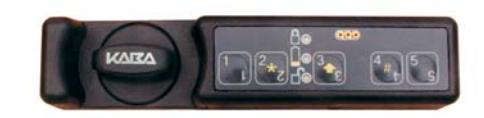
MODEL CL10
I M P
SUPER MASTER OPERATIONS
The following instructions cover Model CL10 Super Master Operations . The lock is shipped with a default factory Super Master User PIN that can be set to a different value when the lock is in factory mode.
WARNING: The setting of the Super Master User PIN is optional, however, if you do not set the Super Master User PIN before setting the Master User PIN, the Super Master shelving capability will be permanently lost.
Once the Super Master User PIN is set, the Super Master User combination can only be used to shelve the lock in the event that the Master User combination is lost. Once set, the Super Master User PIN can be changed any time the lock is in shelved mode.
The 2 , 3 , and 4 keys on the keypad play dual roles. When pressed quickly and released, they serve as the 2, 3, and 4 keys. When pressed and held until the yellow LED displays, these keys represent the alternate symbol found on the keypad ( ¸, , and # respectively.)
The " 2 " key when pressed and held until the yellow LED displays represents the ¸ key. The ¸ key is used to clear an operation or combination entry. Two simultaneous green and red flashes are displayed after yellow flash if successful. O R T
The " 3 " key when pressed and held until the yellow LED displays represents the (shift arrow) key. A N T
The " 4 " key when pressed and held until the yellow LED displays represents the # key. The # key is used for keypad operations.
SET SUPER MASTER USER PIN
The lock must be in factory mode.
Note: The default factory PIN assigned to the Super Master User is "12345". This default PIN must be changed before the Super Master User combination can be used to shelve the lock.
- 1. Press #, # and then 3 . G R 8
- 2. Enter the three-digit Super Master User ID 111 followed by the default factory Super Master User PIN "12345." G R 8
- 3. Enter the three-digit Super Master User ID 111 followed by any five-digit PIN other than "12345". G R 8
- 4. Enter the three-digit Super Master User ID 111 followed by the new five-digit PIN entered in Step 3 again for verification. G R 8 G R 8
The new Super Master User combination is now set.
5. Record the combination and store it in a secure place.
CHANGE SUPER MASTER USER PIN
A Super Master User PIN can only be changed while the lock is shelved.
Warning: Do not change the Super Master User PIN to the factory default of "12345" as this will permanently disable the Super Master User capabilities.
1. Press #, # and then 3 . G R 8
- 2. Enter 111 followed by the current Super Master User PIN. G R 8
- 3. Enter 111 followed by the new Super Master User PIN. G R 8
- 4. Enter 111 followed by the new Super Master User PIN again for verification.
G R 8 G R 8
DETECT IF SUPER MASTER USER COMBINATION IS ACTIVE
To determine if the Super Master User combination is active (i.e., the default factory Super Master User PIN has been changed) within either factory or shelved mode, complete the following steps:
-
1. Press
#
,
#
and then
2
.
- If the Super Master User combination has not been permanently disabled and has not been activated (i.e., neither the Super Master User or the Master User combination
has been changed), two red flashes display with beeps. R 8 R 8
If the Super Master User combination is active ,
five red flashes display with beeps. R 8 R 8 R 8 R 8 R 8
If the Super Master User combination has been permanently disabled ,
a green flash displays with a beep. G 8
SHELVE LOCK USING SUPER MASTER USER COMBINATION
This operation places the lock in Shelved Mode where most lock information is returned to the factory default settings. The only information retained from the operational mode is the audit information and the Super Master combination. Shelving also unlocks the lock.
- 1. Press #, # and then 3 . G R 8
- 2. Enter the Super Master User combination (i.e., ID "111" followed by the five-digit PIN). The lock displays one green flash with a beep G 8 to indicate that a valid combination has been entered and then one long green flash with a beep G 8 to indicate that the lock is ready to open.
- 3. Turn the lock knob to the "unlocked" position to open the secured unit (cabinet, cart, drawer, etc.) Once the knob is returned to the closed position (or after the lock opening period has ended with no open), two green flashes with beeps G 8 G 8 display followed by a long red flash with a beep. R 8
The lock is now shelved and will open by entering any valid User ID for the lock model followed by the default factory PIN for the User ID (" 12345 " for User ID 111, and " 55255 " for all other Users IDs.)
PERMANENTLY DISABLE SUPER MASTER USER
There are two methods for permanently disabling the Super Master User.
If the Super Master User PIN has not been set (i.e., the default factory Super Master User PIN has not been changed) the Super Master User can be permanently disabled by setting the Master User PIN without changing the Super Master User PIN from the default.
If the Super Master User PIN has been set , the Super Master User can be permanently disabled by shelving the lock and then completing the following steps:
- 1. Press #, # and then 3 . G R 8
- 2. Enter 111 followed by the current Super Master User PIN. G R 8
- 3. Enter 111 followed by the default factory PIN "12345". G R 8
- 4. Enter 111 followed by the default factory PIN "12345" again for verification.
G R 8 G R 8