ii_minitech_01_eng
Open the original PDF document
View PDF

Installation instructions

Company
Founded in 1983 with the aim of providing a complete range of professional products, Tecnosicurezza is now a consolidated reality in the field of locks and security systems for safes.
The experience gained in over 35 years of activity in the security sector has allowed the designing and manufacturing of high technology and reliability systems, which continue to receive the approval of an increasingly demanding clientele.
TECNOSICUREZZA is present directly on the Italian, Spanish and US markets and, through a extensive distribution network, in many European and extra-European countries.
TECNOSICUREZZA is aimed at national and international customers of primary importance, such as banks, safe manufacturers, cash in transit companies, mass market retailers and post offices.
Today TECNOSICUREZZA is a leading company focused on the customers' needs and constantly in step with technology.

| Table of contents | |
|---|---|
| COMPANY | 2 |
| TABLE OF CONTENTS | 3 |
| MODELS AND CHARACTERISTICS | 4 |
| ACCESSORIES | 4 |
| AUDIT AND PROGRAMMING ACCESSORIES | 4 |
| CERTIFICATIONS | 5 |
| IMPORTANT NOTES! | 6 |
| KEYPAD DIMENSIONS | 7 |
| ROTOBOLT LOCK DIMENSIONS | 8 |
| STRAIGHTBOLT LOCK DIMENSIONS | 8 |
| SPRINGBOLT LOCK DIMENSIONS | 9 |
| MOTORLOCK LOCK DIMENSIONS | 9 |
| MOTORSPRINGBOLT LOCK DIMENSIONS | 9 |
| FIXED KEYPAD INSTALLATION INSTRUCTIONS | 10 |
| ROTOBOLT LOCK INSTALLATION INSTRUCTIONS | 10 |
| STRAIGHTBOLT AND SPRINGBOLT LOCKS INSTALLATION INSTRUCTIONS | 11 |
| MOTORLOCK AND MOTOR SPRINGBOLT LOCKS INSTALLATION INSTRUCTIONS | 12 |
| CONNECTION EXAMPLES | 14 |
| FUNCTIONAL TESTS | 15 |
| CE DECLARATIONS | 16 |
| CONTACTS | 20 |

Models and characteristics
| Model | Variant |
|---|---|
|
T9520/GR
– Keypad in metal. Grey colour |
/DL
with Dallas key reader. |
| with rubber membrane foil keypad in grey | |
| colour. |
Accessories
| Code | Description |
|---|---|
| N077/A | Battery box with alarm interface. |
| L4001 | Large battery box for 6 size C 1.5V batteries. |
| T6005/W | Power supply interface (12Vdc). |
| T6005 |
Power supply interface (12Vdc) with alarm
interface. |
| L2666 | Knob with 6 mm square spindle. |
| N1982 | User Dallas key. |
Audit and programming accessories
| Code | Description | |
|---|---|---|
| N42180/T | USB interface. | |
| N42170/D |
Dallas
key reader with molex connector. |
|
| N42170/J |
Dallas
key reader with jack connector. |
|
| N42170/M | Magnetic Dallas key connection cable. | |
| N1996RM | Magnetic Dallas key for audit. | |
| T42146/J | Setup and audit cable. | |

Certifications

Anerkennung
von Bauteilen und Systemen
Approval
of Components and Systems
Inhaber der Anerkennung Holder of the Approval TECNOSICUREZZA s.r.l. Via Cesare Battisti 276 IT-37057 Verona
| Anerkennungs-Nr. | Anzahl der Seiten | gültig vom /TT.MM.JJJ) | gültig bis /TT.MM.JJJJ/ |
| Approval No. | No. of pages | valid from (dd.mm.yyyy) | valid until [dd.mm.yyyy] |
| M 112338 | 4 | 14.10.2017 | 13.10.2021 |
Gegenstand der Anerkennung Subiect of the Approval
Elektronisches Hochsicherheitsschloss - Klasse 2/ High security electronic lock - class 2
Baureihe MiniTech
Verwendung
in Wertbehältnissen
in secure storage units
Anerkennungsgrundlagen Basis of the Approval VdS 2344:2014-07 VdS 2841:2005-12 VdS 2396:2014-07
EN 1300:2013-11
Köln, den 09.10.2017

Dr. Reinermann
Geschäftsführer Managing Director
Urban Urban
Urban Leiter der Zertifizierungsstelle Head of Certification Body

Die Anerkennung
umfasst nur das angegebene Bauteil/System in der zur Prüfung eingereichten Ausführung
- mit den Bestandteilen nach Anlage 1
- Anlage 1, dokumentiert in den technischen Unterlagen nach Anlage 2, zur Verwendung in den angege-
- zur Verwendung in den angegebenen Einrichtungen der Brandschutz- und Sicherungstechnik.
Bei der Anwendung des Gegenstandes der Anerkennung sind die Hinweise nach Anlage 3 zu beachten.
Das Zertifikat darf nur unverändert und mit sämtlichen Anlagen vervielfältigt werden. Alle Änderungen der Voraussetzungen für die Anerkennung sind der VdS-Zertifizierungsstelle – mitsamt den erforderlichen Unterlagen – unverzüglich zu übermitteln.
This Approval
is valid only for the specified component/system as submitted for testing
- together with the parts listed in enclosure 1
- documented in the technical documents according to enclosure 2
- for the use in the specified fire protection and security installations.
When using the subject of the approval the notes of enclosure 3 shall be observed.
This certificate may only be reproduced in its present form without any modifications including all enclosures. All changes of the underlying conditions of this approval shall be reported at once to the V4S certification body including the required documentation.
VdS Schadenverhütung GmbH Zertifizierungsstelle Amsterdamer Str. 174
Amsterdamer Str. 174 D-50735 Köln
Ein Unternehmen des Gesamtverbandes der Deutschen Versicherungswirtschaft e. V. (GDV), durch die DAkkS akkreditiert als Zertifizierungsstelle für Produkte in den Bereichen Brandschutz und Sicherungstechnik
A company of the German Insurance Association (GDV) accredited by DAkkS as certification body for fire protection and security products

Important notes!
- Before installing this product, please read carefully the installation and operating instructions.
- Locks can be installed in all traditional safes.
- Lock has to be mounted on secure storage metal (preferred steel) units only.
- Locks must be protected against external attacks, for this reason it is recommended to install them on the door away from any through holes.
- Any electronic part must be properly protected and not easily accessible even when the door is open.
- Locks have been developed to work correctly in a temperature range from -5 ° C to + 50 ° C and in an environment with non-condensing humidity between 25% and 90%.
- The mounting dimensions are standard (magic module).
- For the installation of the keypad and lock, use only the screws provided by Tecnosicurezza. Any other screw must be approved in advance.
- Locks are supplied with metric (M6) mounting screws. Upon request, Imperial 1/4-20 UNC format mounting screws are available.
- The type of material and the length of the screws must, in any case, be selected so as to guarantee long life and reliability.
- Tighten the screws so that the lock is firmly fixed to the mounting surface (recommended torque between 2.5 and 5.5 Nm).
- The mounting surface must be perfectly flat.
- In order to prevent loosening of the screws it is recommended the use of LOCTITE® threadlocker and/or specific washers positioned under the head of the fixing screw.
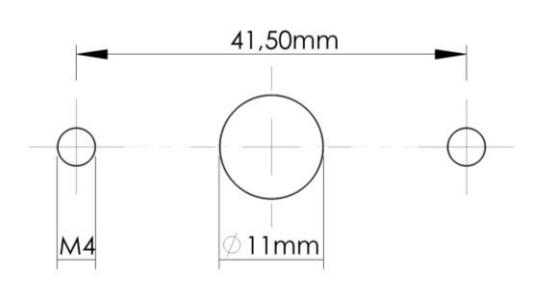
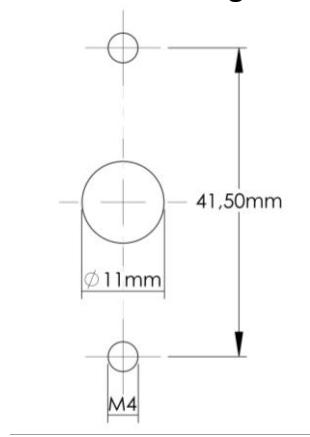
- The diameter of the passage hole for the connection cable or the spindle must not exceed 11 mm.
- The hole must be completely cleaned of drill dust and no edge should be sharp.

- Lock must not be lubricated.
- In the locked position, the distance between the bolt and the boltwork part that is moving the lock bolt must comply with the following specifications for each type of lock.
- Any component to be fixed to the lock bolt must be previously approved by Tecnosicurezza before installation. In any case, the maximum load must not exceed 2.5 N.
- Secure the cables away from moving parts by using cable ties and cable ties bases.
- If placed in normal domestic or office environments, the locks do not require particular maintenance; in any case, after 10,000 opening/locking cycles, it is recommended to run a test that verifies the correct and complete operation of the product.
- Use only DURACELL™ 9 Volt Alkaline batteries, or battery holders with DURACELL™ 1.5 Volt Alkaline batteries. Alternatively, it is also possible to use a stabilized 12V - 1A power supply (p.n. N1212) with relative power supply interface (p.n. T6005/W or p.n. T6005).
- A series of acoustic signals during opening indicate a low battery level. In this case, the battery must be replaced.
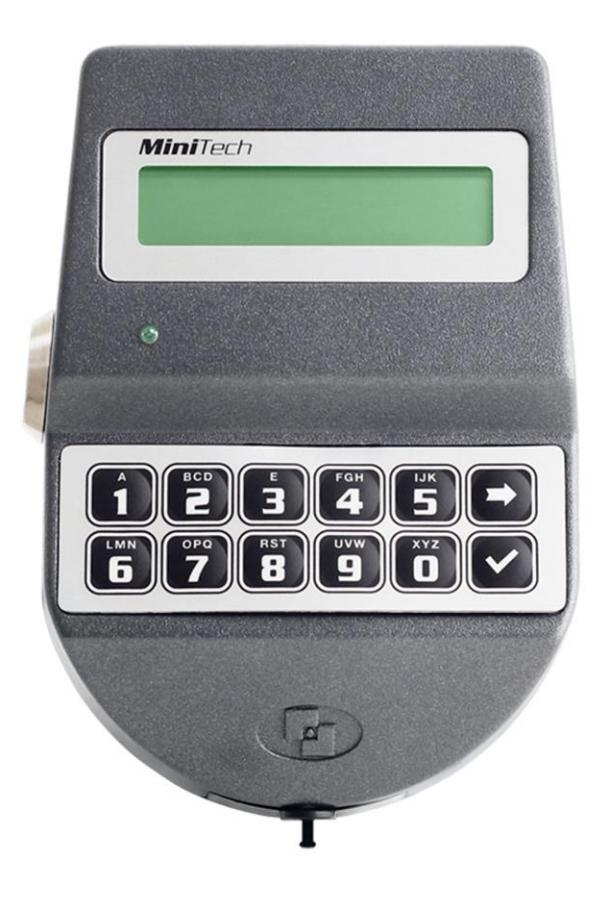
Keypad dimensions
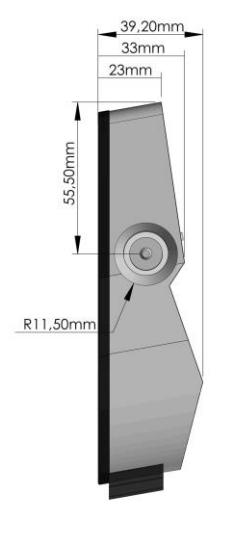
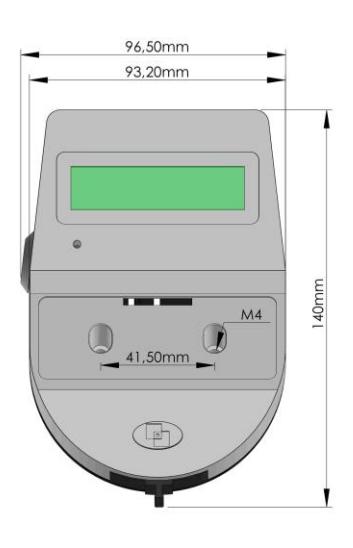

STANDARD mounting VERTICAL mounting
RotoBolt lock dimensions
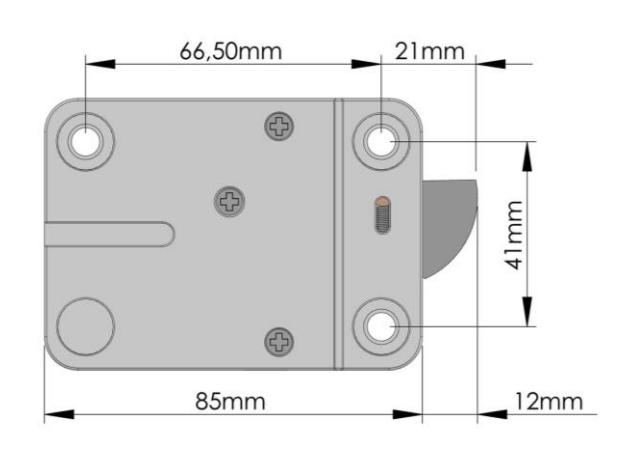
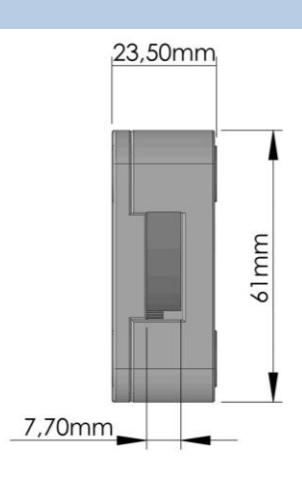
StraightBolt lock dimensions
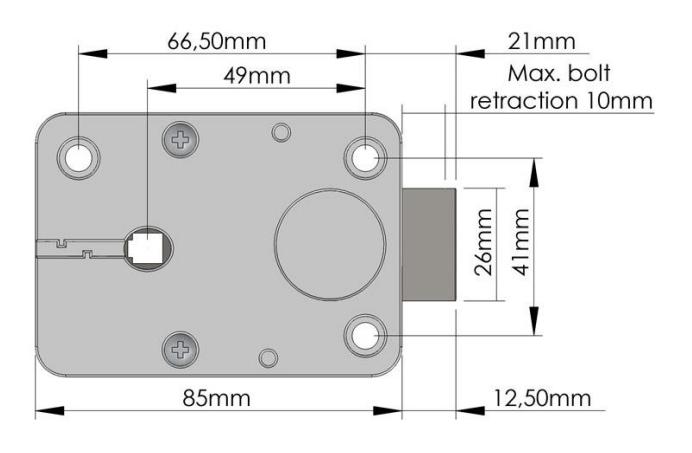
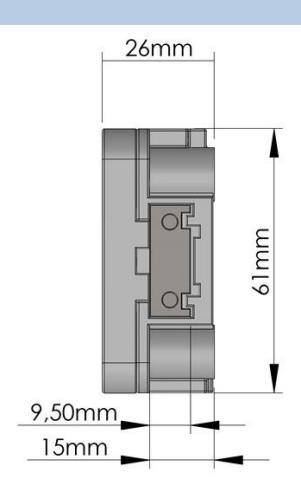

SpringBolt lock dimensions
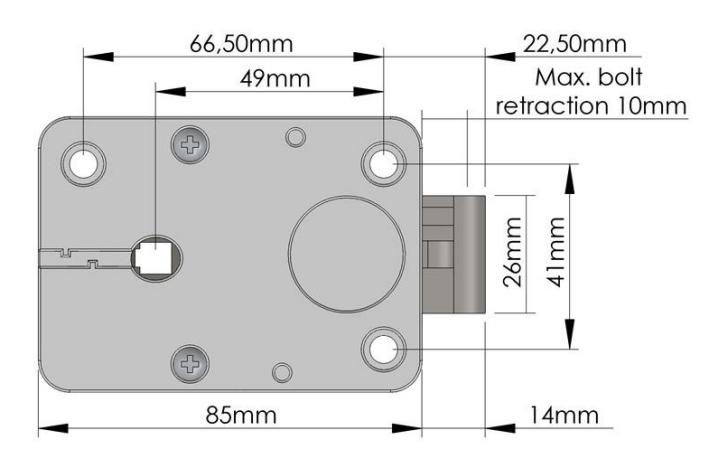
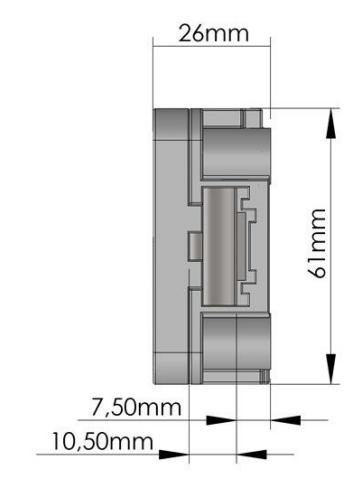
MotorLock lock dimensions
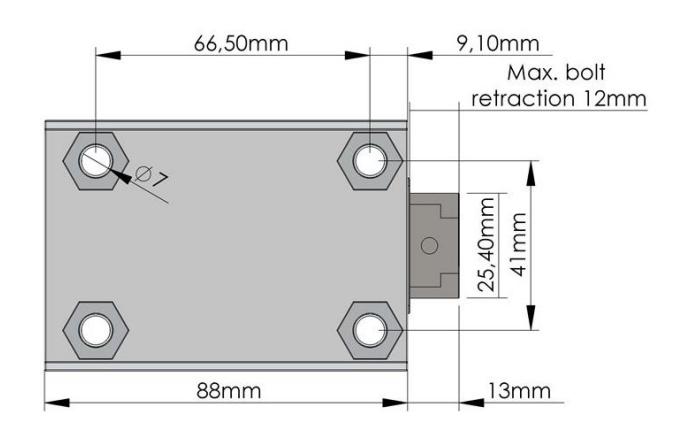
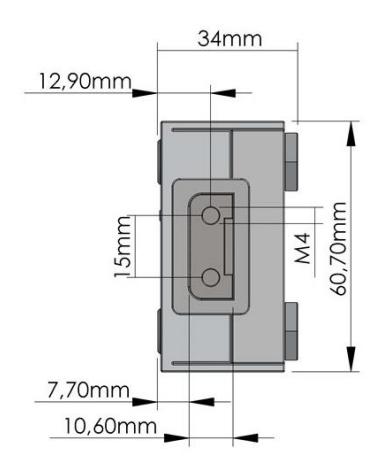
MotorSpringBolt lock dimensions
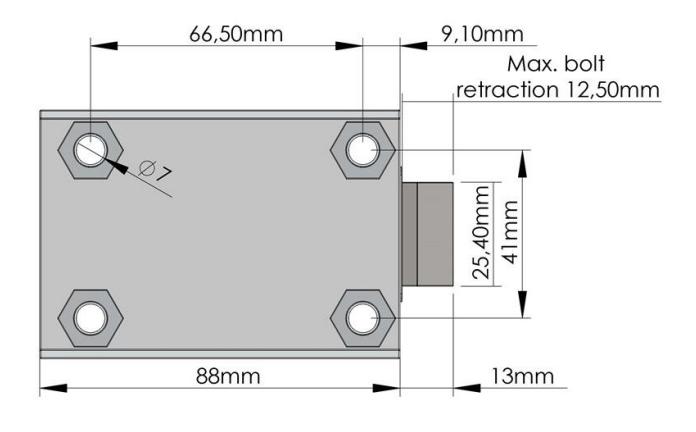
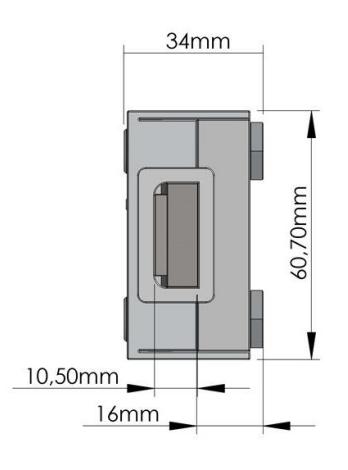

Fixed keypad installation instructions
Insert the keypad cable inside the hole on the safe door and connect it to the lock connector "ENT" (connector 1 in the case of a MotorLock or Motor SpringBolt lock). Lift the keypad membrane and, making sure that the connection cable and the battery cable are not damaged by the keypad case, fix the screws to the relative threaded holes on the safe door.
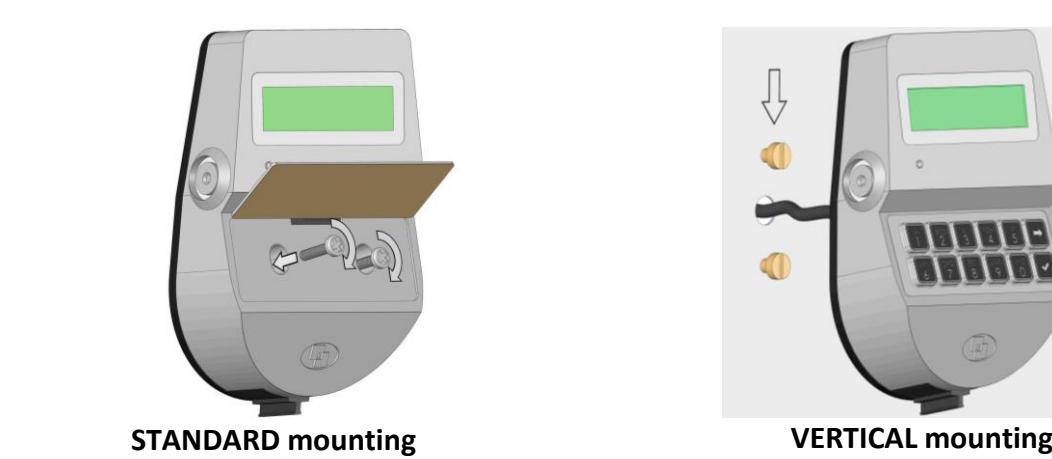
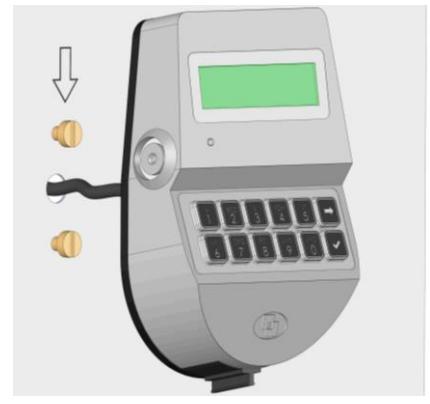
The keypad can also be installed in a quick hooking/unhooking mode (vertical mounting).
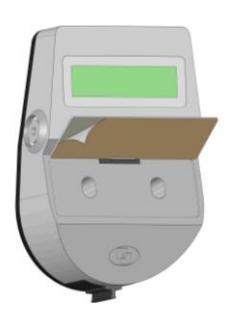
Remove the release liner placed under the membrane and apply the latter on the keypad case.
Connect a battery to the battery connector inside the keypad battery compartment or, if provided, connect the battery pack to the lock connector "BAT" (connector 2 in the case of a MotorLock or Motor SpringBolt lock).
RotoBolt lock installation instructions
The RotoBolt lock is a swingbolt lock whose block is carried out by a motor; it can be installed in all 4 directions, even upside down.
By entering a valid code, the lock electronic removes the blocking for 3 seconds and the boltwork can be moved into open position by pushing the bolt inside the lock case.
The bolt automatically secures when the safe handle, or the safe door mechanism, is brought to the locked position.
If the RotoBolt lock is used in conjunction with other locks, the safe door mechanism must ensure the closure of the RotoBolt before the other locks.
The lock can be mounted in all four mounting directions (RH, LH, VU, VD).
Furthermore, by flipping over the lock, both locking directions can be realized (RH/LH).

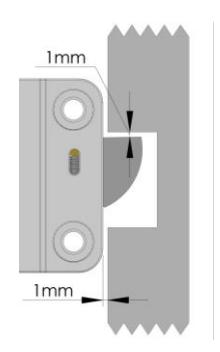
In the locked position the distance between the RotoBolt bolt and the RotobBolt part that is moving the lock bolt should be approximately 1 mm.
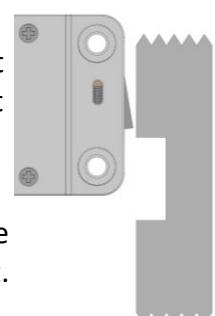
The bolt must be able to move freely without force being applied to it.
The maximum load applicable to the bolt must not exceed 1KN. Contact Tecnosicurezza in case of heavier loads.
Connect the keypad cable to the lock connector "ENT", making sure it is fully inserted and locked.
Any alarm interface or battery holder will be connected to the lock connector "BAT".
To remove the cable, bring the connector upwards and carefully pull it out.
StraightBolt and SpringBolt locks installation instructions
StraightBolt and SpringBolt locks are locks with, respectively, a dead bolt and a spring bolt, whose block is carried out by a motor.
By entering a valid code, the lock electronic removes the blocking for 3 seconds and the boltwork can be moved into open position by turning the spindle inserted in the lock.
The spindle can be connected to a knob, a handle or directly to the keypad if equipped with a rotation kit. When the spindle is brought to the locked position, the bolt comes out ensuring the lock is locked.
The StraightBolt and SpringBolt locks can be mounted in all four mounting directions.
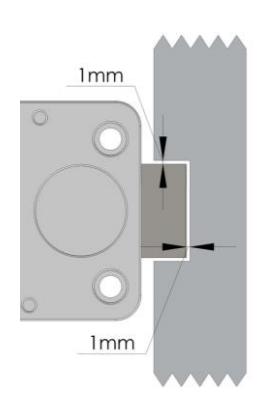
In the locked position, there should be approximately 1 mm clearance between the lock bolt and the cavity in the blocking bar of the boltwork. The bolt must be able to move freely without force being applied to it.
In open position, there should be minimum 3mm and maximum 5 mm clearance between the lock bolt and the blocking bar of the boltwork.
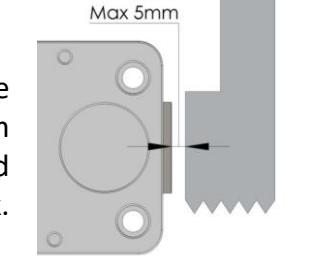
The maximum load applicable to the bolt must not exceed 1KN. Contact Tecnosicurezza in case of heavier loads.
Connect the keypad cable to the lock connector "ENT", making sure it is fully inserted and locked.
Any alarm interface or battery holder will be connected to the lock connector "BAT".
To remove the cable, bring the connector upwards and carefully pull it out.


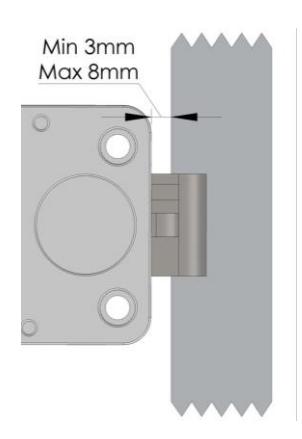
The distance between the SpringBolt lock and the locking edge must be between a minimum of 3 mm and a maximum of 8 mm.
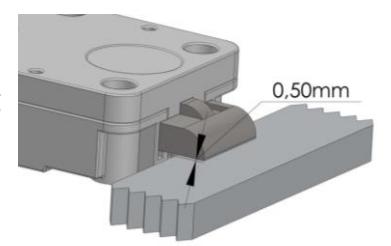
When locked, there must be a 0.5mm gap between lock bolt and locking surface.
The spindle must be inserted between a minimum of 7 mm to a maximum of 12 mm inside the lock.
WARNING: do not insert the spindle up to the lid of the lock, but leave some margin to allow the movement of the cable and to prevent any damage.
Make sure the cable is fully inserted and locked in the groove of the spindle. Remove any residues deriving from the cutting of the spindle that could damage the cable. Insert the cable connector into the square hole present in the bottom of the lock and make it come out from the opposite side.
Secure the cable, avoiding to stretch it too much, inside the specific groove on the lock cover and fix the lock using the appropriate mounting screws.
Connect the keypad cable to the lock connector "ENT", making sure it is fully inserted and locked. Any alarm interface or battery holder will be connected to the lock connector "BAT". To remove the cable, bring the connector upwards and carefully pull it out.
MotorLock and Motor SpringBolt locks installation instructions
MotorLock and Motor SpringBolt locks are locks with, respectively, a motor driven dead bolt and a motor driven spring bolt, whose block is carried out by a motor.
By entering a valid code, the motor retracts the bolt which remains in the open position for about 8 seconds and then automatically returns to the locked position.
If the manual relocking option is selected, the bolt closes by pressing and holding the button .


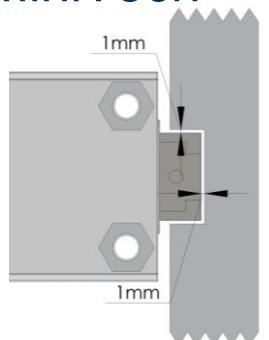
In the locked position, there should be approximately 1 mm clearance between the lock bolt and the cavity in the blocking bar of the boltwork. The bolt must be able to move freely without force being
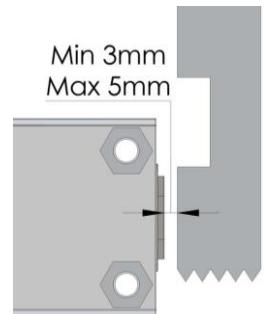
In open position, there should be minimum 3mm and maximum 5 mm clearance between the lock bolt and the blocking bar of the boltwork.
The spring-latch version ( Motor SpringBolt) is specially designed to ensure self locking when the door closes.
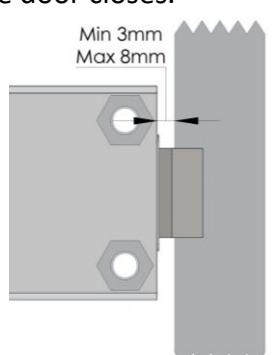
The distance between the SpringBolt lock and the locking edge must be between a minimum of 3 mm and a maximum of 8 mm.
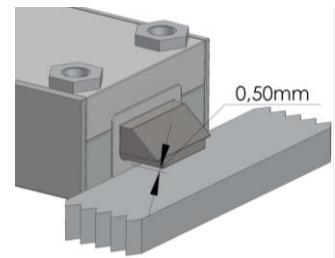
When locked, there must be a 0.5mm gap between lock bolt and locking surface .
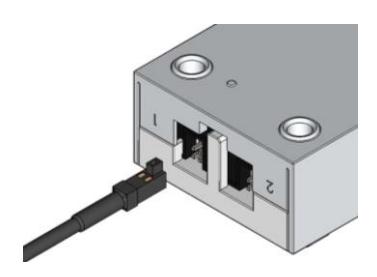
Connect the keypad cable to the lock connector "1", making sure it is fully inserted and locked.
applied to it.
Any alarm interface or battery holder will be connected to the lock connector "2".
To remove the cable, bring the connector upwards and carefully pull it out.

Connection examples
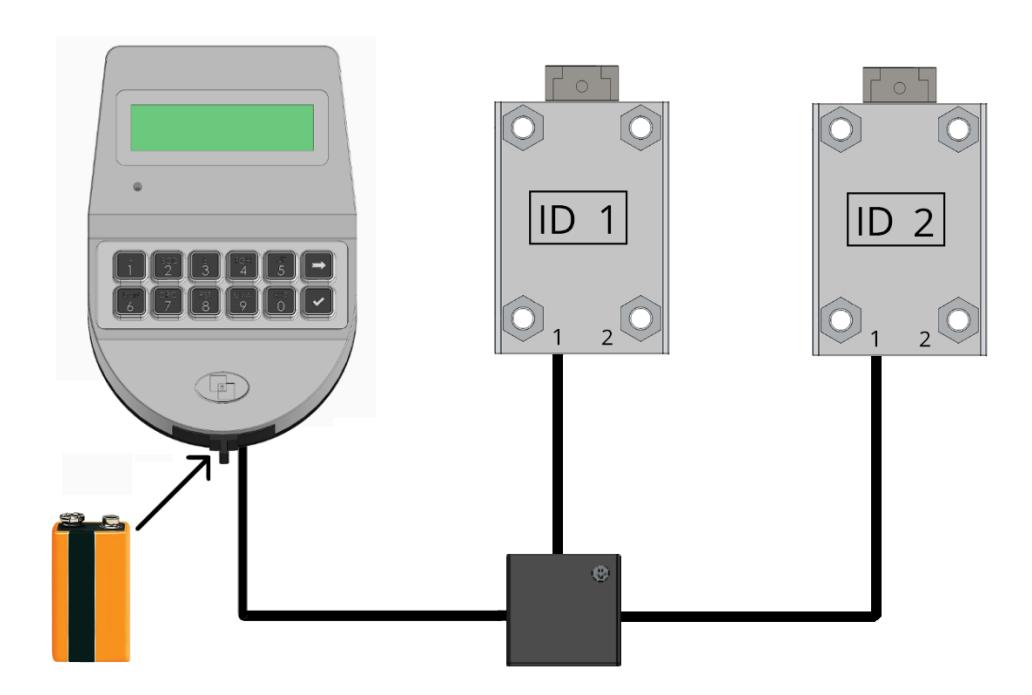
Double lock connection with 9V battery.
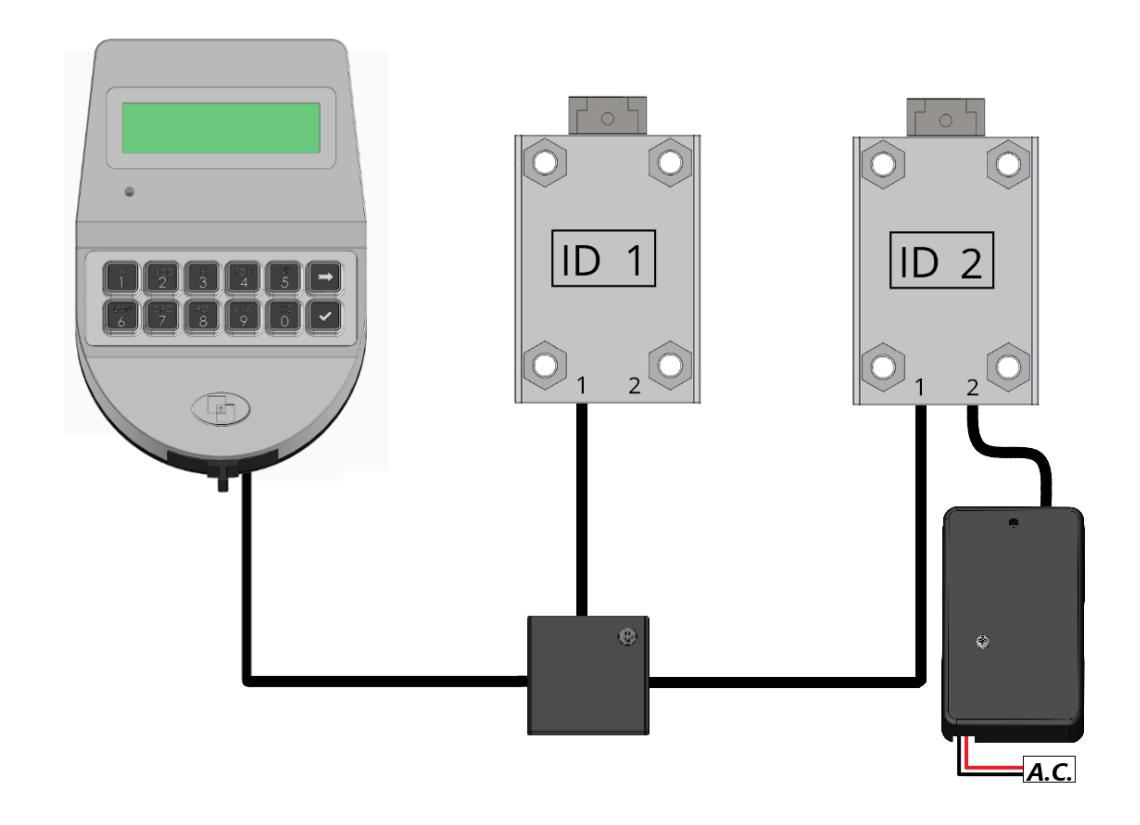
Double lock connection with external power supply (T6005/W interface).

Functional tests
To be carried out with the door open.
MEMBRANE TEST:
Press and hold the button 5 to access the "Membrane Test" function.
Press slowly all the buttons according to the sequence shown on the display.
ELECTRONIC / MECHANICAL TEST:
OPENING:
Enter the opening code (standard manager code 123456 or simply 1 if the lock is in pre-setup mode). The display will show "open" and the green LED will light up.
With RotoBolt and MotorLock locks, turn the safe door handle to the open position.
With StraightBolt and SpringBolt locks, rotate the knob or handle according to the type of installation and move the lock bolt to the open position.
For all types of locks the bolt must be able to move freely.
LOCKING:
With RotoBolt and MotorLock locks, turn the safe door handle to the locked position. Lock bolt must fully extend and ensure locking.
With MotorLock locks with manual relocking, turn the door handle towards the locked position and press the button .
Lock bolt must fully extend and ensure locking.
With StraightBolt lock, rotate the knob or handle according to the type of installation and move the lock bolt to the locked position.
Lock bolt must fully extend and ensure locking.
Make sure that there is free space in all directions around the bolt when the movement is brought to the locked position.
Repeat the functional test several times before locking the safe door.
Failure to follow these installation instructions or opening the lock by personnel not authorized by Tecnosicurezza will void the warranty.
II_MiniTech_01_eng 15 of 20

CE declarations
DICHIARAZIONE CE DI CONFORMITA' CE DECLARATION OF CONFORMITY
MiniTech: T952-x
Il sottoscritto Franco Miller, in veste di Presidente CdA e Legale Rappresentante della società Tecnosicurezza s.r.l. , con sede in San Giovanni Lupatoto (Verona) Via Cesare Battisti 276, dichiara sotto la propria responsabilità, che il suddetto prodotto soddisfa per progettazione e costruzione i requisiti delle direttive di: compatibilità elettromagnetica 2014/30/EU e RoHS 2 UE/2015/863 . La conformità è stata verificata con l'ausilio delle seguenti norme armonizzate:
EN 61000-6-3, EN50130-4,EN 61000-4-2, EN 61000-4-3, EN 61000-4-4, EN 61000-4-5, EN 61000-4-6, EN 61000-4-11, EN 61000-6-1, EN55022
The undersigned Mr Franco Miller as Chairman and Legal Representative of the company Tecnosicurezza s.r.l. , located in San Giovanni Lupatoto (Verona) Via Cesare Battisti 276, declare herewith on our own responsibility that the above-mentioned product meets the requirements of the UE/2015/863 RoHS 2, 2014/30/EU Electromagnetic Compatibility for what concerns engineering and construction. Conformity has been controlled with the aid of the following harmonized standards:
EN 61000-6-3, EN50130-4,EN 61000-4-2, EN 61000-4-3, EN 61000-4-4, EN 61000-4-5, EN 61000-4-6, EN 61000-4-11, EN 61000-6-1, EN55022
Verona - Italy, 02/10/2018
Franco Miller Board Chairman

DICHIARAZIONE CE DI CONFORMITA' CE DECLARATION OF CONFORMITY
MiniTech: T52-xx
Il sottoscritto Franco Miller, in veste di Presidente CdA e Legale Rappresentante della società Tecnosicurezza s.r.l. , con sede in San Giovanni Lupatoto (Verona) Via Cesare Battisti 276, dichiara sotto la propria responsabilità, che il suddetto prodotto soddisfa per progettazione e costruzione i requisiti delle direttive di: compatibilità elettromagnetica 2014/30/EU e RoHS 2 UE/2015/863 . La conformità è stata verificata con l'ausilio delle seguenti norme armonizzate:
EN 61000-6-3, EN50130-4,EN 61000-4-2, EN 61000-4-3, EN 61000-4-4, EN 61000-4-5, EN 61000-4-6, EN 61000-4-11, EN 61000-6-1, EN55022
The undersigned Mr Franco Miller as Chairman and Legal Representative of the company Tecnosicurezza s.r.l. , located in San Giovanni Lupatoto (Verona) Via Cesare Battisti 276, declare herewith on our own responsibility that the above-mentioned product meets the requirements of the UE/2015/863 RoHS 2, 2014/30/EU Electromagnetic Compatibility for what concerns engineering and construction. Conformity has been controlled with the aid of the following harmonized standards:
EN 61000-6-3, EN50130-4,EN 61000-4-2, EN 61000-4-3, EN 61000-4-4, EN 61000-4-5, EN 61000-4-6, EN 61000-4-11, EN 61000-6-1, EN55022
Verona - Italy, 02/10/2018
Franco Miller Board Chairman

Installation instructions
MiniTech
| NOTES |
|---|


| NOTES |
|---|

Correct disposal of this product: (Waste Electrical & Electronic Equipment)
Applicable in the European Union and other European countries with separate collection systems.

This marking displayed on the product or its literature indicates that it should not be disposed with other wastes at the end of its working life.
To prevent possible harm to the environment or human health from uncontrolled waste disposal, please separate this from other types of wastes and recycle it responsibly to promote the sustainable reuse of material resources.
Contacts
| GLOBAL HEADQUARTERS | USA HEADQUARTERS | SPAIN HEADQUARTERS |
|---|---|---|
| Tecnosicurezza SpA | Tecnosicurezza Inc. | Tecnosicurezza Sa |
| Via Cesare Battisti. 276 | 50, Thomas Lane | C/Menor, 4 - Nave 10 |
|
37057 San Giovanni Lupatoto
Verona |
Versailles, KY 40383 |
Pol. Ind La Mina 28770
Colmenar Viejo |
| Tel.+39 045 826 64 70 | Tel.+1 859 490 89 30 | Tel.+34 91 804 33 91 |
| Fax. +39 045 826 64 69 | Fax.+34 91 804 32 63 | |
| info@tecnosicurezza.it | info@usatecno.com | info@tecnosicurezza.es |