gitcon-model-g-2-lock-preparation.pdf_638398
Open the original PDF document
View PDF

Gitcon Model G-2 Lock Preparation
Basic Tools and Materials Required
- 1. Four new high quality (Energizer®, Duracell®, etc.) AA lithium batteries.
- 2. Phillips screwdriver.
Battery Installation
NOTE: The lock shackle must be in the open position (as shipped from the factory) in order to remove the battery housing back plate. If the lock shackle is closed, insert a 9volt battery in the Supplementary Power Connection and follow steps 1-6 of the Operational Check.
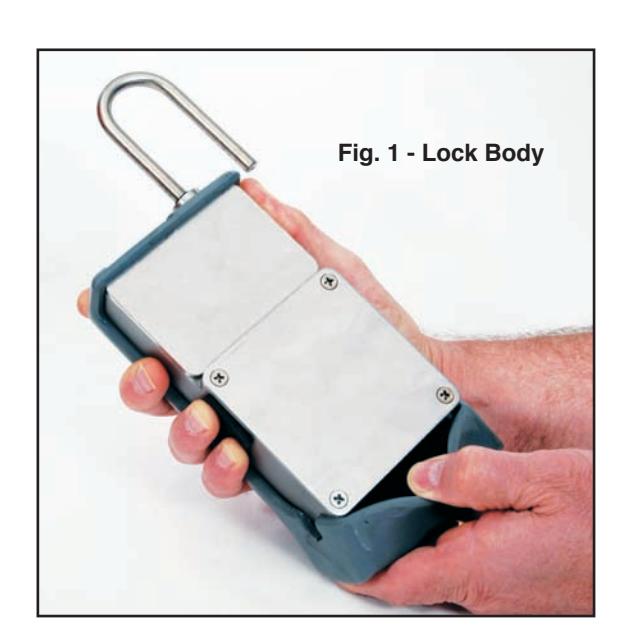
- 1.Remove the bottom of the Weather Guard from the lock body. (See Fig. 1.)
- 2.Remove the battery housing plate (4 screws) located at the back, lower section, of the lock.
- 3.Place four new high quality lithium batteries in the battery retainer.
- 4.Reattach the battery housing plate.
- 5.Reattach Weather Guard.
(See back for Operational Check.)
Operational Check
Make the operational check of the unit by performing the following actions.
- 1.Secure shackle
- 2.Press & Release Red Button
- 3." UNLK " prompt appears; Press & Release Red Button again
- 4. Green Light Flashes
- 5.Present Card
- 6." Open " prompt appears; Plunge and lift shackle
Notice: Information in this document is subject to change without notice. Kaba Mas shall not be liable for technical or editorial errors or omissions contained herein; nor for incidental or consequential damages resulting from the furnishing, performance or use of this material.
© 2006 Kaba Mas Corporation. All rights reserved.
Kaba Mas Corporation 749 W. Short Street, Lexington, KY 40508 USA Phone: (859) 253-4744 FAX: (859) 255-2655 Technical Support: (800) 950-4744 www.kaba-mas.com