


Installation Instructions

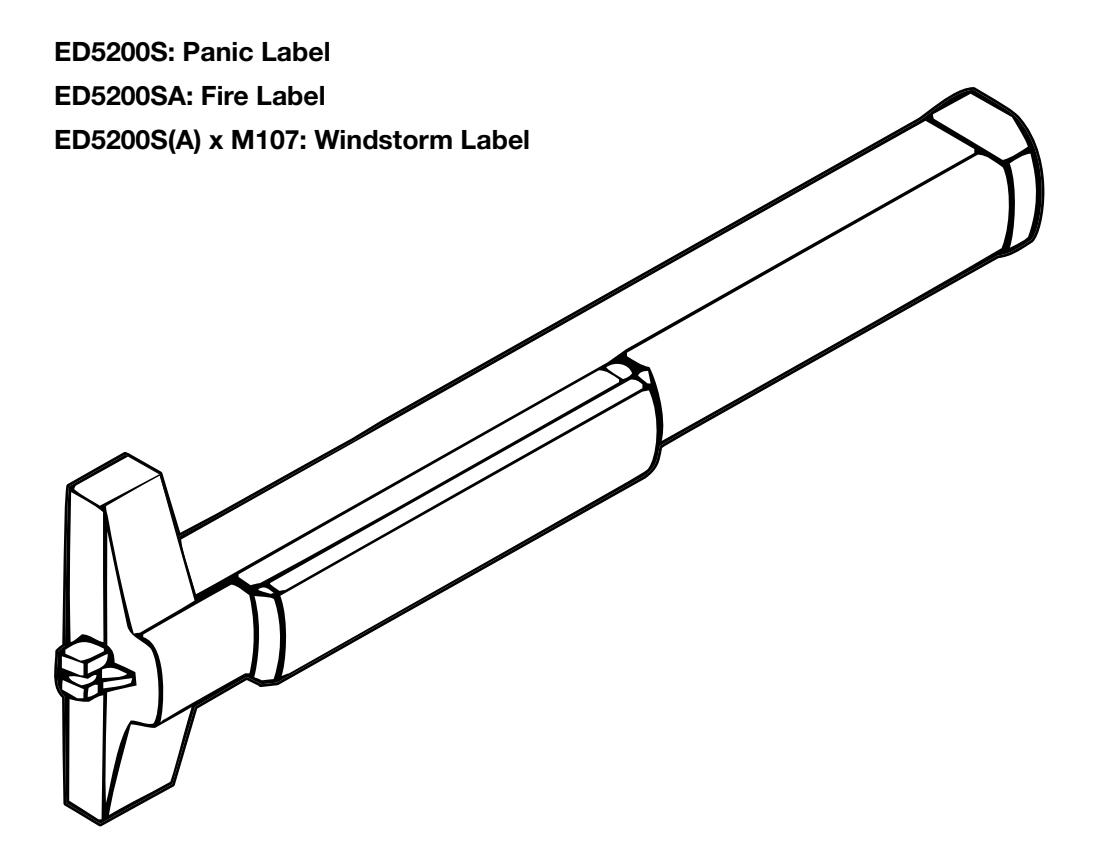
ED5200S(A) Series
SecureBolt® Exit Device
Single Doors or Pairs with Mullion

This product can expose you to lead which is known to the state of California to cause cancer and birth defects or other reproductive harm. For more information go to www.P65warnings.ca.gov.
ED5200A(A) Series
Installation Instructions

| Table of Contents | ||
|---|---|---|
| 1 |
Package Contents
3 |
|
| 2 |
Application and Kit Descriptions
4 |
|
| a |
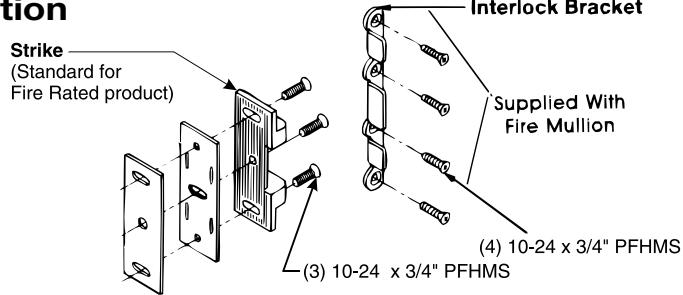
Fire Rated Application
4 |
|
| b |
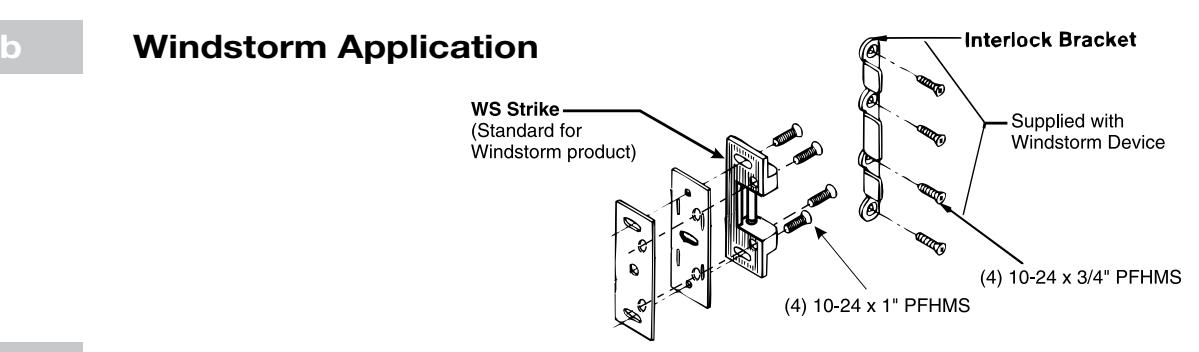
Windstorm Application
4 |
|
| c |
Windstorm Shim Kit
4 |
|
| d |
Shim Kit Option (Raised Glass)
4 |
|
| e |
Sex Nut Option
4 |
|
| 3 |
Check Before Starting
5 |
|
| 4 | Installation 6-10 | |
| a |
Mark Door
6 |
|
| b |
Prepare Door and Frame
6 |
|
| c |
Size Device
7 |
|
| d |
Clear Raised Door Mounting
7 |
|
| e |
Install Device
8 |
|
| f |
Install Strike
9 |
|
| g |
Install Head Cover and End Cap
10 |
|
| 5 |
Maintenance
10 |
|
| 6 |
Plastic Template Instructions
11 |
|
| TOC |
Attention Installer
Please read these instructions carefully to prevent missing important steps.
Notes
- Improper installation may result in damage to lock and void factory warranty.
- Other product brand names may be trademarks or registered trademarks of their respective owners and are mentioned for reference only.
ED5200A(A) Series
Installation Instructions

1 Package Contents
Packed for reinforced metal doors, optional sex nuts required for composite, wood, and unreinforced metal doors.
Note
These installation instructions cover only standard products. To install options, use installation instructions packed with optional component, or contact the factory.
Abbreviation Fastener Description
Dogging Feature to hold bolts retracted and touchpad depressed, for push-pull door operation. To Dog Device: 1. Insert dogging key. 2. Hold touchbar depressed. 3. Turn key 1/4 turn clockwise. (Not a feature of fire labeled devices.) PPH "AB" SMS Phillips pan head type "AB" sheet metal screw PFHUMS Phillips flat head under cut machine screw PFHMS Phillips flat head machine screw PRH "AB" SMS Phillips round head type "AB" sheet metal screw PTH "AB" SMS Phillips truss head type "AB" sheet metal screw PPHMS Phillips pan head machine screw PFH "AB" SMS Phillips flat head type "AB" sheet metal screw Dogging Key End Clamp End Cap (2) 1/4-20 Pan Head Machine Screws OR (2) #14 Wood Screws Shim Locking Plate Strike Hole Plug (Fire Devices) Cover (3) 8-32 x 5/16" Flat Head Undercut Machine Screws (3) 10-24 x 3/4" PFHMS RHR Door LHR Door (4) 1/4-20 x 1" PPHMS For doors of either hand Outside trim Device is packaged ready for any compatible trim.
(2) 8-32 x 1/4" PFHUMS
All dimensions are in inches (mm) unless otherwise noted.
ED5200A(A) Series
Installation Instructions

2 Application and Kit Descriptions
a Fire Rated Application
c Windstorm Shim Kit*
Part Number: 710F468 Black Finish
Kit consists of (3) Latch Head Shims, (3) End Cap Shims, longer fasteners, and longer Spindle Assembly for trim.
Each Shim is 1/8 in. (3 mm) thick.
Note
Shim Kit required for Windstorm application.
*Standard with ED5200S(A) x M107 Windstorm Devices
d Shim Kit Option (Raised Glass)
Part Number: 697F338 Black Finish
Kit consists of (2) Latch Head Shims, (2) End Cap Shims, longer fasteners, and longer Spindle Assembly for trim.
Each Shim is 1/8 in. (3 mm) thick.
More than two shim thicknesses will require longer device mounting screws.

e Sex Nut Option
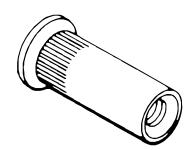
For installation assistance contact Corbin Russwin
Standard for Fire Rated Doors.
Recommended for Unreinforced Metal Doors and Wood Door applications.
| Device | Quantity | Size |
|---|---|---|
| All (Trim) | 6 | |
| All (No trim) | 2 | 1/4 - 20 |
| Fire Mullion (Add) | 4 | 10 - 24 |
ED5200A(A) Series
Installation Instructions

3 Check Before Starting
Unreinforced Door or Frames
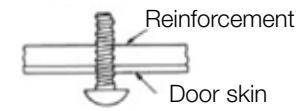
Doors and Frames with walls having a structural thickness (metal skin plus reinforcement, or solid hardwood) to engage less than (3) full screw threads, are considered unreinforced for hardware.
Unreinforced Doors: Use SNB (sex nuts and bolts).
Reinforced Door or Frame engages at least (3) screw threads.
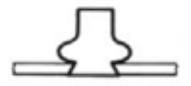
Unreinforced Frames: Use Blind Rivet Nuts.
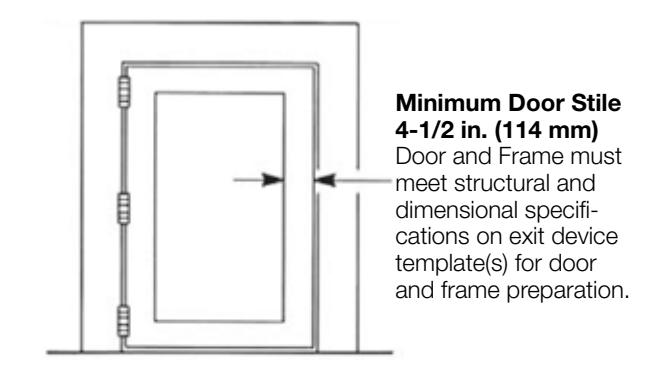
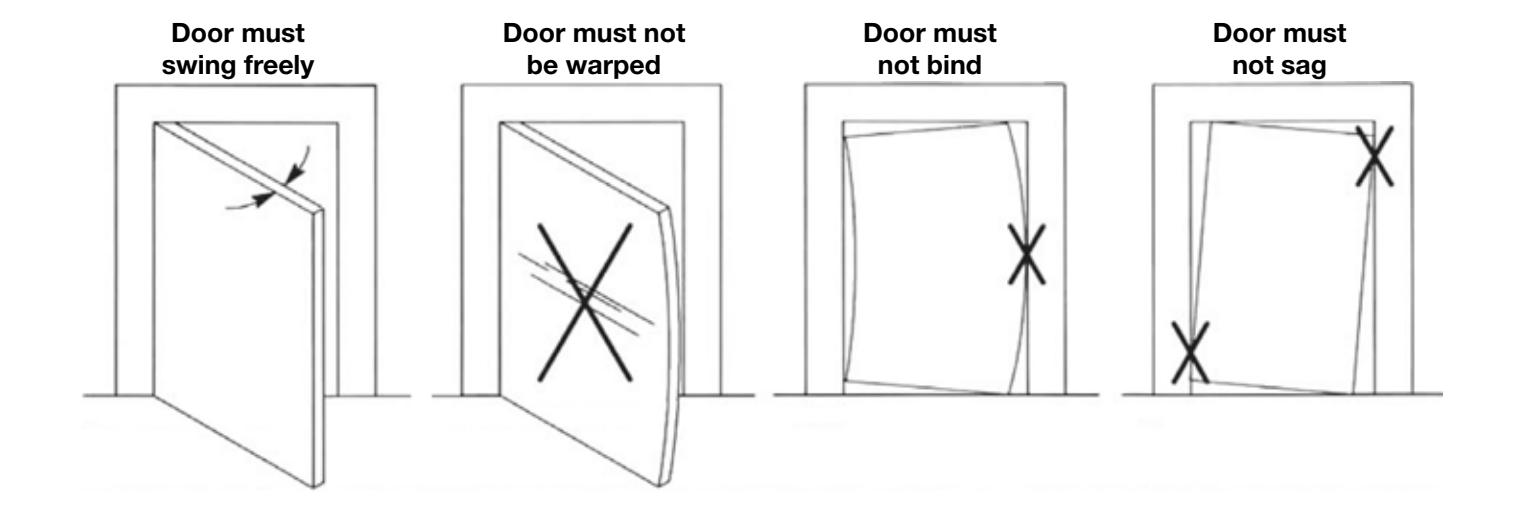
Note
Recommended fasteners for unreinforced openings are not necessarily supplied by Corbin Russwin, Inc.
ED5200A(A) Series
Installation Instructions

4 Installation
a Mark Door
Locate and mark horizontal and vertical reference centerlines, as shown.
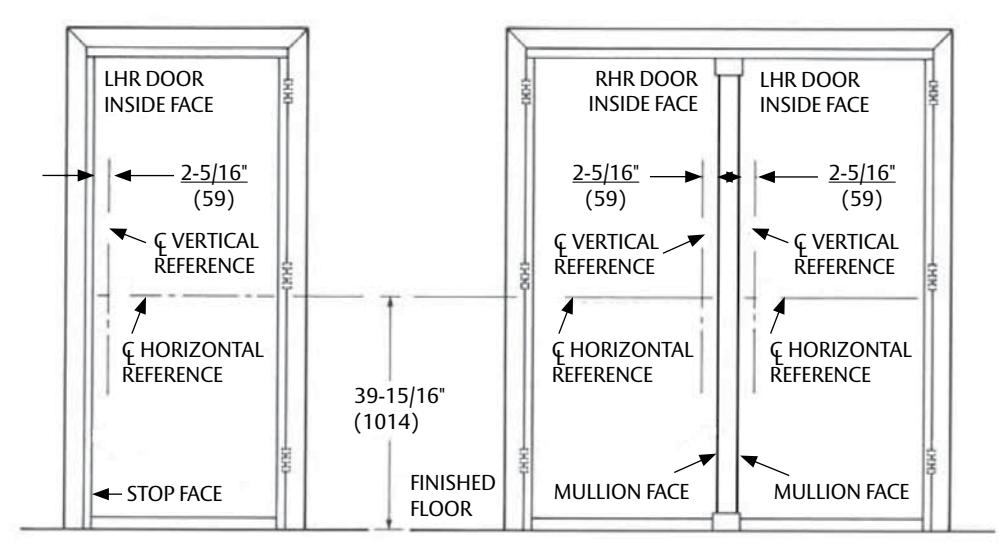
Typical Single Swing Pair with Mullion
b Prepare Door and Frame
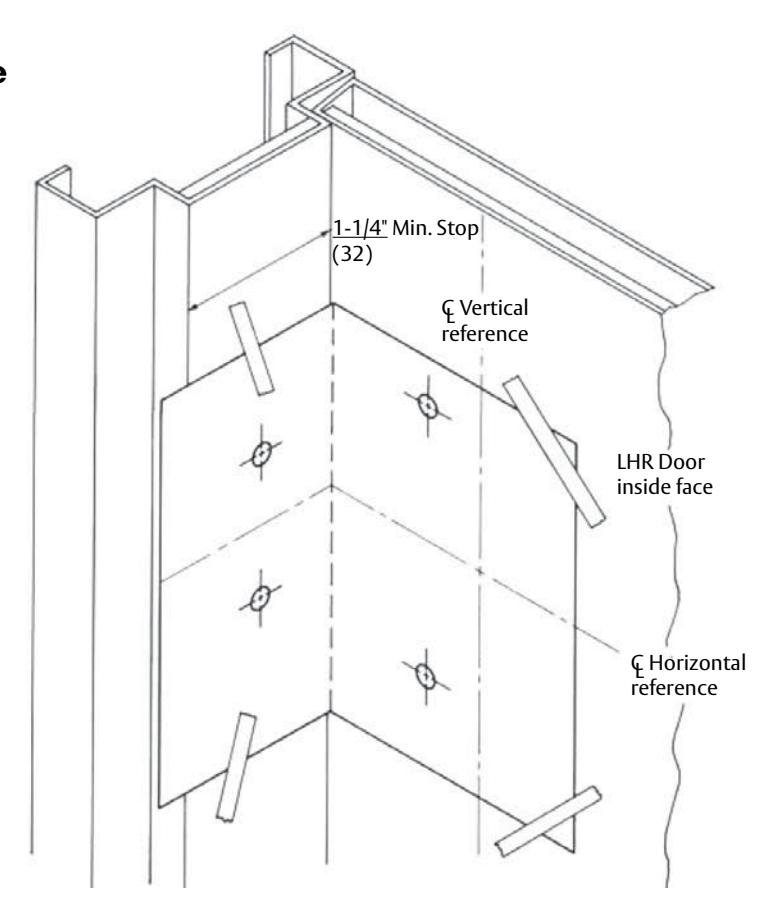
- 1. Seat template on door and stop faces.
- 2. Align horizontal and vertical centerlines. Tape template in place.
- 3. Locate and tape Trim Template to door. (See instructions packed with Trim)
- 4. Spot and prepare holes. (See caution below).
Device: (2) 1/4"-20 Machine Screws (*), or (2) 3/8" Dia. Sex Nuts & Bolts (10)
Strike: (2) 10-24 Machine Screws, or
(2) #10 Wood Screws
* Metal reinforced doors only.
Caution
The use of Shims (ie...Raised Glass or Windstorm) requires shifting location of Strike away from the door. (See Door Marker Template for details).
ED5200A(A) Series
Installation Instructions

4 Installation (continued)
c Size Device
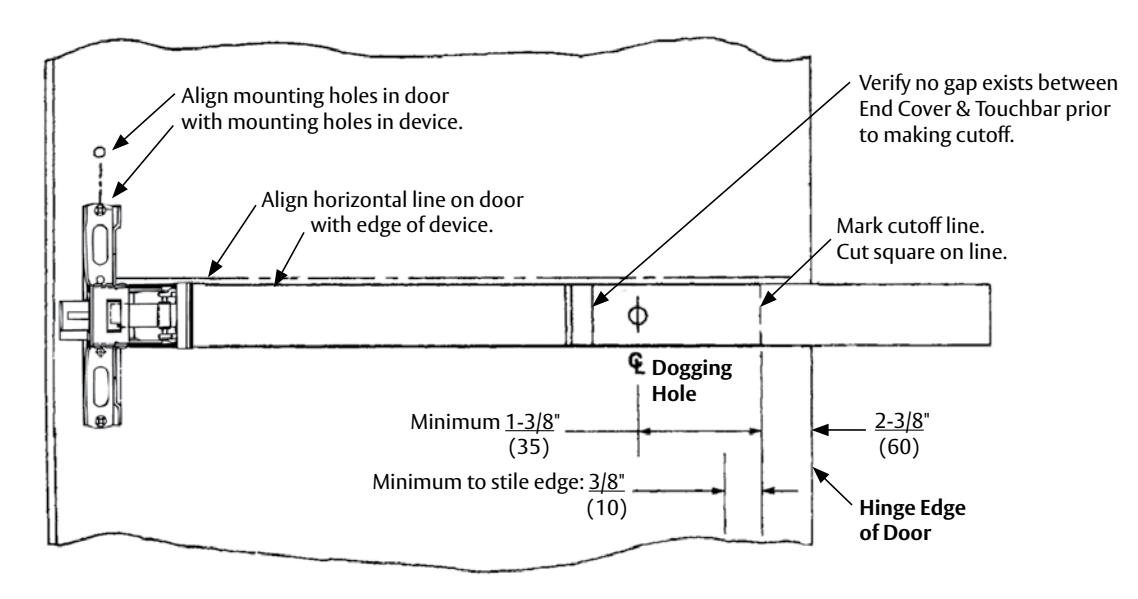
Device must be field cut to size, unless standard opening and device are 36 in. (0.91 m).
LHR Door open 90° inside face
d Clear Raised Door Molding
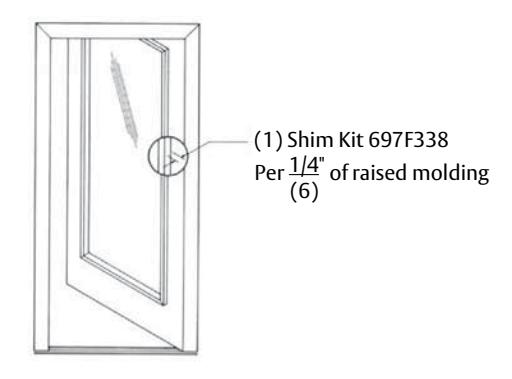
Device must seat flush on door surface, or on shims that keep it parallel to door face.
One shim Kit 697F338 required for each 1/4 in. (6 mm) of device lift needed. Longer device mounting screws needed when more than (1) shim kits are used.
See "Shim Kits Option" on page 4.
FM532 03/19
ED5200A(A) Series
Installation Instructions

4 Installation (continued)

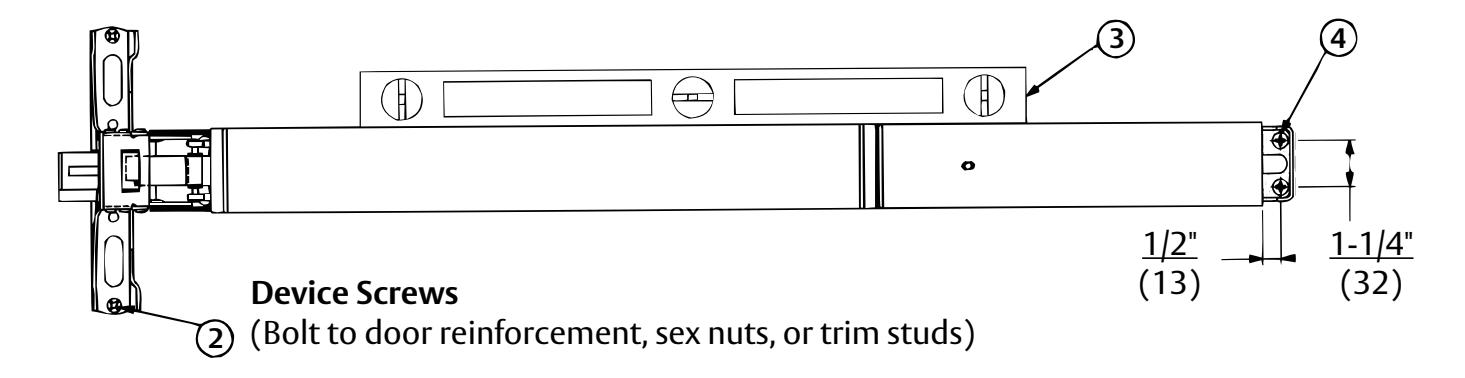
e Install Device
- 1. Mount trim (follow instructions packed with trim).
- 2. Seat bar in place. Fasten device head (2) 1/4-20 x 1" PPHMS or SNB.
- 3. Set bar level. Locate end clamp holes.
- 4. Prepare end clamp mounting holes. Mount end clamp using (2) 1/4-20 x 1" PPHMS or SNB.
-
5. Check bolt retraction.
- A. Depress touchbar (bolt must retract). Release touchbar (bolts must extend).
- B. Actuate trim (bolts must retract). Release trim actuator (bolts must extend).
- C. (NOT FOR FIRE DEVICES). Depress touchbar, turn dogging key clockwise (bar must remain depressed, bolts must remain retracted). Turn dogging key counterclockwise (bar and bolts must return to extended position).
NOTE
When resulting operation is faulty, check first for visible binding or interference. If there is no apparent reason for the fault, remove item from the door and recheck its operation before assuming that it is defective.
6. Tighten all mounting screws.
ED5200A(A) Series
Installation Instructions

4 Installation (continued)
f Install Strike
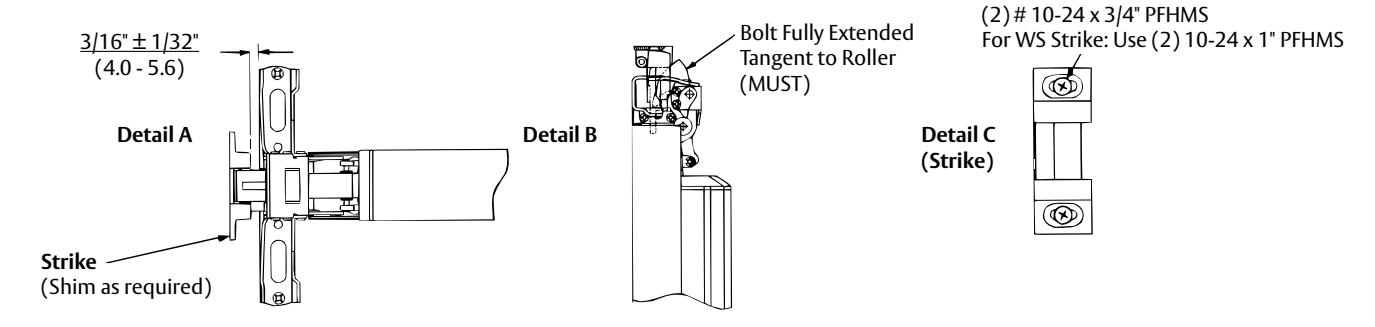
- 1. Position Strike Projection (Strike + Locking Plate + Shims, if needed). See Detail A.
- 2. Position Strike Depth. See Detail B.
- 3. Fasten Strike Securely, as shown on Detail C using (2) 10-24 x 3/4" PFHMS. For WS Strike, use (2) 10-24 x 1" PFHMS.
-
4. Check Bolt Engagement.
- A. Bolt should retract to clear the strike, when actuated by bar, trim, or dogging action. Bolt should consistently re-engage the strike, when actuators are released and the door shuts.
- B. Door should remain latched and not rattle when pushed, pulled, or shaken in/out.
-
5. Lock strike into place. For regular and Fire application, See Detail E1. For Windstorm application See Detail E2.
- A. Strike Application: Spot and prepare (1) hole using the strike as a template, and install strike center screw (1) 10-24 x 3/4" PFHMS.
- B. Windstorm Strike Application: Spot and prepare (2) holes using the strike as a template, drill through the strike shims and locking plate (when required), then install (2) 10-24 x 1" PFHMS strike locking screws.
-
6. Install Interlock Bracket (Fire Mullion). See Detail F.
- A. Position strike Interlock Bracket in place, as shown. Locate bracket holes.
- B. Prepare Interlock Bracket mounting holes. Mount Interlock Bracket using (4) 10-24 x 1" PFHMS or SNB.
Note
Interlock Bracket and screws supplied with Fire Mullion.
-
7. Install Interlock Bracket (Windstorm Device). See Detail F.
- A. Position strike Interlock Bracket in place, as shown. Locate bracket holes.
- B. Prepare Interlock Bracket mounting holes. Mount Interlock Bracket using (4) 10-24 x 1" PFHMS or SNB.
Note
Interlock Bracket and screws supplied with Windstorm Product supersedes interlock bracket supplied with Fire Mullion (remove and discard when applicable).

ED5200A(A) Series
Installation Instructions

4 Installation (continued)
g Install Head Cover and End Cap

5 Maintenance
- 1. Periodically remove covers and coat mechanisms with an appropriate lubricant. This is particularly required in corrosive environment for proper product function.
- 2. Check mounting fasteners periodically. Re-tighten if found loose. Apply screw locking compound, or change part fasteners if screws continue to back out.
- 3. Periodic checks and adjustments of strike are required to compensate for changes in the opening (e.g., door sagging, etc...).
ED5200A(A) Series
Installation Instructions

6 Plastic Template Instructions
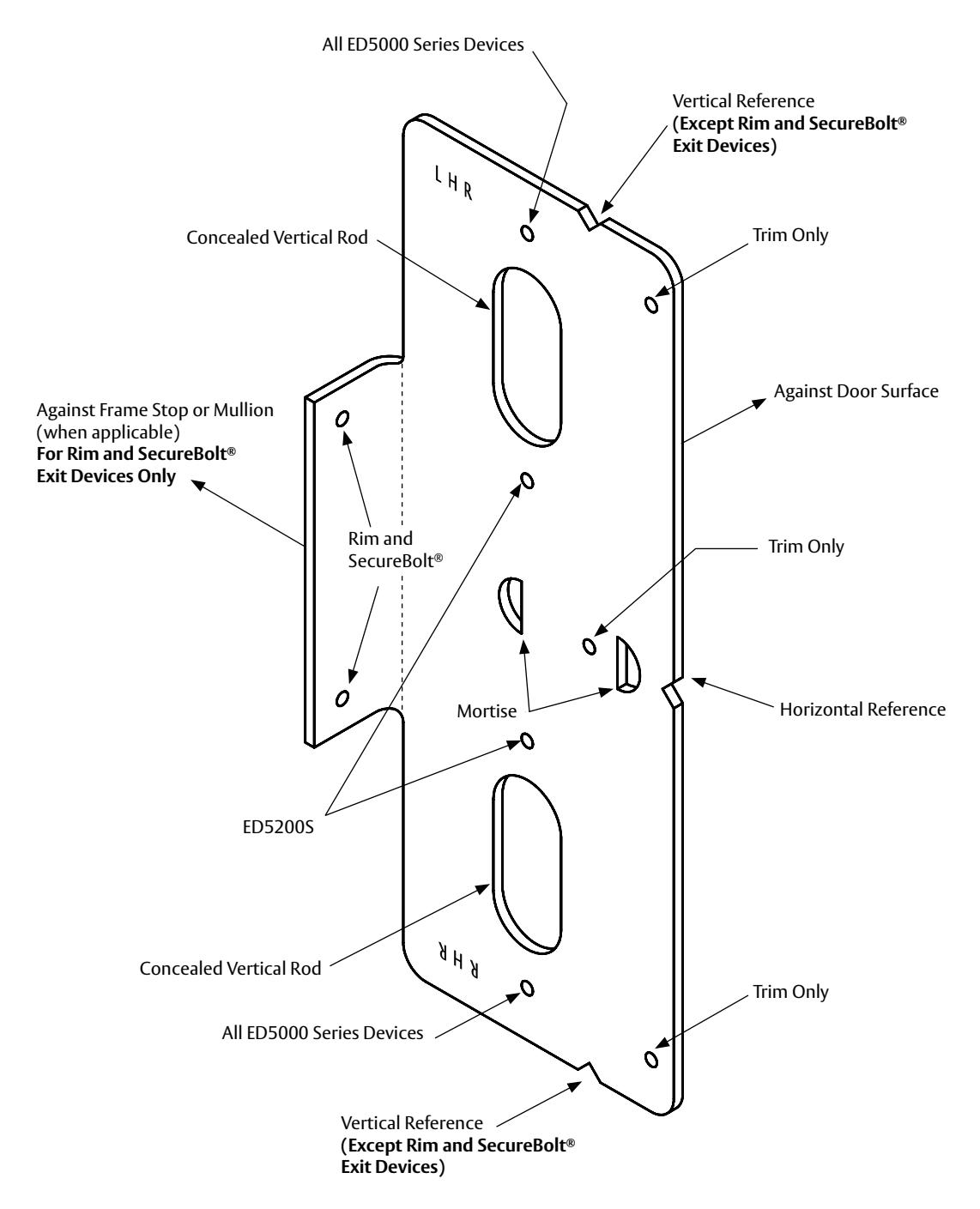
For use in conjunction with instruction sheets and door marker templates packed with exit device. Holes and slots are identified below by exit device series and trim. Prep door and frame for only those features required for the exit device being installed.

Corbin Russwin, Inc. 225 Episcopal Road Berlin, CT 06037 USA Phone: 800-543-3558 Fax: 800-447-6714 www.corbinrusswin.com
ASSA ABLOY is the global leader in door opening solutions, dedicated to satisfying end-users needs for security, safety, and convenience