ML2000 Series Mortise Locks
For Museo® Series Designer Trim, refer to installation instructions FM601.

WARNING
This product can expose you to lead which is known to the state of California to cause cancer and birth defects or other reproductive harm. For more information go to www.P65warnings.ca.gov.
| TOC | Table of Contents |
|---|---|
| 1 |
Mortise Lock Handing Instructions
2 |
| 2 |
M, N and P Escutcheon Installation
3 |
| 3 |
Half Active M, N and P Escutcheon Installation
5 |
| 4 |
Full Dummy M, N and P Escutcheon Installation
7 |
| 5 |
Half Dummy M, N and P Escutcheon Installation
8 |
| 6 |
Installing Knobs Sold Before October 2017 ONLY:
8 |
For installation assistance contact Corbin Russwin 1-800-543-3658 • techsupport.corbinrusswin@assaabloy.com
FM483 11/18
ML2000 Series Mortise Lock
Installation Instructions

Figure 2
1 Mortise Lock Handing Instructions
- 1. Move red locking screw to side of lockbody being locked.
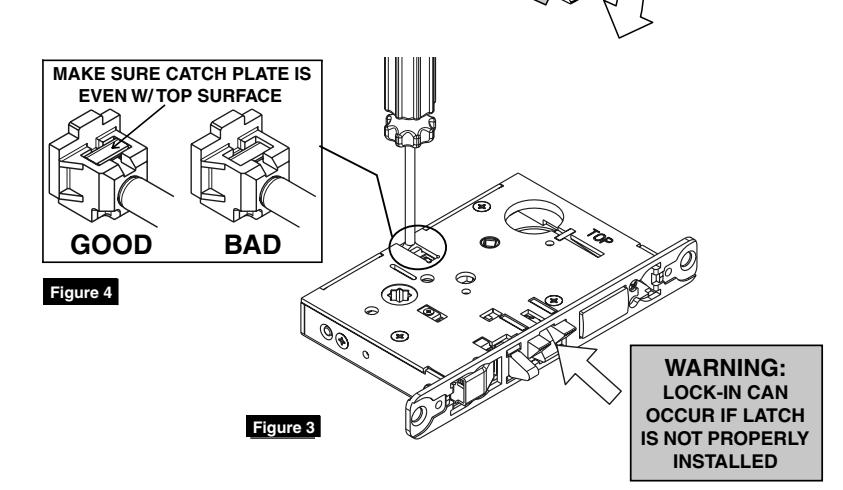
- 2. Push in latch. Depress catch plate with screwdriver. (Figure 1)

- 3. Pull latch out of lock-body and turn latch over. (Figure 2)
- 4. Push in latch while holding screwdriver behind latch tail. (Figure 8)
NOTE:
Push in latch until catch plate is no longer depressed. (Figure 4)
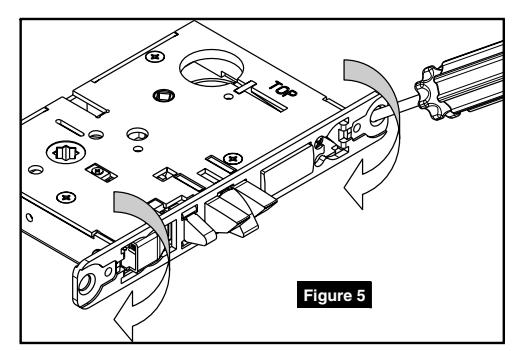
5. Rotate lock front to match bevel of door, as shown. (Figure 10)
ML2000 Series Mortise Lock
Installation Instructions

2 M, N and P Escutcheon Installation
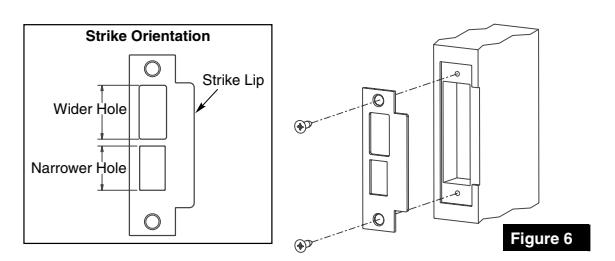
- 1. Install strike using shorter 3/4" strike mounting screws. If strike box is needed, insert between strike and door frame. (Figure 6)
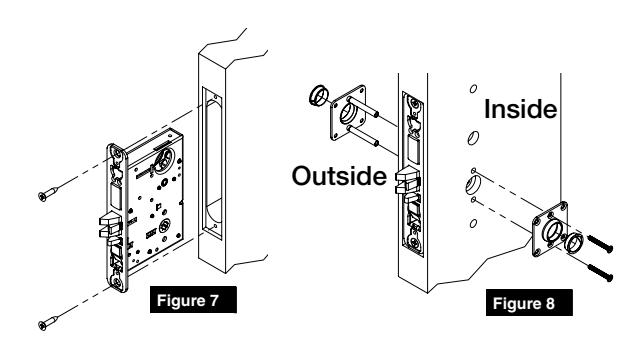
- 2. Insert mortise lock into door and hand tighten longer 1" mounting screws. (Figure 7)
NOTE:
Make sure lock is unlocked. If lock has a toggle, push bottom of toggle inward to unlock during installation.
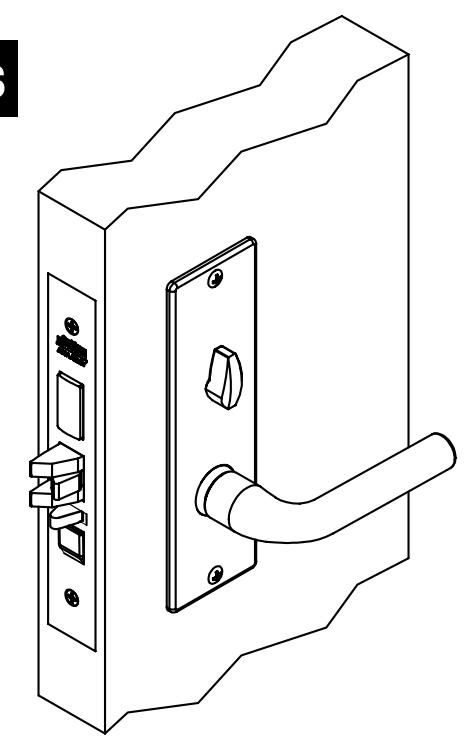
- 3. Install outside and inside adapter plates. (Figure 8)
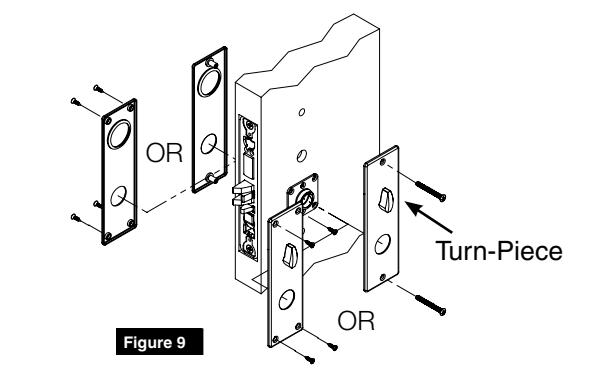
- 4. Mount escutcheons. (Figure 9)
NOTE:
Make sure turn-piece is oriented vertically when installing escutcheon.
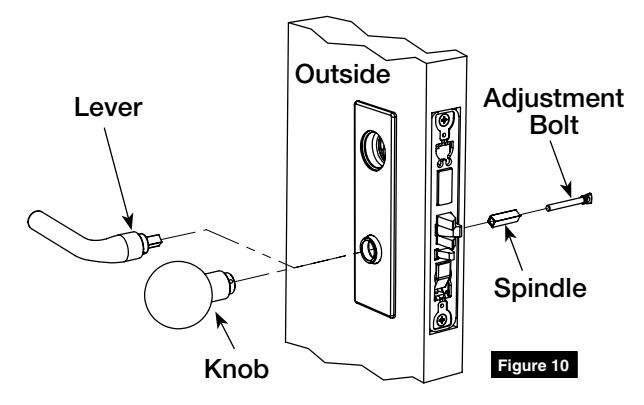
5. Install outside lever or knob by inserting adjustment bolt on opposite side of door. Tighten bolt finger-tight and then loosen a few turns. (Figure 10)
NOTE:
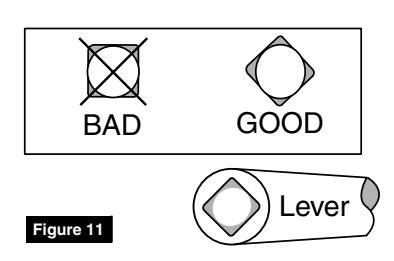
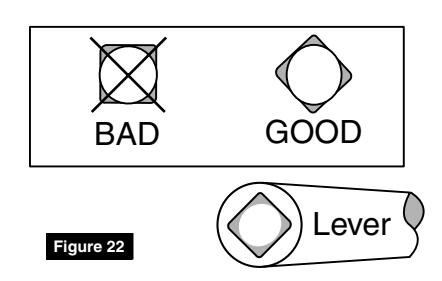
Use correct spindle orientation. (Figure 11)
ML2000 Series Mortise Lock
Installation Instructions

2 M, N and P Escutcheon Installation, (cont.)
6. Install inside lever or knob by inserting dowel screw. (Figure 12)
NOTE:
Make sure adjustment bolt hole is aligned with lever or knob hole. (Figure 13)
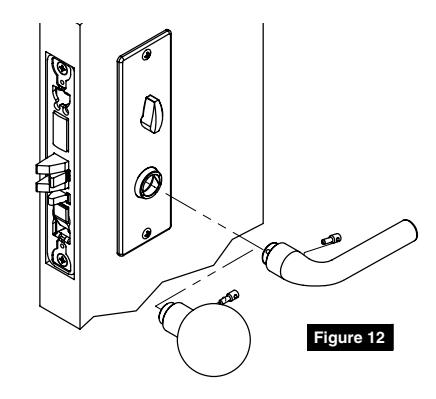
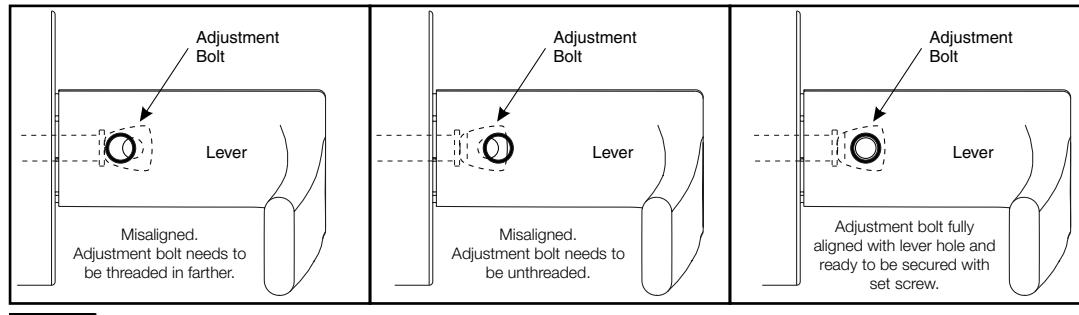
Figure 13
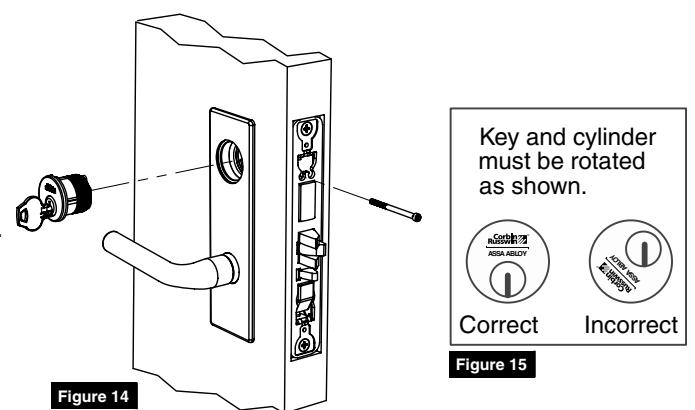
7. Install cylinder. Secure with cylinder set screw. (Figure 14)
NOTE:
- Pull key slightly out of cylinder to help thread into lockbody.
- Cylinder must be oriented correctly. (Figure 15)
- 8. Tighten lock mounting screws.
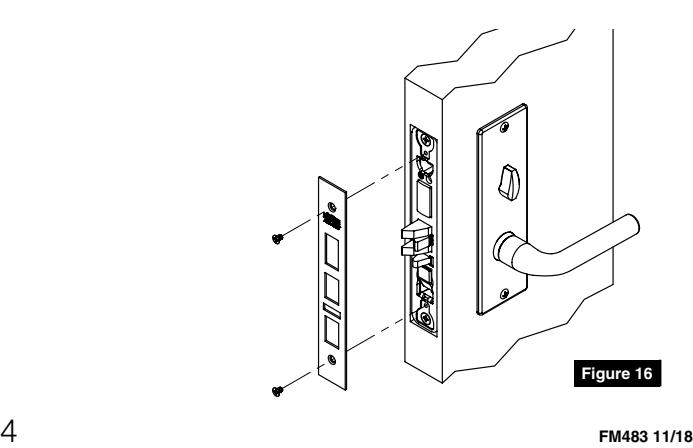
- 9. Install armored front. (Figure 16)
ML2000 Series Mortise Lock
Installation Instructions

3 Half Active M, N and P Escutcheon Installation
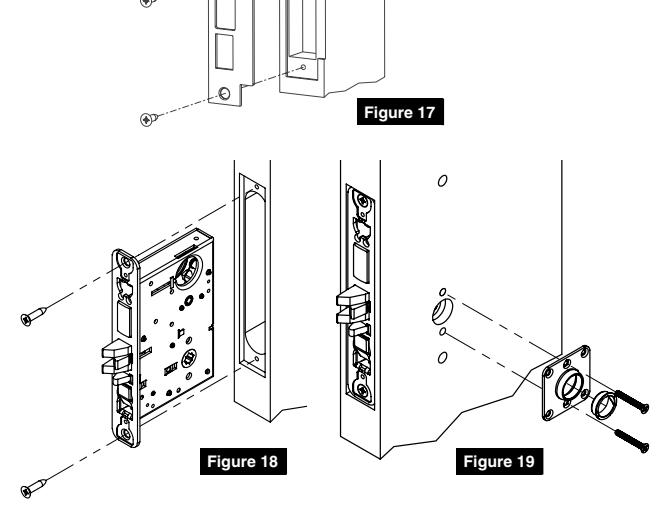
- 1. Install strike using shorter 3/4" strike mounting screws. If strike box is needed, insert between strike and door frame. (Figure 17)
- 2. Insert mortise lock into door and hand tighten longer 1" mounting screws. (Figure 18)
NOTE:
Make sure lock is unlocked. If lock has a toggle, push bottom of toggle inward to unlock during installation.
- 3. Install inside adapter plate. (Figure 19)
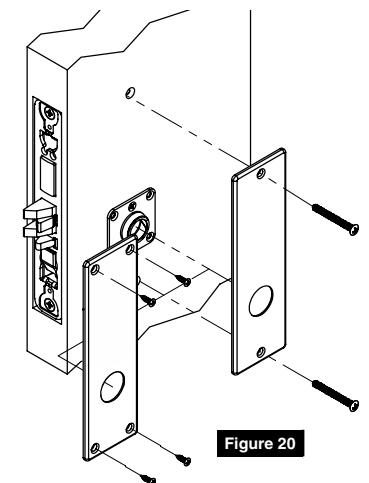
- 4. Mount escutcheon. (Figure 20)
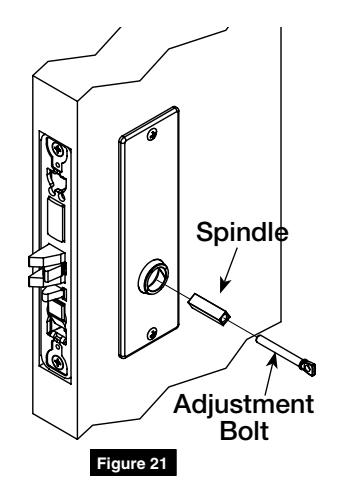
- 5. Insert adjustment bolt and spindle. Tighten bolt finger-tight and then loosen a few turns. (Figure 21)
NOTE:
Use correct spindle orientation. (Figure 22)
ML2000 Series Mortise Lock
Installation Instructions

3 Half Active M, N and P Escutcheon Installation, (cont.)
7. Install inside lever or knob by inserting dowel screw. (Figure 23)
NOTE:
Make sure adjustment bolt hole is aligned with lever or knob hole. (Figure 24)
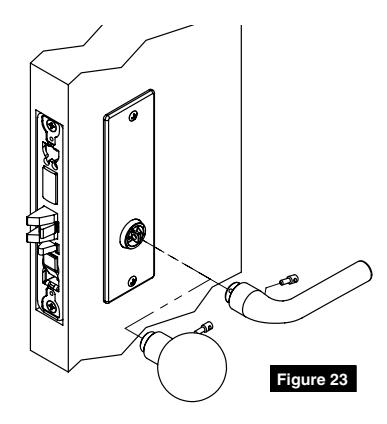
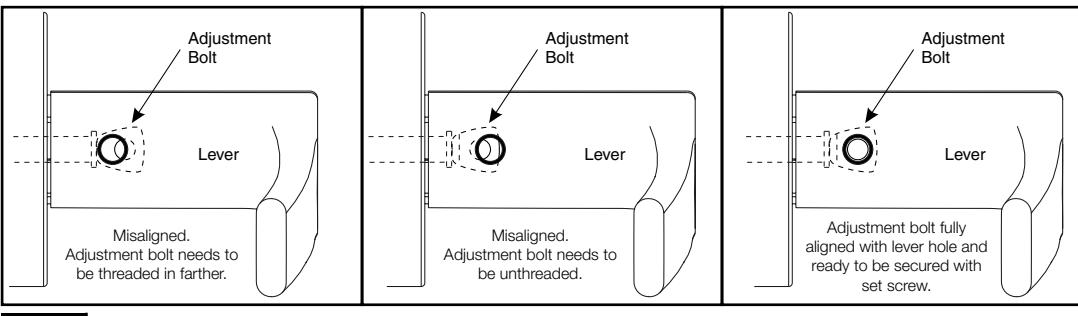
Figure 24
- 8. Tighten lock mounting screws.
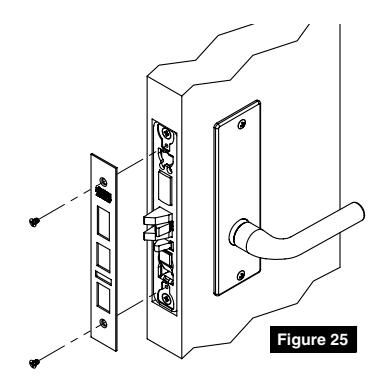
- 9. Install armored front. (Figure 25)
ML2000 Series Mortise Lock
Installation Instructions

4 Full Dummy M, N and P Escutcheon Installation
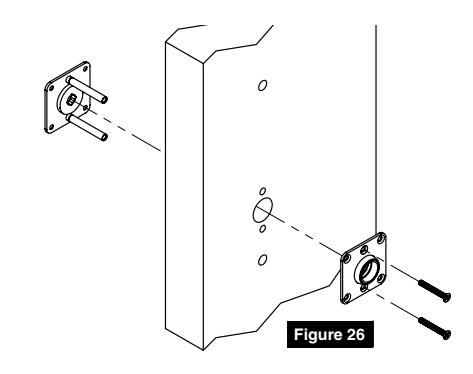
- 1. Install outside and inside adapter plates. (Figure 26)
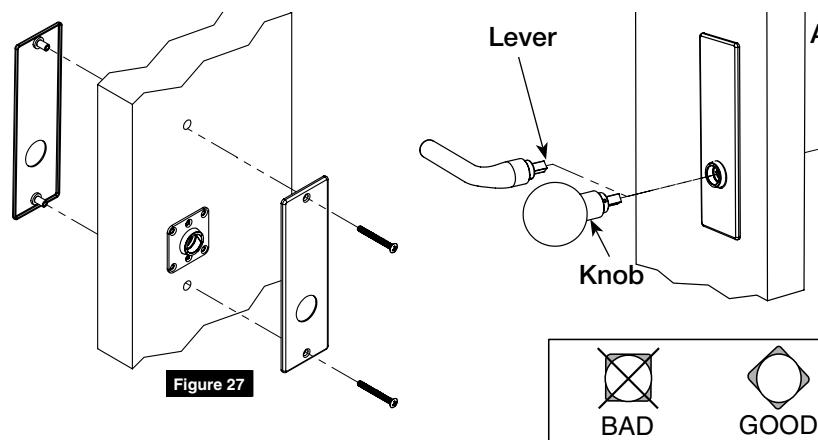
- 2. Mount escutcheons onto adapter plates. (Figure 27)
- 3. Install outside lever or knob by inserting adjustment bolt on opposite side of door. Tighten bolt finger-tight then loosen a few turns. (Figure 28)
NOTE:
Use correct spindle orientation. (Figure 29)

NOTE:
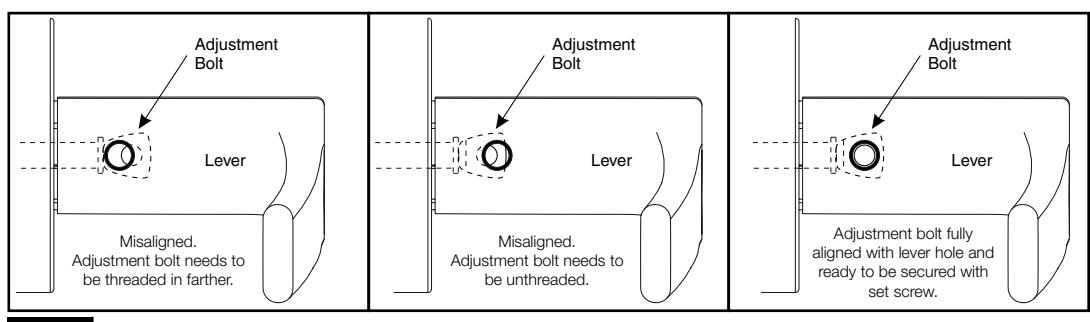
Make sure adjustment bolt hole is aligned with lever or knob hole. (Figure 31)
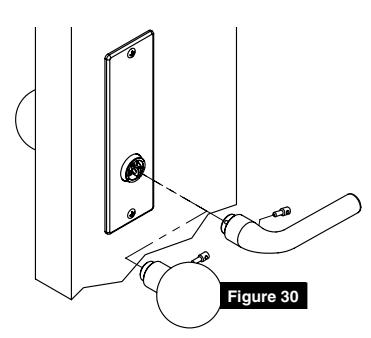
Figure 29
Lever
Figure 28
Spindle
Adjustment Bolt
For installation assistance contact Corbin Russwin 1-800-543-3658 • techsupport.corbinrusswin@assaabloy.com
Figure 31

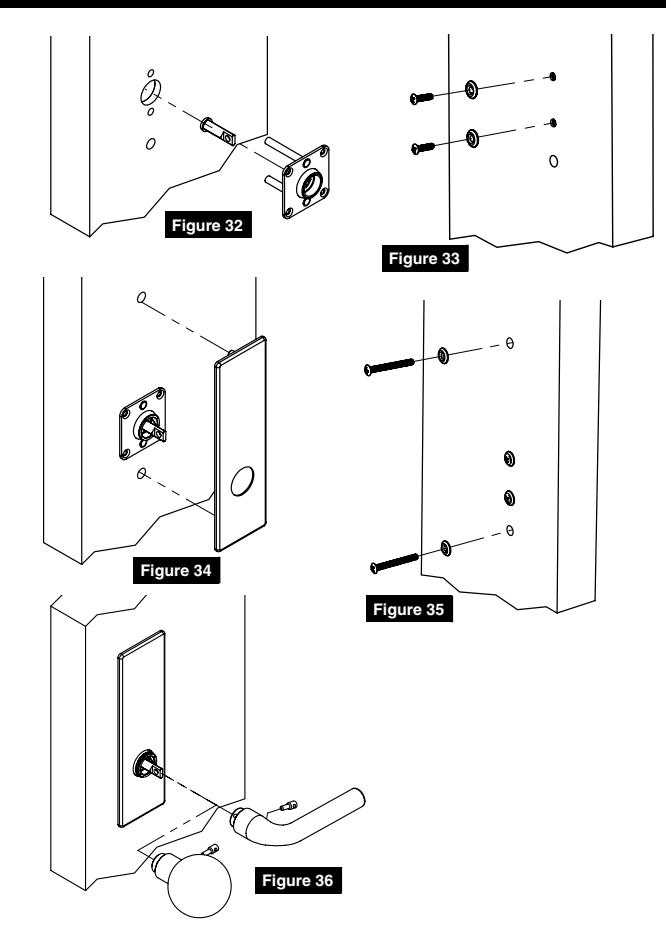
5 Half Dummy M, N and P Escutcheon Installation
- 1. Assemble and install outside dummy adapter plate. (Figure 32)
- 2. Install mounting screws and washers for the adapter plate. (Figure 33)
- 3. Mount escutcheon. (Figure 34)
- 4. Install mounting screws and washers for the escutcheon. (Figure 35)
- 5. Install inside lever or knob by inserting dowel screw. (Figure 36)
6 Installing Knobs Sold Before October 2017 ONLY:
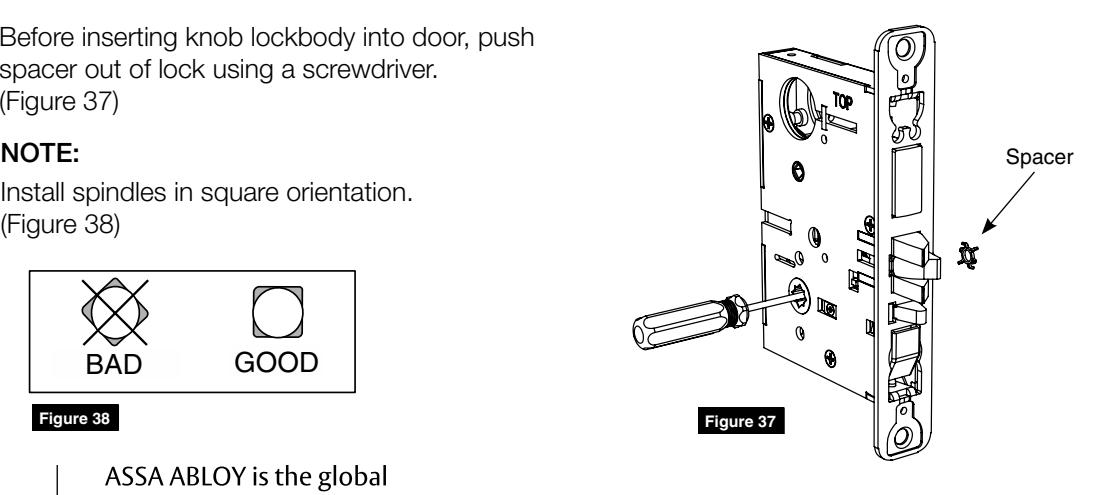
Before inserting knob lockbody into door, push spacer out of lock using a screwdriver. (Figure 37)
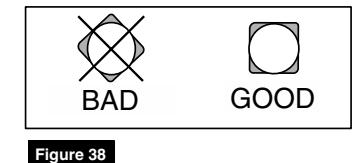
Install spindles in square orientation. (Figure 38)
Corbin Russwin 225 Episcopal Road
Phone: 800-543-3658 Fax: 800-447-6714
Berlin, CT 06037
corbinrusswin.com