ZKTeco USA Proper Fingerprint Enrollment
Open the original PDF document
View PDF

Biometrics Best Practices

Proper Fingerprint Enrollment
First select finger(s) to enroll
Best Practices suggests enrolling at least one finger from BOTH hands. This ensures the user can always gain biometric door access, even IF one of their fingers unexpectedly becomes no longer able to be recognized by the fingerprint reader (due to cuts, scrapes, dirt, etc. adversely affecting the fingerprint image quality).
ZKAccess fingerprint readers will give optimal results for fingerprint-matching if the following recommendations and suggestions are followed:
We recommend enrolling two index fingers (images 3 and 6) or two middle finger (images 2 and 7):
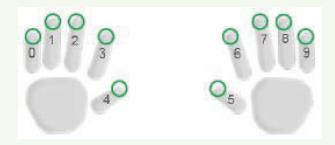
Avoid using the thumb, ring or little finger for enrollment. These fingers are often too difficult to correctly position on the fingerprint sensor and often result in poorer quality fingerprint reads.
Proper Finger Placement
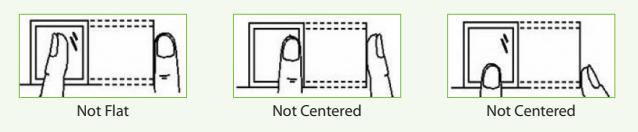
The user's finger should be placed flat and completely cover the fingerprint sensor.
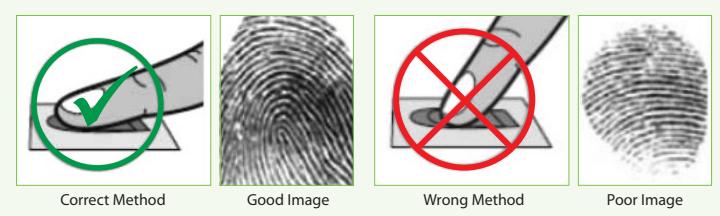
The user's finger should be placed flat (and not turned on its side). The finger also needs to be placed on the center of sensor.
Getting Good Fingerprint Images
The quality of fingerprint images is relative to the number of minutiae points captured by the fingerprint sensor. Fingerprint images not possessing an adequate number of minutiae points may be unreadable.
For those few users whose fingerprint images lack sufficient minutia points and cannot be read by the fingerprint sensor, it's advised to issue those few users an RFID card (or fob) or issue them a secret PIN code, instead.
Figure A-2 shows poor-quality fingerprints, characterized by smudged, faded or otherwise distorted areas on the fingerprint. These conditions can be caused by excessive dryness or wetness, excessive or insufficient pressure, or scarring of the skin at the fingertip.
Figure A-2
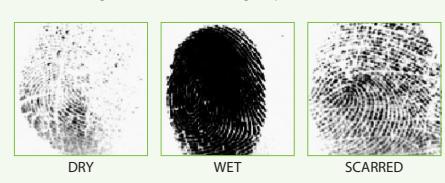
Correcting wet or dry fingerprint images:
When the temperature is very cold or just after washing hands, fingerprints often become very dry. In this case, the user should "moisturize" their fingerprint simply by breathing on the fleshy pad of their fingertip prior to placing their finger on the sensor. Another way to "moisturize" their fingerprint is by gently rubbing their fingertip against their face or forehead for a second. The moisture from their breath or skin oil should improve the recognition of their fingerprint.
Conversely, too MUCH moisture can make it difficult to obtain a good fingerprint image, no differently than adding too much ink to a stamp creates a blurred image. To remedy having too much moisture, simply swipe the finger on a clean dry lint-free cloth.
How much pressure is required for a good-quality fingerprint?
If too much pressure is applied when pressing down on the fingerprint sensor, the finger's ridges become pressed together and create an indistinguishable image. Applying too much pressure (similar to fingerprints that are too wet) will create a "blurred" image which the fingerprint sensor might not recognize. It is similar to using too much ink on a stamp: the stamp will create a smeared image which is unrecognizable.
If too little pressure is applied, the resulting image will be similar to the dry fingerprint. Similar again to a stamp, if not enough ink is used, the image will be barely recognizable.
Issues related to moisture and pressure can be easily resolved. With a little practice, users will get the feel of it.
When enrolling and authenticating, be sure to maintain contact with the fingerprint sensor for a 2 full seconds, until the fingerprint reader responds. Most ZKAccess fingerprint readers have both audio and visual indicators which respond when the reader senses a finger.
ZKAccess fingerprint readers are extremely accurate and fast-matching. And users remaining mindful of the relative moisture, proper placement and pressure of their finger on the sensor will further ensure positive results and user experience.
ZKAccess
6 Kingsbridge Road, Unit 8, Fairfield, NJ 07004 Phone: (862) 505-2101 • Fax: (862) 204-5906 • sales@zkaccess.com • www.zkaccess.com