ZKTeco USA OP400 Lenel Data Sheet
Open the original PDF document
View PDF

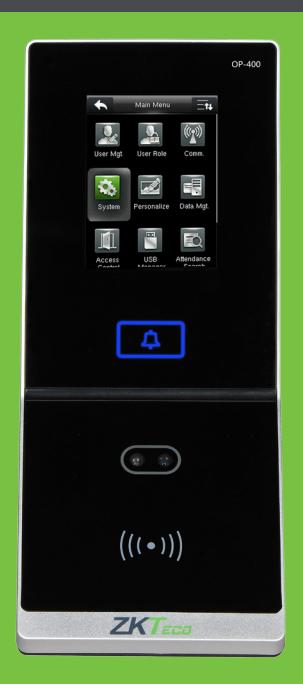

OP 400
Next-generation face reader for fast and simple Biometric Security Upgrades. Designed for Lenel customers.
OP400 unique hardware integration with OnGuard completely eliminates the need for middleware when adding face readers to your network.
Numerous benefits derived from eliminating middleware include:
- Saves money. No licenses to purchase.
- Saves time. No software to install.
- Fast direct communication with OnGuard.
- Optimal uptime. Not dependent upon computer.
- Never the need for software upgrades.
- Never the need for software maintenance.
OP400 features

OnGuard Integration:
OP400 firmware communicates directly with OnGuard and automatically synchronizes needed customer user data. Eliminates need for middleware. Eliminates need to manually create users in the biometric readers.
Biometric Performance:
Advanced face recognition technology delivers optimal accuracy and matching speed.
Auto Data Synchronization:
Multiple OP400s automatically synchronize face templates. Eliminates need for middleware. Eliminates need to separately manage templates.

Communication:
Wiegand-Out to Lenel access control panel TCP/IP and RS485 data communication USB for offline data management

Authentication Options:
(single or multi-factor)
Face
RFID (ZKAccess, HID, iClass, Mifare, Desfire & Legic)

Capacity:
1,000 Face templates 30,000 cards 100,000 transactions
Installation and Operation steps
Installation Steps
- Provide 12V power and network cables near OP400 Master and slave reader wall mounts.
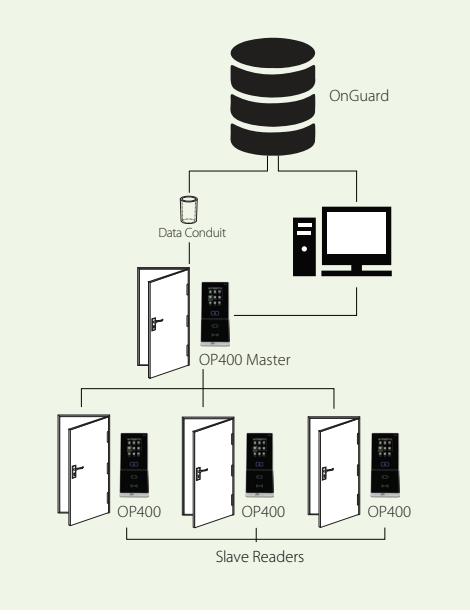
- Connect power and network cable to OP400 Master reader and slave readers. Make note of OP400 Master reader's IP address. Configure slave readers with OP400 Master's IP address.
- Install OP400 driver (data conduit) on computer running OnGuard and enter IP address of OP400 Master reader.
- OnGuard user-data automatically synchronizes with OP400 Master. After synchronization, enroll face directly on OP400 Master reader.
- Installation is complete. OP400 Master reader will automatically synchronize user data and face templates amongst OP400 slave readers whenever changes occur.
Operation
- Once user data and face templates are automatically synchronized between OnGuard and OP400 Master reader, OP400 slave face readers are now ready for operation.
- When users authenticate to an OP400 slave reader with their credential (i.e. their face and/or card) at the door, the OP400 slave reader will query its embedded database for a credential-match. Upon positive match the OP400 slave reader will transmit the user ID to the Lenel panel via Wiegand. If the panel determines that the user has appropriate access rights, the Lenel panel will unlock the door, accordingly.
Note any subsequent change in users (from OnGuard) or face templates (on OP400 Master) are automatically synchronized with OP400 slave readers on the network.
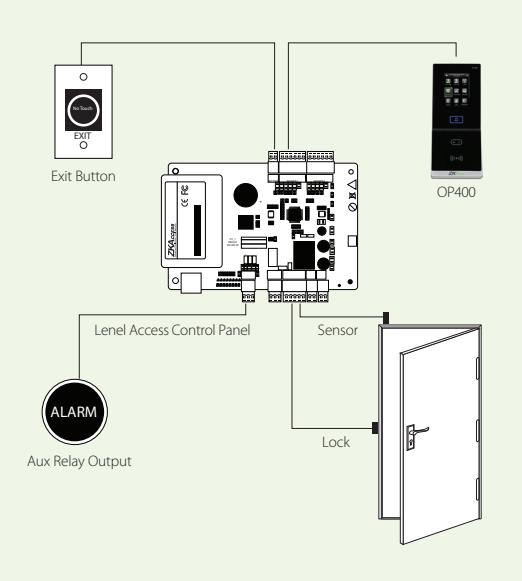
Hardware Diagram Data Communication Flow Part Numbers
OP-400-ID
OP-400 with fingerprint & ZKAccess ID card reader
OP-400-HID
OP-400 with fingerprint & HID 125 kHz card reader
OP-400-iClass
OP-400 with fingerprint & HID iClass card reader
OP-400-M
OP-400 with fingerprint & Mifare card reader
ZKAccess is a member of the Lenel OpenAccess Alliance Program (OAAP) since 2016. Lenel and OnGuard are registered trademarks of United Technologies Corp.
ZKTeco USA
6 Kingsbridge Road, Unit 8, Fairfield, NJ 07004
Phone: (862) 505-2101 • Fax: (862) 204-5906 • sales@zkaccess.com • www.zkaccess.com