XME Programming
Open the original PDF document
View PDFXCE and XME 2000 Series Locks
Index
| Definitions | 2 | |
|---|---|---|
| Factory Default Settings | 3 | |
| Important Notes | 3 | |
| Change Master Code | 4 | |
|
Add Manager
Code |
4 | |
| Add Codes | 5 | |
| Add a User Code | ||
| Add Multiple User Codes | ||
| Add Service Code | ||
| Delete Codes | 6 | |
|
Delete
User Code |
||
| Delete Manager Code | ||
| Delete All Manager Codes | ||
| Delete Service Code | ||
| Delete All Service Codes | ||
| Disable Codes | 7 | |
| Disable all Codes | 7 | |
| Passage Mode | ||
| Pass Time | ||
| Group Function | ||
| Sound Settings |
8
9 |
|
| Lock Status Indicator | 9 | |
| Penalty Time | 10 | |
| Code Location Function | ||
| Next Free User ID | ||
| Reset Lock to Factory Default Settings | ||
| Low Battery Warning | ||
YW2012 1
Definitions
- Code Length: Length of Master Code defines the length of all other codes. Length of codes can be 4, 5, or 6 digits. Master Code and User Codes must be the same length.
- LED Indicator: LED indicators are located at the top outside of the lock. Lock flashes both green and red LED dependent on user inputs.
- Master Code: Code used to program and unlock the lock. Factory Default Setting Master Code is 12345 this must be changed before programming the lock. Multiple locks can have same Master Code.
- Manager Code : A single lock can have a maximum of 5 Manager Codes. Manager Codes can program User Codes under the same group. Manager Codes can be programmed using function 51, 52, 53, 54, and 55.
- User ID: Two-digit Identification numbers for User Codes. Each User Code must have a User ID (00-99).
- User Code: Codes used to unlock the lock. User Codes are programmed by the Master or Manager Code. Lock can have a maximum of 100 User Codes. Function 02 programs User IDs and their User Codes.
- Service Code (One-time User Code): Code that allows one-time entry per code. Service Code is automatically deleted after it has been used. Lock can have a maximum of 5 Service Codes simultaneously active.
- Passage Mode: Mode that keeps the lock unlocked until it is disabled. Factory Default Setting has this mode disabled. Function 40 enables Passage Mode and Function 41 disables Passage Mode
- Pass Time: Period that a lock stays in unlocked position after a valid code is entered. Factory Default Setting Pass Time is 5 seconds. Function 42 adjusts Pass Time from 2 to 20 seconds.
- Sound: Keypad sound is enabled by Default Factory Setting. Disabling the sound affects general operation and programming of the lock. Function 73 disables sound and Function 71 enables Sound.
- Lock Status Indicator: LED indicator on lock to show whether it is locked (flashing red LED) or unlocked (flashing green LED). Function 91 enables or disables the lock status indicator.
- Penalty Time (Keypad Anti-Tamper Lockout Time): Period that a lock stays in locked position after it reaches its max number of incorrect code entries. During Penalty Time, no other codes will be accepted. Factory Default Settings' Penalty Time is 60 seconds after 3 invalid tries. Function 92 adjusts Penalty Time from 0 (disabled) to 90 seconds after 0 (disabled) to 9 tries. This is used to prevent unauthorized entry.
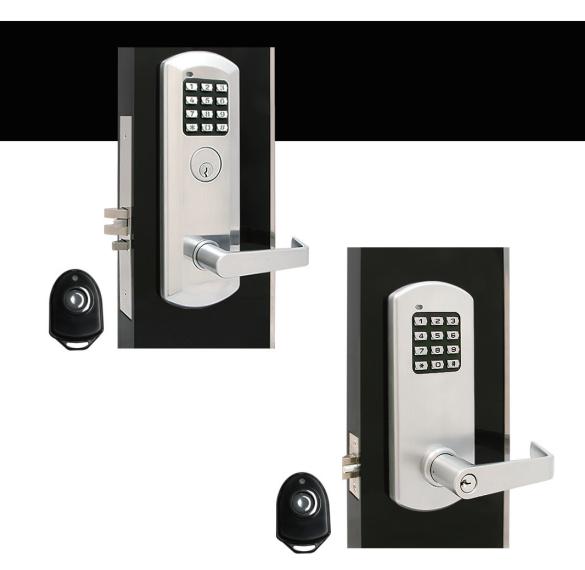
- Remote Access Terminal: For remote control button connection. If connected, pushing a remote button will unlock the lock for 5 seconds.
- Group Function : A group is defined by the first and last location of User ID's programmed into a Manager Code. Manager Code programs User Codes under the same group. Group Function may be enabled or disabled by Master Code. Manager Code may program all User Codes if Group Function is disabled.
Factory Default Settings
Master Code: 12345 Passage Mode: Disabled Pass Time: 5 seconds
Sound: Enabled
Lock Status Indicator: Disabled
Penalty Time (Keypad Anti-Tamper Lockout Time): 60 seconds after 3 Invalid Code Entries
Important Notes
- Master Code must be changed from Factory Default Setting before programming any other codes.
- Manufacturer assumes no liability, direct or indirect, due to failure to change Master Code.
- Pressing the Star (✴) key will cancel any on-going program sequence or code input.
- Pressing the Pound (#) key starts programming.
- Programming can be done only if the lock is locked unless in passage mode.
- Replacing batteries does not change existing settings.
-
During programming, green LED indicator indicates success and the red LED indicator indicates failure.
- o One green LED flash and 2 short beeps occurs after each program sequence. (●)
- o Two green LED flashes and 2 beeps (one short beep and one long beep) occur at the end of each successful program sequence (●●).
- o One red LED flash and 1 long beep indicates failure during program sequence.
- The red LED will flash 0.5 second (with one long beep) after an invalid code is entered.
- It is important to maintain track of user IDs and Codes used in the system to use certain features.
- The length of the Master Code defines the length of all other codes. The length of the Master Code cannot be changed to other lengths unless factory default settings are restored (lock is reset).
Disclaimer - The Codes used in the following examples are not recommended for actual valid codes. Accepted protocol should be followed for secure codes. Repeated strings of numbers are not secure.
Change Master Code
Key Sequence
[#] [Master Code] ● [01] ● [1-digit Code Length] ● [New Master Code] ● [New Master Code] ●●
- For example , to change Master Code to "5555", Press: [#] [12345] [01] [4] [5555] [5555] ●●
- The 3 options for the 1-Digit Code Lengths are 4, 5 or 6.
- The length of the Master Code defines the length of all other codes. It cannot be changed to other lengths unless factory default settings are restored. In order to do any programming, you must change the Master Code from the default settings.
Manager Codes
Add a Manager Code
Key Sequence
[#] [Master Code] ● [Enter 2-Digit Manager ID] ● [New Manager Code] ● [First 2-Digit User ID Location]
-
[Last 2-Digit Last Location] ●●
- For example , to add Manager code "8888" with Manager ID 51 which manages User ID's 01-10, Press [#] [5555] [51] ● [8888] ● [01] ● [10] ●●
- Up to 5 Manager Codes can be programmed. Use 2-digit Manager Code ID's 51, 52, 53, 54, or 55.
- The 2-Digit First Location and 2-Digit Last Location sets the group of User Codes that the Manager ID will manage.
- For example , the first location (01) and last location (10) will give the Manager ID 51 control over every User Code with an ID between 01 and 10, including 01 and 10.
- 2-Digit first and last locations cannot overlap with another Manager Code's 2-Digit first and last locations.
Add Codes
Add a User Code
Key Sequence
[#] [Master Code or Manager Code] ● [02] ● [2-digit User ID] ● [New User Code] ●●
For example , to add User Code of "2010" with User ID 01, Press: [#] [5555] ● [02] ● [01] ● [2010] ●●
Add Multiple User Codes
Key Sequence
[#] [Master Code or Manager Code] ● [02] ● [2-digit User ID] ● [New User Code] ●● [Second 2-digit User ID] ● [Second New User Code] ●● … And so forth
- For example , to add User Codes "2020", "2030" and "2040" with User ID 10, 11, and 12 respectively, Press: [#] [5555] ● [02] ● [10] ● [2020] ●● [11] ● [2030] ●● [12] ● [2040] ●●
- Input of additional User Codes must start before the green LED indicator stops flashing (8 Seconds) otherwise start process from the beginning.
Add a Service Code
Key Sequence
[#] [Master Code or Manager Code] ● [Enter Service Code ID] ● [Enter Service Code] ●●
- For example , to add Service Code 1 "9999", Press [#] [5555] [21] [9999] ●●
- Up to 5 Service Codes can be programmed. Use Service Codes ID's 21, 22, 23, 24, or 25.
- Service Codes are one-time use Codes that will be deleted after each use
- You can Program all 5 Service Code ID's to the same code, i.e . "9999" giving that code 5 total uses before expiring.
Delete Codes
Delete a Code
Key Sequence
[#] [Master Code or Manager Code] ● [03] ● [2-digit User ID] ●●
For example , to delete User Code "2040" with User ID "04", Press: [#] [5555] ● [03] ● [04] ●●
Delete a Manager Code
Key Sequence
[#] [Master Code] ● [Enter 2-Digit Delete Code] ●●
- For example , to delete Manager Code 51, Press [#] [5555] [61] ●●
- Up to 5 Manager Delete Code ID's 61, 62, 63, 64, or 65.
- All Manager Codes have their own corresponding Delete Code 61 = 51, … 65 = 55
Delete All Manager Codes
Key Sequence
[#] [Master Code] ● [60] ● [60] ●●
For example , to delete all Manager Codes, Press [#] [5555] ● [60] ● [60] ●●
Delete a Service Code
Key Sequence
[#] [Master Code or Manager Code] ● [Enter Service Delete Code ID] ●●
- For example , to delete Service Code 1, Press [#] [5555] [31] ●●
- Up to 5 Service Delete Code ID's, 31, 32, 33, 34, or 35
- All Service Codes have a corresponding Delete Code ID, 31 = 21 … 35=25
Delete All Service Codes
Key Sequence
[#] [Master Code or Manager Code] ● [30] ● [30] ●●
For example , to delete all Service Codes, Press [#] [5555] ● [30] ● [30] ●●
Disable a Code
Disable a User Code
Key Sequence
[#] [Master Code or Manager Code] ● [04] ● [2-digit User ID] ●●
- For example , to disable User Code "2030" with User ID "03", Press [#] [5555] [04] [03] ●●
- Manager Code can only disable users under its location group.
Enable a User Code
Key Sequence
[#] [Master Code or Manager Code] ● [05] ● [2-digit User ID] ●●
- For example , to enable User Code "2030" with User ID "03", Press [#] [5555] [05] [03] ●●
- Manager Code can only enable users under its location group.
Disable all User Codes
Disable all User Codes
Key Sequence
[#] [Master Code or Manager Code] ● [06] ●●
- For example , to disable all Users Codes, Press [#] [5555] [06] ●●
- All User Codes are disabled, and Service Codes are deleted.
- If using Manager Code, all User Codes under that Manager Group are disabled.
- Using Manager Code does not delete/disable Service Codes.
Enable all User Codes
Key Sequence
[#] [Master Code or Manager Code] ● [08] ●●
- For example, to enable all User Codes, Press [#] [5555] [08] ●●
- All User Codes are enabled, and Service Codes must be re-programmed.
- If Codes are disabled using Program 06 and a new User Code is subsequently added (or an existing Code changed), the new (or changed) User Code will automatically become enabled.
- If using Manager Code, only User Codes under that Manager Group are enabled.
Passage Mode
Enable Passage Mode
Key Sequence
[#] [Master Code or Manager Code] ● [40] ●●
Disable Passage Mode
Key Sequence
[#] [Master Code or Manager Code] ● [41] ●●
- Lock will stay in unlocked position until Passage Mode is disabled.
- Only the Master Code can enable or disable Passage Mode.
Pass Time
Key Sequence
[#] [Master Code] ● [42] ● [2-digit XX seconds] ●●
Pass Time changes to XX seconds and XX is programmable from 02 seconds to 20 seconds.
Enable Group Function (Factory Default)
Key Sequence
[#] [Master Code] ● [43] ●●
- For example, to Enable Manager Groups, Press [#] [5555] [43] ●●
- Managers are restricted to controlling only the User Codes under their set Location Group.
Disable Group Function
Key Sequence
[#] [Master Code] ● [44] ●●
- For example, to Disable Manager Groups, Press [#] [5555] [44] ●●
- Managers are not restricted to groups, can add/delete/enable/disable all User Codes.
Sound
Disable Keypad Sound – Sound Off
Key Sequence
[#] [Master Code] ● [73] ●●
Enable Keypad Sound – Sound On
Key Sequence
[#] [Master Code] ● [71] ●●
Lock Status Indicator
Enable Lock Status Indicator – Status Locked (Red LED)
Key Sequence
[#] [Master Code] ● [91] ● [2] ●●
Red LED flashes when door is locked
Enable Lock Status Indicator – Status Unlocked (Green LED)
Key Sequence
[#] [Master Code] ● [91] ● [3] ●●
Green Led flashes when door is unlocked or in Passage Mode
Disable Lock Status Indicator – No Flashing LED indicator
Key Sequence
[#] [Master Code] ● [91] ● [1] ●●
Penalty Time (Keypad Anti-Tamper Lockout Time)
Adjust Penalty Time
Key Sequence
[#] [Master Code] ● [92] ● [1-digit invalid codes entry] ● [1-digit X0 seconds] ●●
For example, to adjust Penalty Time for 70 seconds after 5 invalid entries, Press [#] [5555] ● [92] ● [5] ● [7] ●●
Disable Penalty Time
Key Sequence
[#] [Master Code] ● [92] ● [0] ● [0] ●●
- Number of invalid User Codes can be programmed from 0 (disable) to 9.
- Penalty Time can be programmed from 10 seconds to 90 seconds, incremental in 10s (i.e. 9 = 90 seconds).
Code Location Function
Key Sequence
[#] [Master Code or Manager Code] ● [09] ● [Enter Code to be located] ●●
For example, to find the location of code "2010", Press [#] [5555] ● [09] ● [2010] ●● [Keypad will light up 2-Digit Code Location] ●●
If the code entered is recognized, the following sequence will occur:
- At the start of the Code Location Function, the lock will flash both the green and red LED and emit 2 beeps.
- The keypad will light the 2-digit User ID, one digit at time, showing the User ID for the corresponding User code entered.
- To signify the end of the Code Location Function, the lock will flash both the green and red LED and emit 2 beeps.
- If there is no existing Code Location, then the lock will sound one long beep (0.5 sec) with a red LED.
Next Free User Code ID Locator
Key Sequence
[#] [Master Code or Manager Code] ● [10] ●●
If a free user ID is recognized, the following sequence will occur:
- At the start of the Next Free User ID Location function, the lock will flash both the green and red LED and emit 2 beeps.
- The keypad will light the 2-digit User ID, one digit at a time, showing the next free user ID available for use.
- To signify the end of the Next Free User ID, the lock will flash both the green and red LED and emit 2 beeps.
- If no free address is found, then the lock will emit one long beep (0.5 sec) with a red LED.
Reset to Factory Default Settings
Reset to Factor Default Settings with a Master Code
Key Sequence
[#] [Master Code] ● [99] ● [99] ●●
Reset to Factor Default Settings without a Master Code
- 1. Remove one battery.
- 2. Press and hold the "0" button, then replace the battery.
- 3. Release the "0" button after green LED flashes twice and lock beeps twice.
- 4. Within 3 seconds, press the star (✴) key 3 times.
- The green LED will light for 7 seconds and 2 beeps will sound.
- The lock is reset to the Factory Default Settings. All programming is deleted. Master Code is 12345.
Low Battery Warning
When the battery voltage is low, the red LED will flash 5 times before the green LED flashes to signal acceptance of the code. Batteries should be changed as soon as this happens. Only 200 operations are allowed under low battery condition. After 200 operations, User Codes will be disabled under low battery condition. Then, only Master Code can be used to unlock the lock, and LED indicator will flash red 10 times before the lock is unlocked.

Visit www.TownSteel.com for more.
17901 Railroad Street City of Industry, CA 91748
Toll Free: 877-858-0888
Tel: 626-965-8917 Fax: 626-965-8919
9000 Series
Program Guide
For XCE9010/9020/9030/9040 and XME9010/9020/9030/9040
Index
| Definition·······································02 | ||
|---|---|---|
| Factory Default Settings····························03 | ||
| Important Notes··································03 | ||
| Change Master Code·······························03 | ||
| Add Code·······································04 | ||
| | Add a User Code | |
| | Add Multiple User Codes | |
| |
Add
an Office Code |
|
| | Add Multiple office Codes | |
| | Add a Lockdown Cancellation Code | |
| |
Add Multiple Lockdown
Cancellation Code |
|
| Delete Code···································· | 06 |
Delete a User Code, Office Code or Lockdown Cancellation Code
| Disable or Enable Code·····························06 | |
|
|
Disable or Enable
aUser Code, Office Code or Lockdown Cancellation Code of Enable all Office Codes only Disable Disable or Enable all User Codes Office Codes and Lockdown Cancellation Codes |
| Code Location Function·····························08 | |
|
Locator·······················08
Next Free Office Code ID |
|
| Remote Control Code Setting·························09 | |
| Revert to Factory Setting····························09 | |
| Low Battery Warning·······························09 | |
| Trouble Shooting··································10 | |
| Q&A···········································10 |


Definition:
- Code Length:
- LED Indicator:
- Lockdown Cancellation Code:
- Locked Mode:
- Lockdown Mode:
- Master Code:
- Office Code:
- Pass Time:
- Penalty Time (Anti-Tamper Lockout):
- Remote Control Unit (RCU):

User Code:
Factory Default Setting
Master Code:
Pass Time:
Penalty Time:
RCU Code:
Important Notes:
- Factory Default Master Code must be changed to your own personal Master Code before programming any other codes.
- Pressing Star ("Ӿ") key cancels on-going programming.
- Pressing Pound ("#") key starts programming.
- Replacing batteries does not change existing settings.
- During programming, Blue LED indicator indicates either success of programming or programming in progress, and red LED indicator indicates failure of programming.
- Two blue LED flashes and 2 beeps (one short beep and one long beep) at the end of each successful program sequence.
- One blue LED flash and 2 short beeps during program sequence.
- Programming can be done only if the lock is in Locked Mode.
- The red LED will flash 0.5sec (with one long beep) after an invalid code is entered. (To quickly clear an invalid code entry, press □ # and immediately re-enter the correct Code).
Change Master Code – Program 01

Key Sequence
□ # [Master Code] ● □ 0 □ 1 ● [1-digit Code length] ● [New Master Code] ● [New Master Code] ●● For example , if you want your own personal Master Code to be "5555", press: □ # 12345 ● 01 ● 4 ● 5555 ● 5555 ●●
Notes:
- Factory Default Master Code is 12345. It's universal and known to the public. It must be replaced with your own Master Code immediately. Manufacture assumes no liability, direct or indirect, due to failure to do so.
- No other programming commands will be accepted until Factory Default Master Code has been changed.
- Length of Master Code defines length of all other codes. It cannot be changed to other lengths unless Factory Default Setting is restored.
- Master Code cannot be deleted.
- A lock has only one Master Code. Multiple locks can have the same Master Code.
Add Code
Add a User Code – Program 02
Key Sequence
□ # [Master Code] ● □ 0 □ 2 ● [2-digit User ID: 01, 02, 03, 04, 05, 06, 07, 08, 09 or 10] ● [New User Code] ●● For example , if you want to add User Code of "2010" with User ID 01, Press: □ # 5555 ● 02 ● 01 ● 2010 ●●
Add Multiple User Codes – Program 02
Key Sequence
1 st User Code Key Sequence: □ # [Master Code] ● □ 0 □ 2 ● [2-digit User ID] ● [New User Code] ●● Additional User Codes Key Sequence: ● [2-digit User ID] ● [New User Code] ●●
For example , if you want to add User Codes "2020", "2030" and "2040" with User ID 02, 03, and 04 respectively,
Press: □# 5555 ● □0 □2 ● 02 ● 2020 ●●
       ● 03 ● 2030 ●●

● 04 ● 2040 ●●
Notes :
Input of additional User Code must start before blue LED indicator stops flashing.
Otherwise need to start from entering □# .
Add an Office Code – Program 02
Key Sequence
□# [Master Code] ● □0 □2 ● [2-digit office code ID: through 11 to 90] ● [New Office Code] ●●
For example , if you want to add Office Code of "9010" with Office Code ID 11, Press: □# 5555 ● 02 ● 11 ● 9010 ●●
Add Multiple Office Codes – Program 02
Key Sequence
1
 st Office Code Key Sequence: □# [Master Code] ● □0 □2 ● [2-digit Office Code ID: through 11 to 99] ● [New Office Code] ●●
Additional Office Codes Key Sequence: ● [2-digit Office Code ID] ● [New Office Code] ●●
For example, if you want to add Office Codes "9020", "9030" and "9040" with Office Code ID 12, 13, and 14 respectively,
Press: □# 5555 ● □0 □2 ● 12 ● 9020 ●●
       ● 13 ● 9030 ●●
       ● 14 ● 9040 ●●
Notes:
Input of additional Office Code must start before blue LED indicator stops flashing. Otherwise need to start from entering □# .
Add a Lockdown Cancellation Code – Program 02
Key Sequence
□# [Master Code] ● □ 0 □ 2 ● [2-digit Lockdown Cancellation ID: through 91 to 99] ● [New Lockdown Cancellation Code] ●●
For example, if you want to add Lockdown Cancellation Code of "9999" with ID 91, Press: □ # 5555 ● 02 ● 91 ● 9999 ●●

Add Multiple Lockdown Cancellation Codes – Program 02
Key Sequence
1 st Lockdown Cancellation Code Key Sequence:
□ # [Master Code] ● □ 0 □ 2 ● [2-digit Lockdown Cancellation Code ID: through 91 to 99] ● [New Lockdown Cancellation Code] ●●
Additional Lockdown Cancellation Codes Key Sequence:
● [2-digit Lockdown Cancellation Code ID] ● [New Lockdown Cancellation Code] ●●
For example, if you want to add Lockdown Cancellation Codes "8888", "7777" and "6666" with Code ID 92, 93, and 94 respectively,
Press □# 5555 ● □0 □2 ● 92 ● 8888 ●●
        ● 93 ● 7777 ●●
        ● 94 ● 6666 ●●
Notes:
Input of additional Lockdown Cancellation Code must start before blue LED indicator stops flashing. Otherwise need to start from entering □#
Delete Code
Delete a User Code, Office Code or Lockdown Cancellation Code – Program 03
Key Sequence
□# [Master Code] ● □0 □3 ● [2-digit User Code ID] ●●
For example, if you want to delete User Code "2040" with User Code ID "04", Press: □# 5555 ● 03 ● 04 ●●
To delete Office Code or Lockdown Cancellation Code, replace User Code ID in Key Sequence with Office Code ID or Lockdown Cancellation Code ID respectively.
Disable or Enable Code
Disable or Enable a User Code, Office Code or Lockdown Cancellation Code

Disable a User Code – Program 04
Key Sequence
□ # [Master Code] ● □ 0 □ 4 ● [2-digit User Code ID] ●●
For example , if you want to disable User Code "2030" with User Code ID "03", Press: □ # [5555] ● □ 0 □ 4 ● [03] ●●
To disable an Office Code or a Lockdown Cancellation Code, replace User Code ID in Key Sequence with Office Code ID or Lockdown Cancellation Code ID.
Enable a User Code, Office Code or Lockdown Cancellation Code – Program 05
Key Sequence
□ # [Master Code] ● □ 0 □ 5 ● [2-digit User Code ID] ●●
For example , if you want to enable User Code "2030" with User Code ID "03", Press □ # [5555] ● □ 0 □ 5 ● [03] ●●
To enable an Office Code or Lockdown Cancellation Code, replace User Code ID in Key Sequence with Office Code ID or Lockdown Cancellation Code ID.
Disable or Enable all Office Codes only
Disable all Office Codes
□ # [Master Code] ●□ 0 □ 7 ●●
Result: All 80 Office Codes are disabled.
Enable all Office Codes
□ # [Master Code] ●□ 0 □ 8 ●●
Result: All 80 Office Codes are enabled
Disable or Enable all User Codes, Office Codes and Lockdown Cancellation Codes within the System
Disable all User Codes, Office Codes and Lockdown Cancellation Codes – Program 06 Key Sequence

- □ # [Master Code] ●□ 0 □ 6 ●●
-
Enable all User Codes, Office Codes and Lockdown Cancellation Codes within the System Program 08
Key Sequence
- □ # [Master Code] ●□ 0 □ 8 ●●
Code Location Function - Program 09
□ # [Master Code] ● □ 0 □ 9 ● [Enter Code to be located] ●●
Result:
If the code entered is recognized, the following sequence will occur:
- 1.At the start of the Code Location sequence, the lock will Flash both the Blue and RED LEDs and emit 2 beeps.
- 2.The lock will identify the first digit by flashing the Blue LED and beeping the sounder from 0 9 times.
- 3.To signify the end of the first digit sequence, the lock will flash both the Blue and RED LEDs and will emit 2 beeps.
- 4.The lock will identify the second digit by flashing the Blue LED and beeping the sounder from 0 9 times.
- 5.To signify the end of the Code Location function, the lock will flash both the Blue and RED LEDs and will emit 2 beeps.
Note: Should the Code not be recognized, the lock will sound one long beep (0.5 sec) with a RED LED.
Next Free Office Code ID Locator - Program 10
□ # [Master Code] ● □ 1 □ 0 ●●
Report Sequence
- 1. At the start of the Next Free Office Code Location function, the lock will flash both the Blue and RED LEDs and will emit 2 beeps.
- 2. The lock will identify the first digit by flashing the Blue LED and beeping the sounder from 0 -9 times.
- 3. To signify the end of the first digit sequence, the lock will flash both the Blue and RED LEDs and will emit 2 beeps.
- 4. The lock will identify the second digit by flashing the Blue LED and beeping the sounder from 0 -9 times.
- 5. To signify the end of the Office Code Location function, the lock will flash both the Blue and RED LEDs and will emit 2 beeps. If no

free address is found, then the lock will emit one long beep (0.5 sec) with a Red LED.
Remote Control Code Setting - Program 95
# [Master Code] • 9 5 • [RCU 8 digits Code] • •
For example, to set RCU Code "11110000"
Step 1 . XCE 9000 Keypad input: # 5555 • 95 • 11110000 • •
Step 2. Open RCU Cover, change DIP Switch to "11110000"
Step 3. Screw RCU Cover back, pressing button on RCU to test it.
Revert to Factory Setting – Program 99
Key Sequence
# [Master Code] • 9 9 • 9 9 • •
Result: Lock is reverted to factory default setting. All codes are deleted and Master Code changes to 12345.
Note: The Blue LED lights for 7 seconds and 2 beeps sounds.
Low Battery Warning
- 4 AA batteries for lock and a 23A battery for RCU.
- When the 4AA battery voltage is low, LED indicator flashes in red for 5 times before the Blue LED flashes to signal acceptance of the code. Batteries should be replaced as soon as this happens.
- When RCU has low battery, LED on the RCU flashes in red when pressing lockdown button.
- Only 200 operations are allowed under low battery condition. Over 200 operations, only Master Code is allowed to\nunlock the lock. All other codes are disabled. LED indicator flashes in red for 10 times before the Blue LED flashes to signal acceptance of the Master Code.
- Both 4AA batteries and a 23A battery are recommended to be replaced at least once every year.

Trouble Shooting
-
Master Code does not work
- Check keypad cable connection to PCB
- Check Battery connection to PCB
- ▼ If no issue is found, then the PCB may be dead. Call Technical Support at (877) 858-0888
-
User Code does not work
- Check your coding book; make sure the specific User Code is programmed into the lock.
- Check battery voltage. Try Master Code or Manager Code. If only Master and Manager Code are working, but not User Code, then the battery voltage is low. Replace all 4 AA batteries right away.
-
Service Code does not work
- Service code is for one time use only. It is deleted from the system once being used.
Q&A
1. How to replace lock batteries?
A: 4 AA alkaline batteries locate on the inside of the door lock. Take off inside escutcheon and battery cover to replace batteries.
2. How to replace Remote Control Unit (RCU) Battery?
A: unscrew the RCU cover, and replace the inside 23A battery
3. Does the lock have audit trail?
A: No
4. What is the product warranty?
A: one year limited.
5. What's the Technical Support Contact?
A: From 7:00AM-3:30PM, Mon-Fri, Pacific Time
Toll Free: (877) 858-0888 Email: sales@townsteel.com Website: www.townsteel.com

17901 Railroad Street, City of Industry, CA 91748
Toll Free: 877-858-0888 Tel: 626-965-8917
Fax: 626-965-8919
www.townsteel.com