Trine Wireless Chime 232 Instructions
Open the original PDF document
View PDFWIRELESS CHIME 232
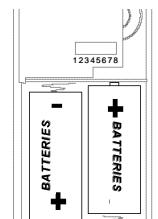
This package includes (Style of push button and chime may vary from illustration):
- Wireless chime
- Wireless push button w/battery Mounting hardware pack
You'll need to buy 2 "C" alkaline batteries for the chime. In typical use alkaline batteries will last up to one year.
Kevhole
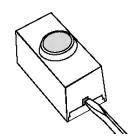
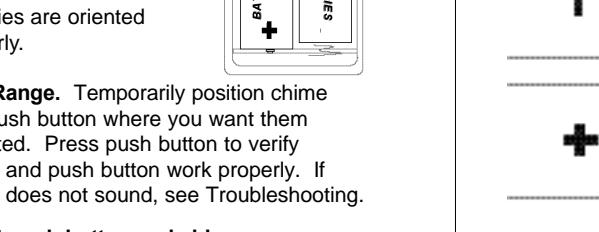
1. Install alkaline type A23 12 volt push button battery. Remove back of case by pushing in tab on bottom with a small screwdriver. Make sure battery is oriented properly.
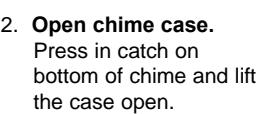
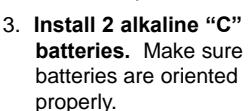
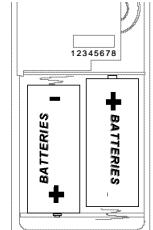
4. Test Range. Temporarily position chime and push button where you want them mounted. Press push button to verify chime and push button work properly. If chime does not sound, see Troubleshooting.




Position button with label "Install This End Down". Case Style: Chime can be mounted by using 1 screw with keyhole.
Snap battery access door firmly in place before mounting.

The push button and chime communicate by using a code that can be changed by removing and/or adding jumpers on both the push button and chime. The code is factory set; however, there are 128 selectable codes that allow you to expand your system and prevent outside interference. Other wireless products may cause interference and the system may not function properly. Follow the instructions below for setting a new code.
- 1. Open the cases and locate the jumpers on both the push button and
- 2. The push button and chime both have eight different jumper locations. The jumper positions 1 thru 7 are used for setting the code.
- 3. To change the code, add and/or remove jumpers as needed. It is recommended to only change one jumper at a time and then check to see if system is functioning properly. Note: Jumpers in positions 1 thru 7 must be exactly the same for both the push button and chime for this system to function.

instructions below: Ding (one note tune)
Ding-Dong (two note tune)
- Make sure push button and chime codes are the same
- Check orientation of push button battery
(Not used or
· Check charge of push button and chime batteries, replace if
Tune Setting
Your wireless chime has two different selectable tunes: Ding (One note), Ding-Dong (two note). The factory setting is for the
Ding-Dong tune. This tune can be changed by following the
Note: All models have both front and back door tune capabili-
ties. We recommend the back door use the Ding tune and the
Push button: Add a jumper to location 8
Chime: Remove jumper from location 8
Push button: Remove jumper from location 8
Batteries seem OK, but the chime doesn't work when installed:
- Don't mount chime or push button on metal or near metal studs. This reduces the transmitter range. Use 1/4" to 1/2" (6 to 13 mm) wood shims to move chime or push button off metal surface.
- Concrete floors may reduce range. Move chime away from floor.
- Try locating chime closer to push button.
The range of the wireless chime can vary with location, temperature and battery condition.
Regulartory Information
This device complies with Part 15 of the FCC Rules and RSS-20 of Industry Canada. Operation is subject to the following conditions: (1) this device may not cause harmful interference, and (2) this device must accept any interference received, including interference that may cause undesired operation.
The user is cautioned that changes or modifications not expressly approved by the party responsible for regulatory compliance could void the user's authority to operate equipment
FCC, IC RECOGNIZED
ONE YEAR LIMITED WARRANTY
TRINE ACCESS TECHNOLOGY reserves the right to discontinue and to change specifications at any time without notice incurring any obligation to incorporate new reatures in previously sold products.
1440 Ferris Place - Bronx - NY - 10462 Tel: 718-829-2332 • Fax: 718-829-6405
web-site: www.trineonline.com
E-mail: customerservice@trineonline.com

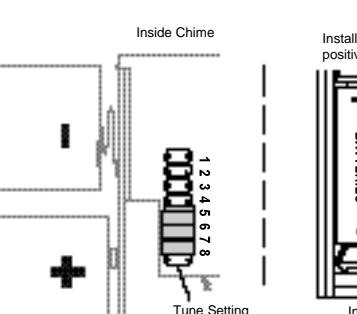
front door use the Ding Dong tune.
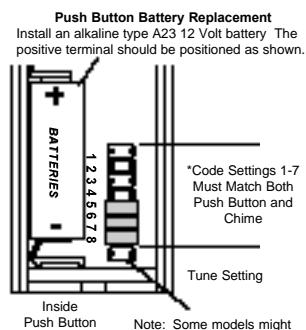
require the use of tweezers to remove and replace the jumpers