Trine 017TDC-4 & 018-4 Wireless Controller and Transmitter Instructions Sheet
Open the original PDF document
View PDF

017TDC-4 AND 018-4 WIRELESS CONTROLLER AND TRANSMITTER
NOTE: THE 017TDC-4 AND THE 018-4 ARE NOT COMPATIBLE WITH 017TDC-1, 2, 3 & 018-1, 2
INSTRUCTION SHEET AND TROUBLESHOOTING GUIDE
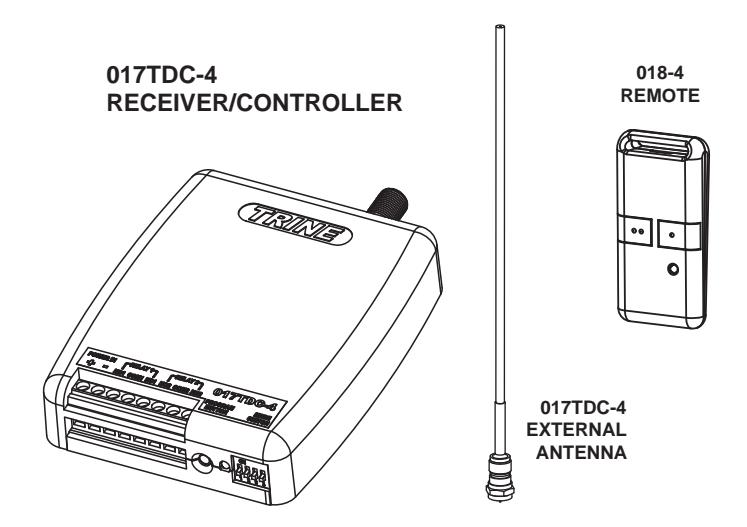
SPECIFICATIONS:
018-4 Two Button Transmitter
- Uses Rolling Code Protocol
- LED indicates operation
- Operates on 433.92 MHz
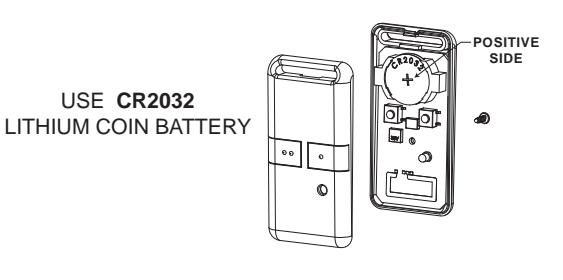
- CR2032 Battery Included
- FCC Registered
017TDC-4 (Dual Relay Controller)
- 500 Foot Range
- Preset Time Delay 4, 8 & 16 Seconds
- 2 Channel receiver and transmitter
- Relays can be programmed for continuous "ON" and "OFF" alternate action
- Two 5 amp Normally Open and Normally Closed contacts, rated at 12 through 30 volts AC or DC
- Single push button programming
- Simple one button memory reset for security
- Superheterodyne low radiant receiver
- Works with up to 8 transmitters per receiver
- Easy wiring screw terminal connections
CAUTION: CHANGES OR MODIFICATIONS TO THE 017TDC-4 AND 018-4 NOT EXPRESSLY APPROVED BY THE PARTY RESPONSIBLE FOR COMPLIANCE COULD VOID THE USERS AUTHORITY TO OPERATE THE DEVICE.
HOW TO WIRE YOUR 017TDC-4 WITH DIFFERENT DEVICES
THE ILLUSTRATIONS ON THIS MANUAL SHOWS AN ELECTRIC STRIKE AS THE INTENDED LOAD, THE 017TDC-4 CAN BE USED FOR OTHER APPLICATIONS (I.E. GARAGE DOOR OPENERS, REMOTE LIGHTING, OTHER SPECIAL APPLICATION SWITCHING... ETC.).
CAUTION: TO AVOID ELECTROCUTION, MAKE SURE TO TURN OFF THE POWER FROM THE CIRCUIT BREAKER BEFORE ELECTRICALLY WIRING THIS DEVICE.
CONNECTING YOUR 017TDC-4 TO THE POWER SUPPLY
The 017TDC-4 will work with a range of operating voltages. These voltages are from 12 Volts through 30 Volts - AC (Alternating Current) or DC (Direct Current).
If the operating voltage is AC, polarity is not an issue. However, if the operating voltage is DC, the installer must make sure that all the polarity is matched between the power supply and the devices being connected to the 017TDC-4.
Figure 1 shows how the transformer is connected. Connect the output wires from the transformer to the power input terminals marked Positive (+) and Negative (-) if using DC voltage. If the operating voltage is AC then you need not bother about polarity, simply connect your power wires to the two terminals marked "POWER IN".
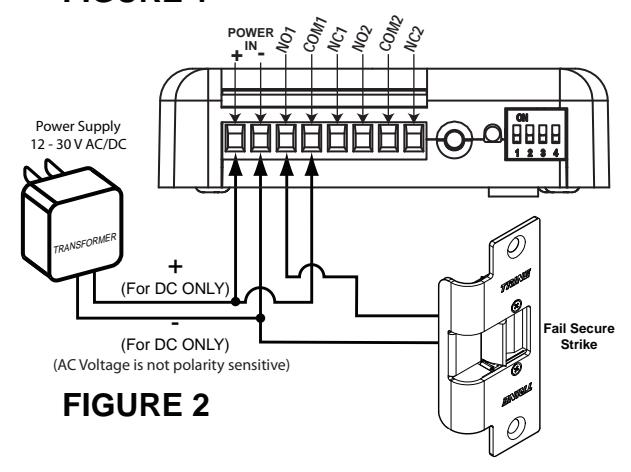
CONNECTING A FAIL-SECURE STRIKE TO YOUR 017TDC-4
Electric strikes can be FAIL SECURE (Locked when power is off) or FAIL SAFE (Unlocked when power is off). To connect a FAIL SECURE Strike please see Figure 2. Note that most electric strikes are not polarity sensitive. Read the electric strike's instruction sheet and follow it's polarity recommendations.
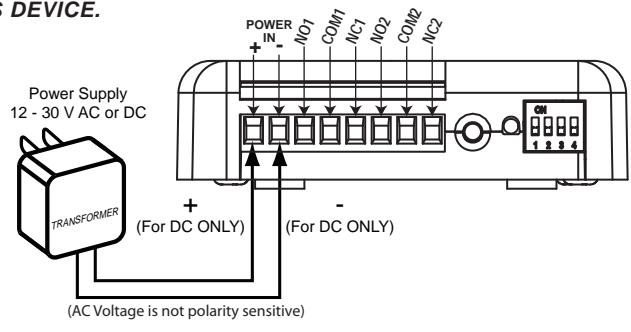
FIGURE 1
CONNECTING A FAIL-SECURE STRIKE AND A SWITCH TO YOUR 017TDC-4
To connect a push button to mechanically operate the FAIL-SECURE Strike, connect one side of the Normally Open Switch to the positive side of the power supply and to one terminal wire of the electric strike or load as shown on Figure 3.
This application is not limited to electric strikes only. Any device that needs to be remotely switched can be substituted as a load. As long as it operates within the electrical limits of the relay and the electronics of the receiver.
NOTE: If external push button switches were used, the time delay function of the receiver is overridden when using the push buttons so the load will stay "ON" only for the duration that the switches are pressed.
Power Supply 12 - 30 V AC/DC (For DC ONLY) (AC Voltage is not polarity sensitive) Fail Secure Strike
CONNECTING TWO FAIL-SECURE STRIKES AND SWITCHES TO YOUR 017TDC-4
017TDC-4 has two relay outputs that corresponds to the remote's two buttons. You can connect two fail-secure electric strikes as shown below in Figure 4. Optionally, you can add two switches to manually override the wireless receiver.
This application is not limited to electric strikes only. Any device that needs to be remotely switched can be substituted as a load. As long as it operates within the electrical limits of the relay and the electronics of the receiver.
NOTE: If external push button switches were used, the time delay function of the receiver is overridden when using the push buttons so the load will stay "ON" only for the duration that the switches are pressed.
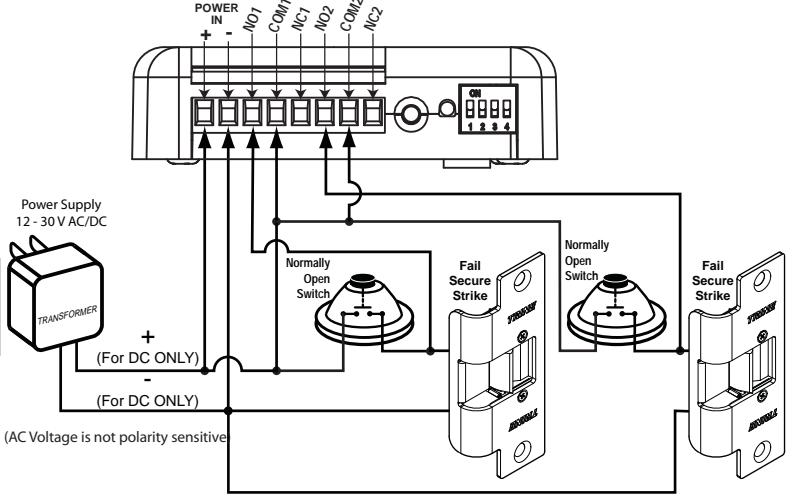
FIGURE 4
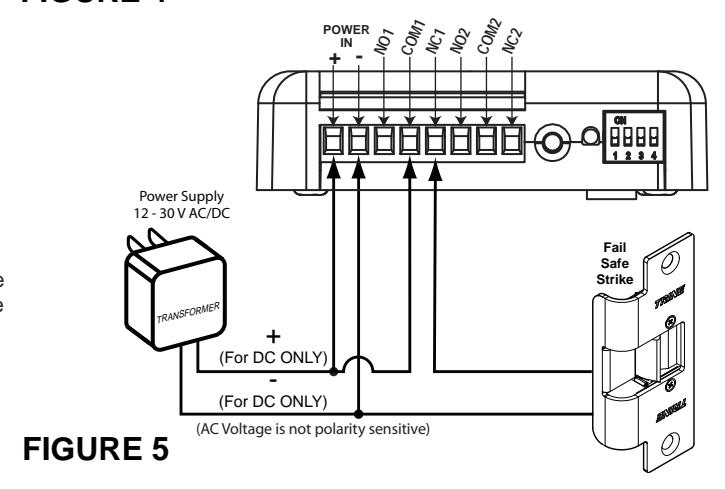
CONNECTING A FAIL-SAFE STRIKE TO YOUR 017TDC-4
To connect a FAIL-SAFE strike to the 017TDC-4 please see Figure 5.
Note that AC application requires no polarity matching, however, for DC applications such as the fail-safe electric strike, the polarity assignments on the terminal and electric strike must be observed.
This application is not limited to electric strikes only. Any device that needs to be remotely switched can be substituted as a load. As long as it operates within the electrical limits of the relay and the electronics of the receiver.
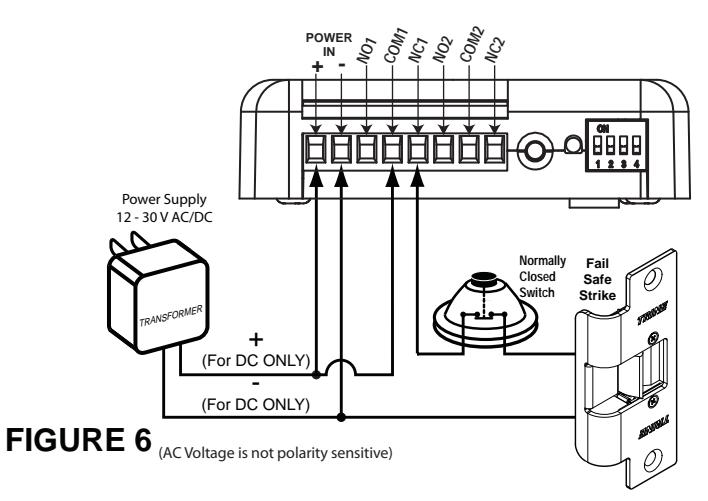
CONNECTING A FAIL-SAFE STRIKE AND A SWITCH TO YOUR 017TDC-4
To connect a push button to mechanically operate a FAIL SAFE strike, connect one side of a Normally CLOSED Switch in series with the strike as shown on the electrical schematic as shown on Figure 6.
This application is not limited to electric strikes only. Any device that needs to be remotely switched can be substituted as a load. As long as it operates within the electrical limits of the relay and the electronics of the receiver.
NOTE: If external push button switches were used, the time delay function of the receiver is overridden when using the push buttons so the load will stay "ON" only for the duration that the switches are pressed.
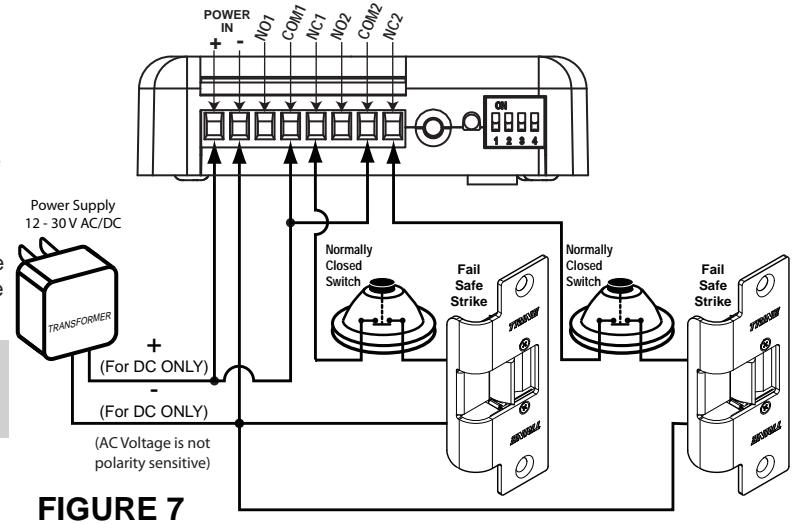
CONNECTING TWO FAIL-SAFE STRIKES AND SWITCHES TO YOUR 017TDC-4
Optionally, you can connect two fail-safe strikes on the 017TDC-4 that can have two switches to manually override the wireless receiver. Refer to the schematic shown in Figure 7.
This application is not limited to electric strikes only. Any device that needs to be remotely switched can be substituted as a load. As long as it operates within the electrical limits of the relay and the electronics of the receiver.
NOTE: If external push button switches were used, the time delay function of the receiver is overridden when using the push buttons so the load will stay "ON" only for the duration that the switches are pressed.
SETTINGS: PAIRING THE REMOTE, TIME DELAYS AND SWITCHING MODE
HOW TO PAIR REMOTE TO CONTROLLER:
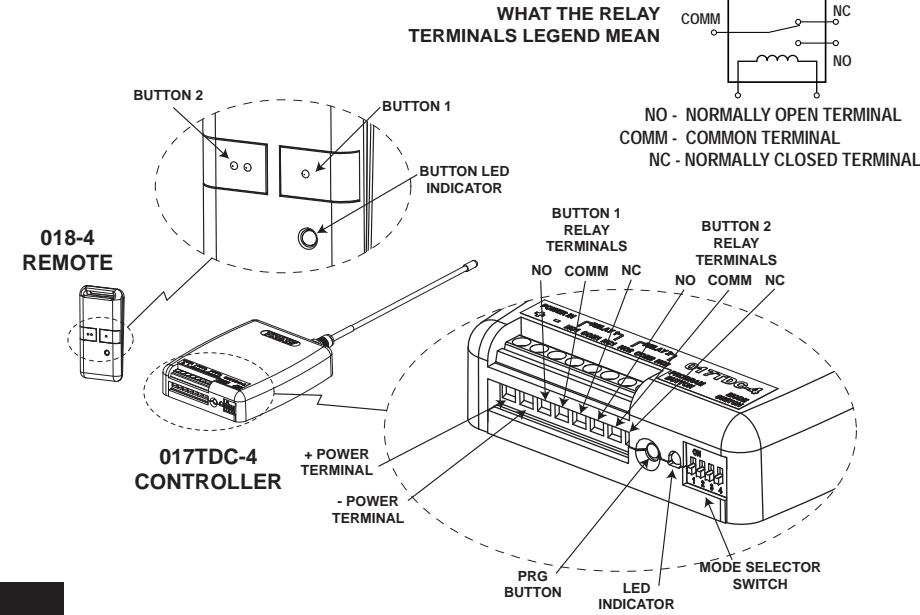
You need to pair the 018-4 remote to the 017TDC-4 receiver/controller for your system to work. The 017TDC-4 receiver can work with up to eight (8) transmitters.
To pair the remote with the receiver/controller follow the steps
- 1. Press the PRG button on the 017TDC-4 (see picture below for the location of the PRG switch) the LED light next to the PRG button will turn ON indicating that it is ready to pair.
- 2. Push any of the two 018-4 buttons to start pairing and the 017TDC-4 LED will blink to indicate that the pairing is successful.
- 3. For additional remotes, do the same procedure for 1 & 2 above using the new remotes you want to pair. The 017TDC-4 will remember the previous remotes paired up to a maximum of 8 remotes.
NOTE: To reset the 017TDC-4 back to factory setting and erase all the paired remotes from it's memory, press and hold down the PRG button for 10 seconds and release it. The LED will blink to indicate that the procedure is complete. TURN THE POWER OFF AND BACK ON TO FINISH ERASING THE MEMORY.
TIME DELAY AND MODE SELECTION:
2 3 4
The mode selector switch settings determines the time the relay is ON and the action of how the relay will switch. Before setting the mode selector switch, you MUST TURN OFF THE POWER TO THE 017TDC-4. The mode selector, switches 1 and 2 works with button #1 of the remote and switches 3 and 4 works with button #2.
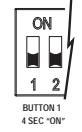
Relay will stay ON for
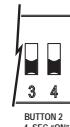
4 seconds at this setting.
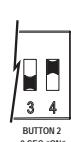
1 2 Relay will stay ON for 8 seconds at this
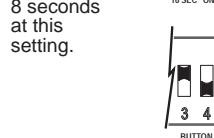
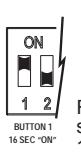
Relay will stay ON for 16 seconds at this setting
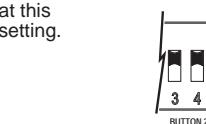
Relay will turn ON when the button is pressed and turn OFF when the button is pressed again.
BATTERY SPECIFICATION AND ORIENTATION:
TROUBLESHOOTING GUIDE SECTION:
The 017TDC-4 and the 018-4 operates on radio frequency (RF) signaling and may have some problems being installed in certain locations. Radio Frequency (RF) signals are similar in principle as two people conversing. RF communications however are more difficult to troubleshoot because RF modulates at frequencies that are not audible to human ears.
Let's say that you and I are comfortably conversing, if a person starts talking loud next to us, then we may start to go closer and closer to each other until we can once again understand each other.
RF devices will work the same way. The first objective in troubleshooting is to spot the troublemaker, in this case, the offending device. The offending device can be one or the combination of the following items: light dimmers, fluorescent lights, TV or computer CRT displays and any piece of equipment using a switching power supply or "clock" oscillator (computers and other digital devices). Additionally, ham and CB transmitters, remote controls, wireless phones, cellular phones, commercial taxi/police/aircraft radios, microwave ovens, motion sensors, radar systems, and a myriad of medical and industrial RF devices.
As you can appreciate from the litany of devices above almost any perimeter can have multiple sources of RF noisemakers. Deciding the final position for mounting the 017TDC-4 will immensely improve your chances of installation success. Before screwing the 017TDC-4 receiver down, choose an initial location and use a 10 feet electrical cord and walk test the 017TDC's sensitivity to receive the 018-4's signal. Once you have determined the most ideal spot, that is the place you will install the receiver.
| PROBLEM | POSSIBLE CAUSE | SOLUTION |
|---|---|---|
|
Transmitter does not work
(LED lamp does not light) |
Battery is low | Replace the battery. Use a CR2032 size 3VDC Lithium battery. |
| Battery is not properly installed | Reinstall the battery correctly (see battery polarity drawing above) | |
|
Transmitter does not work
(LED lamp turns ON) |
Transmitter is out of range | Move the transmitter closer to the receiver (see above article) |
| Wiring connections may be faulty | Check your wiring scheme refer to the 017TDC-4 instruction sheet. | |
| Remote & Controller are improperly paired | Pair the remote and controller again see instructions on the front page. | |
| Wiring connection may be faulty | Check your wiring scheme refer to the 017TDC-4 instruction sheet. | |
| RF interference | Read the article above regarding RF interference | |
| Faulty power supply | Check the power supply for correctness of voltage and capacity | |
| Receiver works intermittently | Loose wiring connections or shorted wire | Carefully check all your wiring connections and tighten loose connections |
For additional information regarding the 017TDC-4 Wireless Controller and to download this document in electronic form (Adobe Acrobat PDF). Go to our website at http://www.trineonline.com/interior/support/instruction_sheet.html

2 Parklawn Drive Ste "F" Bethel Connecticut 06801 Tel. No. (203) 730-1756 Fax No. (203) 730-1781 Website: www.TrineOnline.com
NOTICE REGARDING THE 018-4 TRANSMITTER
FCC ID: PFO018-4
018-4 TRANSMITTER
This device complies with Part 15 of the FCC Rules. Operation is subject to the following two conditions: (1) this device may not cause harmful interference and (2) this device must accept any interference received, including interference that may cause undesired operation.