Touch Manager User Instructions
Open the original PDF document
View PDF

Touch Manager
User instructions
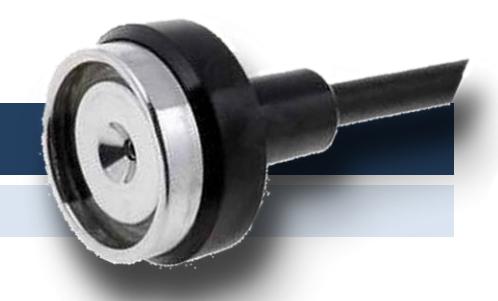
Information
The system consists of a HSL lock (art. T4000, art. T4000/D, art. T4000/S, art. T4000/M, art. T4000/M/S), a Dallas reader and a power system provided with a 9 volt battery clip (art. TC0200). An emergency power jack is also available on demand (art. N162).
Only use 9V alkaline battery or 9V lithium battery for a greater autonomy.
The system allows the opening of the lock through the use of Dallas keys (maximum 50 keys).
The product is basically composed by three different Dallas keys:
- Blue key, programming key (p.n. N1971 or N1982);
- Red key, reset key (p.n. N1971 or N1982);
- Black key, user key (p.n. N1990);
Low battery signal
Five beeps mean a low battery level.
Replace immediately the low battery with a new Alkaline one.
Acoustic signals
A double beep means operation accepted.
A triple beep means the key is already stored into the lock.
A long beep means the end of a programming session.
A long bad sound means a key not enabled to perform the operation.
Opening
To perform the opening, place a black Dallas key (user key) on the reader. Double beep and lock open.
Open the door within 4 seconds.
A long bad sound means the key is not enabled to open.
Programmazione/Rimozione delle chiavi utente
Place the blue Dallas key (programming key) on the reader and wait few seconds.
A double beep means a programming session has been opened.
A "bad sound" means a not enabled key.
Place a black Dallas key (user key) on the reader.
A double beep means the key has been stored.
A triple beep means the key is already present in the memory and has been now removed.
Place another black Dallas key on the reader or place again the blue Dallas key (programming key) to close the programming session.
After 20 seconds of inactivity the programming session is automatically closed. Long beep.
Reset
Place the red Dallas key (reset key) on the reader and wait few seconds.
A double beep means a reset session has been opened. Keep the key on the reader.
A "bad sound" means a not enabled key.
After about 5 seconds a long beep means all the user keys have been removed.
Further information
For the complete manual and further information on the product's features, please visit www.tecnosicurezza.it
|
GLOBAL HEADQUARTERS
Tecnosicurezza SpA |
USA HEADQUARTERS
Tecnosicurezza Inc. |
SPAIN HEADQUARTERS
Tecnosicurezza Sa |
|---|---|---|
| Via Cesare Battisti. 276 | 50, Thomas Lane | C/Menor, 4 - Nave 10 |
|
37057 San Giovanni Lupatoto
Verona |
Versailles, KY 40383 |
Pol. Ind La Mina 28770
Colmenar Viejo |
|
Tel.+39 045 826 64 70
Fax. +39 045 826 64 69 |
Tel.+1 859 490 89 30 |
Tel.+34 91 804 33 91
Fax.+34 91 804 32 63 |
| info@tecnosicurezza.it | info@usatecno.com | info@tecnosicurezza.es |