Simplex 1000-L1000 Changing the Code – KAA1163
Open the original PDF document
View PDFChanging the Code/Combination Simplex 1000/L1000
Note: If your lock is opening on every turn of the knob or lever, except upon entering a code, this may be a ZERO CODE. Before attempting to remove the lock from the door, refer to the troubleshooting procedures outlined at bottom of this document for a zero code symptom/solution.
1000/L1000 Series FAQ Changing the Code/Combination

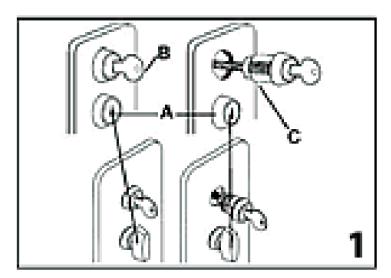
On models with the passage feature, make sure the passage feature is disengaged: turn knob or key should be in vertical position (A) (see figure 1).

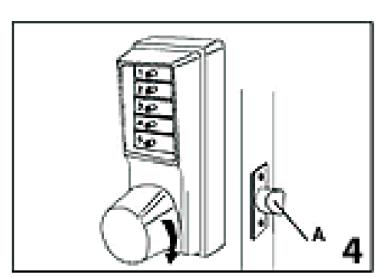
- 2. Turn the outside knob/lever once clockwise (all the way, until it stops) then release. The latch should not retract (see figure 4) .
- 3. Enter the existing combination. On new installations, use the factory set combination: depress 2 and 4 simultaneously, (release), then 3 (release). You should feel a slight click as each button is depressed.
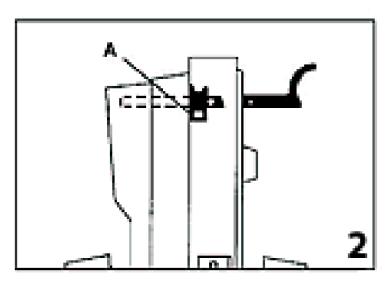
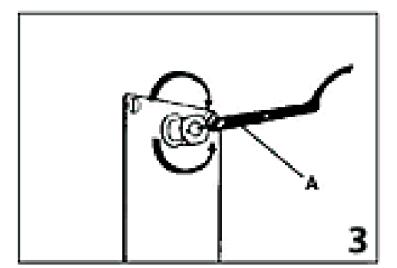
4. Insert the spanner wrench as shown in figure 2 to engage the combina tion change sleeve (A). Gently turn the spanner wrench clockwise to the stop position (a slight click should be felt), then turn the spanner wrench counter-clockwise to the stop position (A) (see figure 3) . Remove the spanner wrench.
- 5. Turn the outside knob/lever once clockwise all the way until it stops, then release. The latch should not retract (see figure 4) .
- 6. Choose your new combination, write it down, then enter the new combination—depress buttons carefully (a slight click should be felt as each button is depressed).
Note: You can use one button or all five for a combination, but each button can only be used once. You can depress two or more buttons simultaneously as a step in the combination.
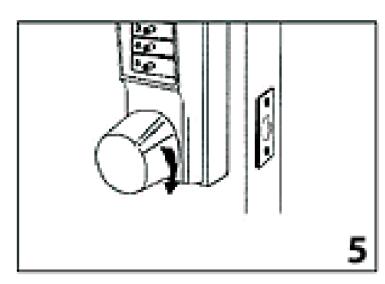
7. Turn the outside knob/lever clockwise once, all the way, until it stops, hold in position and make sure the latch is retracted (see figure 5) . Release the knob/lever.
- 8. Turn the knob/lever clockwise again to the stop position. At this point, the latch (A) should not retract unless you enter the new combination (see figure 4).
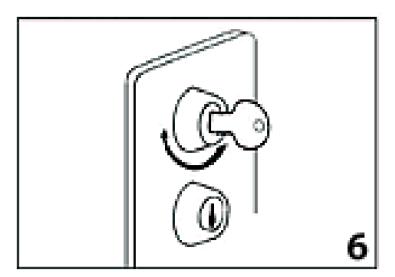
- 9. Re-secure the combination change plug assembly by screwing it in clockwise with the DF-59 key—do not overtighten (see figure 6) . Remove the key and store it in a secure area with these instructions and the spanner wrench.
Troubleshooting
Symptom/problem: Outside knob/lever when turned always retracts latch without depressing any buttons.
Cause: Lock is in zero combination.
Solution: Follow the procedure for changing a combination except omit step 3 (do not enter the existing combination).