Securitron WSS-WSD Motion Sensor Installation Instructions
Open the original PDF document
View PDF
Package Contents
- Microwave motion sensor
- Faceplate Weather-resistant gasket
- Adapter ring
-
Faceplate screws Mounting ring Instructions
| Specifications | |
|---|---|
| ELECTRICAL |
INPUT 12
to 24 VAC ±10% 12 to 24 VDC +30%/-10% 50 to 60 Hz |
|
OUTPUT
Relay contact rating (max voltage) Relay contact rating (max current) Max switching power |
<1.5W
Relay with switch-over contact (voltage free) 60 VDC/125 VAC 1A (resistive) 30W DC / 60 VAC |
| DETECTION RANGE | 4" to 24" (10cm to 60cm)(adjustable) |
| DETECTION MODE |
Motion
(bidirectional) |
| OUTPUT HOLD TIME | 0.5-30 seconds |
| OPERATING TEMPERATURE |
-4
°F to +131 °F (-20 °C to +55 °C) |
| IMMUNITY |
Immune
to electrical and radio frequency interference |
| WEIGHT |
0.34
lbs (0.15 kg) |
| REGULATORY |
Electromagnetic
compatibility (EMC) according to 2004/108/EC FCC: G9B-21016 IC: 4680A-21016 |
Precautions
- 1. SHUT OFF power to header before attempting any wiring procedures.
- 2. MAINTAIN a clean and safe environment when working in public areas.
- 3. Constantly BE AWARE of pedestrian traffic around the door area.
- 4. Always STOP pedestrian traffic through the doorway when performing tests that may result in unexpected reactions by the door.
- 5. OBSERVE proper protocols for circuit board handling to protect the unit from electrostatic discharge.
- 6. Before handling any board, ENSURE dissipation of any bodily charge.
- 7. CHECK placement of all wiring before powering to ensure that moving door parts do not catch wires and cause damage to equipment.
- 8. ENSURE compliance with all applicable safety standards (i.e., ANSI A156.10/A156.19) upon completion of installation.
- 9. DO NOT ATTEMPT any repair of the sensor.
-
10. Unauthorized disassembly or repair:
- May jeopardize personal safety and may cause exposure to the risk of electrical shock.
- Will void the product warranty.
Installation / Wiring / Setup
Installation
- 1. MOUNT the WSS using the included mounting ring or in a standard plastic or metal electrical gang box, as applicable, and depending on the type of door installation.
- NOTE 1: The weather resistant foam is used as a protective barrier against the elements.
- NOTE 2: The plastic adapter ring enables the double gang face plate to attach to various plastic and metal gang boxes.
- NOTE 3: If using a metal electrical box, do not allow contact between the sensor and the box to prevent shorting the device.
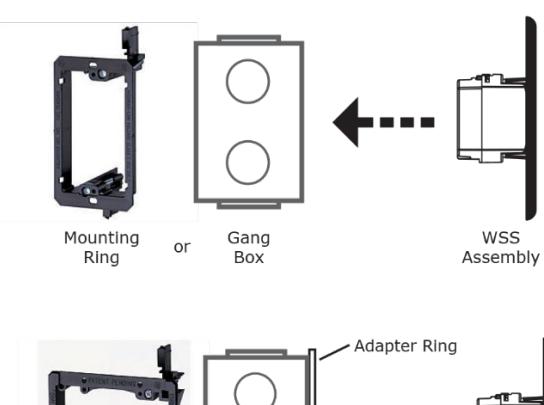
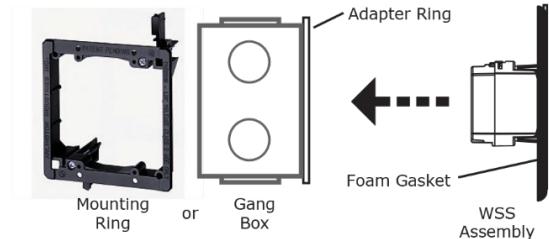
2. ENSURE placement of the device so that motion from the door or other types of movement do not interfere with the detection zone.
Wiring
1. WIRE the four-conductor cable as shown below.
2 500-23710_1
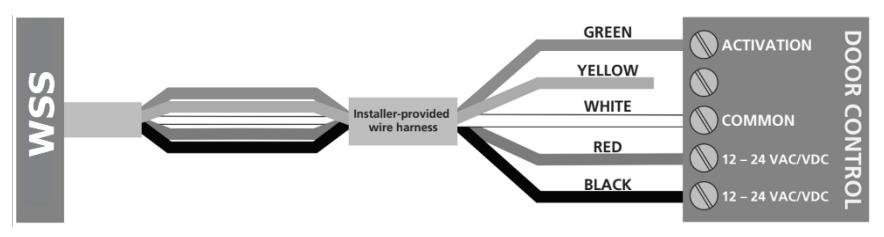
NOTE: Use either green (N.O.) or yellow (N.C.) wire, not both. Refer to the door control manual to determine which must be used.
Setup
NOTE: Four adjustments can be made to the sensor.
-
1. Sensitivity potentiometer: adjust detection field from 4 to 24 inches (rotate clockwise to increase)
- Factory default: 4 inches (fully CCW)
-
2. Hold time potentiometer: adjust relay hold time from 0.5 to 30 seconds (rotate clockwise to increase)
- Factory default: 0.5 sec (fully CCW)
-
3. Output Mode switch: determines Toggle mode or Timer mode
- Toggle (switch up) = detection activates the relay and the relay holds until a second detection deactivates the relay (recommended for switch applications)
- Timer (switch down, factory default) = detection activates the relay for 0.5 to 30 seconds; relay will hold as long as detection occurs
-
4. LED mode switch: determines if LED illuminates when in detection or when not in detection
- switch up (factory default) = LED on when sensor is NOT in detection, LED off when in detection
- switch down = LED on when sensor is in detection, LED off when not in detection
Troubleshooting
PROBLEM: Door does not open when swiping hand in front of sensor.
-
CAUSE/ACTION:
1. Bad or no power supply. . CHECK power supply. If LED switches on or flashes, power connections are OK.
- 2. Detection range is too small. ADJUST the detection range. REMOVE any metal plates in front of sensor.
- 3. Wrong connection. CHECK wiring and relay connection.
PROBLEM: Door remains permanently open.
CAUSE/ACTION: 1. Environmental conditions are influencing the sensor. REMOVE any
moving objects close to the sensor.
3 500-23710_1
2. Wrong connection/Output mode. CHECK wiring and relay connection and switch output mode to Timer.
PROBLEM: The door remains open after detection/activation.
CAUSE/ACTION: 1. Wrong output mode. SWITCH the output mode to Timer Mode.
2. Wrong connection. CHECK wiring and relay connection.
FCC Approval
This device complies with Part 15 of the FCC Rules and with RSS-210 of Industry Canada.
Operation is subject to the following two conditions:
- 1. This device may not cause harmful interference, and
- 2. This device must accept any interference received, including interference that may cause undesired operation.
IMPORTANT NOTE
Changes or modifications to this equipment that are not expressly approved may void the FCC authorization to operate this equipment.