Securitron PB22 Push Buttons Operating Manual
Open the original PDF document
View PDF

SECURITRON PB22 SERIES EXIT BUTTON INSTALLATION AND OPERATING INSTRUCTIONS
1. DESCRIPTION
The model PB22 is a spring loaded momentary 2" square, exit button, with bi-color illumination, mounted on a stainless steel single gang outlet box cover. The DPDT contacts switch when the button is depressed and return when it is released. The contacts are UL listed with 5 AMP capacity. The indicator LED mounted above the button and the switch LED illuminates the button itself.
The indicator LED and switch LEDs can be individually operated according to the needs of the installation. The indicator LED is mounted above the button and the switch LED illuminates the button itself. The PB22 can be used for momentary release of fail safe or fail secure electric locks. If interfaced with a release hold timer, such as Securitron's TimeMate, it can provide for timed release of electric locks. It may also be used to input a REX (request to exit) signal to a card reader system. We recommend that the local building or fire safety authority be consulted prior to using exit buttons for door egress. They may require a "no special knowledge" exit device such as Securitron's Touch Sense Bar.
2. INSTALLATION
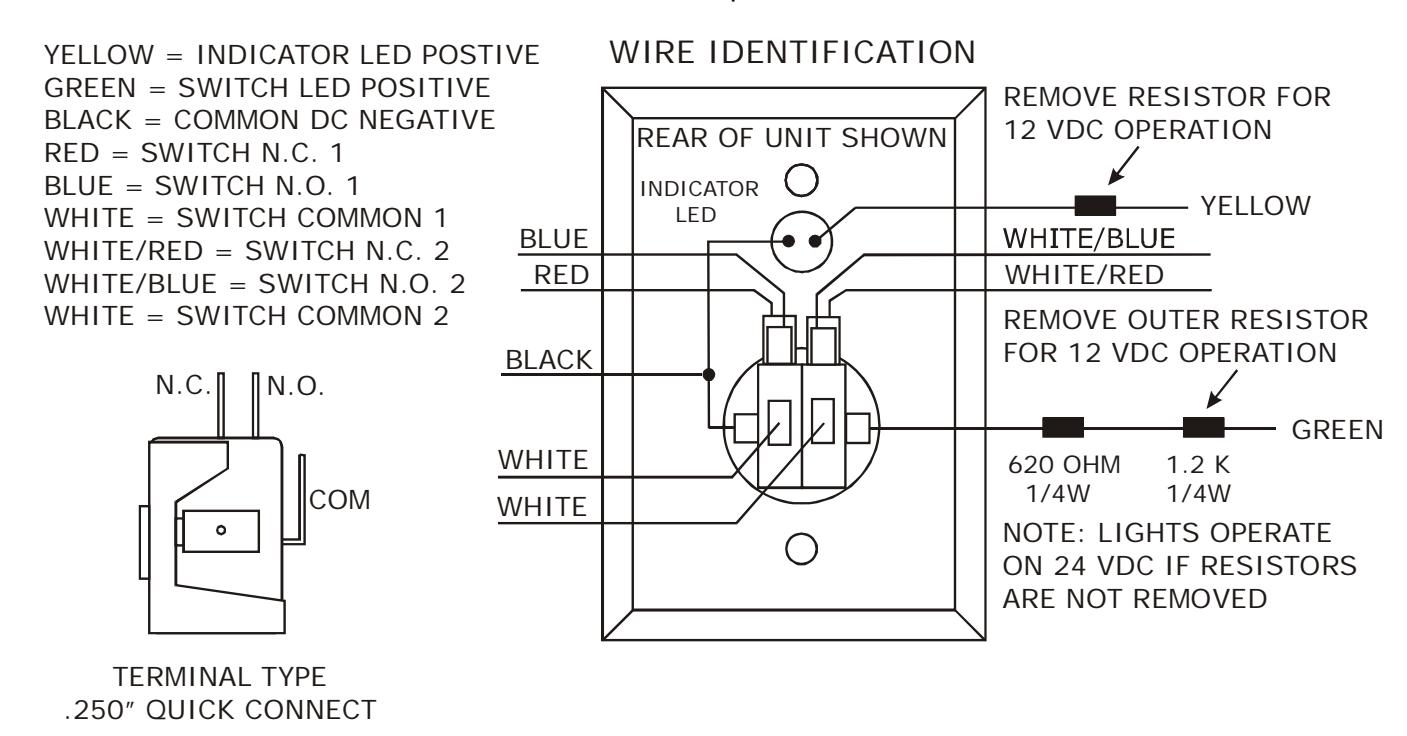
The PB22 comes with a retro-fit wall mounting device and color coded hookup wires installed. If a back box is used, the installer should select a box with minimum depth of 2 1/2". The drawings below show identification of the unit's connection points.
3. LED OPERATION
Resistors are installed so that the LEDs may be operated on either 12 or 24 VDC. The yellow wire drives the indicator LED and the green wire drives the switch LED. Both wires have a resistors soldered on them. If the power supply is 24 VDC, connect directly to the wires. If the power supply is 12 VDC, remove the outer resistor for proper operation at the lower voltage.
The indicator LED draws 20 mA and the switch LED draws 9 mA @ 12VDC or 20 mA @ 24VDC. For replacement: the indicator LED is Securitron part number 700-10095 (Red) or 700-10097 (Green) and the switch LED is Securitron part number 030-14600. The switch LED is replaced by grasping the back of the white contact block and twisting it counter-clockwise to the 11 o'clock position, then pull the contact block straight out of the rear of the switch. This reveals
the LED which then can be pulled out from the block. Note: LED is polarity sensitive. Insert new LED into contacts, the should be on the side of the green wire with printing facing the same directions as the switch block terminals. Operating Life of the switch LED is 100,000 hours.
For LED replacement in older PB22: The switch LED assembly is replaced by snapping out the contact block assembly at the rear of the switch. This reveals the LED assembly which then can be pulled out from the block. Note: LED assembly is polarity sensitive. Insert the new LED into contacts, the should be on the side of the green wire with printing facing the same directions as the switch block terminals.
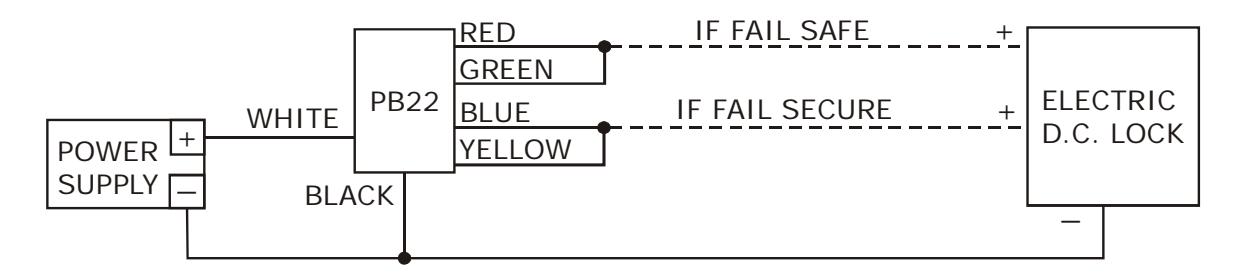
MOMENTARY RELEASE OF FAIL SAFE OR FAIL SECURE ELECTRIC LOCK
TIMED DOUBLE BREAK RELEASE OF FAIL SAFE LOCK
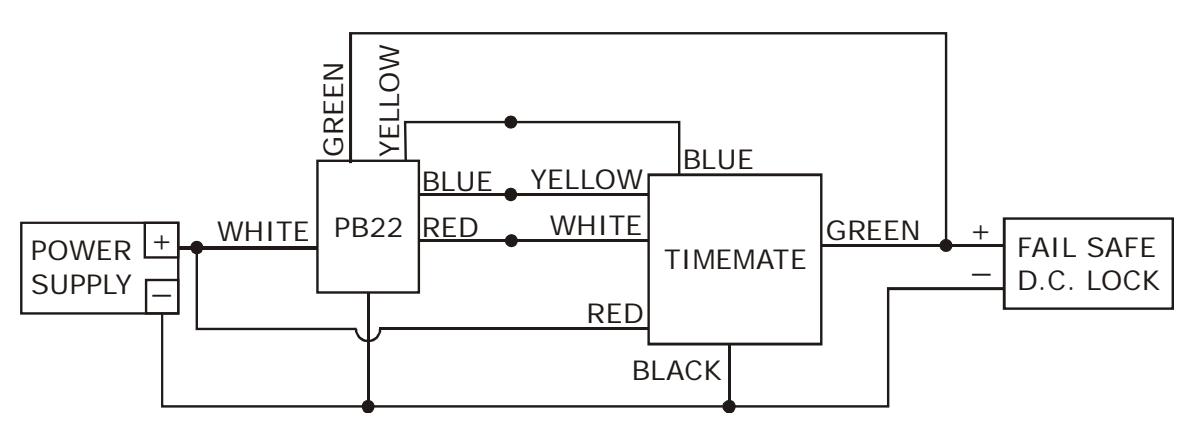
NOTE: Both configurations allow for one SPDT dry contact for integration into an access control or monitoring system.
4. ALTERNATE LENS CHANGING
The pushbutton is factory shipped with the green lens set installed and two lens/insert options. Changing to the other lens sets is simple.
- 1) Grasp keyplate and turn over. From the back rotate the white contact block of the switch counter-clockwise to the 11 o'clock position and pull straight back to remove the contact block.
- 2) With a slender smooth ended object such as a marker pen, slide it inside the switch body. With the object inserted in the switch up against the lens, place the object on a smooth surface with the keyplate on top, and tap the keyplate up and down on the object to pop the lens off. Remove the lens and insert.
- 3) Turn the keyplate over and place the new insert onto front of switch, confirm that the text on the insert is correct reading to the keyplate and place the matching colour lens on top of the insert and compress around all edges of the lens until it snaps in place. Depress lens several more times to ensure smooth operation and that the lens is not binding.
- 4) With the terminals upward insert the contact block back into the back of the switch at the 11 o'clock position and rotate clockwise until it stops straight up and down.