Securitron PB, PBA Push Buttons Operating Manual
Open the original PDF document
View PDFPB and PBA Exit Button

Installation & Operating Instructions
Description
- The model PB is a spring loaded momentary, 1-1/2" Diameter, exit button, with bi-color illumination, mounted on a stainless steel single gang outlet box cover.
- The model PBA is alternate action (push-on; push off). The NO and NC (DPST) contacts switch when the button is depressed and return when it is released.
- The contacts are UL listed with 7 AMP capacity.
- The indicator LED and the switch LED can be individually operated according to the needs of the installation. The indicator LED is mounted above the button and the switch LED illuminates the button itself.
- The PB can be used for momentary release of fail safe or fail secure electric locks. If interfaced with a release hold timer, it can provide for timed release of electric locks. It may also be used to input a REX (request to exit) signal to a card reader system.
- We recommend that the local building or fire safety authority be consulted prior to using exit buttons for door egress. They may require a "no special knowledge" exit device such as Securitron's Touch Sense Bar.
Installation
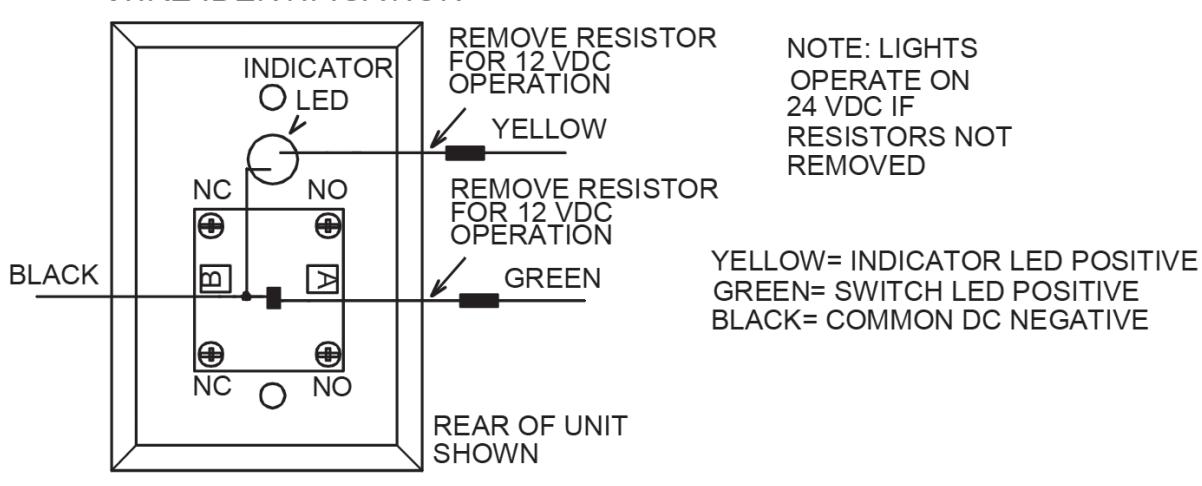
The PB comes with a retrofit mounting device and color coded hookup wires installed. The drawing below shows identification of the unit's connection points.
Lamp Operation
- Resistors are installed so that the LEDs may be operated on either 12 or 24 VDC. The yellow wire drives the indicator LED and the green wire drives the switch LED. Both wires have a single resistor soldered on them. If the power supply is 24 VDC, connect directly to the wires. If the power supply is 12 VDC, remove the resistor for proper operation at the lower voltage.
- The switch LED draws 30 mA and the indicator LED draws 20 mA at either voltage. For replacement LEDs see chart on reverse side.
Wiring
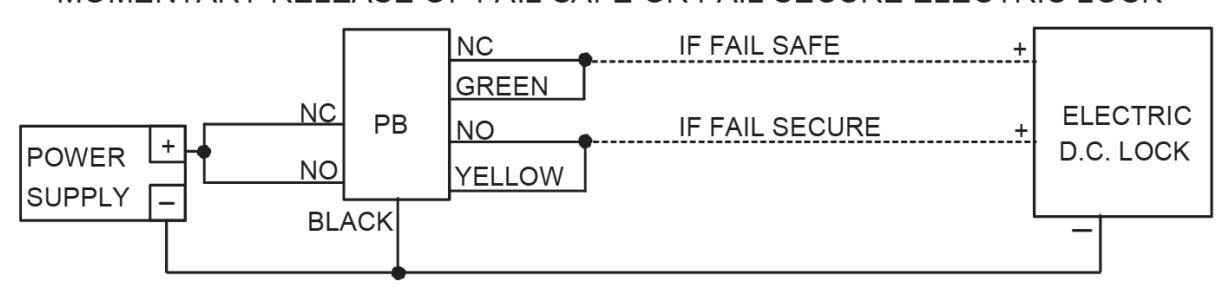
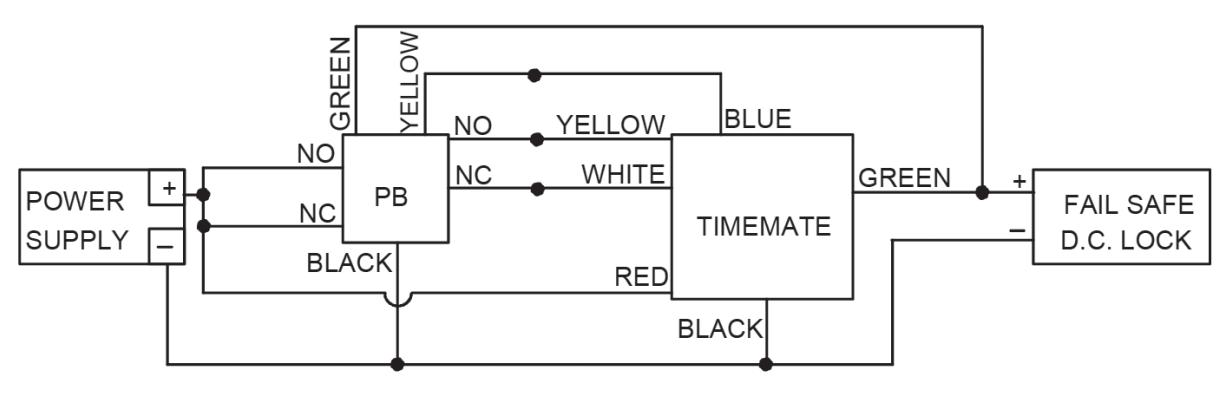
The PB can be used in many different ways but the drawings below show two common applications.
- The first shows momentary release of a fail safe or fail secure electric lock. The PB indicators are connected so that the switch button illuminator is normally on. When the button is pressed, releasing the lock, the switch LED turns off and the indicator LED comes on.
- The second drawing shows timed release of a fail safe electric lock using the PB and Securitron's TimeMate. Momentarily pressing the button will release the lock for the amount of time set on the TimeMate. The LEDs will switch colors during the lock release period. The wiring is also done in double break fashion so that even if the timer fails, the button will still be able to momentarily release the lock. This is for added safety.
Alternate Lens Changing
The pushbutton is factory shipped with a Green lens and LED installed; an optional Red lens is included and simple to swap:
- Grasp keyplate and unscrew the Green mushroom lens counter-clockwise. Remove the Green mushroom lens.
- Replace the Red lens over the insert on the switch and tighten the lens clockwise. Be careful not to dislodge the insert sitting in the notches.
- Hand-tighten to secure; do not over tighten.