Securitron M670, M680BD Electromagnetic Locks Installation Instructions
Open the original PDF document
View PDF

Securitron www.securitron.com Tel 800.624.5625 techsupport@securitron.com
M670/M680BD MAGNALOCK® SERIES Installation Instructions
Table of Contents
| Package Contents | 3 |
|---|---|
| Mounting Hardware | 3 |
| Recommended Tools | 3 |
| M670 / M680BD Specifications | 4 |
| Performing a Pre-Installation Survey | 4 |
| Preparing the Magnalock | 4 |
| Locating and Setting the Components in the M670 and M680BD | 5 |
| Documenting the Configuration Settings | 8 |
| Installing the Magnalock | 9 |
| Installing the Strike | 13 |
| Assembling the Lock to the Bracket and Adjusting, as Necessary | 15 |
| Performing the Final Installation | 17 |
| Performing the Final Wiring | 18 |
| Performing Magnalock Maintenance | 19 |
| Using Proper Cleaning Methods | 19 |
| Troubleshooting Guide | 20 |
| LED Error Codes | 20 |
| Problems with Installation? | 20 |
Package Contents

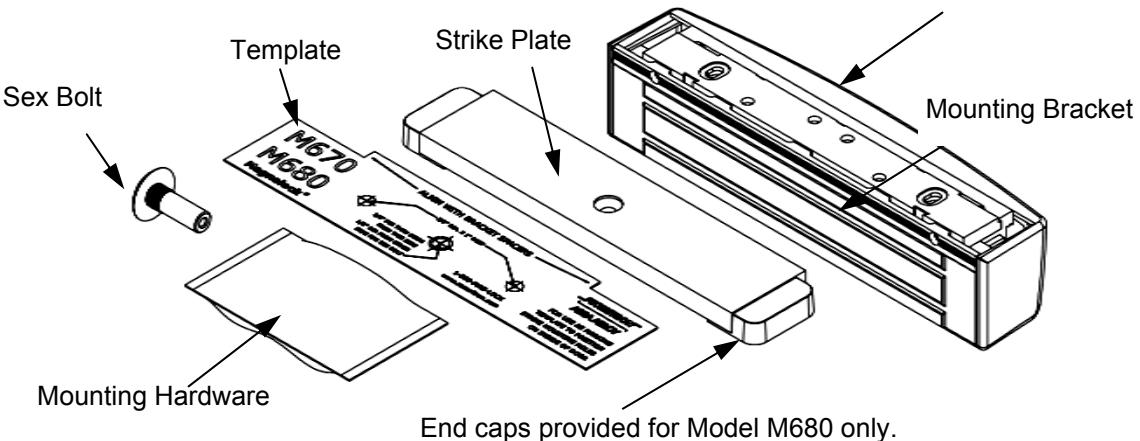
Mounting Hardware
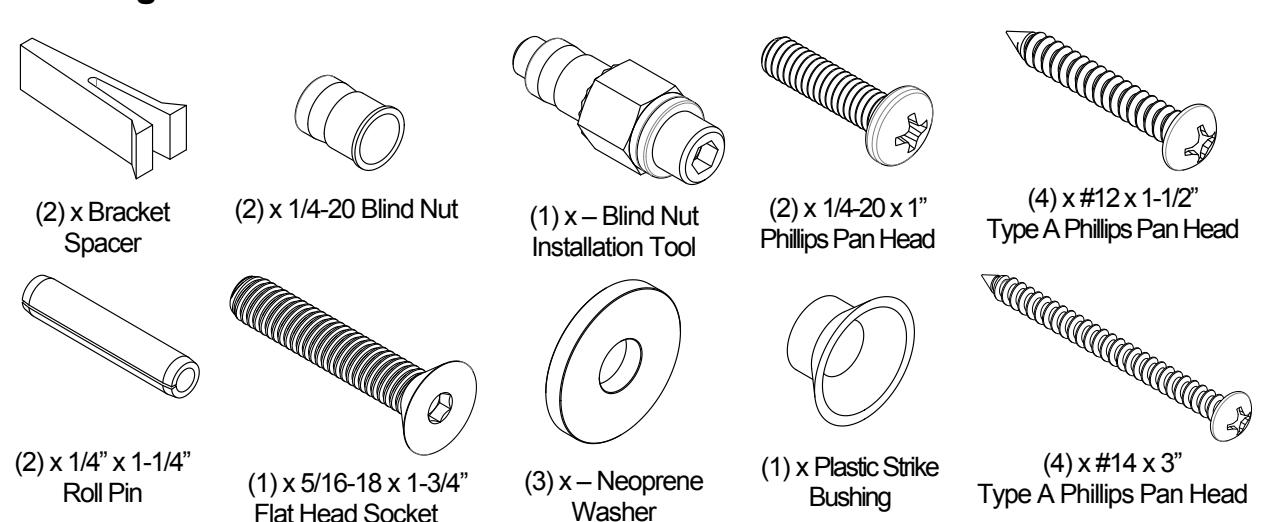
Recommended Tools
Masking Tape#1 and #2 Phillips ScrewdriversHammerMeasuring Device1/2" Open End or Crescent WrenchPencil/PenCenter PunchWire Strippers/CutterMultimeter
Fish Tape or Lead Wire 3/16" Hex (Allen) Wrench
Drill bits: 3/16", 7/32" (wood frames only), 3/8", 1/2"
M670 / M680BD Specifications
| Mechanical | Electrical |
Environmental
(Recommended) |
|---|---|---|
|
Physical Size:
Height: 2.20" [56mm] |
Input Voltage:
12/24 VDC |
Operating Temperature
32ºF to 110ºF [0ºC to 43ºC] |
|
Depth: 2.45" [62mm]
Length: 10.00" [254mm] |
Current
M670 |
Humidity
10% to 90% RH |
| Shipped Weight: |
12 VDC/500 mA (±10%)
24 VDC/275 mA (±10%) |
|
|
Weight: 6 lb
Holding Force (Maximum): |
M680BD | |
|
600 lbs [272 kg]
UL Tested Ratings: |
12 VDC/530 mA (±10%)
24 VDC/310 mA (±10%) |
|
|
Static Holding Force: 500 lbs [227 kg]
Dynamic Holding Force: 50 ft-lbs [68 J] Endurance: 250,000 cycles |
Tamper Switch Rating
Voltage – 30 VDC (Maximum) Current – 1 Amp |
|
|
DPS Rating (M680 only)
Voltage – 30 VDC |
||
| (Maximum) Current – 125 mA |
Magnalock Preparation and Installation
Performing a Pre-Installation Survey
-
1. Before installing the Magnalock, DETERMINE and ASSESS the mounting location for the following:
- Physical strength of the frame—it should be strong enough to meet or exceed the holding force of the Magnalock.
- Frame and vicinity—it should offer protection for the wiring to prevent vandalism.
- Door inspection—it should be inspected for any obstacles that may interfere when mounting the strike plate.
- Proper mounting—The Magnalock M670/M680 comes with factory default mounting for use with an out swing door. Securitron should be contacted for available brackets for other installation configurations.
Preparing the Magnalock
NOTE: Removing the cover provides access to the circuit board and on the back of the magnet.
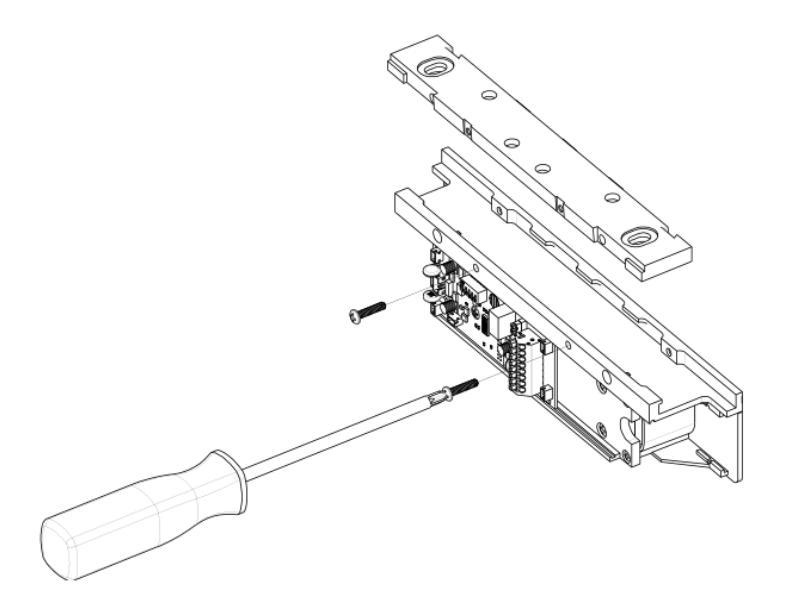
- 1. Using a Phillips screwdriver, REMOVE the two (2) screws securing the cover, as shown in Figure 1, "Removing the Cover Screws."
- 2. SET the screws aside to re-attach the cover later.
PN# 500-10550 Page 4 Rev. D, 12/14
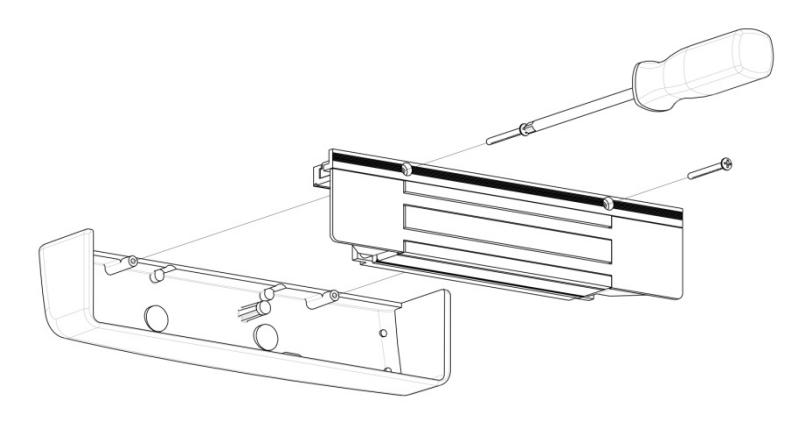
Figure 1. Removing the Cover Screws
Locating and Setting the Components in the M670 and M680BD
1. LOCATE and SET the components in the M670 and M680BD using Figure 2, "M670 SW3 and J1 Locations," Figure 3, "M680BD SW3, JP3, JP4, and J1 Locations," and Table 1, "Component Label, Name, Selection, and Position."
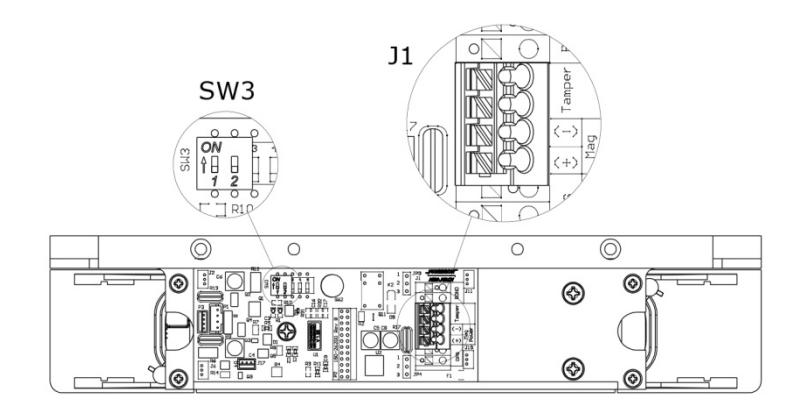
Figure 2. M670 SW3 and J1 Locations
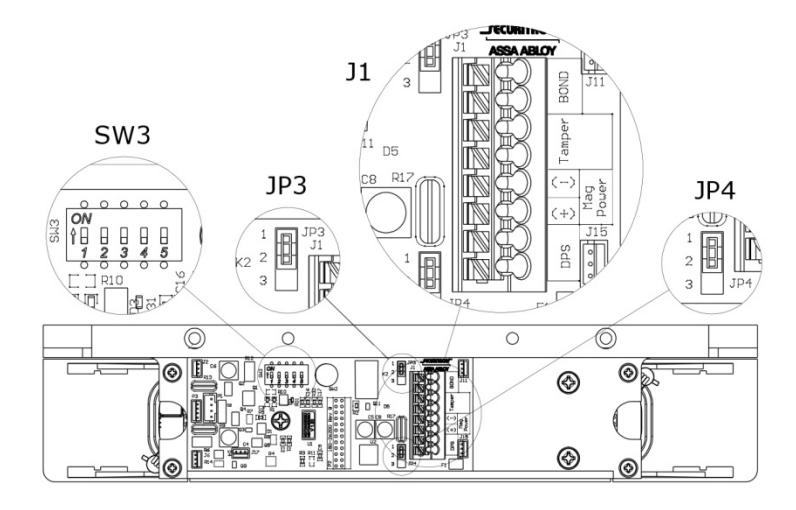
Figure 3. M680BD SW3, JP3, JP4, and J1 Locations
Table 1. Component Label, Name, Selection, and Position
| Component Label | Component Name | Selection | Position |
|---|---|---|---|
|
SW3
DIP Switch SW3.1: LED Enable Position 1 setting of |
ON = LED ENABLED | Position 1 ON (default) | |
|
(M670 has a
2-position DIP) |
the DIP switch enables
or disables the display of the LED for lock status. |
OFF = LED DISABLED
(default setting) |
Position 1 OFF |
| SW3 |
DIP Switch SW3.2:
LED Color Select Position 2 setting of the DIP switch controls the color of the LED output. Output options are red or green. |
ON = SECURE = RED | Position 2 ON |
|
OFF = SECURE = GREEN
(default setting) |
Position 2 OFF (default) | ||
|
SW3
DIP Switch SW3.3, SW3.4 and SW3.5: Auto Relock Timer Enable and Delay Selection The Auto Relock Delay Timer is (Auto Relock disabled by default. Timer available on The delay can be M680 models enabled by setting the only) position 3 switch of SW3 to ON, and then selecting a time delay with Position 4 and Position 5 of SW3. |
DISABLE Delay Timer | Position 3 OFF (default) | |
| ENABLE Delay Timer | Position 3 ON | ||
| 5 second delay |
Position 4 OFF
Position 5 OFF |
||
| 10 second delay |
Position 4 OFF
Position 5 ON |
||
| 20 second delay |
Position 4 ON
Position 5 OFF |
||
| 30 second delay |
Position 4 ON
Position 5 ON |
||
|
JP3
(available on M680 models only) |
Jumper 3:
BondSTAT Mode Select A 3-pin jumper that controls the output |
(NC) Normally Closed
Circuit Closed when Bond is secure (default setting) |
|
|
setting for the
BondSTAT in Terminal Block J1 Position 7 & 8. |
(NO) Normally Open
Circuit Open when Bond is secure |
||
PN# 500-10550 Page 6 Rev. D, 12/14
| Component Label | Component Name | Selection | Position |
|---|---|---|---|
|
Jumper 4:
JP4 Door Position (available on Mode Select M680 models A 3-pin jumper that only) controls the output |
(NC) Normally Closed
Circuit Closed when Door is Closed (default setting) |
||
|
setting for the Door
Position Switch (DPS) in Terminal Block J1 Position 1 & 2. |
(NO) Normally Open
Circuit Open when Door is Closed |
||
| J1 (M670) | Terminal Block 1 | (M670 has a 4-position terminal block) | |
|
Position 1 & 2:
Input Power |
Terminal positions 1 & 2 provide a connection point for
positive (+) and negative (-) 12 and 24 VDC power connection. Position 1 = (+) Positive Position 2 = (-) Negative |
||
|
Position 3 & 4:
Tamper Indication |
Terminal positions 3 & 4 of the terminal block provide
connection for tamper sensing. Signal continuity is disrupted whenever the cover is removed. |
||
| J1 (M680) | Terminal Block 1 | (M680 has an 8-position terminal block) | |
|
Position 1 & 2:
Door Position Switch |
Terminal positions 1 & 2 provide a set of contacts of
which state change is determined by Jumper 4 (JP4) based on the strike plate's proximity to the lock face. |
||
|
Position 3 & 4:
Input Power |
Terminal positions 3 & 4 provide a connection point for
positive (+) and negative (-) 12 and 24 VDC power connection. Position 3 = (+) Positive Position 4 = (-) Negative |
||
|
Position 5 & 6:
Tamper Indication |
Terminal positions 5 & 6 provide connection for tamper
sensing. Signal continuity is disrupted whenever the cover is removed. |
||
|
Position 7 & 8:
BondSTAT |
Terminal positions 7 & 8 provide a set of contacts of
which state change is determined by Jumper 3 (JP3) based on the strike plate's magnetic bond to the lock face under power. |
||
Documenting the Configuration Settings
NOTE: The Board Settings are now complete.
1. COPY the settings onto the adhesive-backed circuit board settings label enclosed with the mounting hardware packet. (See Figure 4, "M670/M680 Settings").
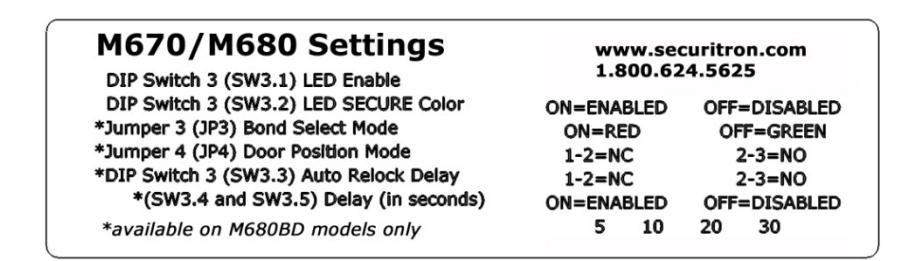
Figure 4. M670/M680 Settings
NOTE 1: The figure above shows the Default settings. Settings may vary based on checklist.
NOTE 2: The settings information is required if the Magnalock needs to be inspected, serviced, or replaced.
2. COMPLETE the label and AFFIX to the inside cover of the Magnalock (see Figure 5, "Magnalock Settings Label."
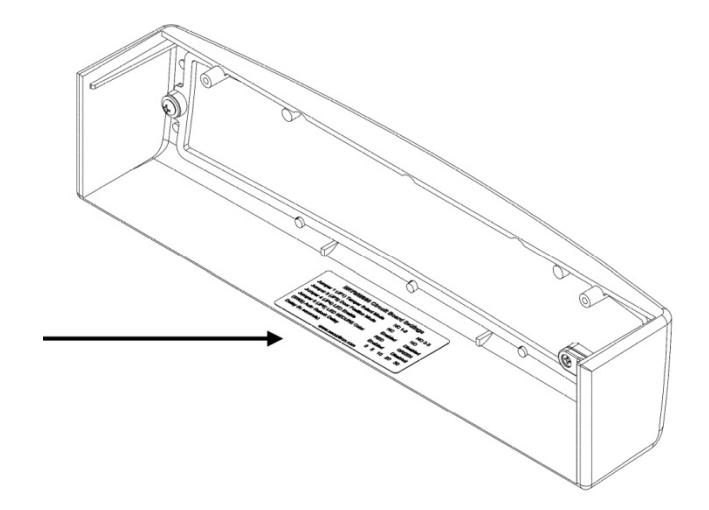
Figure 5. Magnalock Settings Label
PN# 500-10550 Page 8 Rev. D, 12/14
Installing the Magnalock
1. REMOVE the two (2) screws securing lock to mounting bracket and SLIDE the bracket from the top of the lock chassis.
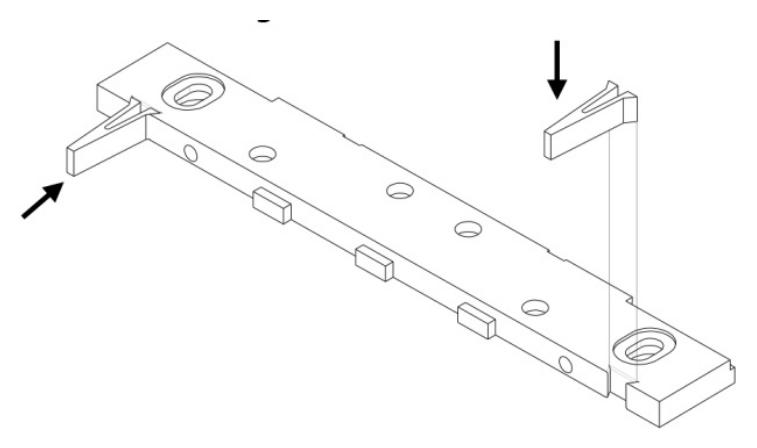
2. PINCH and INSERT spacers flush into the dovetail slots of the lock-mounting bracket.
-
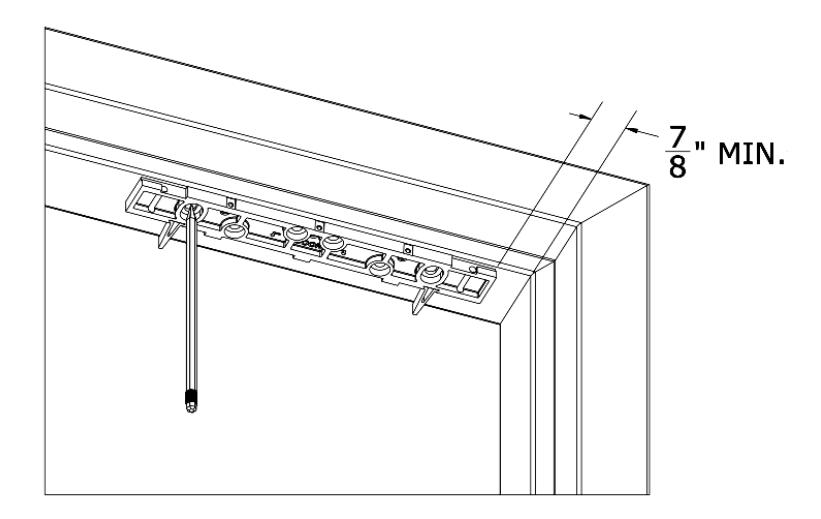
3. PERFORM the following to mark the mounting holes.
- a. PROTECT the door and frame surfaces from any possible damage during marking and drilling by using masking tape.
- b. PLACE the lock bracket on the secure side of the door against the frame stop, towards the side of the door that does not have hinges, and has a minimum of 7/8" clearance from the frame.
- c. CLOSE the door and ADJUST the bracket so that the spacers rest against the door.
- d. MARK the frame through the two (2) oblong bracket mounting holes.
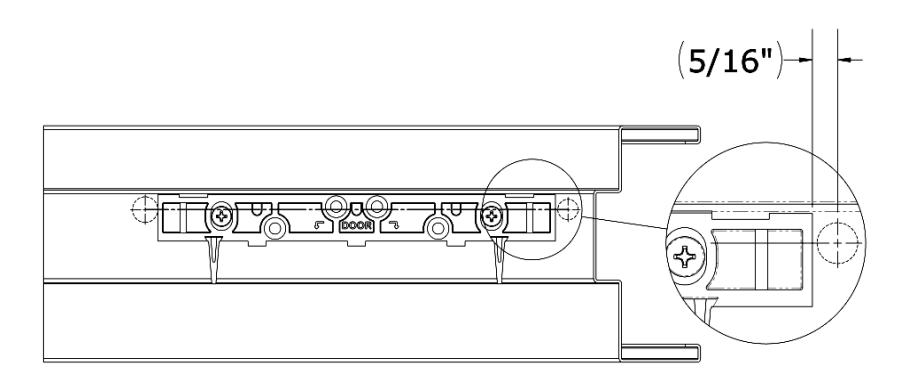
- 4. MARK the frame for wire feed-through hole at the end closest to where the wire run will be accessed.
- 5. ENSURE these holes are toward the rear edge of the mounting bracket and adjacent to the end of the bracket, as shown.
- 6. REMOVE mounting bracket from frame when drilling holes.
NOTE: Steps 7 through 10c are performed if installing on a metal door frame.
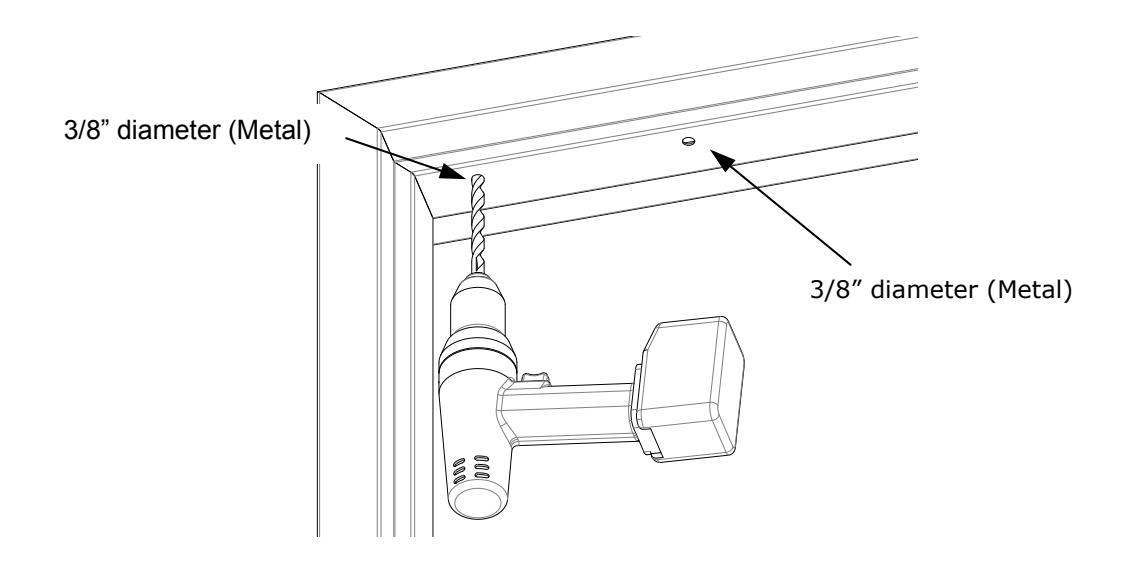
- 7. DRILL two (2) 3/8" diameter holes at bracket-mounting hole marks.
- 8. DO NOT oversize the hole.
- 9. USE a step bit or pilot hole first to ensure a snug fit for the blind nuts.
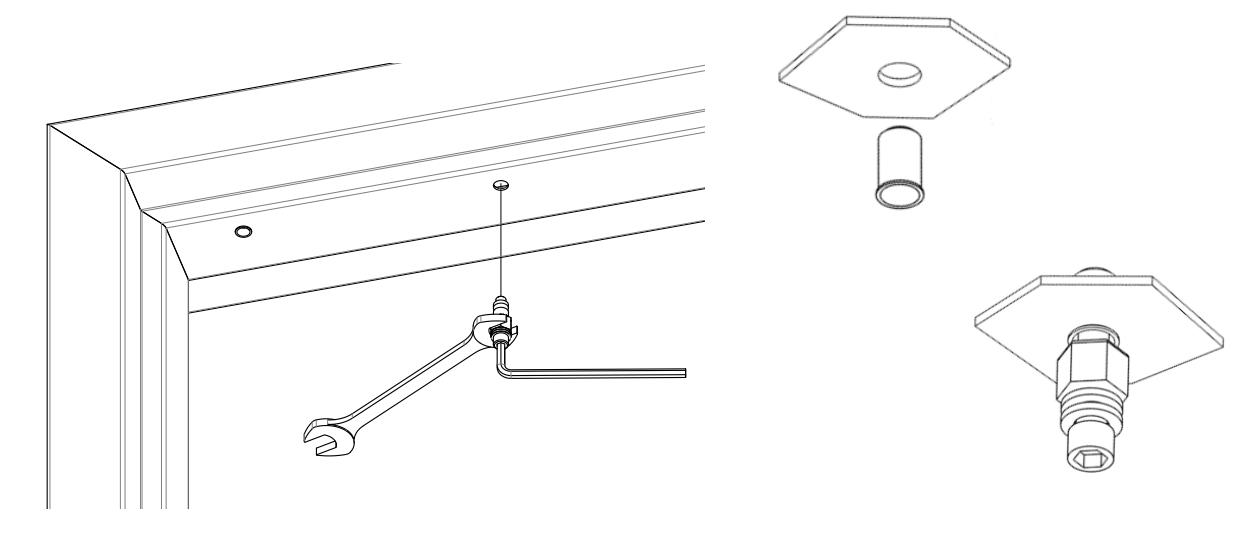
- NOTE 1: Blind nuts provide a highly secure and tamper resistant system for mounting and are the mounting hardware provided for this unit.
- NOTE 2: Only approved included hardware should be used for mounting.
-
10. INSTALL blind nuts into each 3/8" diameter hole using the provided tool.
- a. HOLD the collapsing nut with a 1/2" box end wrench.
- b. MAINTAIN pressure on the mounting surface, TIGHTEN the cap screw using a 3/16" hex wrench, and COLLAPSE the blind nut.
- c. GO TO Step 12.
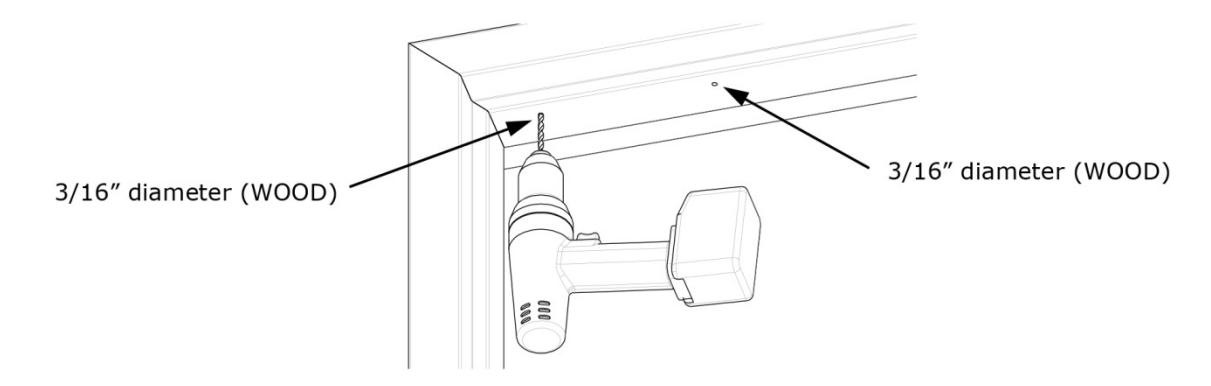
11. DRILL two (2) 3/16" diameter mounting holes by 1-1/4" deep at bracket-mounting hole marks.
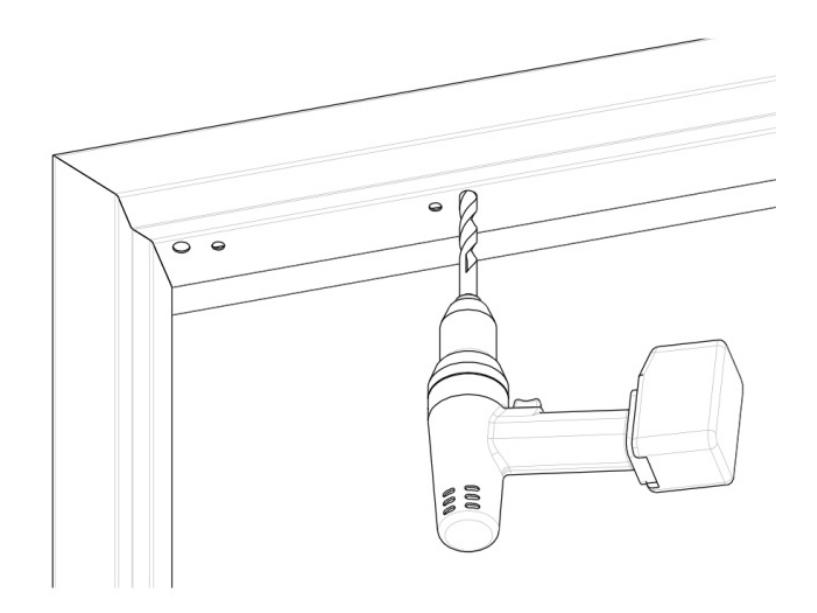
12. DRILL wire access holes (1/2" recommended), as needed, on one or both sides of the bracket.
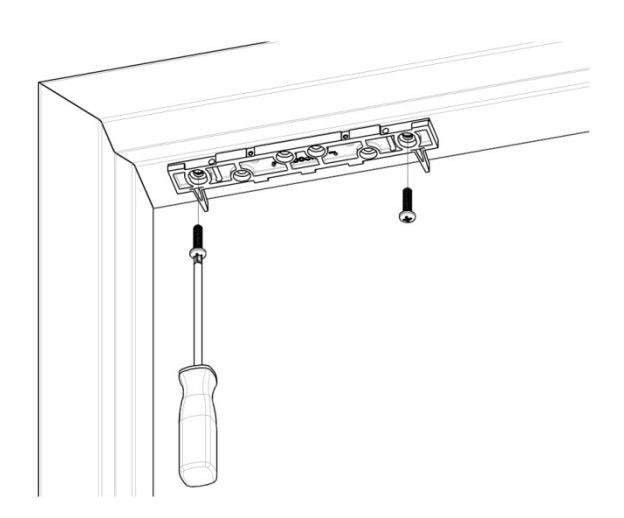
13. Temporarily INSTALL the bracket with spacers against the closed door using a Phillips screwdriver.
NOTE: Step 13a applies to metal frames.
a. USE two (2) 1/4-20 X 1" Phillips Pan Head Screws and APPLY included thread lock to screw threads.
NOTE: Step 13b applies to wood frames.
b. USE two (2) #12 X 1-1/2" Type A, Phillips Pan Head Screws.
Installing the Strike
- 1. CLOSE the door and PLACE the template between the bracket spacers.
- 2. MARK the strike plate hole locations.
- 3. REMOVE the bracket spacers from the bracket.
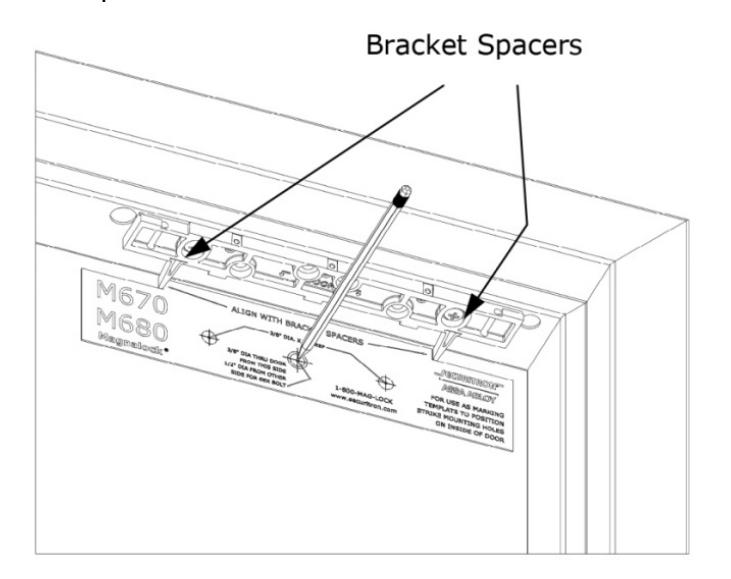
From INSIDE the door:
- 4. DRILL one (1) 3/8" diameter hole for the sex bolt through the door at the strike mounting center mark.
- 5. DRILL two (2) 3/8" diameter x 1" deep holes at each side mark for the strike alignment roll pins, but DO NOT DRILL through the door.
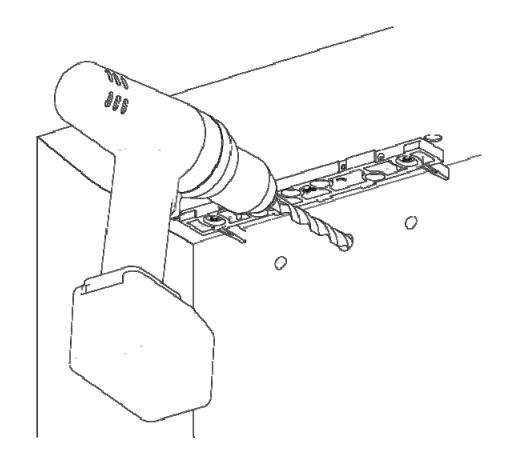
From OUTSIDE the door:
- 6. For a Hollow Metal Door , DRILL out the 3/8" diameter strike mounting hole to 1/2" diameter in the outer wall only.
- 7. For a Solid Wood Door , DRILL out 3/8" diameter strike mounting hole to 1/2" diameter; DRILL completely through.
-
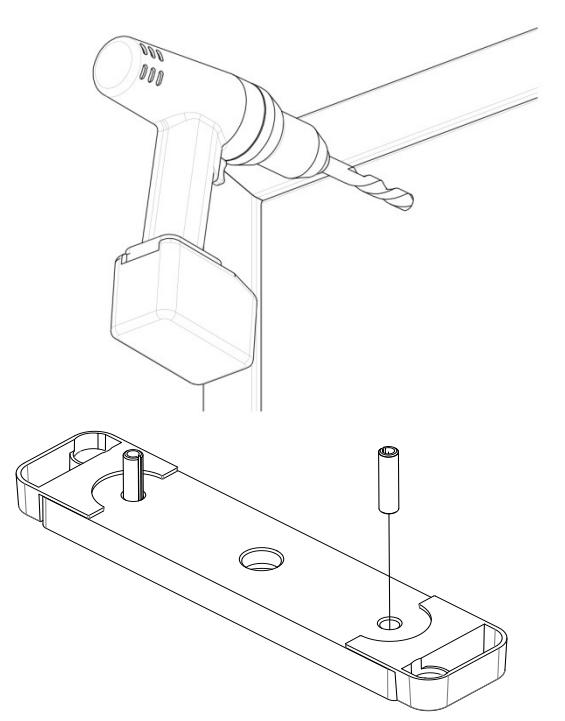
8. PERFORM the following to install roll pins into strike plate.
- a. REMOVE the two (2) roll pins from the hardware packet.
- b. INSERT a roll pin into each of the holes in back of strike.
- c. Gently TAP into place using a hammer.
-
9. PERFORM the following to secure strike plate to the door.
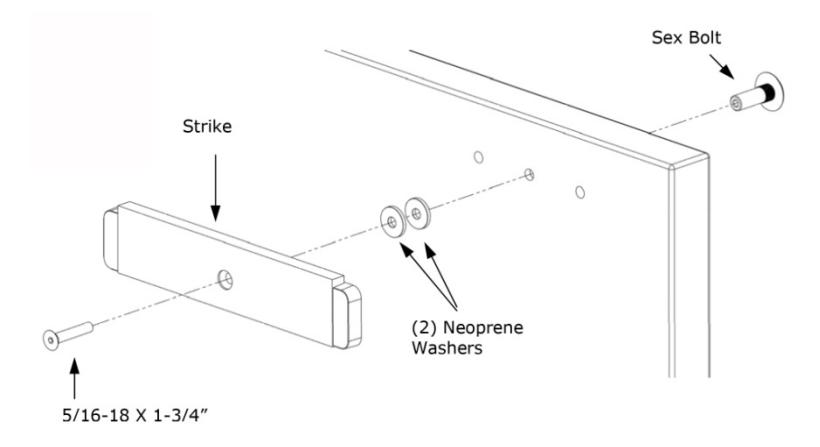
- a. APPLY the included thread lock compound to 5/16-18 X 1-3/4" flat head socket screw.
- b. INSERT the 5/16-18 X 1-3/4" flat head socket screw through the strike bushing, strike plate, two (2) neoprene washers, door and into the sex bolt as illustrated.
- c. TIGHTEN the screw into sex bolt using a 3/16" hex wrench; and while tightening, gently TAP the head of sex bolt until the head sits flush with the door using a hammer.
NOTE: The strike should rock on the neoprene washers for proper function and optimal holding force.
d. DO NOT OVER-TIGHTEN the assembly; the neoprene washers should not be compressed.
Assembling the Lock to the Bracket and Adjusting, as Necessary
- 1. LOOSEN the two screws securing the mounting bracket to the door frame so that the bracket can move.
- 2. SLIDE the lock onto the mounting bracket and TEST FIT against the strike plate with the door closed; SLIDE the lock so that the entire face makes contact with the strike plate. . MARK back edge of mounting bracket at each end and REMOVE the lock from the bracket.
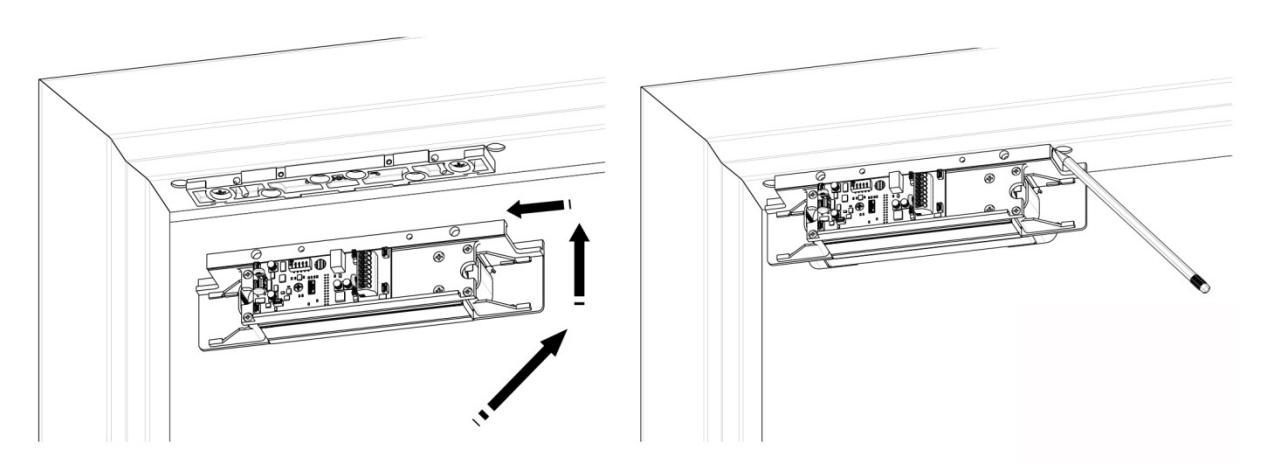
4. ENSURE that the mounting bracket aligns with the marks, and TIGHTEN the mounting screws.
-
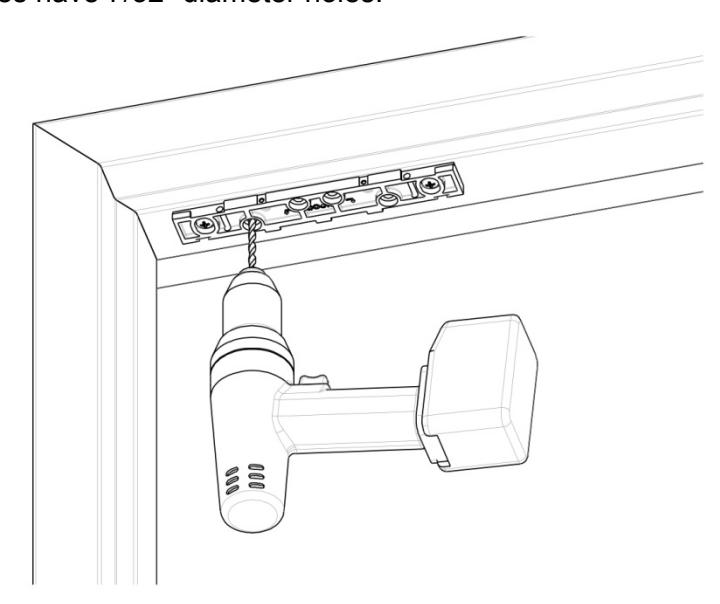
5. DRILL Frame for anchor screws.
-
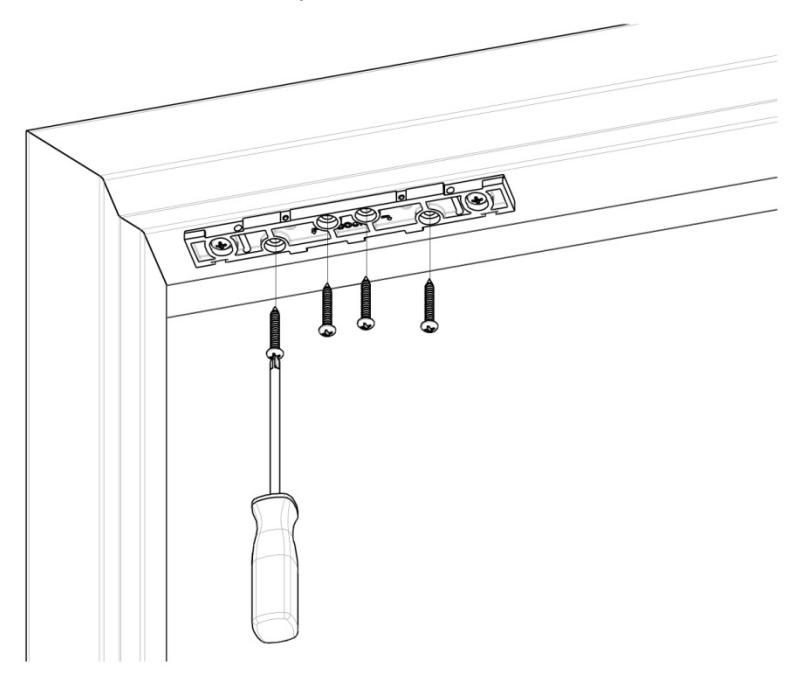
a. Using the mounting bracket as a template, DRILL the four remaining holes in the frame for the anchor screws as follows:
- Metal Frames have 3/16" diameter holes.
- Wood Frames have 7/32" diameter holes.
-
a. Using the mounting bracket as a template, DRILL the four remaining holes in the frame for the anchor screws as follows:
-
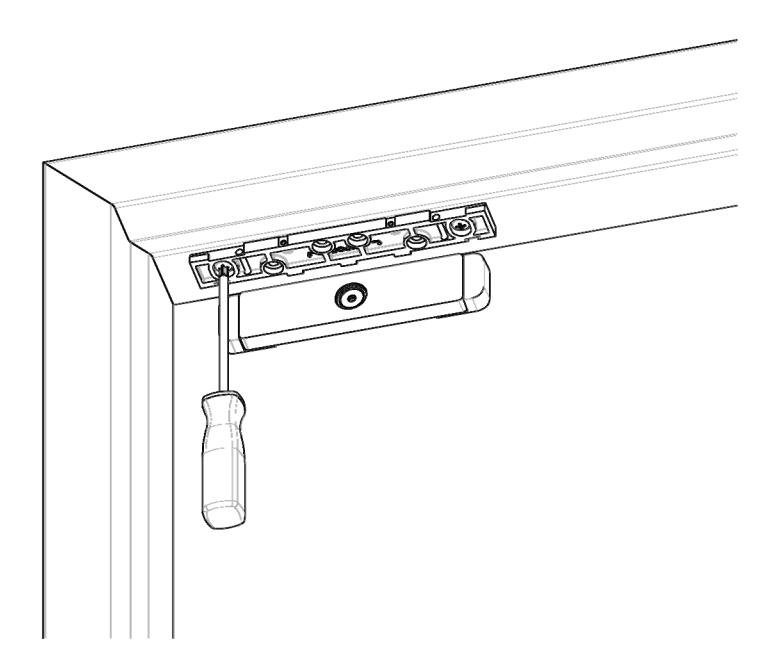
6. INSTALL the four (4) anchor screws using a Phillips screwdriver:
- Metal Frames use #12 X 1-1/2" Type A, Phillips Pan Head Screws
- Wood Frames use #14 X 3" Type A, Pan Head Screws
Performing the Final Installation
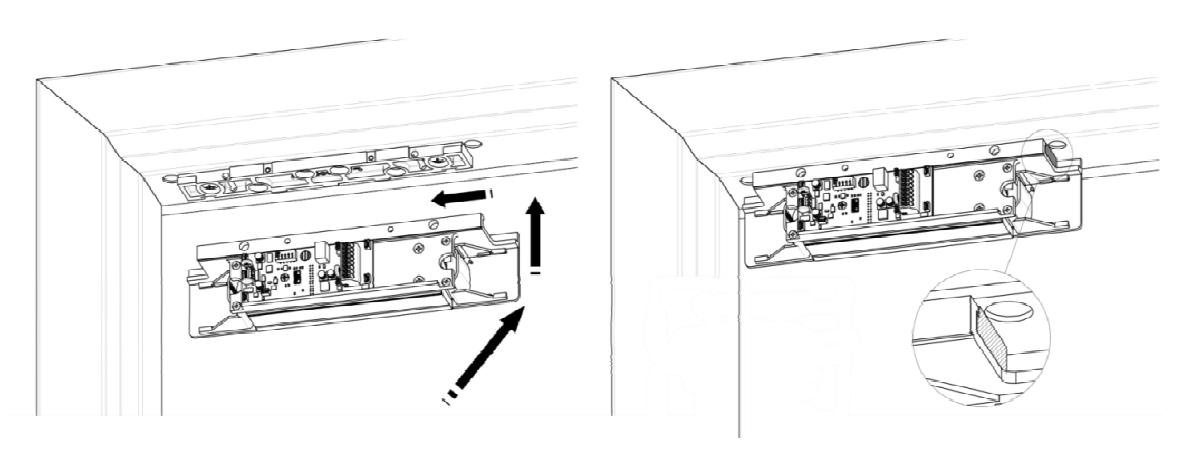
NOTE: The edge of the lock chassis must be flush with the end of the mounting bracket when centered (see inset).
1. INSERT the top of the Magnalock chassis at the end of the mounting bracket, and SLIDE the lock chassis to the center of the bracket.
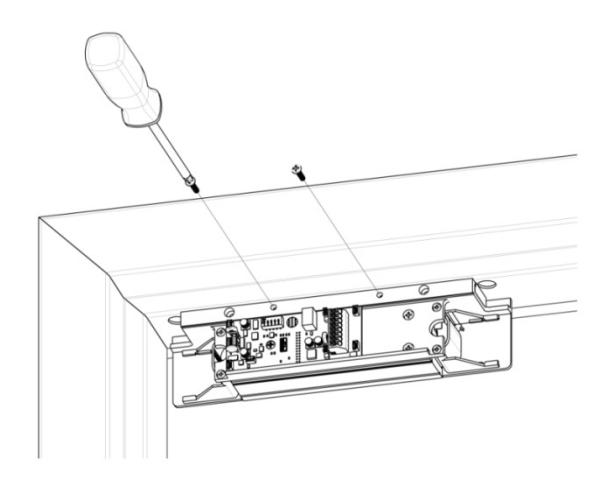
2. INSTALL the three (3) 6-32 X 3/4" Phillips pan head screws to secure the lock chassis to the mounting bracket using a Phillips screwdriver.
Performing the Final Wiring
- NOTE 1: The end user and installer are liable for Fire and Building code compliance.
- NOTE 2: A small screwdriver has been included to help make connections to the terminal blocks, as required.
- 1. PULL wires/cables through the wire feed-through hole(s) that are drilled in the frame, and CONNECT wiring using the two diagrams below as a guide.
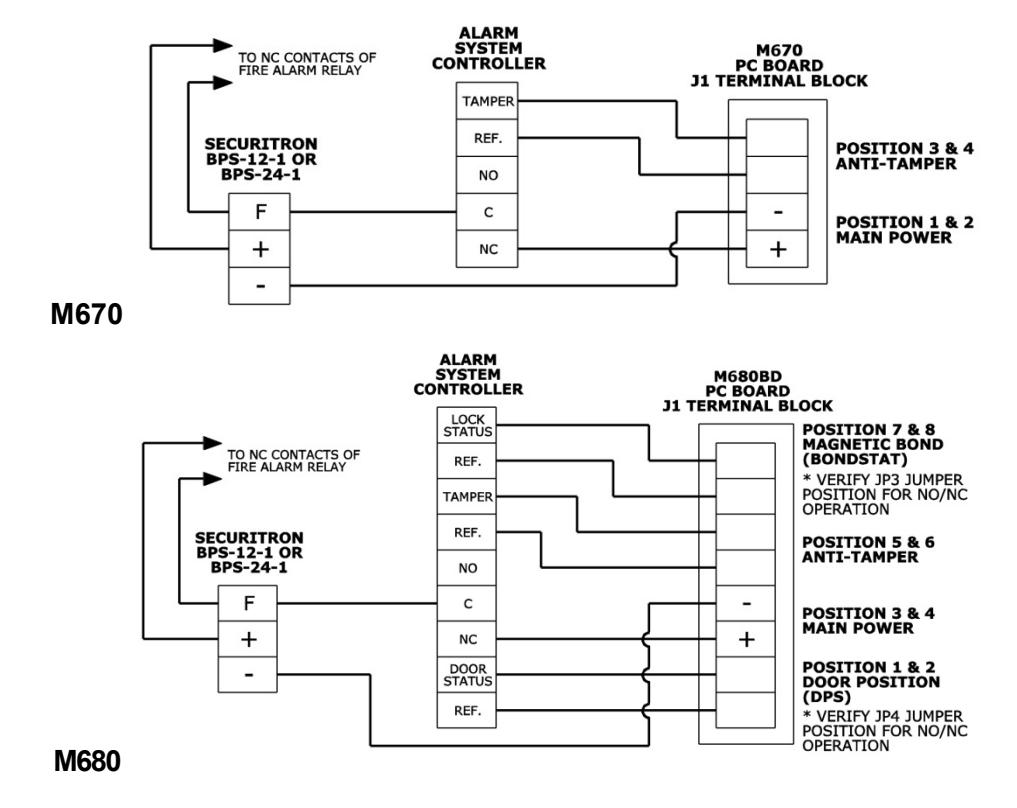
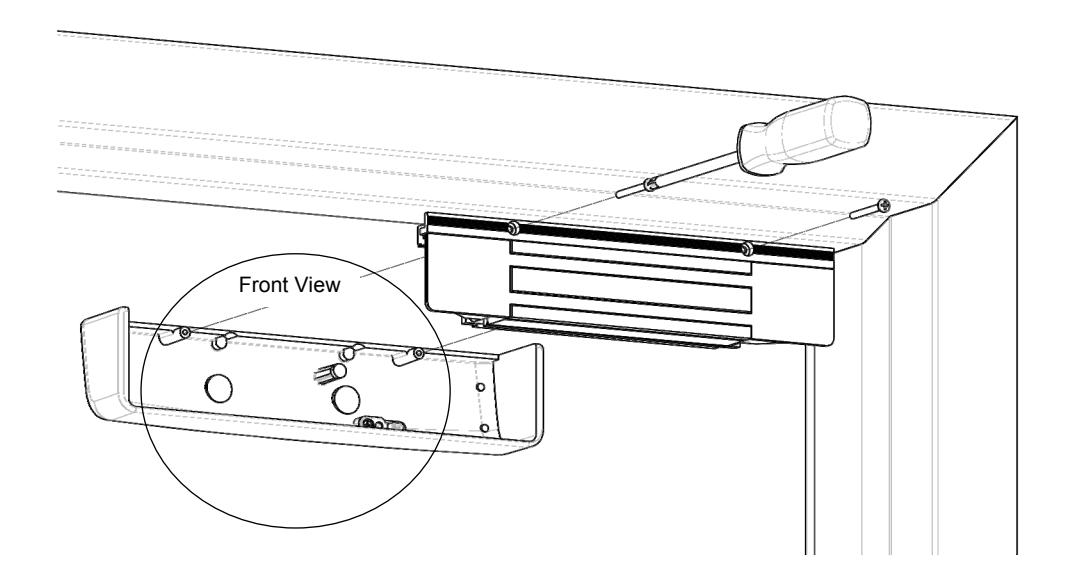
2. After installation and wiring have been completed, RE-INSTALL the lock cover through the lock chassis using the two (2) phillips screws.
Performing Magnalock Maintenance
-
1. PERFORM the following to complete a visual inspection.
- a. INSPECT the rubber washers for elasticity and proper pivoting; and TIGHTEN, as required.
- b. INSPECT for build-up of debris on the Magnalock and strike armature.
- c. INSPECT for rust on the Magnalock and strike plate armature; CLEAN, as required.
Using Proper Cleaning Methods
- 1. APPLY rubbing alcohol onto a clean cloth and thoroughly WIPE DOWN the Magnalock and strike plate armature.
- NOTE 1: Cleaning once a year is recommended.
- NOTE 2: Petroleum-based products should never be used for cleaning.
- NOTE 3: Steel wool-based scrub pads or sandpaper should never be used for cleaning.
- 2. CLEAN every three to six months where rusting occurs.
- 3. USE a plastic dishwashing scrub pad to aid in the removal of rust.
Troubleshooting Guide
| POSSIBLE ISSUES | TROUBLESHOOTING TIPS |
|---|---|
| No power or low power |
CONFIRM voltage and current at Magnalock to spec
CHECK that the DC Power Source is Full Wave Rectified (Half wave Rectified or AC power is unacceptable). |
| Reduced Holding Force |
CHECK strike plate position and orientation.
CLEAN surfaces and CHECK for obstructions. |
LED Error Codes
NOTE: The position 1 switch of DIP switch SW3 must be set to the ON position (LED ENABLED) for error codes to be visible.
| CODE | STATE | SOLUTION |
|---|---|---|
|
SECURE selected color, on
continuously |
Normal Operation with Door
Closed |
System working normally, SECURE selected color
can be selected with position 2 switch of SW3. See page 4. |
|
NON-SECURE selected
color, on continuously |
Normal Operation with Door
Open |
System working normally. |
|
RED/GREEN
continuous flash |
Processor Error |
CHECK all connections, if error persists replace
unit. |
|
3 Fast Flashes of SECURE
color every 5 seconds |
Magnet Voltage has dropped
below 85% |
CHECK
voltage and current at Magnalock connections. CHECK DC Power Source is Full Wave Rectified. |
|
Single Flash Amber every 5
seconds |
Bond Error – Left Side |
CHECK strike plate position and orientation.
CLEAN surfaces and check for obstructions. |
|
Double Flash Amber every 5
seconds |
Bond Error – Right Side |
CHECK strike plate position and orientation.
CLEAN surfaces and check for obstructions. |
| Off | LED disabled |
CHECK voltage and current at Magnalock
connections. CHECK that LED is enabled with position 1 switch of SW3 is in the OFF position. |
Problems with Installation?
Call Securitron: 1.800.MAGLOCK
For warranty information: www.securitron.com/warranty
Email: techsupport@securitron.com