Securitron EEB2, EEB3N Push Buttons Installation and Operating Manual
Open the original PDF document
View PDFSecuritron® EEB2, EEB3N Exit Button with Integrated Timer
Installation & Operating Instructions
Description
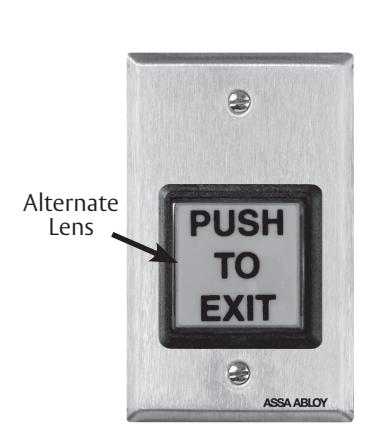
Model Securitron EEB2 is a two-inch square, exit button, mounted on a stainless steel, single gang key plate.
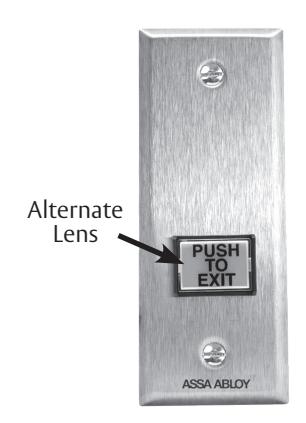
Model Securitron EEB3N is a rectangular exit button, mounted on a 1 3/4" stainless steel narrow stile key plate.
Both Securitron EEB2 and EEB3N have a 3A switching capacity and a timer set for 30 seconds. These units are intended only for release of a magnetic lock from the inside of a door. When the button is pressed, the lock releases for 30 seconds. If pressed again during the 30-second lock release period, the unit will "retrigger" starting a new 30-second lock release period. These buttons are specifically intended for installation on access controlled egress doors, as described in the International Building Code (IBC). Check your jurisdiction for applicable IBC codes.
A motion detector, such as the Securitron Model XMS, is the primary means of magnetic lock release on the door. The Securitron EEB2 or EEB3N exit button is employed as a backup means of releasing the lock in case of a problem with the motion detector. It should be noted that the exact release time will vary with temperature, but it will not be less than 30 seconds.

The following are the UL294 access control performance levels:
- • Destructive Attack = Level 1
- • Line Security = Level 1
- • Endurance = Level 1 (6,000 cycles)
- • Standby Power = Level 1
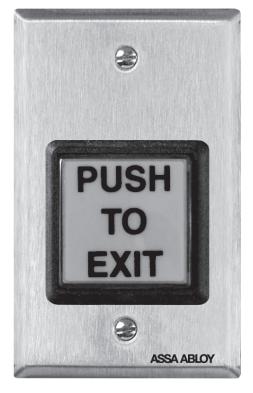
Securitron EEB2
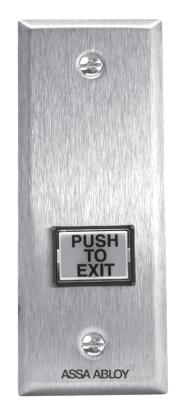
Securitron EEB3N
Mounting
• MOUNT the Securitron EEB2 using its included mounting device.
NOTE: The aluminum door frame must be sufficiently routed out to accommodate the Securitron EEB3N components.
• MOUNT the Securitron EEB3N directly on a narrow stile aluminum door frame.
Wiring
NOTES: The Securitron EEB2 and EEB3N operate on 12 VDC or 24 VDC, and can accept the use of full-wave rectified DC (transformer and bridge rectifier).
Securitron EEB2 and EEB3N are factory shipped with the jumper in place (12 VDC). If jumper is removed, unit operates on 24 VDC.
Securitron EEB2 and EEB3N draw no current when at rest, and only draw 28 mA at 12 VDC or 38 mA at 24VDC when releasing the lock.

CAUTION The Securitron EEB2 and EEB3N can be damaged if operated on 24 VDC with the jumper in place, or operated on a power supply different than what is operating the magnetic lock.
1. WIRE the Securitron EEB2 or EEB3N in accordance with Diagram 1, 2 and 3.
Diagram 1: Wire Identification
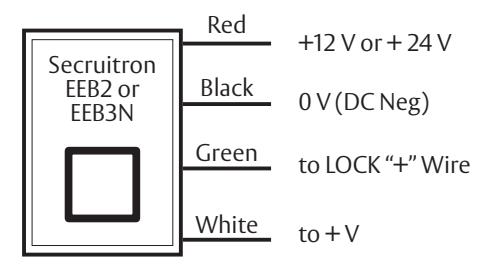
Diagram 2: Typical Connection
NOTE: Positive input voltage on the white wire must be from the same power source that the red and black wires connected.
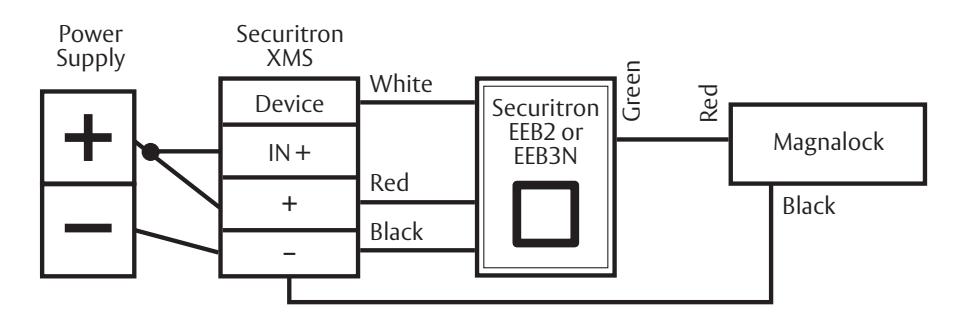
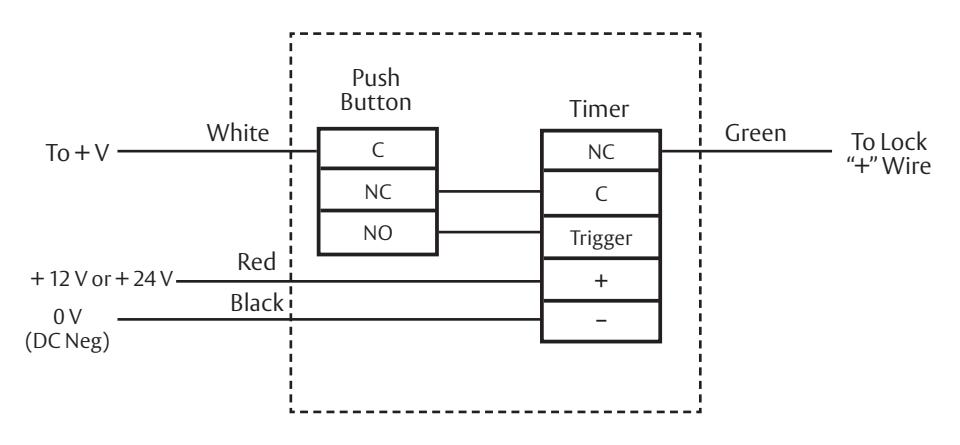
Diagram 3: Internal Schematic
NOTE: Positive input voltage on the white wire must be from the same power source that the red and black wires are connected.
Changing the Alternate Lens on the Securitron EEB2
- 1. GRASP and TURN OVER the keyplate.
- 2. From the back, ROTATE the white contact block of the switch counterclockwise to the 11:00 o'clock position, and PULL straight back to remove.
- 3. SLIDE a slender smooth-ended object, such as a marker pen, inside the switch body up against the lens.
- 4. PLACE the object on a smooth surface with the keyplate on top, and TAP the keyplate up and down on the object to pop off the lens.
- 5. REMOVE the lens and insert.
- TURN OVER the keyplate and PLACE a new insert onto the front of switch.
- ENSURE that the text on the insert is correctly reading to the keyplate, and PLACE the matching color lens on top of insert.
- 8. PRESS around all edges of the lens until it snaps in place.
- 9. DEPRESS lens several times to ensure smooth operation and the lens is not binding.
- 10. With the terminals upward, INSERT the contact block back into the back of the switch at the 11:00 o'clock position and ROTATE clockwise until it stops straight up and down.
Changing the Alternate Lens on the Securitron EEB3N
- 1. While holding keyplate, GRASP the top and bottom of the lens and PULL straight out from the keyplate.
- 2. PLACE a new lens over the switch face, and ENSURE the text on the lens is correctly reading to the keyplate.
- 3. PRESS completely until it snaps into place.
- 4. DEPRESS the lens several time to ensure smooth operation and the lens is not binding.
Warranty
For information on warranty coverage and replacement options, please visit assaabloyesh.com/warranty
ELECTRONIC SECURITY HARDWARE
HES | Securitron
techsupport.esh@assaabloy.com | 800 626 7590 assaabloyesh.com
10027 S. 51st Street, Ste. 102 Phoenix, AZ 85044 USA
Patent pending and/or patent www.assaabloydss.com/patents
Copyright © 2020, Hanchett Entry Systems, Inc., an ASSA ABLOY Group company. All rights reserved. Reproduction in whole or in part without the express written permission of Hanchett Entry Systems, Inc. is prohibited. 500-12600_7