Securitron AQU243B AQ Power Boards Installation Instructions
Open the original PDF document
View PDF

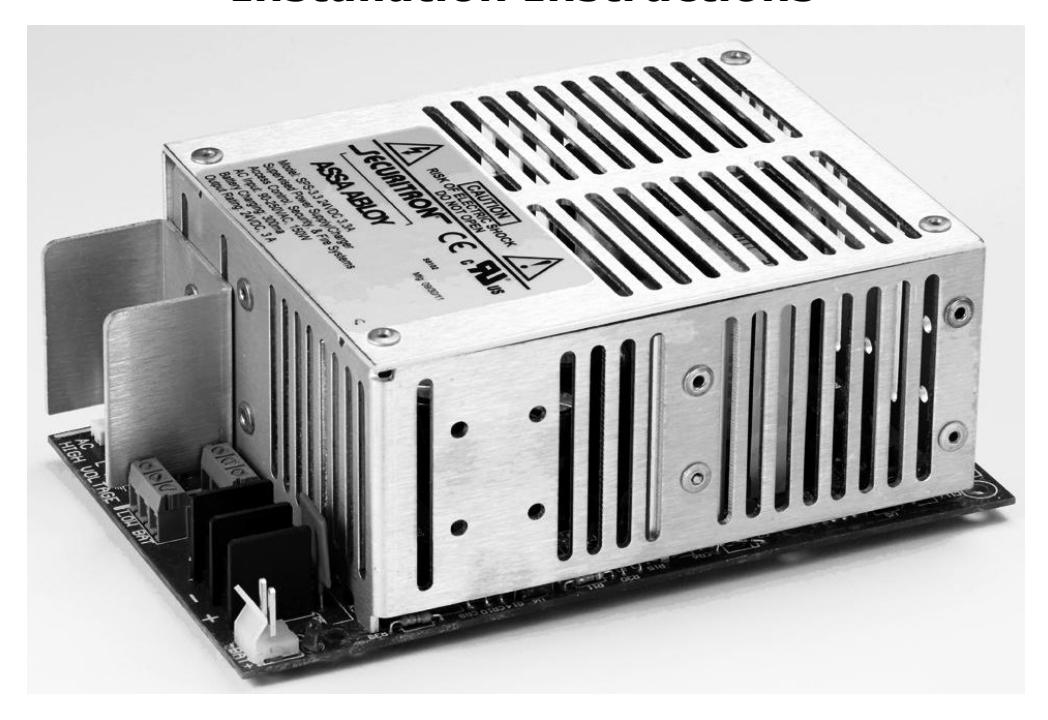
AccuPower AQU243B Installation Instructions
Recommended Tools & Additional Materials
#2 Phillips Screw Driver Wire connectors Lead Acid or Gel Cell Batteries*
1/16" Flat head Screw Driver 6-32x1/4" Mounting screws (QTY4)
AccuPower AQU243B Specifications
| Mechanical | Electrical | Environmental | Regulatory |
|---|---|---|---|
|
Physical Size:
Board: 3 15/16" x 6 3/8" x 2 3/8" Mounting: 3 9/16" x 5 3/8" |
Input Voltage Operating
Range 110-240VAC 47-63Hz |
Operating
Temperature 0ºF to 130ºF [-17 to 54ºC] |
Recognized
Component: UL294 Listed UL603 Listed |
|
Weight*
AQU243B 1.5 lbs |
Maximum Output Voltage
79 VA 3.3 Amps @ 24VDC (±10%) Continuous Output Voltage: 72VA 3 Amps @ 24VDC ((±10%) Voltage Range: 20.0 - 27.5 VDC/ 27.3V typical Frequency 27KHz |
Humidity
10% to 95% RH For Indoor use |
cUL Listed
RoHS Compliant |
* See Battery sizing guide on page 6.
Overview of AQU243B Series Power Module
The Securitron AccuPower AQU243B offers clean, steady and accurate power output for peak performance of access control equipment plus flexibility unmatched by any power supply/battery charger on the market today.
- Universal AC input with brownout tolerance to 60VAC
- Tolerates and protects against input voltage fluctuations.
- External LED AC power indicator
- Form " C" contact for AC power fail notification
- Dedicated voltage for battery charging even under full load
- Low battery disconnect prevents deep discharge of batteries
- PTC protection for Thermal Runaway and Current Overload Short Circuit and Reverse Battery protection will auto restart without removing load.
AQU243B and AQU243 provide a single output. The output can be divided into additional channels using any of the optional power distribution boards: PDB-4, PDB-8, PDB-8F8R, PDB-8C8R, PDB-8C1R or PDB-1R.
Applications
The AQU243 Series can be used with electrified access control equipment in conjunction with access control systems and fire/burglary systems including most electrified locking hardware and latches, card readers, keypads, electric strikes, REX and motion detectors and more.
Pre-Installation Survey
Before installing the AQU243 Series, the mounting location should be determined and assessed for the following:
- Availability of AC power service
- Protection from vandalism and tampering
- Sufficient clearance for air circulation and heat dispersal
CAUTION: Check with your local code inspectors to ensure your compliance with the National Electrical Code (ANSI/NFPA 70), (Canadian Electrical Code for Canada) or equivalent and any additional licensing and wiring requirements for your jurisdiction.
Page 2 P/N 500-30030
A. Installing the Power Module
1. Select mounting location so that AC input conduit can be aligned to maintain separation with DC power outputs.
Ensure unit is mounted with sufficient airflow to prevent heat buildup.
IMPORTANT: AC Power input is not power limited. AC lines must be enclosed in approved conduit. AC Input lines must be separated by at least ¼" from Class 2 power limited output wires.
Mark board mounting hole locations and drill. Install mounting screws appropriate for the mounting location, leaving enough hardware exposed to install standoffs. Install standoffs. Place starwheel on any one of the three standoff locations corresponding to a mounting location on the board that has a metal ring.
Affix board to standoffs with provided metal screws.
IMPORTANT: User is responsible for observing all electrical and code requirement when installing in self-provided enclosure or mounting location.
B. Make Electrical Connections

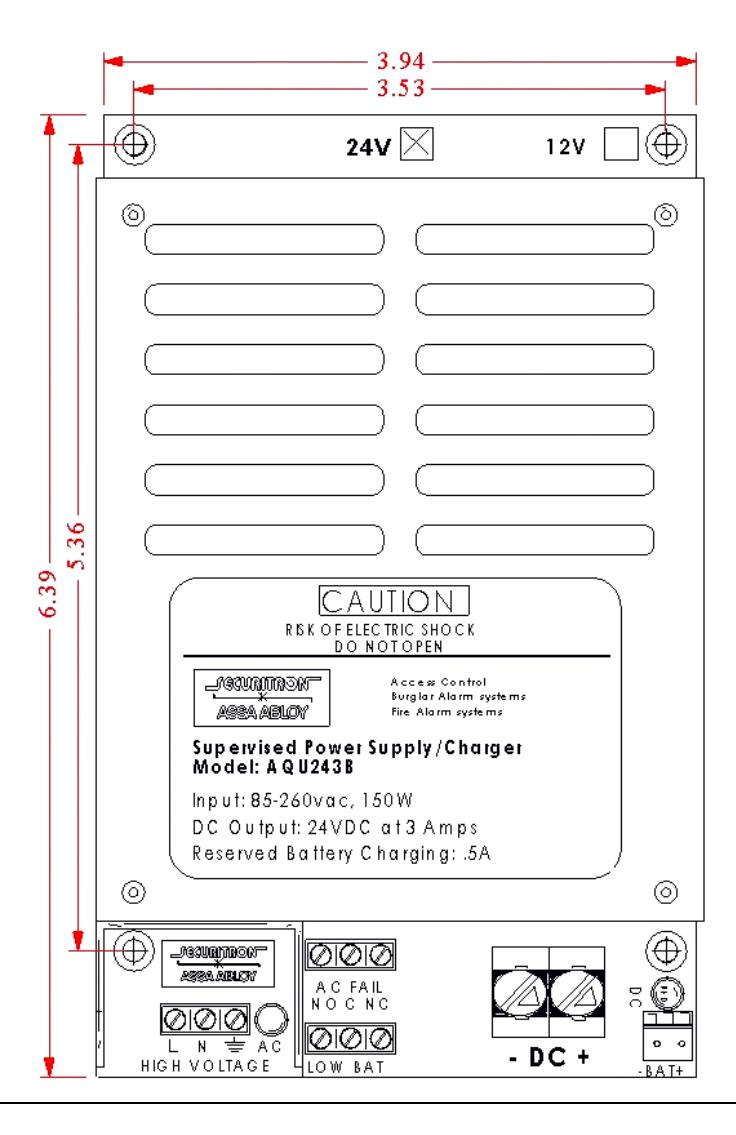
| 2. | Understanding the Power Module | |||
|---|---|---|---|---|
|
Component
Label |
Component
Name |
Function | ||
| AC | AC LED Connector |
2-pin connector for plug-in onboard LED or remote LED harness
(included) |
||
| L N |
AC –In
Terminal Block |
A 3-wire terminal block for AC power input.
Handles 110-240 VAC. Accepts wire gauge 12AWG-18AWG. L = Line (+) N = Neutral = Ground |
||
|
AC FAIL
AC Status Relay |
A 3-wire terminal block providing a SPDT-Form C contact that
changes state when the AC power is interrupted. Provides 2amp@120VAC output for triggering alert notification |
|||
|
NO = Normally Open
C = Common NC = Normally Close |
||||
|
The switch is NO/C open when energized, C/NC closed when
energized. During power loss, the switch changes state with NO/C closed and C/NC open. |
||||
| -DC+ |
DC-Out
Terminal Block |
A 2-wire terminal block for DC output voltage to devices, power
distribution or accessory board. NOTE: DC output is not Class 2 power limited. |
||
| -BAT+ |
Battery Backup
Plug |
A 2-pin plug for connecting battery cables for uninterruptable
battery backup. |
||
| DC LED |
DC Output Power
Indicator |
Red LED indicator is lit when DC power is ON. | ||
| LOW BAT |
Low Battery
Warning Relay |
Three position terminal block providing a SPDT Form C contact
that changes state when battery output drops to 11V. Default position is Normally Open when energized. Terminal accepts 22- 30AWG wire. |
||
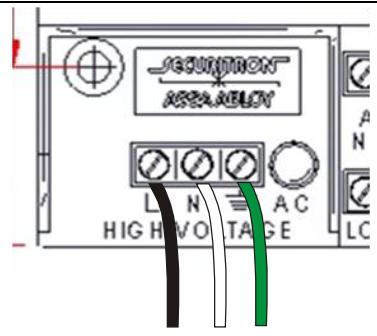
3. Make AC Power Input Connections
IMPORTANT: VERIFY AC POWER IS OFF BEFORE MAKING CONNECTIONS
The AQU243 has a universal transformer that accommodates 90-240 VAC input.
Connect AC power wires as follows:
Black/Positive = L
White/Negative = N
Green/Ground= G
4. Make DC Power Output Connections to Distribution or Accessory Boards
Using 18 to 24 AWG wire, connect the DC OUT Positive (+) terminal to the positive (+) IN terminal on the distribution board.
Connect the DC OUT Negative (-) terminal to the Negative/Common/C (-) IN terminal on the distribution board.
It is recommended to pass the wires under the power module board before connecting to the accessory board in order to maintain separation from battery cables.
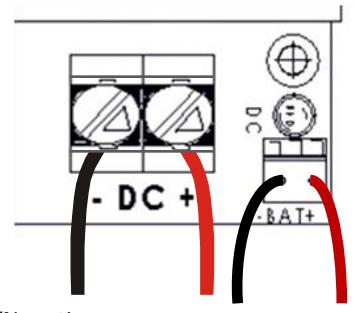
5. Make DC Power Output Connections to Devices
Using 10AWG to 24 AWG wire, connect the device wire run to the DC outputs. Maintain separation from battery cable placement by passing wires under power module before connecting to terminal screws.
Connect the Positive wire to DC OUT Positive (+) terminal
Connect the Negative wire to DC OUT Negative (-) terminal
NOTE: Use appropriate wire gauge for the Amperage and distance of the run. For more info, see Wire Loss Calculator at http://www.securitypower.com/AN2Wire.html
-/Negative +/Positive
6. Wiring for Status Monitoring Options
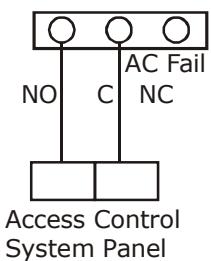
The diagram shows basic wiring to provide output to a control panel or local alarm for notification of AC power loss.
AC-ON state energized the NO/C switch.
The Switch changes state when power is lost.
7. Wiring for Limited Time Warning/Low Battery
8. Turn on AC Power
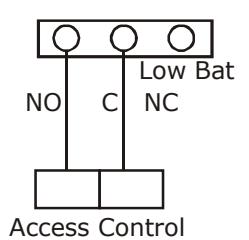
The diagram shows wiring to an access system controller to provide low battery warning.
The switch changes state from NO/C to C/NC when battery voltage drops to 22VDC
System Panel
After making electric connections, turn on AC power before installing batteries. The AC LED power indicator should be lit.
C. Install Batteries
1. Understanding Battery Charging and Backup Power
The AQU243B is a backup battery charger with automatic fail over to battery power in case of primary AC power failure when batteries are installed and connected to the power module. The use of battery backup is optional - the unit will function without batteries installed, but no internal backup power will be available in case of AC power failure.
Note: The battery circuit features automatic disconnect when the battery output falls to 9.8 VDC/19.6 VDC to prevent deep discharge and also protects the power module in case the battery is connection is reversed.
For battery backup in 24VDC operation, two (2) 12V batteries are wired in series are used.
Backup power run time depends on the continuous output needed to support the load and the ambient temperature at the enclosure. Estimates are provided in the table below:
Estimated Standby Time (3 amp/5 minute reserve for alarm)
|
Total Current
Draw of Load |
1Hr | 4Hr | 12Hr |
|---|---|---|---|
| 1A | 2AH | 5AH | 12AH |
| 1.4A | 3AH | 8AH | 20AH |
| 2A | 5AH | 10AH | 26AH |
| 2.8A | 5AH | 12AH | 40AH |
Larger batteries may be used external to the enclosure by running the battery cable through a dedicated knockout separate from the AC input and DC output.
Charge current is not less than 500mA @24VDC at peak load
2. Connecting the Battery
Plug battery cable assembly into battery backup plug -BAT+.
Install batteries. Mark batteries with "Installed" date and "Replace By" date according to manufacturer's battery life recommendations.
Connect leads to batteries.
For 24VDC operation:
Using a Battery Jumper Cable, connect the Positive (+) battery terminal of one battery to the Negative (- ) terminal of the second battery.
CAUTION: Connect and disconnect batteries with AC power ON. Battery circuit is engaged when AC power is OFF. Adding or removing batteries with circuit engaged could result in electrical shock and injury.
Connect red battery lead to the unused Positive (+) battery terminal.
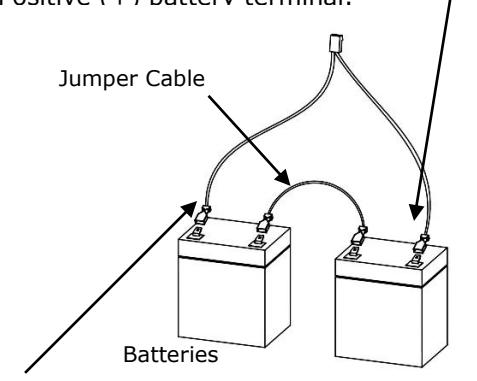
Connect black battery lead to the unused Negative (-) battery terminal.
D. Testing
1. Test Input and Outputs
AC Input: Enable AC power to input line. Confirm LED on front of enclosure is lit.
DC output : If connected to load or distribution board, DC output indicator on power module will be lit.
If not connected to load or distribution board, test output with Amp Meter to verify current.
AC Fail Notification: Disable AC power to input line. If AC fail notification is configured, the switch will change state, triggering the notification output.
Low Battery Notification: Disable AC power to input and allow batteries to run down to Low Battery Warning
| Recommended Annual Maintenance | ||||
|---|---|---|---|---|
| Battery Test | Turn off AC power | |||
| Check DC output voltage under battery operation. | ||||
|
For fully charged batteries, voltage should be above 11.5V. If voltage is below this range, test batteries
per battery manufacturer instructions and replace if needed. |
||||
| AC Fail Test |
Turn off AC power. AC Fail switch should trigger an alert upon disconnect or upon fail over to battery
power. |
|||
Problems with installation? Call Securitron: 1-800-MAG-LOCK
For warranty information visit: www.securitron.com/en/site/securitron/About/MagnaCare-Warranty