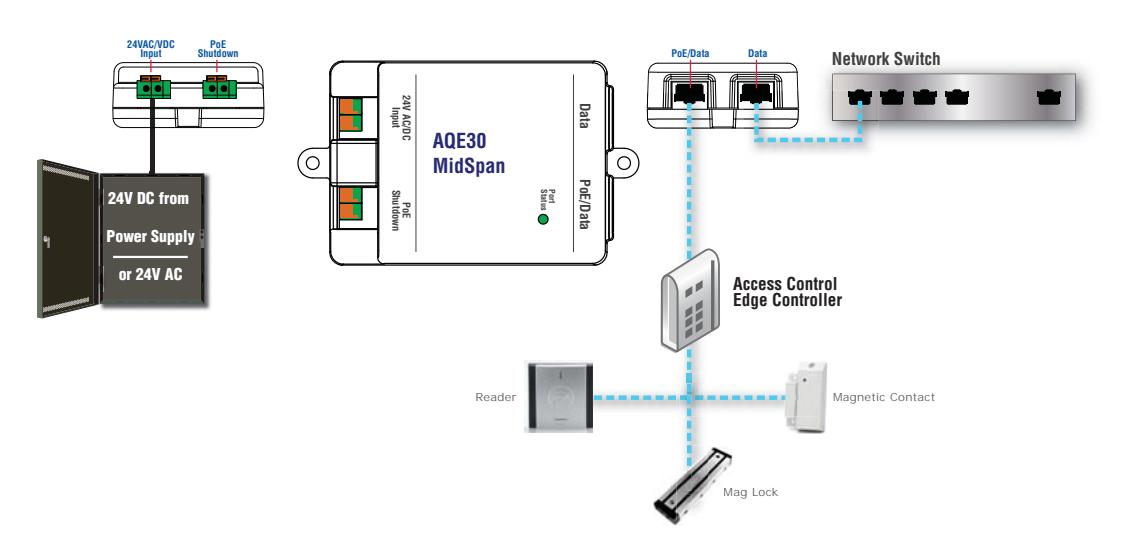
Securitron AQE15, AQE30, Single Port Injectors Installation Instructions
Open the original PDF document
View PDFAQE15 and AQE30 Power over Ethernet Midspan Injector Installation Manual

Description
The AQE line of Power over Ethernet (PoE) MidSpan Injectors are available at 15.5 watts (W) and 30W in accordance with the requirements in the Institute of Electrical and Electronics Engineers (IEEE) Standard 802.3, "Ethernet."
The AQE line of MidSpan Injectors provides PoE compliant power to PoE compatible devices such as Internet Protocol (IP) cameras, infrared (IR) illuminators, access control panels and readers, or to non-PoE devices using a PoE Extractor such as the AQE30E.
Regulatory Information
The equipment discussed within this manual has been tested to the following standards:
- UL Standard UL294b, "The Standard of Safety for Access Control System Units"
- International Electrotechnical Commission (IEC) and UL Standard IEC/UL 60950-1, "Components"
- Canadian Standards Association Standard C22.2 No. 205-M1983, "Signal Equipment"
Mounting the AQE Series Module
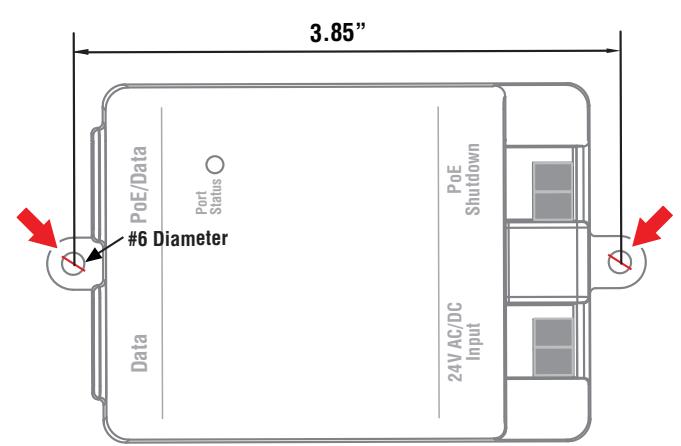
The AQE line of Midspan Injectors mount using two screws in the mounting tabs. The unit must be mounted in a secure, indoor, dry location to a suitable surface, using suitable hardware.
| Specifi cations | ||||
|---|---|---|---|---|
| AQE15 | AQE30 | |||
| Input Voltage |
24 volts (V) Alternating Current (AC) or
24V Direct Current (DC) ±15% |
24 VAC or 24 VDC ±15% | ||
| Input Current |
1.4 Amperes (A) Maximum (Max) AC or
DC |
2.6A Max AC or DC | ||
| Output Power | 15.4W (IEEE802.3af) | 30W (IEEE802.3at) | ||
| Output Voltage | 50 VDC | 50 VDC | ||
| Output Current | 300 mA | 600 mA | ||
| Shutdown Terminals | 5–24 VDC @ 10 mA Max | 5–24 VDC @ 10 mA Max | ||
| Data Cable Length | 328 feet (ft) or 100 meters (m) Max | 328 ft (100 m) Max | ||
| Data Rate | 10/100 Base-T | 10/100/1000 Base-T | ||
| ESD Immunity | 8 kilovolts (kV) | 8 kV | ||
| PoE Pin Assignment |
Positive (VCC+):
Pins 4, 5 |
Positive (VCC+):
Pins 4, 5 |
||
|
Negative (VCC–):
Pins 7, 8 |
Negative (VCC–):
Pins 7, 8 |
|||
|
Data:
Pins 1, 2, 3, 6 |
Data:
Pins 1, 2, 3, 4, 5, 6, 7 |
|||
| Operating Ambient Temperature | 0 to 49°C, Indoor Dry Locations | 0 to 49°C, Indoor Dry Locations | ||
| Storage Temperature | –20 to +70°C | –20 to +70°C | ||
| Operating Humidity | 5 to 95% (Non-Condensing) | 5 to 95% (Non-Condensing) | ||
| Size |
4.20" L x 2.50" W x 1.20" D
(107mm L x 64mm W x 31mm D) |
4.20" L x 2.50" W x 1.20" D
(107mm L x 64mm W x 31mm D) |
||
| Weight | 0.25 pounds (lb) or 0.11 kilograms (kG) | 0.30 lb (0.14 kG) | ||
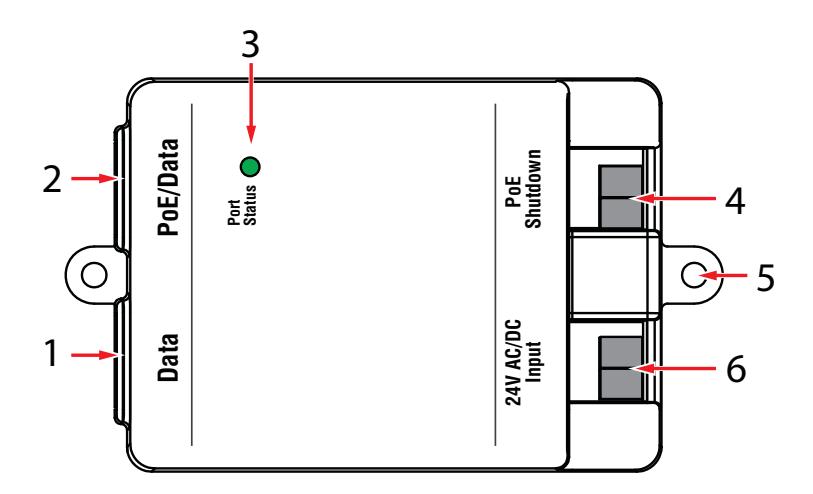
Data
This is the non-PoE input from the network switch. This connector is an RJ45 jack and accepts a CAT-5 cable.
PoE/Data
This is the PoE output to the camera or other device to be powered. See the Specifications section for ratings. This connector is an RJ45 jack and accepts a CAT-5 cable.
Port Status (Green)
This LED shows the status of the AQE MidSpan Injector. See the appropriate status chart for more information.
PoE Shutdown
This input will shut down the PoE output of the AQE MidSpan Injector. This can be useful for rebooting devices that have
become non-responsive. These terminal strips accept wire sizes from AWG14–AWG22. To shut down the PoE Output, apply any DC voltage within the ratings shown under "Shutdown Terminals" in the Specifications section of this manual.
Mounting Tab
The mounting tab centers are spaced 3.85" on center. Refer to the mounting guide (page 1) for mounting details.
24 VAC or 24 VDC Input
This is the power supply input for the AQE MidSpan Injector. These terminal strips accept wire sizes from AWG14–AWG22.See the Specifications section for more information. When using DC voltage, the voltage may be connected in either polarity.
AQE15 / AQE30 - Status LED
| AQE15 Port Status | LED State | Flash Pattern |
|---|---|---|
| No Primary Power to Unit | OFF | LED OFF |
| No Connection on PoE/Data Port | OFF | LED OFF |
| Operation Normal | ON | LED ON |
| Improper Load Device–Signature Resistance too low | Flashing | 1 Flash |
| Improper Load Device–Signature Resistance too high | Flashing | 2 Flashes |
| Port Overload Fault | Flashing | 5 Flashes |
| AQE30 Port Status | LED State | Flash Pattern |
|---|---|---|
| No Primary Power to Unit | OFF | LED OFF |
| No Connection on PoE/Data Port | OFF | LED OFF |
| Operation Normal | ON | LED ON |
| Improper Load Device | Flashing | 5 Flashes |
| Port Overload Fault | Flashing | 2 Flashes |
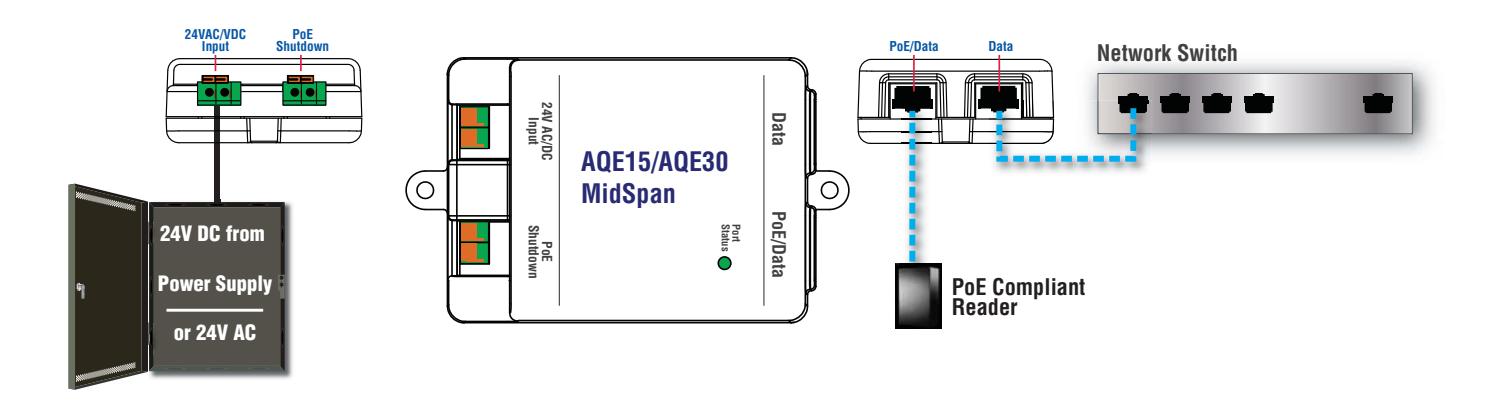
a) Powering a PoE Reader
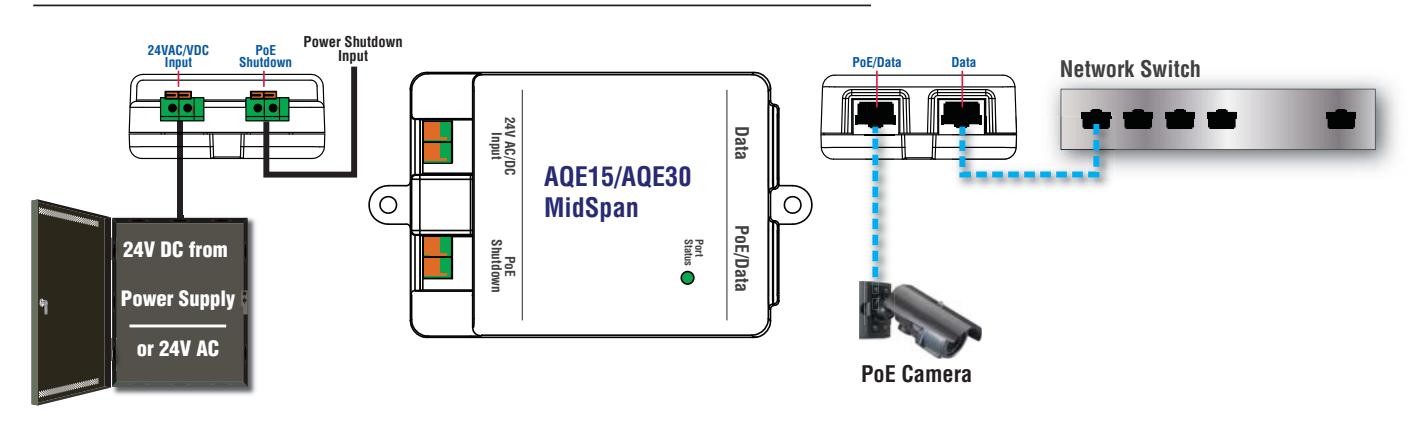
b) Powering a PoE Camera
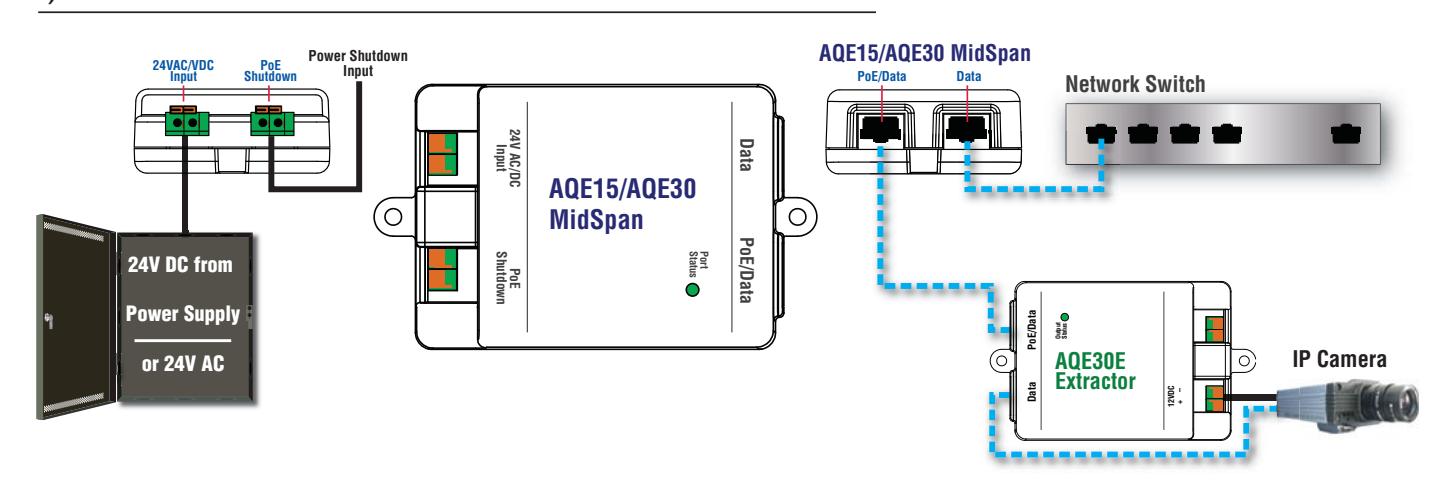
c) Power & Data for a non-PoE IP Camera
Example Wiring - Block Diagrams (continued)
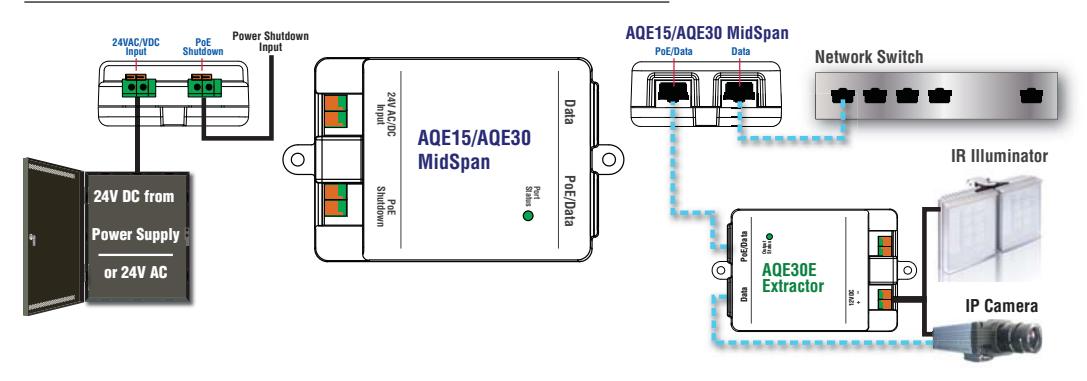
d) Power & Data for a non-PoE IP Camera and Illuminator
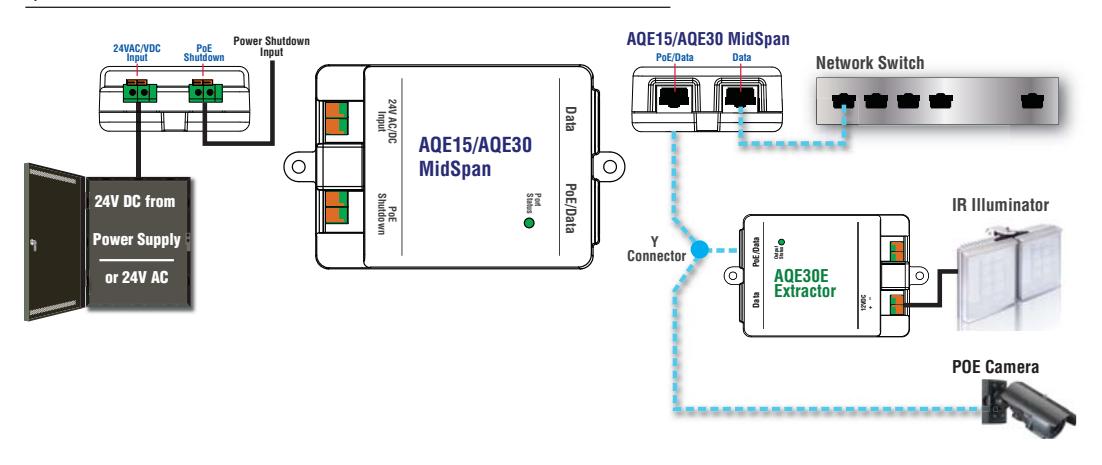
e) Power & Data for PoE Camera and non-PoE IR Illuminator
f) Powering a PoE Access Controller with AQE30