Securam Electronic Safe Lock Quick Start Guide ProLogic L02
Open the original PDF document
View PDF
Quick Start Guide - ProLogic L02
Congratulations on the purchase of your new SecuRam ProLogic L02 Safe Lock! This Quick Start guide will help you set up your ProLogic L02 for use.
The ProLogic L02 comes with (2) default codes: ID00 or the Super Code is set to 111111 ID01 or the Manager Code is set to 123456 It is recommended to change both codes to unique codes immediately.
Step1: Change the Default Codes
Enter the default Super Code: 111111 When the LCD screen shows "Select Menu", press the or buttons, until you see the menu selection "Change Code":
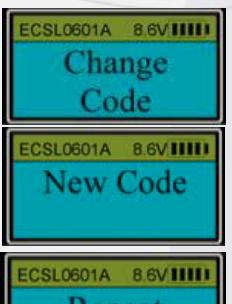
Press Menu/OK
Enter a 6 digit code
Repeat 6 digit code
ID00 Code is now saved
Follow the same procedure to change the Manager Code. Enter 123456 and complete steps above.
Step 2: To Open Lock
Just enter a valid code:
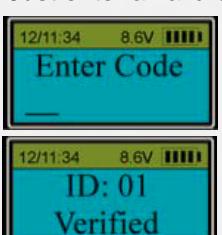
Enter 6 digit code
Valid code will be verified and the lock will open
Step 3: Enroll a User Code
With the ProLogic L02 you can add up to 28 User Codes. Follow these steps:
Enter the Manager Code. When the LCD screen shows "Select Menu", press the or buttons, until you see the menu selection "Enroll New User"
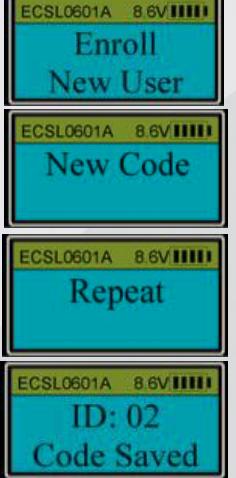
Press Menu/OK
Enter a unique 6 digit code
Repeat 6 digit code
The User code is saved
Repeat to add other User Codes
Note: To Change Any Code
- Enter the code you want to change
- When the LCD screen shows "Select menu", scroll to "Change Code" and follow the prompts.
To Change Batteries
Your ProLogic L02 is designed to provide long life up to 4000 operations with a single 9 volt battery. When it is time to change the battery the LCD will indicate "Low Battery".
- Push up on the EntryPad until it releases from the SnapFit mounting holes
- Carefully remove the battery and replace
- When re-mounting the entrypad be careful not to damage the lock cable.
For a full set of Operating Instructions visit our website at www.securamsys.com