Securakey Touch Card Reader Wiring Data Information
Open the original PDF document
View PDFTOUCH CARD® Reader Wiring Data
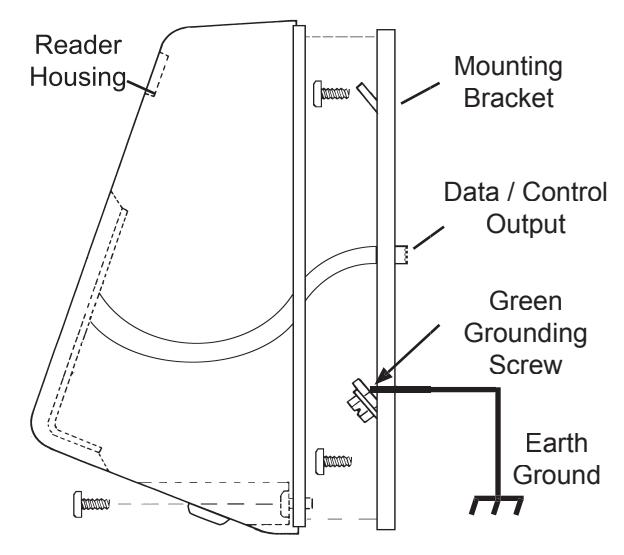
Grounding Connections:
All Models: You MUST connect the Green Ground Screw on the Reader Mounting Plate to a Good Earth Ground. Use 18AWG or heavier wire, and make the connection as short as possible. Failure to do so may result in improper operation or damage to the reader.
Data / Control Connections:
The tables below contain hookup instructions for the data and control wires for various TOUCHCARD® reader output formats.
| SK-OxxW Wiegand Type Output | |||
|---|---|---|---|
| Wire Color | Description | ||
| RED | 9-24 VDC | ||
| BLACK | SIGNAL GROUND | ||
| BROWN | GREEN LED * | ||
| YELLOW | RED LED | ||
| GREEN | DATA - 0 | ||
| WHITE | DATA - 1 | ||
| SK-OxxX RS-485/422 Output | |||
|---|---|---|---|
| Wire Color | Description | ||
| RED | 9-24 VAC | ||
| BLACK | SIGNAL GROUND | ||
| BROWN | GREEN LED* | ||
| YELLOW | RED LED | ||
| GREEN | В | ||
| WHITE | А | ||
Surface Mount Reader, Side View (Typical) <sup>1</sup>
|
OUTPUT
TYPE |
2-LINE
WIEGAND |
RS-232 | RS485/422 |
1-LINE
WIEGAND |
|---|---|---|---|---|
|
SUPPLY
VOLTAGE |
9-24 VDC | 9-24 VDC | 9-24 VDC | 9-24 VDC |
|
SUPPLY
CURRENT |
65 mA | 65 mA | 65 mA | 65 mA |
| SK-OxxR RS-232 Output | |||
|---|---|---|---|
| Wire Color | Description | ||
| RED | 9-24 VDC | ||
| BLACK | SIGNAL GROUND | ||
| BROWN | GREEN LED* | ||
| YELLOW | RED LED | ||
| GREEN | TXD → | ||
| WHITE | RXD← | ||
| LED Control Options | ||||||
|---|---|---|---|---|---|---|
|
SINGLE
LINE LED |
DUAL LINE
LED |
DUAL LINE
LED/RED STAYS ON |
||||
|
RED
LED ON |
BROWN
WIRE TO +5 VDC |
YELLOW WIRE
TO GND |
YELLOW
WIRE CONSTANT GROUND |
|||
|
GREEN
LED ON |
BROWN
WIRE TO GND |
BROWN WIRE
TO GND |
BROWN
WIRE TO GND |
|||
| LED OFF |
BROWN
WIRE FLOATING |
YELLOW &
BROWN WIRE FLOATING |
N/A | |||

& lt;sup>1</sup> (Also applies to MH, FM, CR and IB Readers)