Securakey SK-NET-Defining Auxiliary Outputs on the SK-ACP-LE Control Panel Bulletin #31
Open the original PDF document
View PDF

APPLICATIONS BULLETIN # 31
Subject: SK-NET-Defining Auxiliary Outputs on the SK-ACP-Control Panel
SK-NET-Defining Auxiliary Outputs on the SK-ACP-LE Control Panel
The SK-NET system offers tremendous flexibility in defining the operation of the AUX relays on its panels.
- • The relays can be connected to strobes or horns to annunciate security violations such as propped or forced doors.
- • They can be activated by inputs or by a predefined range of cards to operate various types of equipment such as cameras, lighting or HVAC, also keeping a record of use.
- • They can be used to shunt a door monitor contact connected to an external alarm system for any valid access transaction.
- • Relay activation can be set for specified time duration, or it can be latched, and then canceled by presentation of a valid card.
Many SK-NET users are not familiar with these capabilities, which have not previously been described in detail in the operating manual. That is the purpose for creating this application note.
The SK-ACP has a main (latch) relay and an auxiliary relay for each of its two readers. This extra relay can be activated by a variety of means to accomplish various functions
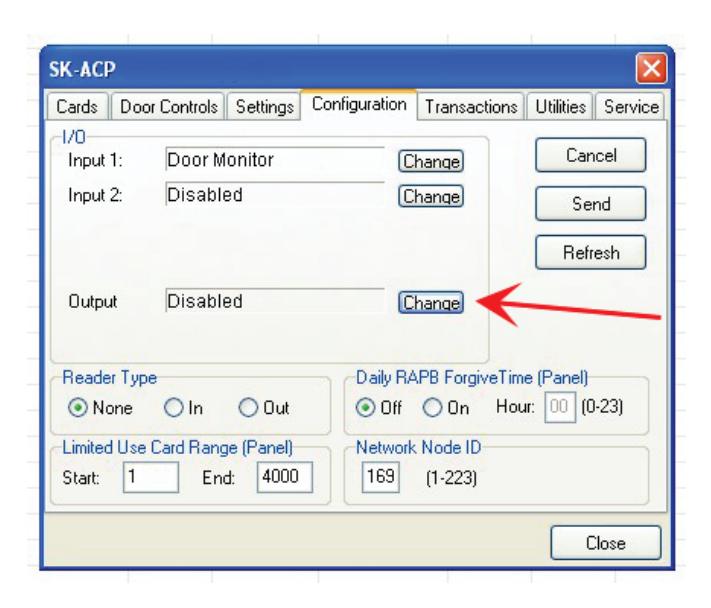
- 1. From the Tree View , right click on a reader name.
- 2. Select Properties .
- 3. Click on the Configuration tab.
- 4. Click on Edit .
- 5. Click on the Change button (to the right of "Output" and the current configuration) The Configure Output screen displays
-
6. Select the desired Output definition.
- The parameter settings are displayed below the list of options
- 7. Set any applicable Output Parameters Click OK .
- 8. Click on the Send button. Close .
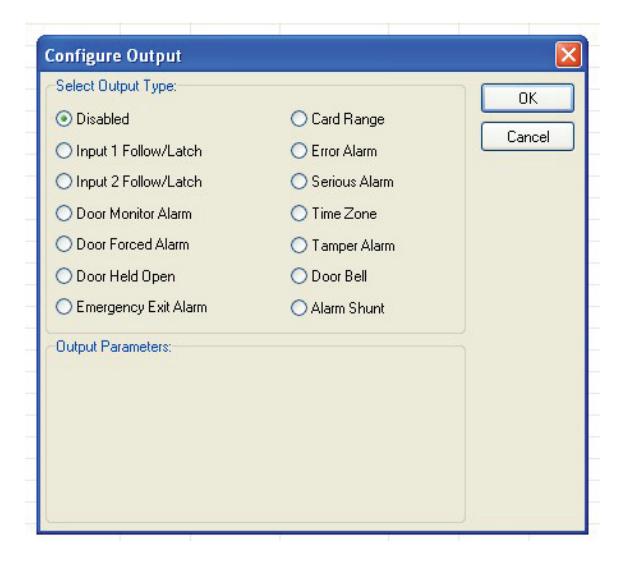
The following paragraphs will explain each of the Output Type options, available Output Parameter options, and how the output will work. For each output type you may select, different parameters will appear below the list of output types in the Output Parameters area of this screen.
1. Disabled
The output is not used.
2. Input 1 Follow / Latch
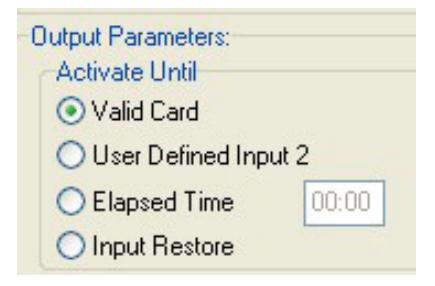
Whenever Input 1 is closed (activated) the aux. relay will activate and latch until (select option by clicking the adjacent radio button):
- 1) a valid card is presented to the reader
- 2) a User Defined Input 2 is activated
- 3) a pre-selected amount of time elapses (Max mm:ss=59:59)
- 4) Input 1 is opened (restored)
Typical Application: allows a switch (PIR, pushbutton, relay output) to activate a relay-controlled device (horn, strobe, camera, HVAC, lighting) which can be cancelled by various means.
3. Input 2 Follow / Latch
| Output Parameters: | |
|---|---|
| Activate Until | |
|
|
| O User Defined I | nput 1 |
| O Elapsed Time | 00:00 |
| O Input Restore |
Whenever Input 2 is closed (activated) the aux. relay will activate and latch until (select option by clicking the adjacent radio button):
- 1) a valid card is presented to the reader
- 2) a User Defined Input 1 is activated
- 3) a pre-selected amount of time elapses (Max mm:ss = 59:59)
- 4) Input 2 is opened (restored)
Typical Application: allows a switch (PIR, pushbutton, relay output) to activate a relay-controlled device (horn, strobe, camera, HVAC, lighting) which can be cancelled by various means.
4. Door Monitor Alarm
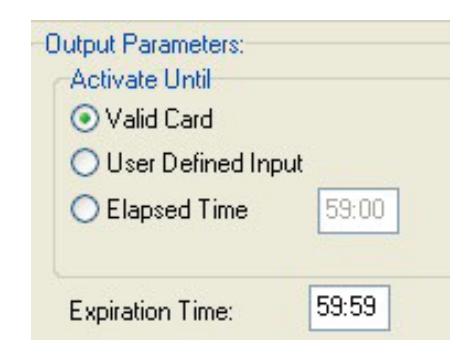
If one of the Inputs is configured as Door Monitor, the aux output will activate if the door is forced open or if it is left open too long. A Forced Door condition occurs if the door is opened, and neither a valid card transaction nor a REX activation has occurred.
A DOTL (door-open-too-long) condition normally occurs after a valid card access or REX activation, if the door is still open at the end of the latch time. Entering a time value into the Expiration Time field will delay the start of the DOTL status beyond the latch time.
If this Output Type is selected, once the Door Forced or DOTL condition exists, the Aux relay will stay energized as long as the door continues to be held open. Once the door is closed, you have three options to turn the relay off (select option by clicking the adjacent radio button):
- 1) a valid card is presented to the reader
- 2) a User Defined Input is activated
- 3) a pre-selected amount of time elapses (Elapsed time 59:59 mm:ss max)
Note that if Elapsed Time is selected and set to 0, the relay will deactivate as soon as the door is closed.
Typical Application: allows output contact to provide a warning that a controlled door was propped or forced open, which can be connected to a central station alarm panel, or to a local annunciator (horn, strobe) alerting local security personnel.
5. Door Forced Alarm
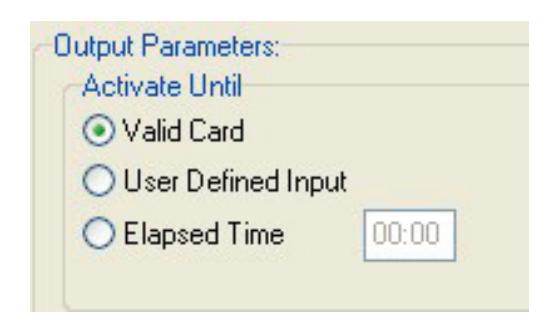
If one of the Inputs is configured as Door Monitor, this output will activate if the door is forced open. This output is typically connected to a local alarm signal or to a remote monitoring station. Once the auxiliary relay is activated it will remain activated until (select option by clicking the adjacent radio button):
- 1) a valid card is presented to the reader
- 2) a User Defined Input is activated,
- 3) a pre-selected amount of time elapses.
Typical Application: allows output contact to provide a warning that a controlled door was forced open, which can be connected to a central station alarm panel, or to a local annunciator (horn, strobe) alerting local security personnel.
6. Door Held Open
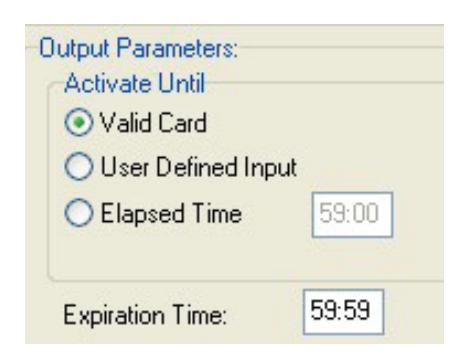
If one of the Inputs is configured as Door Monitor, the aux output will activate if the door is held or propped open too long after a valid card access or REX activation. Normally, a DOTL (door-open-too-long) condition occurs if the door is still open at the end of the latch time. Entering a time value into the Expiration Time field will delay the start of the DOTL status beyond the latch time.
If this Output Type is selected, once the DOTL condition exists, the Aux relay will stay energized as long as the door continues to be held open. Once the door is closed, you have three options to turn the relay off (select option by clicking the adjacent radio button):
- 1) a valid card is presented to the reader
- 2) a User Defined Input is activated
- 3) a pre-selected amount of time elapses (Elapsed time 59:59 mm:ss max)
Note that if Elapsed Time is selected and set to 0, the relay will deactivate as soon as the door is closed.
Typical Application: allows output contact to provide a warning that a controlled door was propped open, which can be connected to a central station alarm panel, or to a local annunciator (horn, strobe) alerting local security personnel.
7. Emergency Exit Alarm
Used when one of the Inputs is designated as Remote Open, in which case, the auxiliary relay will activate whenever the main relay is triggered via the Remote Open Input. This is typically used to sound a local alarm when the door has been used for egress. There are no configurable options if this Output Type is selected.
Typical Application: allows output contact to provide a warning that a controlled door was opened, which can be connected to a local annunciator (horn, strobe) alerting local security personnel.
8. Card Range
Cards in a selected range will activate the auxiliary relay only or both the auxiliary and main relays. Typically this is used so specific cards can cause something special or extra to happen. The relay can be set to Toggle, (activate until another card in the selected range is presented) or to activate for a preset amount of time. If you select the Card Mode Timed button, the Expiration Time field will appear below.
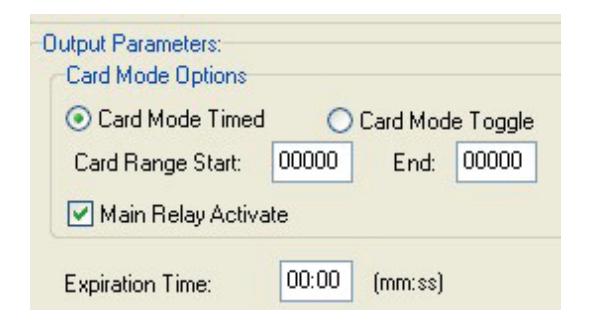
Typical Application: allows output contact to be activated by designated card holders, to operate a relaycontrolled device (HVAC, lighting, additional door/gate, process control) separately or in conjuction with opening the controlled door, for a configurable time, or until canceled by a card in the same range.
9. Error Alarm
When any one of selected "Error" conditions occur, the auxiliary relay will activate and stay activated until a valid card is presented to the reader. You can select one or multiple conditions by clicking on the desired check boxes. Error Conditions you may select from are "Door Forced", Door Held", Tamper Input", "Void User", "Invalid Facility Code", "Antipassback Violation", "Arming", "Tamper Card", "Inactive", "Invalid ID", "Time Zone Error", "Time Zone Date", "Limited Use Violation".
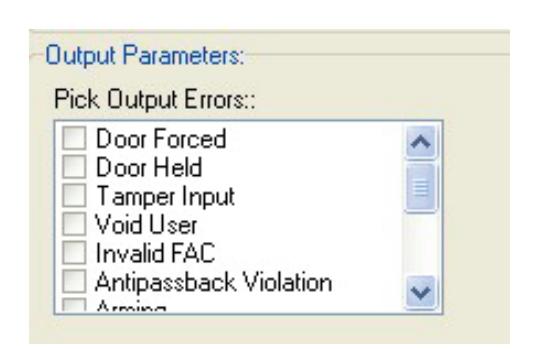
Typical Application: Provide a local warning (horn, strobe, etc) for various card access exceptions, alerting security personnel to security breaches, intrusion or illicit entry attempts.
10. Serious Alarm
When any one of the following "Error" conditions occur, the auxiliary relay will be activated and remain activated until a valid card is presented: "Void Card", "Invalid Facility Code", "Tamper", "Door Forced", "Door Held". This group of conditions is pre-selected in the software, so no options are displayed in the Output Parameters section.
Typical Application: Provide a local warning (horn, strobe, etc) for various card access exceptions, alerting security personnel to security breaches, intrusion or illicit entry attempts.
11. Time Zone
The auxiliary relay will be activated during the GREEN increments of the selected Time Zone.
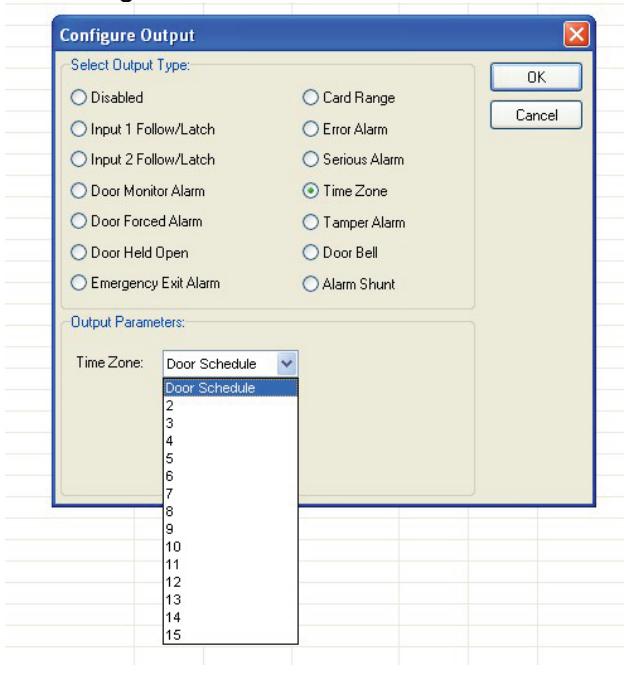
Typical Application: Allows scheduled operation of any relay controlled device (HVAC, lighting, an additional door/opening, alarm shunt circuit, keypad).
12. Tamper Alarm
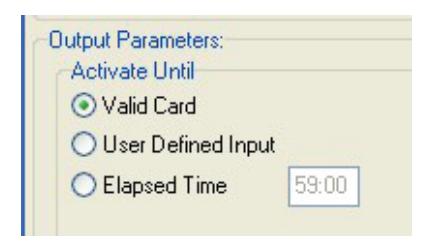
If a Tamper Input is closed, the auxiliary relay will be activated and will remain activated until (select option by clicking the adjacent radio button):
- 1) a valid card is presented to the reader
- 2) a User Defined Input is activated
- 3) a pre-selected amount of time elapses.
Typical Application: Mount an NO tamper switch behind reader or in panel enclosure. Output provides local annunciation of attempts to open control panel enclosures, or remove readers (depending on where tamper switch is installed) by connecting aux relay to a local horn or strobe.
13. Door Bell
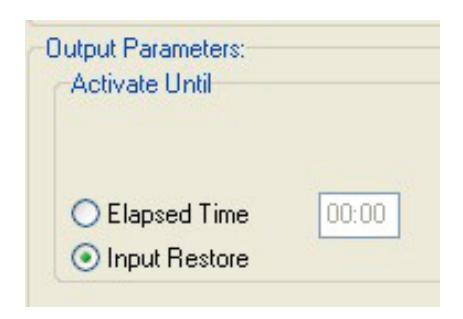
If a Door Bell Input is closed the auxiliary relay will be activated and remain activated until (select option by clicking the adjacent radio button):
- 1) The input is opened
- 2) a pre-selected amount of time elapses.
Typical Application: output provides local annunciation of a non-cardholder using a doorbell button to request access from staff or security personnel, for use at public entrances, gates, or shipping/receiving areas.
14. Alarm Shunt
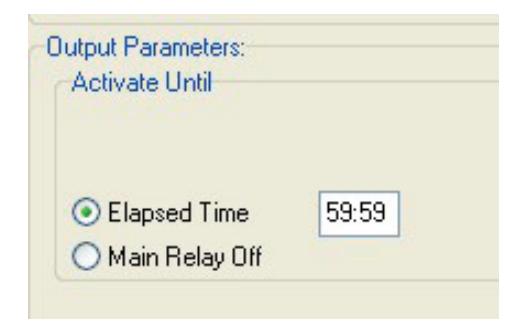
Whenever the main relay is activated by a valid card or a Remote Open input, the auxiliary relay will be activated and will remain activated until (select option by clicking the adjacent radio button):
- 1) the main relay returns to normal
- 2) a pre-selected amount of time elapses
Typical Application – used to suppress a Door Monitor Contact which is connected to an external Central Station Alarm System, to prevent false alarms from being reported. The elapsed time should be set long enough for a person to pass through the door, allowing additional time when appropriate for bringing product, equipment or luggage through the door on carts or hand-trucks. (Note that some newer alarm monitor contacts are digital devices, which cannot be shunted in this manner.)

DATE: 6-28-12 REV.: AF#: 7717
20301 Nordhoff St. • Chatsworth, CA 91311 phone 818-882-0020 • fax 818-882-7052 Toll Free - 800-891-0020 www.securakey.com • techsupport@securakey.com
PAGE <u>7</u> OF <u>7</u>