Securakey SK-NET Badge Printing Data Sheet
Open the original PDF document
View PDFSK-NET™

SK-NET™ Badge Printing
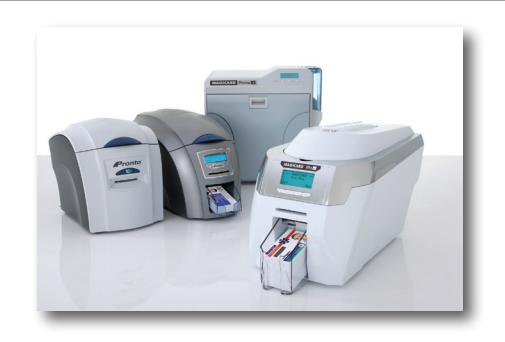
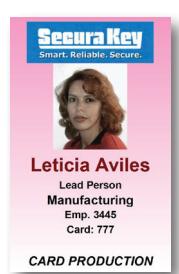
SK-NET-MLD now includes integrated badge printing capability in Version 5.0. SK-NET-MLD is now capable of printing ID badges using any windows-compatible ID card printer. This feature eliminates the requirement for duplicate data entry when using non-integrated ID printing software.
Badge Templates
SK-NET™ Badge printing is template based, which allows the inexperienced user to create professional looking badges without the long learning curve required by more complicated ID badge design software.
SK-NET™ Badge printing allows you to design and name custom badge templates that can be assigned to individual classes of card holders (for example, at a Hospital, you can design and save different badge templates for Nurses, EMTs, Facilities, Doctors, etc.).
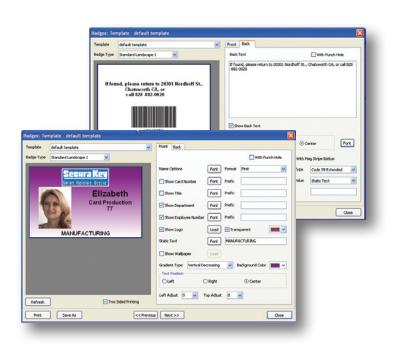
You can choose from seven different standard templates, which include portrait or landscape layouts and different locations for photos, names and organizational logos.
Layout Configuration
When configuring the badge layout, the user can choose whether or not to display each data field. The user can select a font, font color, and point size for each field, and he can choose the display order of First name, Last name and MI.
If the "With Punch Hole" option is selected, the software will reformat the card layout to allow for a slot punch.
The Prefix field allows you to insert a prefix text before each data field, such as Card No: or Employee No:
Adding Logos
To insert a company or organization logo, first save a jpeg of the logo onto your computer's hard drive, and you can browse your disk drive to find the logo file. If the logo is not correctly sized, SK-NET™ will center and size the logo to fit into the card layout.
The Static Text field allows you to enter text that is not a database field. This is useful when setting up templates for various cardholder job classifications.
Once you have set up the artwork the way you want it, you can name the template and save it for future use.
Card Backgrounds
You can use any jpeg image file as a background for the card. This can be a pattern or interesting texture, or you can design and create a custom card background using a program such as Photoshop and save it as a jpeg onto your computer's hard drive. Then you can browse your disk drive to find the "Wallpaper" file. SK-NET will center and size the image to fit into the card layout.
If you don't have a pre-designed background for the card, SK-NET™ will allow you to select a color for the background, and choose from several different types of gradiated washes. If you are designing a number of different Badge Templates for your organization, you may want to give them different colored backgrounds, so that they can be visually recognized at a distance.
Card Printing Tips
Note that access control cards contain embedded integrated circuits or "chips," antennas, inlays, Wiegand code strips, or magnetic materials, which can cause the card surface to be uneven. Sometimes the dye sublimation print head

will lose contact with the card at the point where it passes over a high spot, causing a white spot or "printing void" in the card background. These issues can be minimized by trying different templates with different photo or logo locations, and/or by avoiding solid color backgrounds. These problems can also be avoided by
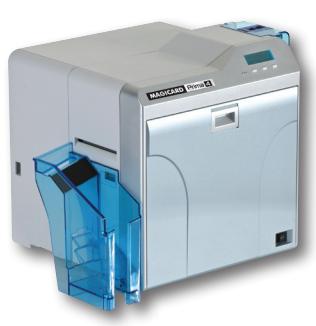
using a reverse-transfer printer, such as the Ultra Magicard Prima 4, which reverse-prints the image on a clear plastic overlay, which is then laminated onto the card. Advantages are that the printing is protected from fading or scratching by the clear plastic layer, and any card surface problems do not affect printing of the image.

SK-NET™ SK-NET™ Badge Printing
Dye Sublimation Printers
Secura Key is proud to offer Ultra Magicard dye sublimation printers and supplies. Ultra Magicard has a reputation for quality and for its strong product warranty, but they have recently upgraded their entire product line, with easy to use products, which provide high-quality card printing at an economical price. We offer a full range of printers, from the Pronto for smaller facilities, to the Enduro for mid-sized facilities and Rio Pro and Prima 4 for large facilities and institutions. The Rio Pro and Prima 4 include the 3 year UltraCoverPlus manufacturer's warranty, which includes full print head coverage, and a free loaner while your unit is being repaired.
| Features | Pronto | Enduro | Enduro Duo | Rio Pro | Rio Pro Duo | Prima 4 | Prima 4 Duo |
|---|---|---|---|---|---|---|---|
| Part Numbers | SK-IDPTR-1 | SK-IDPTR-2 | SK-IDPTR-3 | SK-IDPTR-4 | SK-IDPTR-5 | SK-IDPTR-6 | SK-IDPTR-7 |
| General |
Light Duty, single-sided
printer |
Light-Duty single
sided printer - easy field upgrade to dual- sided |
Light-Duty, Factory
Pre-configured as a dual-sided printer |
High-volume
professional printer - easy field upgrade to dual-sided |
High-Volume, Factory
Pre-configured as a dual-sided printer |
High-volume
professional reverse transfer printer |
High-volume dual-sided
professional reverse transfer printer |
| Print Speed YMCKO | 35 seconds single side, 7 seconds monochrome |
31 seconds std color, 23 seconds fast color, 6
seconds Monochrome |
80 cards/hour, single-sided YMCK plus transfer | ||||
| Printer Interfaces | USB Rev 1.1 (2.0 compatible) | USB, Ethernet | USB 2.0, 10-base-T or 100-base-T Ethernet | ||||
| Dye film Loading | Simple drop-in loading (no spooling) | Easy Front-loading, remove cover | |||||
| Dye film Setup | Automatically detects dye film type | ||||||
| Dye Film Capacity |
300 print YMCKO, 600 prints monochrome
300 print YMCKO, 250 printymckok |
dual-sided, 600 prints Monochrome |
1000 prints w/YMCK and transfer film; 755 prints
YMCKK dual sided dye film |
||||
| Printhead Replacement | Simple field-replaceable unit | ||||||
| Software drivers | Win Prof 2000 SP4, XP, Vista, 7, 32/64-bit compatible |
Win Prof 2000 SP4,
XP SP 2&3, Vista SP1, Windows Server 2003 R2, SP2, 2008, 7 |
Win Prof 2000 SP4,
XP SP 2&3, Vista SP1, Windows Server 2003 R2, SP2, 2008, 7 |
||||
| Cleaning |
Simple cleaning cycle
using T-card |
10 cleaning cards and one head cleaning pen | Removable cleaning roller cassette | ||||
| Card Size & Thickness | ISO CR80, 0.020" - 0.040" | ISO CR79/80 PVC, 0.020 - 0.050" |
ISO CR79/80, 0.010 - 0.040", also ABS, PET, PVH,
PC and clamshell cards |
||||
| Card Capacity | Single card, hand-fed | 100 card feeder, 30-card stacker | 100 card feeder, 70-card stacker | 100 card feeder, 100 card stacker | |||
| Dimensions |
10.6"L x 8.4"W x 9.1"H
270mm x 215mm x 233mm (LWH) |
17.8"L x 8.1"W x 9.2"H 453mm x 206mm x
233mm (LWH) |
18.5"L x 8.6"W x 9.8"H 470mm x 220mm x
250mm (LWH) |
13.5"W x 12.6"H x 13"L 343 mm x 335 mm x
322 mm (WHD) |
|||
| Standard Warranty | 2 year ltd. Manufacturer's warranty in NA and EU, 12 months elsewhere | 3 year unltd. Manufacturer's warranty - free loaner/ full print head coverage | |||||
| Weight | 9.7 lbs (4.4 Kg) | 12 lbs (5.5 kg) |
10.8lbs (4.9 kg)
34.1 lbs (15.5 kg) |
||||
PRINTERS
SK-IDPTR-1 Pronto Printer, Single Sided, Hand-Fed Color Card Printer
SK-IDPTR-2 Enduro, Single sided printer
SK-IDPTR-3 Enduro Duo, Dual-sided printer
SK-IDPTR-4 Rio Pro - High Volume Professional printer - Single-sided SK-IDPTR-5 Rio Pro - High Volume Professional printer - Dual-sided
SK-IDPTR-6 Prima 4 Uno , Reverse Transfer Printer - Single-sided SK-IDPTR-7 Prima 4 Duo, Reverse Transfer Printer - Dual-sided
FILM
SK-DF-1 YMCK Dye Film & Re-transfer Film Set - 1000 Images (Prima 4)
SK-DF-2 YMCKK Dye Film - 750 images (double sided) (Prima 4), Black on card Back - Order with Re-transfer Film
SK-RXF-3 Re-Transfer film - 1000 Images (Prima 4) - Order with Dye Film
SK-DF-4 YMCKO Dye film for Rio Pro, Pronto, Enduro, 100 Images
SK-DF-5 YMCKOK Dye film for RioPro Duo, Enduro Duo, 250 Images - Duo Only
SK-DF-6 YMCKO Dye film for Rio Pro, Pronto, Enduro, 300 Images