Securakey RKDT-WM-WS Installation Instructions
Open the original PDF document
View PDFRKDT-WM/WS Installation Instructions
SWITCHPLATE INSTALLATION DIAGRAM
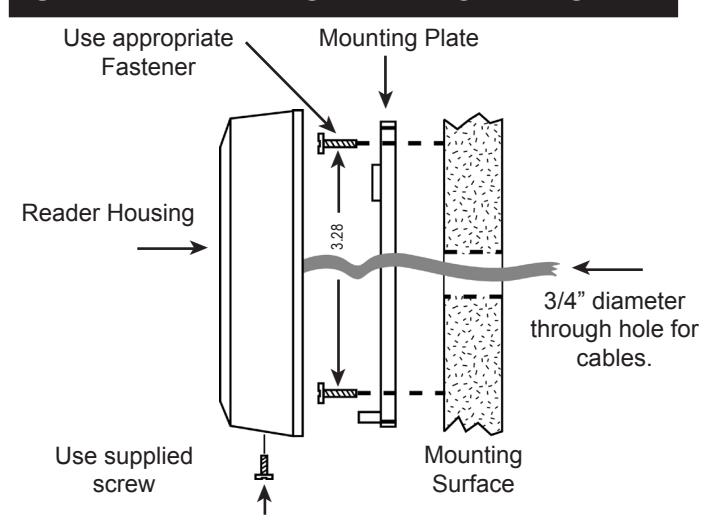
- 1. If mounting the unit outdoors, especially on a rough surface like masonry, we recommend that you seal the reader with silicone caulking.
- 2. Drill holes as needed per installation diagram shown to the left or install a single gang j-box.
- 3. Run field wiring to reader location and feed into j-box or through cable hole.
- 4. Attach the mounting plate to the mounting surface or j-box with the appropriate fasteners.
- 5. Splice the connector pigtail to field wiring. Insert the connector into the back of the reader.
- 6. Attach the housing to the mounting plate by inserting the two tabs inside the top of the housing into the two slots at the top of the mounting plate.
- 7. Secure by installing supplied screw into the hole at the bottom of the reader.
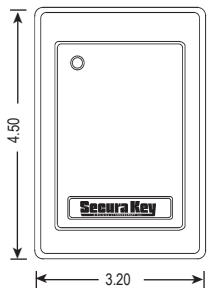
MULLION INSTALLATION DIAGRAM
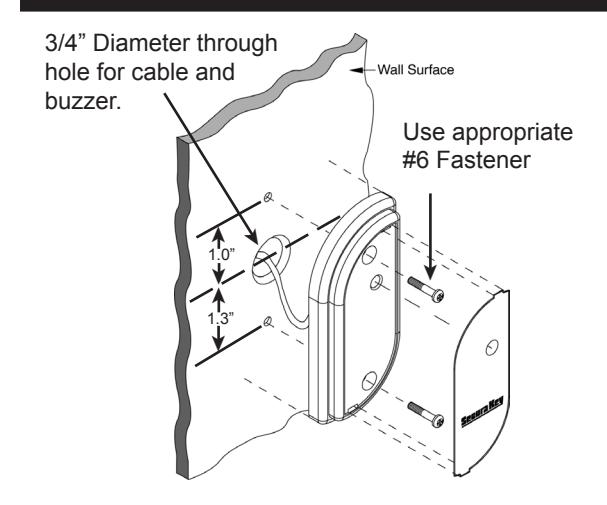
- 1. If mounting the unit outdoors, especially on a rough surface like masonry, we recommend that you seal the reader with silicone caulking.
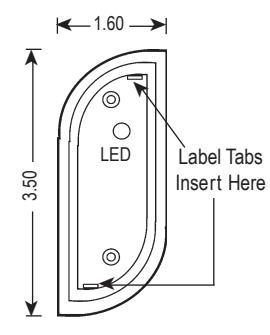
- 2. Drill a hole for the field wiring. Remove label insert from reader. Using the reader as a template, mark the location of the two mounting holes. Drill two 1/8" pilot holes for the mounting screws.
- 3. Run field wiring to reader location and feed through cable hole.
- 4. Splice the reader cable to field wiring.
- 5. Attach the reader to the surface using the two machine screws provided. These may be replaced with tamper proof screws (customer supplied).
- 6. Snap the label insert into front of reader to cover screws.
| WIRING CONNECTIONS | ||
|---|---|---|
| WIRE COLOR | RKDT-WM | RKDT-WS |
| RED | 5-14 VDC + | 5-14 VDC + |
| BLACK | GROUND | GROUND |
| YELLOW | BUZZER INPUT (1) | BUZZER INPUT (1) |
| BLUE | HOLD | HOLD |
| ORANGE | GREEN LED INPUT (1) | GREEN LED INPUT (1) |
| BROWN | RED LED INPUT (1) | RED LED INPUT (1) |
| GREEN | WIEGAND DATA-0 | WIEGAND DATA-0 |
| WHITE | WIEGAND DATA-1 | WIEGAND DATA-1 |
| VIOLET | NOT USED | NOT USED |
| GRAY | NOT USED | NOT USED |
| ( 1 ) C o n n e c t t o G R O U N D t o a c t i v a t e | ||
Parts Supplied:
Reader
Installation Instructions all Models Mounting Plate (RKDT-WS only)
2, #6 Mounting Screws
1, 4x40 Screw (RKDT-WS only)
1, Security Screw (RKDT-WS only) Snap-In Labels (RKDT-WM only)
Accessories (not included):
RK-BB: Back Box/Spacer (RKDT-WS only)
SPECIFICATIONS:
POWER REQUIREMENTS
5-14 VDC, 150 mA Max.
CONTROL INPUTS
Red LED, Green LED and Buzzer for online systems.
WIEGAND OUTPUT
Any Wiegand Format up to 40 bits
Maximum Distance: 500 ft. - 5 or 6 conductor 20 gauge
shielded cable
ENVIRONMENT
Reader, Key Tags and Cards
Ambient Temperature -40° to +70°C (-40° to +158°F) Humidity 0 to 95% (non-condensing)
INSTRUCTION TO THE USER FCC ID: NNHDTR1
"This device complies with Part 15 of the FCC rules. Operation is subject to the following two conditions: (1) this device may not cause harmful interference, and (2) this device must accept any interference received, including interference that may cause undesired operation."
This equipment has been certified to comply with the limits for a class B computing device, pursuant to FCC Rules. In order to maintain compliance with FCC regulations, shielded cables must be used with this equipment. Operation with non-approved equipment or unshielded cables is likely to result in interference to radio and TV reception. The user is cautioned that changes and modifications made to the equipment without the approval of the manufacturer could void the user's authority to operate this equipment.