Securakey RK-WL Installation Instructions
Open the original PDF document
View PDFRADIO KEY® RK-WL Installation Instructions
INSTALLATION STEPS:
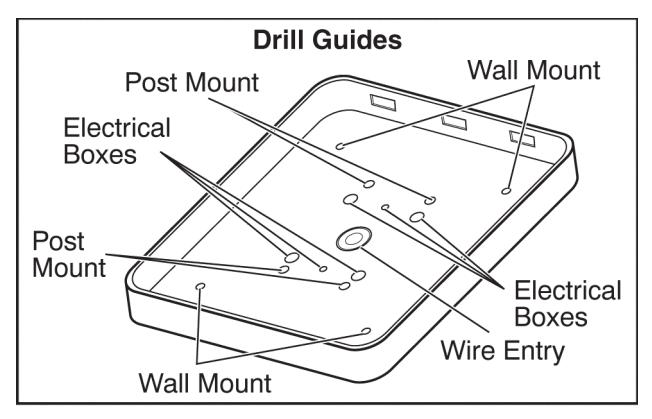
- 1. Drill holes as needed per installation diagram shown to the right.
- 2. Feed cable through 3/4" hole in mounting plate.
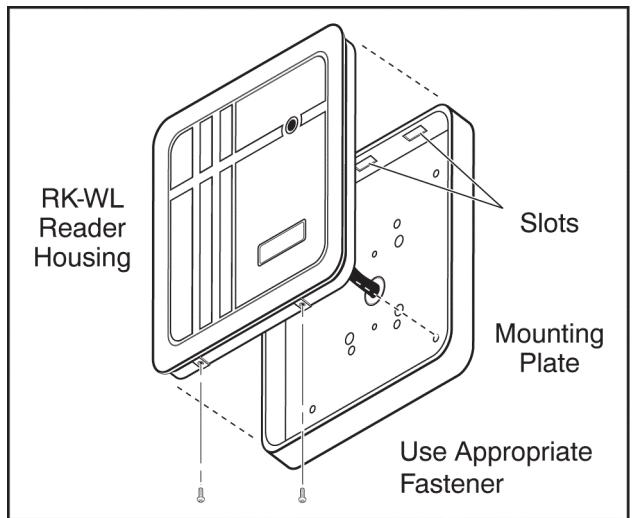
- 3. Attach the mounting plate to the mounting surface with the appropriate fasteners.
- 4. If the reader will be mounted on a metallic surface as large as, or larger than the reader housing, install a one-inch non-metallic spacer behind the reader mounting plate.
- 5. Connect RK-WL cable per wiring diagram shown on the reverse side.
- 6. Attach the housing to the mounting plate by inserting the three tabs inside the top of the housing into the three slots at the top of the mounting plate.
- 7. Secure by installing supplied screws into the holes at the bottom of the reader.

- 1. RK-WL readers can interfere with one another. If you have two or more RK-WL units, locate them at least 8 feet apart.
- 2. Extended range readers will generally perform better in outdoor applications and less well for interior applications.
- 3. Read distance can be adversely effected by nearby metal, electronic equipment and power lines. Radio transmitters (i.e. CB radio, wireless intercoms) can also deteriorate performance.
- 4. Before mounting the reader we recommend connecting it to a 12VDC battery or power supply and trying it in different orientations. Sometimes a slight change of angle can improve range considerably.
SPECIFICATIONS
OUTPUTS & INPUTS
Wiegand Output Data 1 and Data 0
Output Sink Current: 100mA; Output Source Current: 5mA
LED/Buzzer Control
LED Bicolor (Red or Green)
Buzzer Short chirp upon presentation of
any compatible Secura Key transponder, also controlled
by input.
Cable Required Maximum Distance - 500 ft.- 5 to 7 conductor .
20 gauge shielded cable
(depends on LED and Buzzer control used)
ENVIRONMENT Access Control Unit and Card/Key Tag
Ambient Temperature
-40° to +70°C (-40° to +158°F) Humidity 0 to 100%, non-condensing
OVER FOR ADDITIONAL INFORMATION

20301 Nordhoff Street • Chatsworth, CA 91311 Phone: 818-882-0020 • Fax: (818) 882-7052
TOLL-FREE: (800) 891-0020 E-mail: mail@securakey.com Web site: www.securakey.com
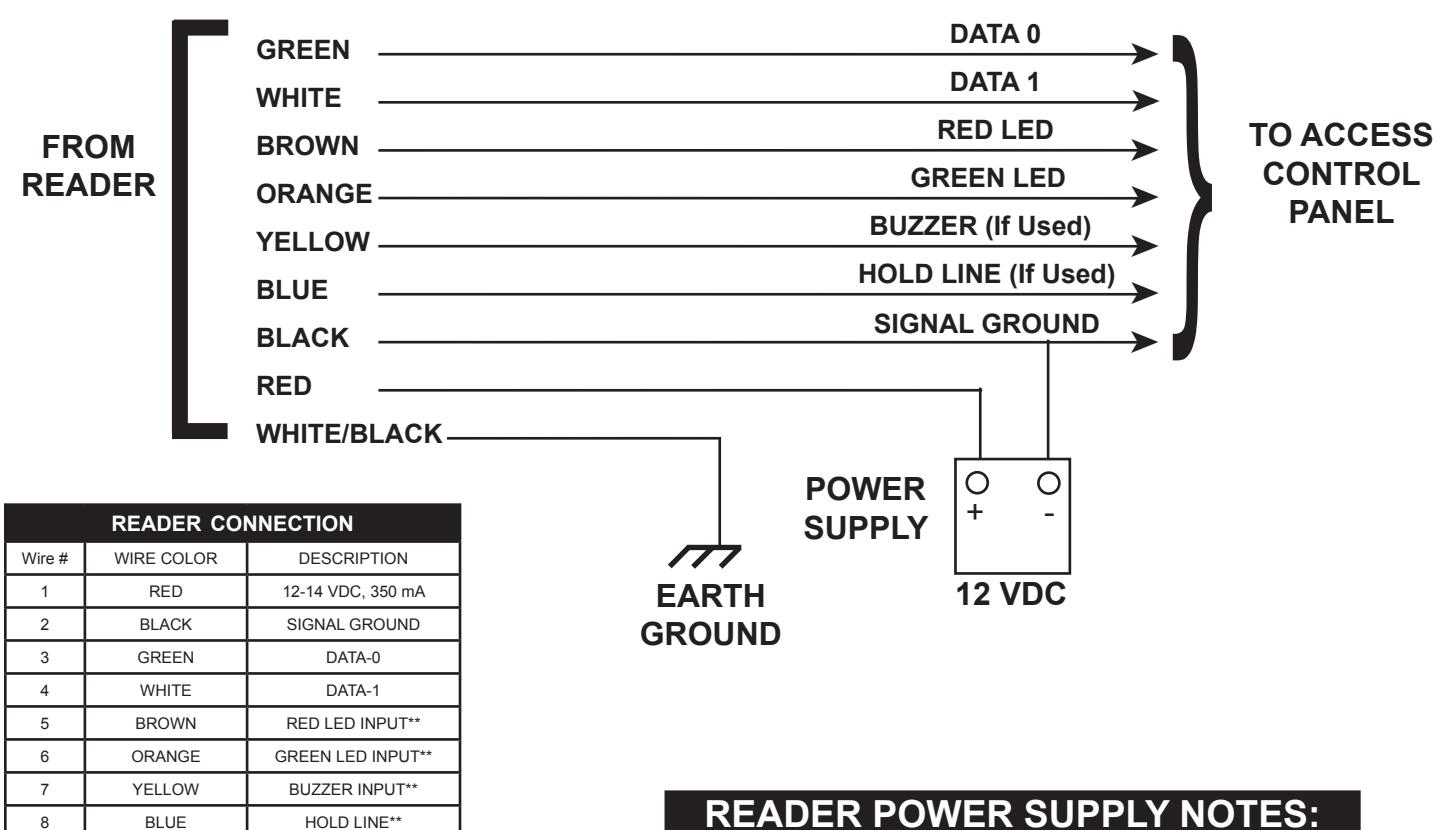
When used with SK-ACP, a separate power supply must be used.
WHITE/BLACK
VIOLET
WHITE/BROWN
q
10
11
12
** Connect to GROLIND to activate
READER POWER SUPPLY NOTES:
Connect the red and black wires from the reader to a 12VDC power supply. Do NOT attempt to power the reader directly from the access control panel.
INSTRUCTION TO THE USER FCC ID: NNHRKWL
This equipment has been tested and found to comply with the limits for a class B digital device, pursuant to part 15 of the FCC Rules. These limits are designed to provide reasonable protection against harmful interference in a residential installation. This equipment generates, uses and can radiate radio frequency energy and if not installed and used in accordance with the instructions, may cause harmful interference to radio communications. However, there is no guarantee that interference will not occur in a particular installation. If this equipment does cause harmful interference to radio or television reception, which can be determined by turning the equipment off and on, the user is encouraged to try to correct the interference by one or more or the following measures:
Reorient or relocate the receiving antenna.
EARTH GROUND
NOT USED
NOT USED NOT USED
- Increase the separation between the equipment and receiver.
- Connect the equipment into an outlet of a circuit different from that to which the receiver is connected.
- Consult the dealer or an experienced radio/TV technician for help.
This equipment has been certified to comply with the limits for a class B computing device, pursuant to FCC Rules. In order to maintain compliance with FCC regulations, shielded cables must be used with this equipment. Operation with non-approved equipment or unshielded cables is likely to result in interference to radio and TV reception. The user is cautioned that changes and modifications made to the equipment without the approval of the manufacturer could void the user's authority to operate this equipment.



20301 Nordhoff Street • Chatsworth, CA 91311 phone 818-882-0020 • fax 818-882-7052 TOLL-FREE (800) 891-0020
E-mail: mail@securakey.com Web site: www.securakey.com