Securakey Installation Instructions NET-CONV-P – For use with SK-ACP
Open the original PDF document
View PDFInstallation Instructions NET-CONV-P
Optically Isolated RS-232/RS-485 Converter
For Use with the SK-ACP Access Control Panel and 28SA-Plus
The NET-CONV-P (or NET-CONV without power supply) RS-232/RS-485 Converter is specially-configured for connecting a PC to a Secura Key Single Twisted Pair RS-485 reader network connecting one or more SK-ACP panels or 28SA-Plus access control units.
The converter plugs directly into the PC's DB-9 male COM port connector. If the COM port is a DB-25, a standard 9-Pin to 25-Pin adapter can be used.
Each RS485 input line is coupled through an optical isolator, which eliminates the direct wire path from the reader network to the PC, protecting against damage from voltage spikes and transients.
WARNING
If your system is located in an area with frequent lightning, and the reader network cable will be run between buildings, buried under ground or located near bodies of water, additional power and data transient protection between the converter and the network is highly recommended. Clamping voltage should be no less than 20 VDC.
The single twisted pair network is connected to the converter's screw terminal block (See below). For the 28SA-Plus, the wire colors shown (Black, Brown, Red) match with the cable at the Network Module installed in each reader. For the SK-ACP, be sure that TD(A) connects to J8 2A and RD (B) connects to J8 1B. Your data cable may have different colors; it is only important that the proper conductors are routed back to the proper inputs at the converter, TD(A) or RD(B). Jumpers from TD(A) to RD(A) and TD(B) to RD(B) must be connected by installer for proper operation. On the converter, a pair of jumpers is labeled ECHO. Factory Jumper OFF must be removed (open), Factory Jumper ON must be connected (jumpered).
Strip cable ends and use a miniature flat-blade screwdriver to tighten the wires down. Connect the power supply as shown, paying careful attention to polarity.
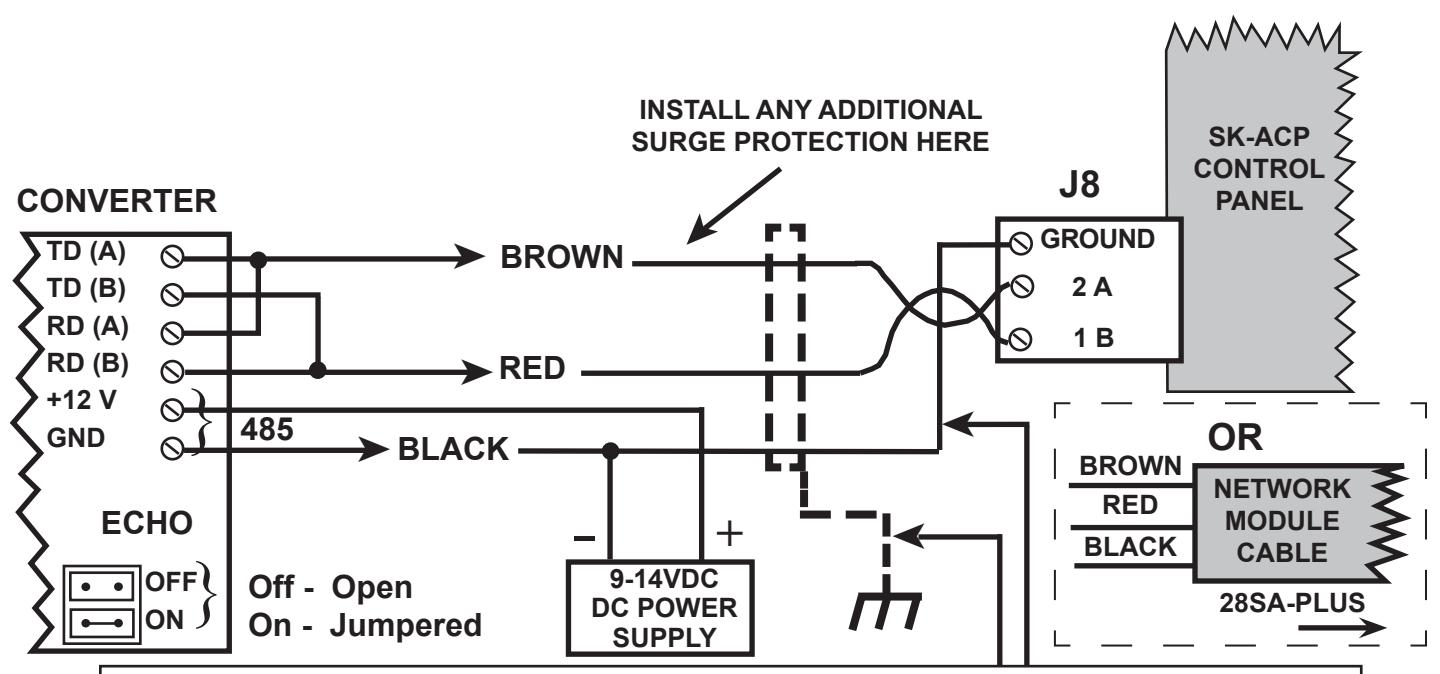
Earth Grounded Shield is highly recommended in environments subject to high voltage electrical discharge (i.e. lightning). Shield should be connected to earth ground only at one end of the cable. DC Signal Ground may be necessary in networks with very long wire runs. DC Signal Ground wire is NOT to be connected to earth ground.
Installation Instructions NET-CONV-P
Optically Isolated RS-232/RS-485 Converter
For Use with the ET4-WX_, ET8-SR-X-_ or RK-XR_
The NET-CONV-P (or NET-CONV without power supply) RS-232/RS-485 Converter is specially-configured for connecting a PC to a Secura Key Single Twisted Pair RS-485 reader network, connecting one or more addressible RS-485 readers.
The converter plugs directly into the PC's DB-9 male COM port connector. If the COM port is a DB-25, a standard 9-Pin to 25-Pin adapter can be used.
Each RS485 input line is coupled through an optical isolator, which eliminates the direct wire path from the reader network to the PC, protecting against damage from voltage spikes and transients.
WARNING
If your system is located in an area with frequent lightning, and the reader network cable will be run between buildings, buried under ground or located near bodies of water, additional power and data transient protection between the converter and the network is highly recommended. Clamping voltage should be no less than 20 VDC.
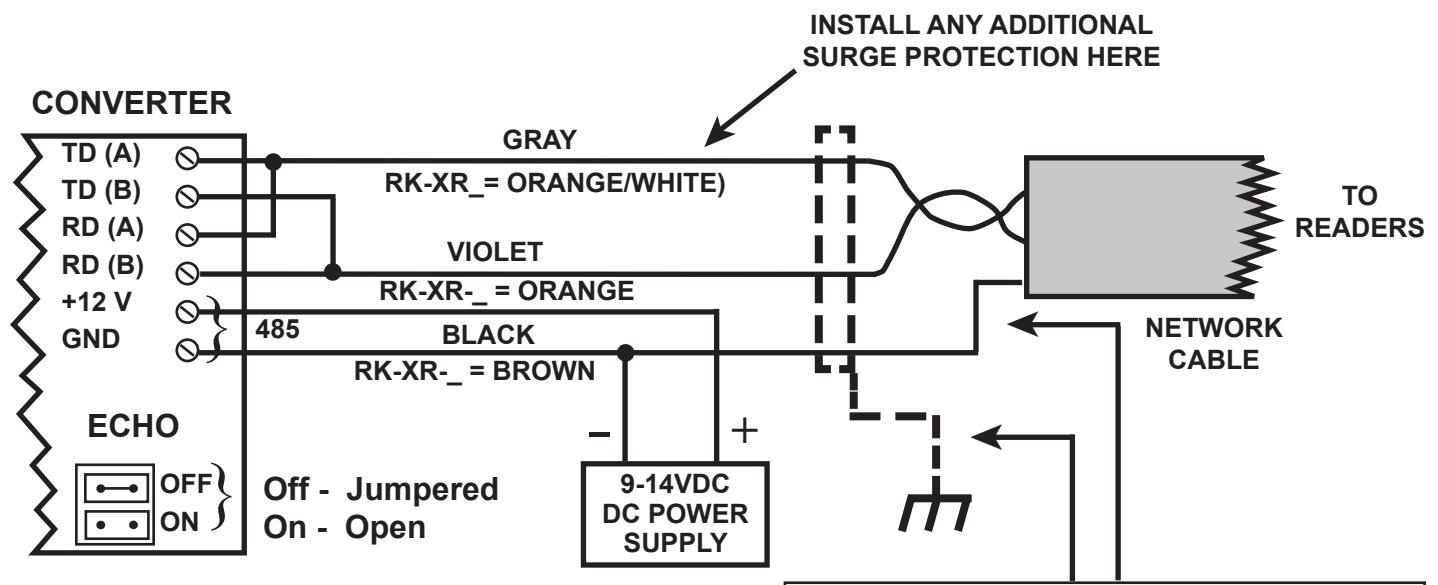
The single twisted pair network is connected to the converter's screw terminal block (See below). Wire colors shown match with the cable installed in each reader. Your data cable may have different colors; it is only important that the proper conductors from each reader are routed back to the proper inputs at the converter, TD(A) or RD(B). Jumpers from TD(A) to RD(A) and TD(B) to RD(B) must be connected by installer for proper operation. On the converter a pair of jumpers is labeled ECHO. Factory Jumper ON must be removed (open), Factory Jumper OFF must be connected (jumpered).
Strip cable ends and use a miniature flat-blade screwdriver to tighten the wires down. Connect the power supply as shown, paying careful attention to polarity.

20301 NORDHOFF STREET CHATSWORTH, CA 91311 PHONE (818) 882-0020 • FAX (818) 882-7052 TOLL FREE (800) 891-0020 E-mail: mail@securakey.com Web site: www.securakey.com
Earth Grounded Shield is highly recommended in environments subject to high voltage electrical discharge (i.e. lightning). Shield should be connected to earth ground only at one end of the cable. DC Signal Ground may be necessary in networks with very long wire runs. DC Signal Ground wire is NOT to be connected to earth ground.