Securakey ET8-SR-X-M Manual
Open the original PDF document
View PDFe*Tag® ET8-SR-X-M Installation Instructions
Installation Steps For Mullion Reader
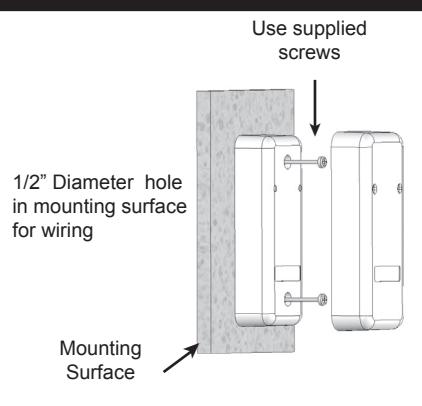
- 1. This reader is designed to mount on any flat surface. If mounting it outdoors, especially on a rough surface like masonry, we recommend that you seal the reader with silicone caulking.
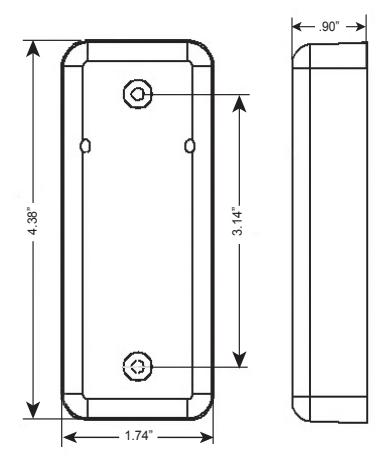
- 2. Drill a 1/2" hole for the wiring connection. Using the reader as a template, mark the location of the two mounting holes. Drill two 1/8" pilot holes for the mounting screws.
- 3. Splice the connector pigtail to cable that has been home run to the control panel or host system. Insert the connector into the back of the reader.
- 4. Attach the reader to the surface using the two machine screws provided. These may be replaced with tamper proof screws (customer supplied).
- 5. Slip on the decorative cover (if used) until both tabs snap into place.
MULLION INSTALLATION DIAGRAM .90"
SPECIFICATIONS:
POWER REQUIREMENTS
5-14 VDC, Idle: 30 mA, When reading card: 65 mA
INDICATORS
LED Host-driven, bi-color (Red /Green) Buzzer Host-driven
INPUTS & OUTPUTS
Open Collector Rating 20 VDC @ 80 mA
Solid State Relay 60V max – 1.0A AC / 2.0A DC
Inputs 1 – 4 Ground to Activate Cable Distance Up to 500'
Cable Type 2-10 cond depending on I/O used
22-24 AWG
ENVIRONMENT
Ambient Temperature -40° to +70°C (-40° to +158° F) Humidity 0 to 100% (non-condensing)
COMMUNICATIONS
RS-485 Host Driven Protocol Cable Distance 4,000 ft. total system Cable Type 2 twisted-pair, 22-24AWG
or CAT-5
| Wire Color | ET8-SR-X-M |
|---|---|
| GREEN | Open Collector 1 |
| WHITE | Open Collector 2 |
| VIOLET | RS-485-B |
| GRAY | RS-485-A |
| ORANGE | Input 1 |
| BROWN | Input 2 |
| YELLOW | Input 3 |
| BLUE | Input 4 |
| RED | 5-14VDC + |
| BLACK | DC Ground |
| WHITE/BLACK | RELAY |
| WHITE/BROWN | RELAY |
& quot;Changes or modifications not expressly approved by the party responsible for compliance could void the user's authority to operate the equipment".
INSTRUCTION TO THE USER FCC ID: NNHETAGS8
This equipment has been tested and found to comply with the limits for a class B digital device, pursuant to part 15 of the FCC Rules. These limits are designed to provide reasonable protection against harmful interference in a residential installation. This equipment generates, uses and can radiate radio frequency energy and if not installed and used in accordance with the instructions, may cause harmful interference to radio communications. However, there is no guarantee that interference will not occur in a particular installation. If this equipment does cause harmful interference to radio or television reception, which can be determined by turning the equipment off and on, the user is encouraged to try to correct the interference by one or more or the following measures:
- Reorient or relocate the receiving antenna.
- Increase the separation between the equipment and receiver.
- Connect the equipment into an outlet of a circuit different from that to which the receiver is connected.
- Consult the dealer or an experienced radio/TV technician for help.
This equipment has been certified to comply with the limits for a class B computing device, pursuant to FCC Rules. In order to maintain compliance with FCC regulations, shielded cables must be used with this equipment. Operation with non-approved equipment or unshielded cables is likely to result in interference to radio and TV reception. The user is cautioned that changes and modifications made to the equipment without the approval of the manufacturer could void the user's authority to operate this equipment.

20301 Nordhoff Street Chatsworth, CA 91311 phone 818-882-0020 fax 818-882-7052 TOLL-FREE (800) 891-0020 E-mail: mail@securakey.com Web site: www.securakey.com