Securakey Card Access Configuration Guide
Open the original PDF document
View PDFSECURA KEY CARD ACCESS CONFIGURATION GUIDE Multi-Reader Systems with NOVA.16 (SK-MRCP) 16-Door Panel
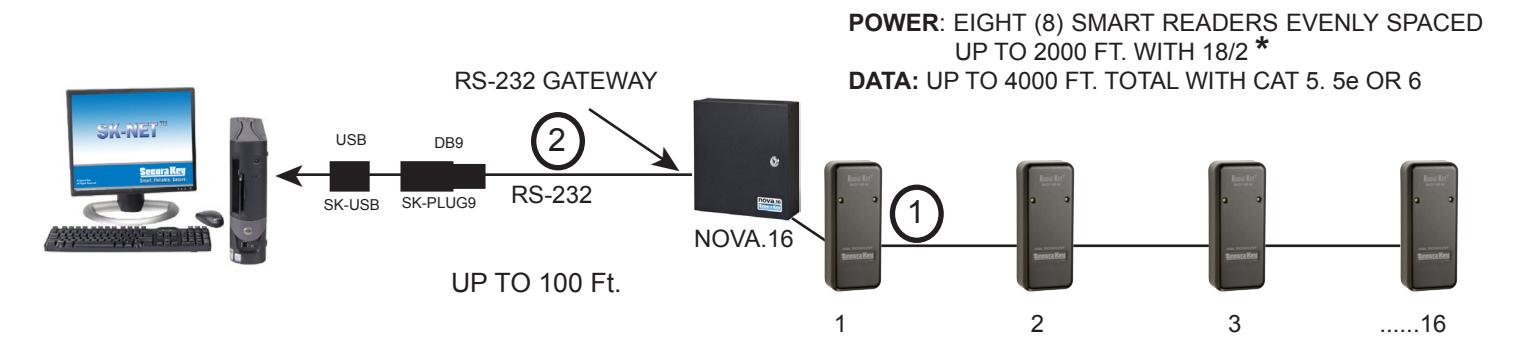
NOVA.16 (SK-MRCP) SYSTEM USING SK-NET™ SOFTWARE WITH RS-232 GATEWAY CONNECTED DIRECTLY TO A PC
NOVA.16 (SK-MRCP) SYSTEM USING SK-NET™ SOFTWARE WITH RS-232 TO RS-485 CONVERTER (NET-CONV-P)
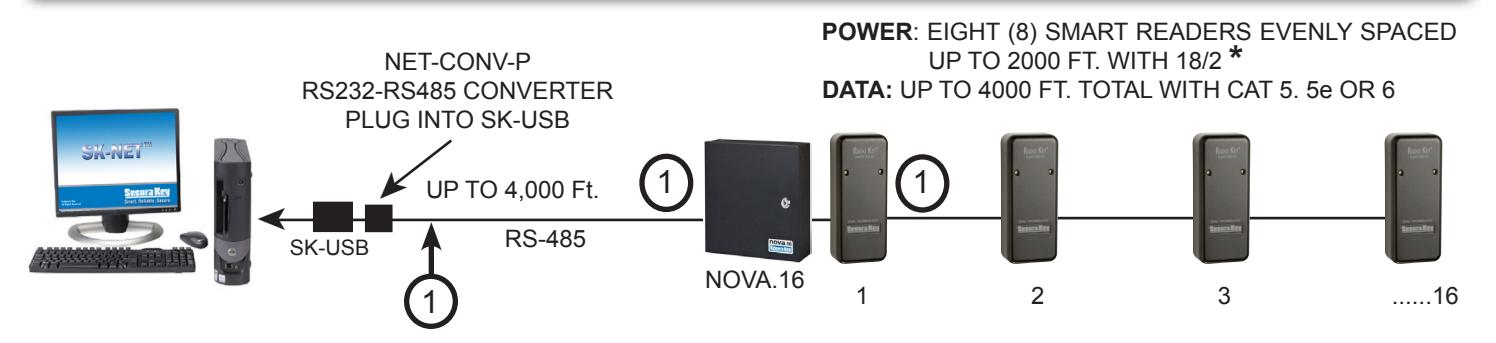
* NOVA.16 HAS TWO SEPARATELY FUSED 14VDC POWER OUTPUTS - EACH HANDLES MULTIPLE READERS
NOVA.16 (SK-MRCP) SYSTEM USING SK-NET™ SOFTWARE WITH SINGLE LOCATION RS-232 CONNECTION
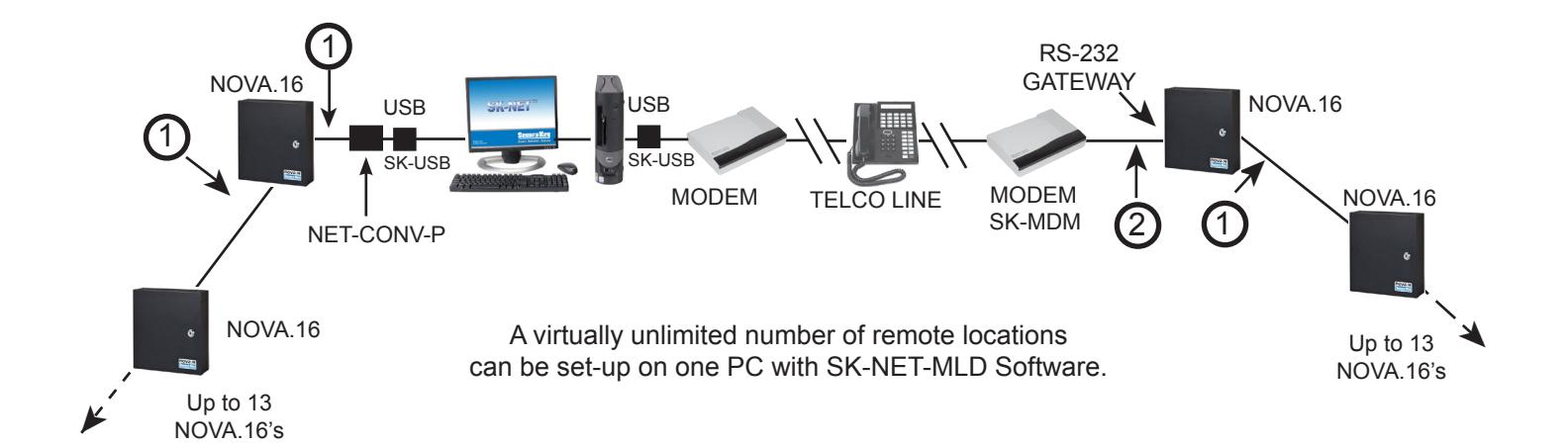
NOVA.16 (SK-MRCP) MULTI LOCATION SYSTEM WITH SK-NET-MLD SOFTWARE
NETWORK WIRING CONNECTIONS
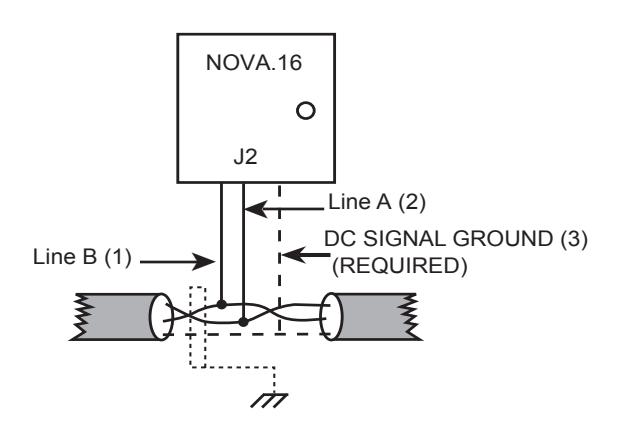
Earth Grounded Shield is highly recommended in environments subject to high voltage electrical discharge (i.e. lightning). Shield should be connected to earth ground only at one end of the cable. DC Signal ground is required. DC Ground wire is NOT to be connected to earth ground.
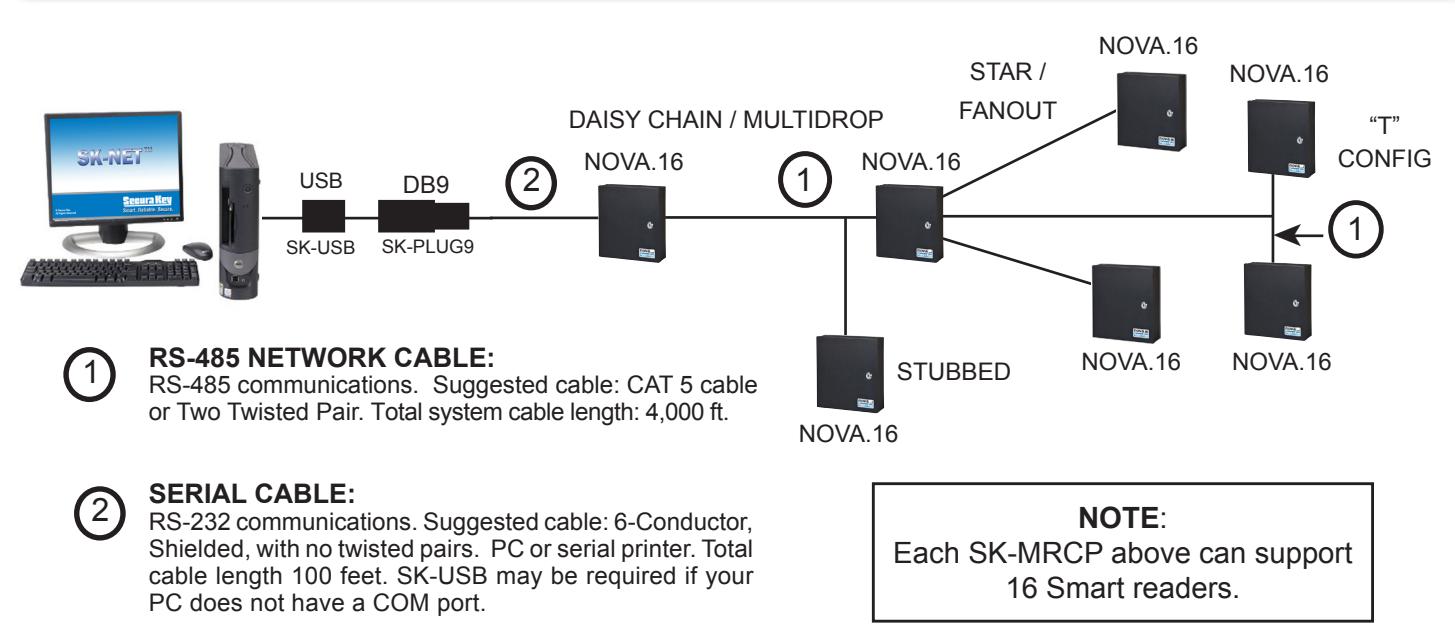
NOVA.16 (SK-MRCP) SYSTEM USING SK-NET™ SOFTWARE SINGLE LOCATION RS-485 with CONVERTER

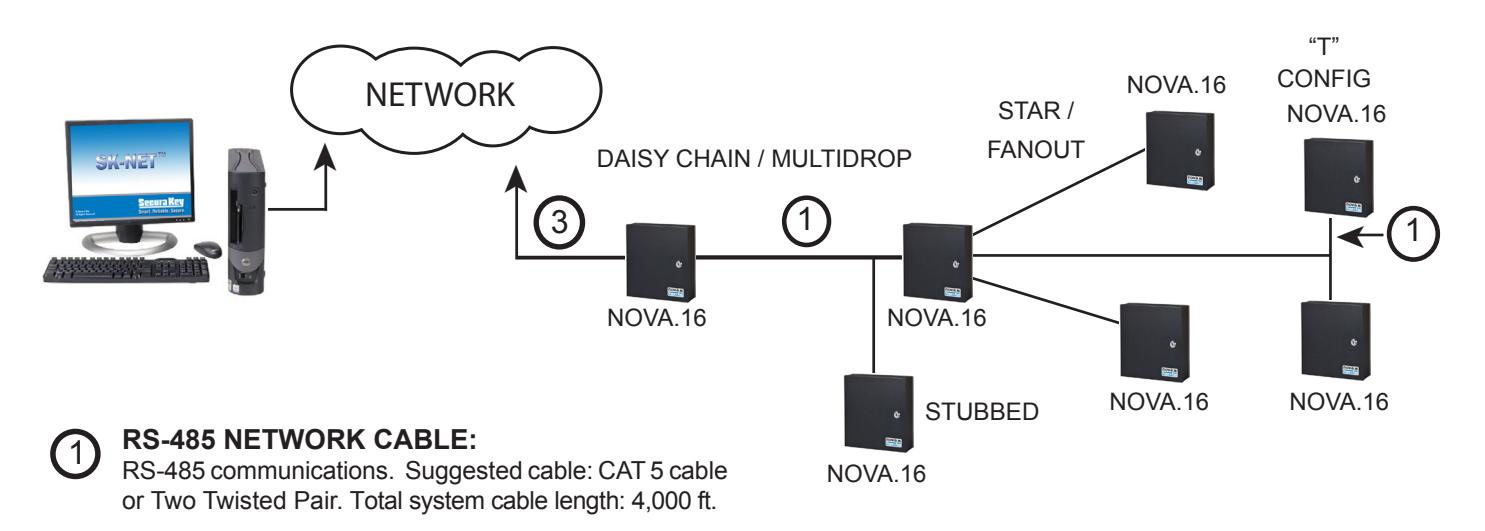
RS-485 NETWORK CABLE:
RS-485 communications. Suggested cable: CAT 5 cable or Two Twisted Pair. Total system cable length: 4,000 ft.
SERIAL CABLE:
RS-232 communications. Suggested cable: 6-Conductor, Shielded, with no twisted pairs. PC or serial printer. Total cable length 100 feet. SK-USB may be required if your PC does not have a COM port.
Note: When using the RS-232 to RS-485 converter, you cannot use the stubbed, star fanout or "T" configuration. All network connections from SK-MRCP to the next SK-MRCP must be in parallel with each other. The J2 connector, Pins 1 and 2 must be a twisted pair. Pin 3 (Ground) uses a conductor from another pair, if you are using CAT 5 or CAT 6 cable.
NOVA.16 (SK-MRCP) SYSTEM USING SK-NET-MLD SOFTWARE WITH MULTIPLE LAN CONNECTIONS
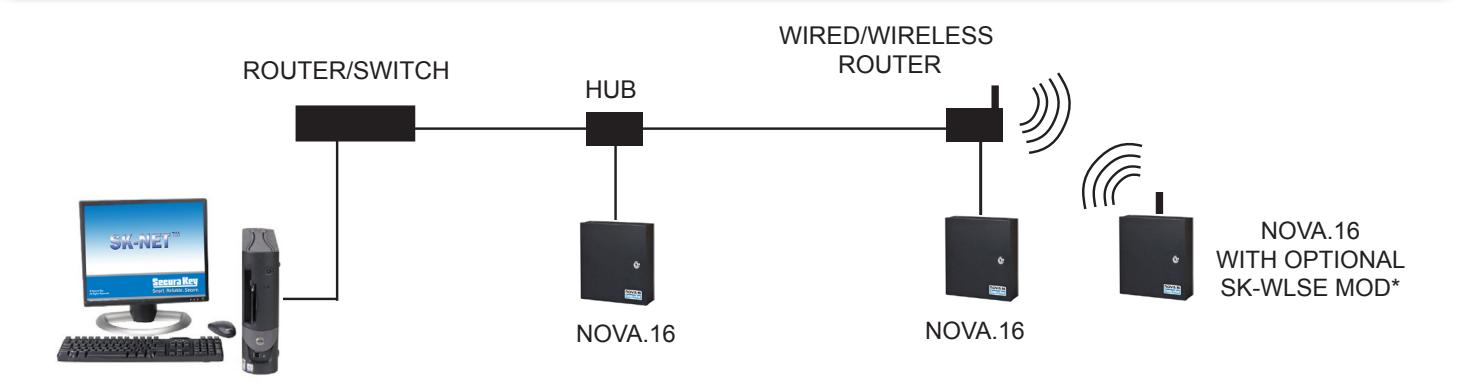
3 ETHERNET CABLE: (Required cables CAT 5e or CAT 6).
Wired: max distance 300' (100m) between devices. Wireless: Typically 100-200' (30-60m) depending on interference, building structure and metal objects.
NOTE : Each SK-MRCP above can support 16 Smart Readers.
* Call Factory for availability.
NOVA.16 (SK-MRCP) SYSTEM USING SK-NETTM SOFTWARE SINGLE LOCATION WITH LAN CONNECTION
NOTE : SK-NET-MLD software must be used when connecting more than one SK-MRCP to the LAN. This can also be a remote location connected over a WAN, if a static IP address is used at each remote site.
SERIAL CABLE: 2
RS-232 communications. Suggested cable: 6-Conductor, Shielded, with no twisted pairs. PC or serial printer. Total cable length 100 feet.
3 ETHERNET CABLE: Standard Ethernet cable connector connected to existing LAN.
NOTE: Each SK-MRCP above can support 16 smart readers.
SYSTEM equipment components
ACCESS CONTROL UNIT:
NOVA.16 (SK-MRCP): 16-Door Access Control Unit with Ethernet connector
Radio Key® Low Frequency Proximity
READERS - Proximity Smart Reader (16 per SK-MRCP)
RKDT-SR-M (Mullion Style Reader)
RKDT-SR-S (Switchplate Style Reader)
CARDS/TAGS:
RKCM-02-2 Molded Proximity Cards - 26/32 bit encoding
RKKT-02-2 Key Tags - 26/32 bit encoding
RKCI-02-2 ISO Proximity Cards - 26/32 bit encoding
E*Tag® High Frequency Proximity:
READERS -Contactless Smart Readers (16 per SK-MRCP)
ET8-SR-X-M (Mullion Style Reader)
ET8-SR-X-D-W, or ET8-SR-X-D-I (Switchplate/ Decora Style Reader, white or ivory)
CARDS/TAGS:
ETCI04-1- ISO Card- 26/32 bit encoding
ETCI04-4- ISO Card- 26/32 bit encoding, Mag-Stripe
ETST03-1-Key Tag Trapezoidal - 26/32 bit encoding
ETKT03-1 Key Tag, Rounded End, 26/32 bit encoding
SOFTWARE:
SK-NET™-DM - Basic Software - USB Flash Drive & Manual
SK-NET™-MLD - Multi-Location Software with USB Flash Drive and manual
SK-NET-MLD - CSXX (XX= 2,5,10 or 15 workstations)
USB Flash Drive and Manual with Client Server License
| MINIMUM REQUIREMENTS* | |||
|---|---|---|---|
| OPERATING SYSTEM |
PROCESSOR
SPEED |
RAM |
AVAILABLE
DISK SPACE |
|
WINDOWS® XP OR
NEWER |
1 GHz | 1 GB | 1 GB |
| * For larger installation more disk space may be required. | |||
| RECOMMENDED SYSTEM | |||
|
WINDOWS® XP OR
NEWER |
2 GHz | 2 GB | 10 GB |
| * For larger installation more disk space may be required. | |||
| SERVER REQUIREMENT (FOR CLIENT/SERVER VERSIONS)** | |||
|
WINDOWS® 2003
OR NEWER |
2 GHz | 1 GB | 1 GB |
** For SK-NET-MLD-C/S version, a server is required to install ADS and the database. SK-NET™ must be installed on a workstation only.
Required Peripherals:
RS-232 COM Port, USB Port or TCP/IP, a modem if you use dial-up and a printer for reports.
PC REQUIREMENTS: See Table
ACCESSORIES:
NET-CONV-P - RS-232 to RS-485 Converter with Power Supply (plug into SK-USB)
RELAY BOARDS — ELK-924 Sensitive Relay, Altronix RBSN or RBSNTTL Relay Modules (Contact your dist.)
RS-232E - Connects J11 MTA connector to DB9
SK-24VDC - DC power supply, provides 1A@24VDC.
SK-SR1 - SecuRelay™ Intelligent Relay Module
SK-MDM - Modem - 56K Baud External Modem for dial-up connection to any SK-MRCP with MLD software
SK-ACP-PS - 1A, 24VDC 4.0 AH supply and stand by battery for SK-MRCP.
SK-BAT - 4.0 AH standby battery for SK-MRCP.
SK-PLUG9 - Computer connector (DB9) with wire pigtail.
SK-USB - Converts USB Port at PC to serial COM Port with DB9 connector
SK-WIO-1 - One-door Wiegand Reader Interface, Connects to RS-485 Peripheral Bus
SK-WLSE-MOD* - Wireless LAN adapter, 802.11 b/g. Powered by SK-MRCP. Connect at J6 and set jumpers.
SK-XFRMR - 16.5VAC 40VA Transformer for SK-MRCP.
* Contact Factory for Availability.
SECURA KEY sk-MRCP Typical Door Installation
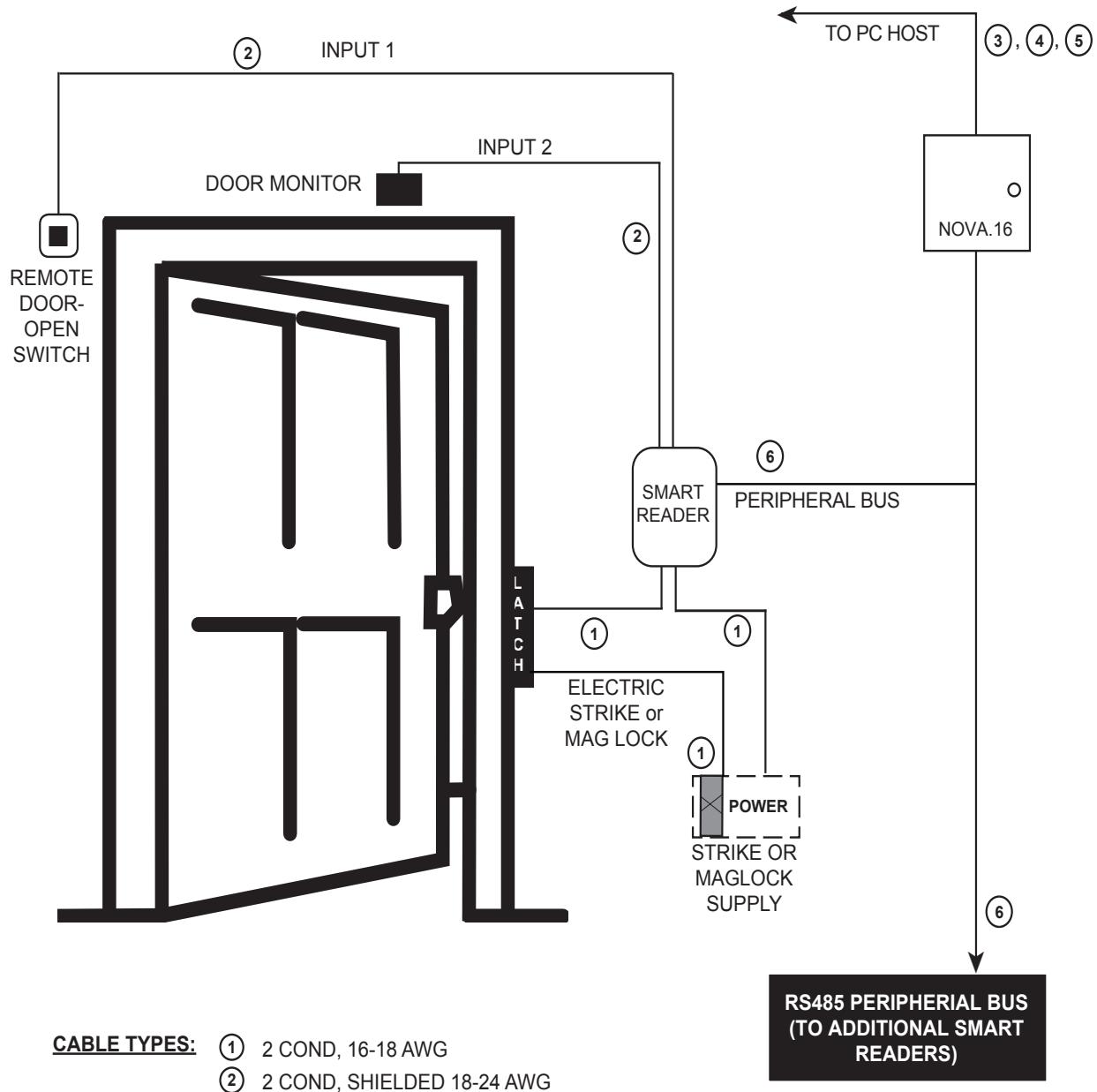
- 2 COND, SHIELDED 18-24 AWG
- RS-485 CAT 5 NETWORK CABLE OR TWO TWISTED PAIR 3
- 4 TCP/IP - CAT 5e OR CAT6 ETHERNET CABLE
- 5 RS232-5 or 6 CONDUCTOR, SHIELDED, NON-TWISTED
-
6
DATA & READER POWER CABLE:
- CAT 5 (RS-485) + 18/2 (reader Power)
- Coleman 97395-06-23 CAT5 + 18/2 siamese cable

20301 NORDHOFF STREET CHATSWORTH, CA 91311 PHONE (818) 882-0020 • FAX (818) 882-7052 TOLL FREE (800) 891-0020 7995 mail@securakey.com • www.securakey.com