Securakey Access Control System Worksheet – Using Pre-Packaged Kits
Open the original PDF document
View PDFSECURA KEY
Access Control System Worksheet
SECURA KEY PRODUCTS
The SECURA KEY access control system uses one or more control panels, each connected to one or two card readers, keypads or biometric sensors. The system is programmed using SK-NET™ software running on a Windows computer (XP, Vista, Windows 7/8). The following questions will guide you through the process of designing a system, and will help you to develop an equipment list and a total cost. This worksheet also allows you to build a system based on our pre-packaged 2-door system kits, or by ordering individual components which meet your custom requirements.
Designing a System Using Pre-Packaged Kits
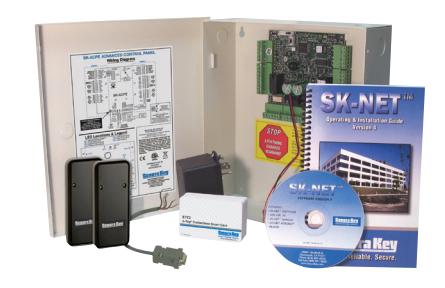
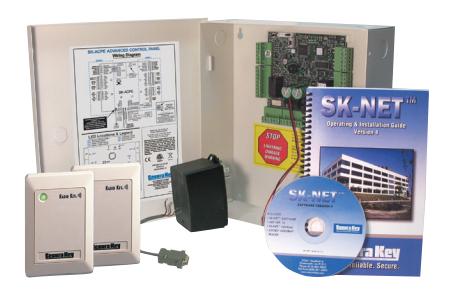
You can save 12-22% on hardware costs by using our pre-packaged kits to configure your system. e*ACCESS kits feature Secura Key's e*Tag® smart card technology, which offers higher security and additional data storage on the card, but works just like proximity. SYSKITs feature Secura Key's Radio Key® reliable proximity technology. Each kit has a control panel, two readers and a power supply. Starter Kits also include the SK-NET-DM basic software, a PC cable and 25 cards. Add-on kits do not include software, cable or cards, and Starter Kits Without Cards allow the user to purchase keytags or custom cards separately.
To design a system, purchase a starter kit (with or without cards) for the first two doors, and an add-on kit for every additional 2 doors. Additional cards can be purchase separately.
Note: If you are using pre-packaged kits, please review the rest of the Worksheet, which discusses other components not included in the kits, such as spares, lightning suppression, network modules, power supplies, cable and door locking devices
| Kit Part Number | Description | ||
|---|---|---|---|
| e*ACCESS KITS - Featuring Smart Card Technology | |||
| e*ACCESS1 | Starter Kit, mullion readers | ||
| e*ACCESS2 | Starter Kit, Wall switch readers | ||
| e*ACCESS3 | Add-on Kit, mullion readers | ||
| e*ACCESS4 | Add-on Kit, Wall switch readers | ||
| e*ACCESS5 | Starter Kit, Mullion readers, no cards | ||
| e*ACCESS6 | Starter Kit, Wall switch readers, no cards | ||
| SYS-KITS - Featuring Radio Key® Proximity Technology | ||||
|---|---|---|---|---|
| SYSKIT1 | Starter Kit, mullion readers | |||
| SYSKIT2 | Starter Kit, Wallswitch readers | |||
| SYSKIT3 | Add-on Kit, mullion readers | |||
| SYSKIT4 | Add-on Kit, Wallswitch readers | |||
| SYSKIT5 | Starter Kit, Mullion readers, no cards | |||
| SYSKIT6 | Starter Kit, Wallswitch readers, no cards | |||
| Starter Kit | 1 x | Cost each | |
|---|---|---|---|
| (For Readers 1 & 2): | starter kits | total cost | |
|
Add-on Kits
(For Systems with more than 2 readers): |
# Readers |
() X ½ =) x
# add-on kits total cost |
|
Total Cost:
Designing a System, using Individual Components
How many readers will there be?
Usually there will be one reader per door, but if you want to monitor traffic in and out, you will need two readers per door. The readers must be located within 500 feet of a control panel, so you may need an additional panel for any single door which is located over 1000 feet away from other doors. Each SK-ACPE supports 2 readers.
SK-ACPE-LE Control Panel
_____________ (divided by)2 = __________ X ________ = ________ # of readers # of panels cost each Total Cost
Secura Key offers a variety of readers that can be used with the SK-ACPE-LE. Wiegand output readers by other manufacturers can also be used. You can review reader choices on our web site.
Card Readers
e*Tag® Contactless Smart Card Readers: ET8-RO-W-M ___ ET8-RO-W-D ___ ET4-WXM ___ ET4-WXS ___ Radio Key® 125 KHz Proximity Readers: RK-WM ___ RK-WS ___ RK-WL ___ Wiegand-Output Piezo Keypads: SK-KPM ___ SK-KPS ___ Dual Technology HID Compatible Readers RKDT-WS____ RKDT-WM___ _________ X ________ = ________ # of readers cost each Total Cost
Spares (optional)
Although Secura Key equipment is well-known for its reliability, we recommend that you order up to 10% spares for readers and SK-ACPE-PCBAs (printed circuit boards), particularly in areas with high lightning activity.
Spare Readers __________ X ________ = ___________ # of readers x 10% cost each Total Cost Spare SK-ACPE-PCBAs ___________ X ________ = ___________ # of panels x 10% cost each Total Cost
How many cards or key tags do you need?
Minimum order quantity for cards and tags is 50. (Packs of 25 are available from stock, but you have no choice of the facility code or card numbering.) You must order the correct card/tag type to match the readers selected.
Cards for e*Tag® readers:
ETCI-04 or ETCI-04 standard cards (specify format) ETST-03 or ETKT-03 key tags (specify format)
Cards for Radio Key® readers:
RKCM-02 (Format 201 (26bit) or Format 303 (32bit) molded cards) RKCI-02 (Format 201 (26bit) or Format 303 (32bit) ISO cards) RKKT-02 (Format 201 (26bit) or Format 303 (32bit) key tags)
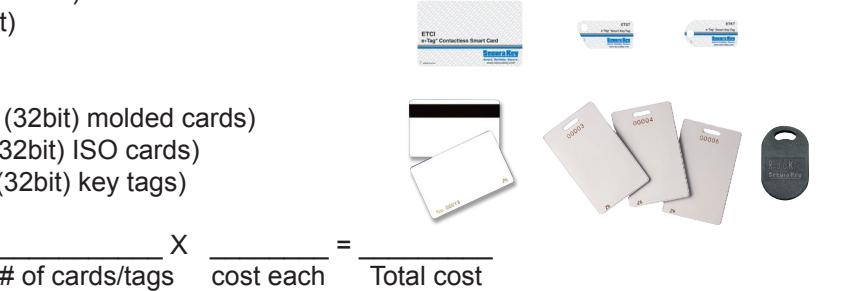
Additional Cards
In addition to one card per employee/user, we recommend that you order additional cards, so that you can quickly replace cards which are lost, stolen, or damaged.
___________ X ________ = _________ # of cards/tags cost each Total cost
How will you provide power to the system?
In most cases, you can connect each SK-ACPE-LE to a low voltage power source (at least 500 mA) and the readers will receive power from the control panel. We recommend using our SK-24VDC, 1Amp power supply or our SK-XFRMR 16.5 VAC, 40 VA transformer. Either will be adequate to power the SK-ACPE and the RK-WL long range readers.
SK-ACPE-PS or SK-XFRMR Power Supply w/ Standby Battery _________ X 1 = ____________ X ________ = ________ # of panels # power supplies cost each Total Cost
How will you connect the system to your computer?
You can choose to hard-wire the system to a PC or just plug in a laptop when you want to do programming. SK-NET-MLD software is required for remote locations connected using a dial-up modem or if more than one TCP/IP connection is required.
You can connect one SK-ACPE directly to the PC or to the Network, and then additional SK-ACPEs can be daisy-chained from the first panel using RS-485 over twisted-pair cable. With SK-NET-MLD, you can connect all panels to the network, using the built-in Ethernet connector or a SK-WLSE-MOD wireless network adapter on each panel.
| Cost each | |
|---|---|
| SK-USB - Converts PC/USB connection to DB9 serial COM port. | |
| RS-232E - MTA connector to DB9 cable assembly for temporary PC connection | |
| SK-PLUG9 DB9 - plug pigtail for permanent RS-232 connection | |
| NET-CONV-P - RS-232 to RS-485 converter, for computer over 100' away | |
| SK-MDM - External 56K modem, pre-configured for SK-NET™ | |
| SK-WLSE-MOD - Plug-in module for connection to a wireless LAN | |
| Total cost: |
Lightning Protection (recommended)
In areas with high lightning activity, we recommend lightning protection devices for reader and data cables. Surge protection will minimize circuit damage from nearby lightning strikes. At a minimum, we recommend: 1 DTK-CR per card reader and 1 DTK-XR per panel (using an RS-485 connection).
________ X __________ = _________ # of readers cost DTK-CR Total Cost _________ X __________ = _________ # of panels cost DTK-XR Total Cost
Which software version do you need?
Basic SK-NET™ manages one location from one, locally connected computer. Upgrade versions allow multiple locations, remote sites and multiple workstations.
| Cost Each | |
|---|---|
| SK-NET-DM - Basic software, one PC, one LAN connection or one location. | |
| SK-NET-MLD - Multiple locations via dial-up modem or multiple TCP/IP connections | |
| SK-NET-MLD-C/S Client/Server version has features of SK-NET-MLD plus multiple | |
| workstation access and five software user levels. | |
| Total Cost: |
PRODUCTS BY OTHER MANUFACTURERS
What equipment do I need from others?
WIRE- You will need six-conductor, shielded cable (not twisted pair) between the panels and the readers. This same cable can be used to connect the PC to the panels, when the nearest panel is within 100' of the computer and the SK-PLUG9 is used. You will need two twisted-pair (or CAT5) cable between the panels and also from the NET-CONV-P (if used) to the nearest panel. You will also need standard 18-2 cable for lock, power and accessory connections.
| X | = | ||
|---|---|---|---|
| Ft. of 6 conductor cable | cost / foot | Total Cost | |
| X | = | ||
| Ft. of CAT5 / 2 twisted Pair | cost / foot | Total Cost | |
| X | = | ||
| Ft. of 18-2 cable | cost / foot | Total Cost |
LOCKS / OPERATORS - The system can operate all types of electric locking devices and gate operators. Separate power supplies should be used for these. Auxiliary controls, such as request-to-exit sensors, can also be obtained from your gate, security or low-voltage equipment supplier.
__________________ X ________ = ________ # Locks/Operators cost each Total Cost
The above guidelines cover the most common applications. For special circumstances or integration with other systems, call Secura Key for assistance.
NOTES