STB Microtechniques Finger Lock Users Instructions
Open the original PDF document
View PDF

Fingerlock
Users' instructions
IDENTIFICATION
-
FL3510
- 1.Press the ON button The LED is green
- 2.Place your finger on the sensor The LED flashes green
- 3.Open
VERIFICATION
1. FL3520
- 1. Enter your combination The LED is green
- 2.Place your finger on the sensor The LED flashes green
- 3.Open
2. FL3530
- 1. Place your key onto the contacts in the middle of the lock front The LED is green
- 2. Place your finger on the sensor The LED flashes green
- 3. Open
3. FL3530
- 1. Press the ON button and present your card, about 5 cm from the lock front The LED is green
- 2. Place your finger on the sensor The LED flashes green
- 3. Open
BATTERY MONITORING
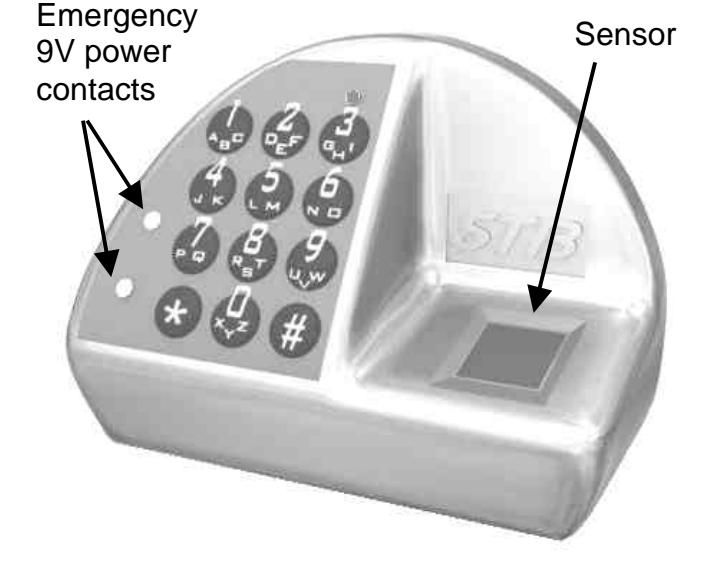
The FL3500 series automatically monitor battery voltage and are equipped with a low battery indicator. Fast orange blinking during opening indicates that batteries are low – immediately replace batteries. In case of a total loss of power, the lock can be powered from the outside, applying a 9V battery on the external contacts.
The following codes are used to inform the user of the Lock status
© STB microtechniques sa 2002
E-mail : info@stbmicro.com Website : stbmicro.com

FL3500 Users' instructions
| FL-MAUe-2702-JB | |
|---|---|
| Crée le 27.05.02 | Par: JMB |
| Contrôlé le: | Par |
| Modifié le 01.07.02 | Par: |
| Status / Event | Green | Orange | Red | Note |
|---|---|---|---|---|
| Lock asleep | ||||
| Waiting for a TAG / PIN | ||||
| Waiting for a finger | ||||
| Wrong TAG or PIN | ||||
| Wrong fingerprint | ||||
| Waiting for new TAG or PIN | Blinking | |||
| Waiting for new finger | Blinking | |||
|
Waiting for TAG or PIN to be
deleted |
Alternately | |||
| Waiting for finger to be deleted | Alternately | |||
| Lock open | Fast blinking during opening | |||
| Low battery | Fast blinking during opening | |||
| System default | Fast blinking during opening | |||
|
Opening attempt during Timelock
period |
G: 0.5s O: 0.5s R: 1s | |||
|
Opening attempt in dual mode with
non-authorized user |
G: 0.5s O: 0.5s R: 1s | |||
| Time delay | Alternately, every 10 seconds | |||
| Opening window | 2 blinks every 10 seconds | |||
| Penalty period | Alternately, every 10 seconds | |||
| Desynchronised clock | Fast blinking during opening |