Rixson Checkmate Series Standard Duty Multi-Function Installation Instructions
Open the original PDF document
View PDFStandard Duty Multi-Function
Installation Instructions
® After installing Checkmate on door and frame, select the function desired and proceed. All units are shipped as stops.
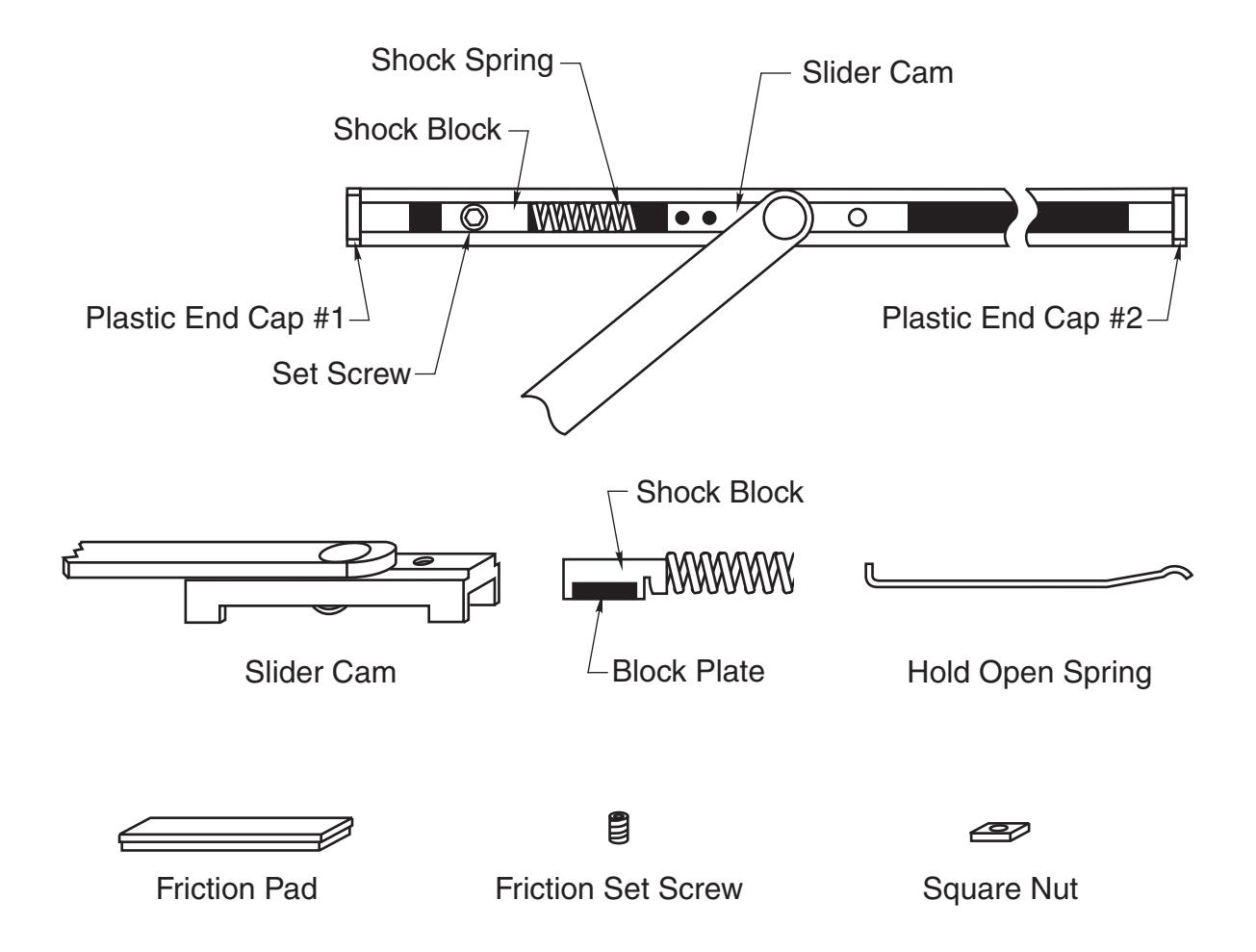
TO SELECT DEGREE OF STOP
- 1. With a 3/16" hex key wrench, loosen the set screw in the shock block.
- 2. Open door to desired degree of opening.
- 3. Slide shock block and spring until the spring touches slider cam.
- 4. Tighten set screw.
- 5. Verify door opening position and re-adjust, as needed.
| Standard Duty Multi-Function |
RIXSON
® |
|
|---|---|---|
| ASSA ABLOY | ||
| www.rixson.com | ||
| TEMPLATE NUMBER | DATE | |
| IS-5012 | 07-16 | |
WARNING:THESE FUNCTIONS CANNOT BE USED ON LABELED OPENINGS!
To Convert to Hold Open:

- 1. Follow instructions for selecting degree of stop.
- 2. With pencil, mark the position of the shock block, on the channel.
- 3. Remove the plastic end cap at the spring end of the channel. (1)
- 4. With a 3/16" hex key wrench, loosen the set screw in shock block.
- 5. Remove shock block and block pate from channel.
- 6. Insert the hold open spring into the slot of the shock block.
- 7. Replace the shock block, block plate and hold open spring into channel.
- 8. Be sure the shock plate assembly is poistioned as shown.
- 9. Replace the plastic end cap.
- 10. Slide shock block until it lines up with mark you made on the channel.
- 11. Tighten set screw of shock block.
To Convert to Friction Stay:
- 1. Follow instructions for selecting degree of stop.
- 2. Remove plastic end cap, farthest away from the spring (2).
- 3. Slide arm and slider cam out of the channel.
- 4. Turn slider cam over.
- 5. Insert the tip of a small screw driver under the round area of the spring.
- 6. Twist slightly, raising the unsecured end of the spring.
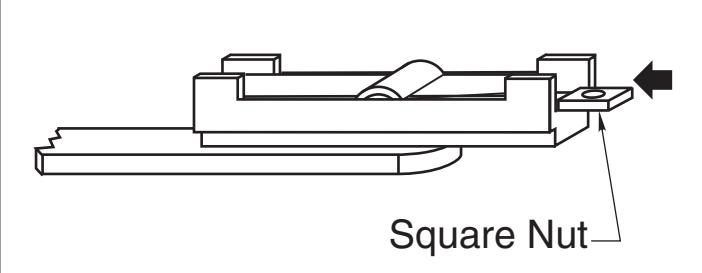
- 7. Slide square nut completely under end of spring. (Nut will drop into cavity in slider cam.)
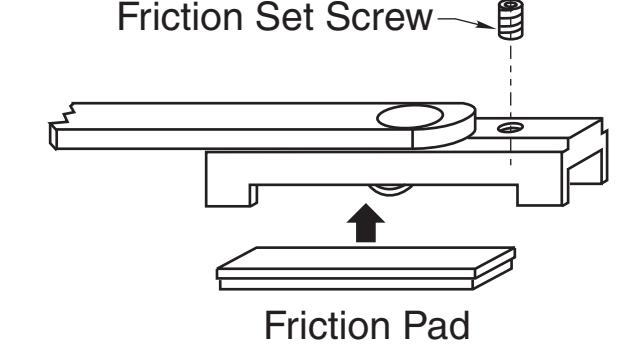
- 8. Turn slider cam and arm over, insert friction set screw into hole on top of slider cam.
- 9. Turn the set screw one revolution to start threading it into the square nut.
- 10. Place friction pad in recess in slider cam. (Metal side of friction pad closest to slider cam).
- 11. Insert the slider cam and friction pad in the channel. (End with 2 rivets are toward the spring)
- 12. Replace the plastic end cap.
- 13. Adjust the set screw to the desired tension.
Standard Duty Multi-Function
ASSA ABLOY RIXSON
www.rixson.com
TEMPLATE NUMBER DATE
07-16 IS-5012
®