Reset Unknown Lost Simplex Combination Code
Open the original PDF document
View PDFNOTICE: EFFECTIVE 12/15/2010
This document supercedes all prior revisions.
Resettingan Unknown Combination
Remove the combination chamber from the lock.
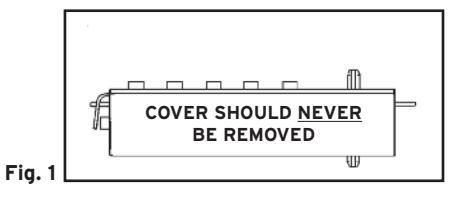
Cover Removal is NO Longer Required and Should NEVER be Removed for Lost Code Retrieval.
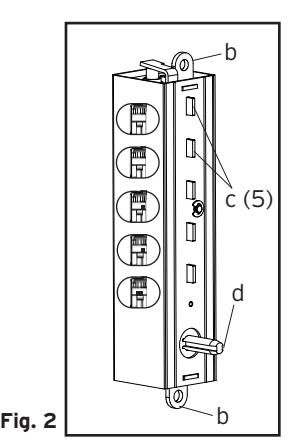
- 1. Hold the chamber in one hand by the screw tab ( b ) on each end with the key-stems ( c ) facing you and the control shaft ( d ) at the bottom (See Figure 2) .
- 2. Using pliers or equivalent, rotate the control shaft ( d ) counterclockwise and release to clear the chamber (See Figure 2) .
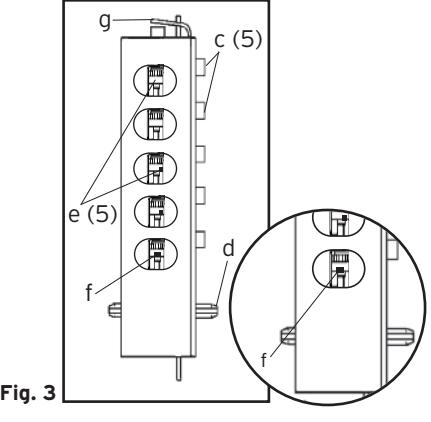
- 3. Look at the 5 code gears ( e ) found inside the oblong windows. If any code gear pockets ( f ) are already at the shear line (open position), ignore them. They are not used in the combination (See Figure 3) .
Note : Shear line (open position) references the "L" shaped feet already aligned with the mating gear pocket.
- 4. Find the code gear pocket/s ( f ) that is farthest away from the shear line (open position). Depress that key-stem/s ( c ) and release (See Figure 3) . If any code gear pockets are equal distance from the shear line, then they must be depressed together to reset the combination.
- 5. Find the code gear pocket/s ( f ) that is the next farthest away from the shear line (open position). Depress that key-stem/s ( c ) and release (See Figure 3) .
Note : If any of the code gear pockets travel past the shear line, the keystems have been depressed in the wrong sequence. Start over at step 2.
- 6. Repeat step 5 until all code gear pockets ( f ) are at the shear line (open position).
- 7. If all the code gear pockets ( f ) are not lined up at the shear line (open position), start over at step 2.
- 8. Depress the lockout slide ( g ) at the top of the chamber and release (looks like one end of a spark plug) (See Figure 3).
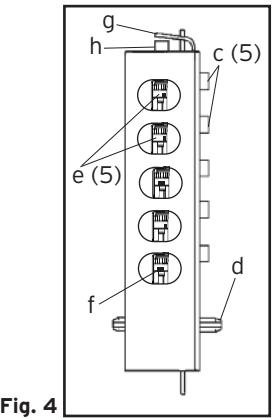
- 9. Using pliers or equivalent, rotate the control shaft ( d ) counterclockwise to clear the chamber and release. The lockout slide ( g ) should pop out (button underneath will stay depressed) (See Figure 4) .
- 10. Depress the key-stem/s ( c ) that you want in the combination, releasing each after it is depressed (See Figure 4) .
- 11. Once all the digits in the new combination have been depressed, with the pliers or equivalent, rotate the control shaft ( d ) clockwise (See Figure 4) . The code change button ( h ) underneath the lockout slide ( g ), should pop up (See Figure 4) . The new combination is now set.
- 12. Look at the code gear pockets ( f ). The numbers in the new combination should not be at the shear line (open position) (See Figure 4) .
Reinstallation : Reinstall the chamber into the lock.
Testing : Turn outside knob/lever and release (for thumbturn models, turn counter-clockwise). Enter code. Turn knob/lever (for thumbturn models, turn clockwise). Latch should retract.
Kaba Access Control 1
2941 Indiana Avenue, Winston-Salem, NC 27105 U.S.A. Tel. 800.849.8324 or 336.725.1331 www.kabaaccess.com