Pulse Pro User Instructions II
Open the original PDF document
View PDF

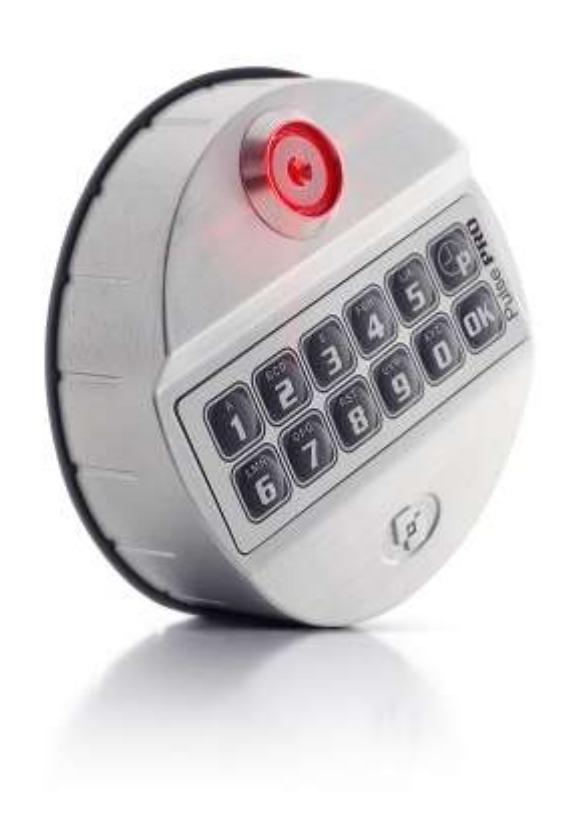
Pulse Pro
User Instructions

Company
Founded in 1983 with the aim of providing a complete range of professional products, Tecnosicurezza is now a consolidated reality in the field of locks and security systems for safes.
The experience gained in over 35 years of activity in the security sector has allowed the designing and manufacturing of high technology and reliability systems, which continue to receive the approval of an increasingly demanding clientele.
TECNOSICUREZZA is present directly on the Italian, Spanish and US markets and, through a extensive distribution network, in many EU and extra-EU countries.
TECNOSICUREZZA is aimed at national and international customers of primary importance, such as banks, safe manufacturers, cash in transit companies, mass market retailers and post offices.
Today TECNOSICUREZZA is a leading company focused on the customers' needs and constantly in step with technology.

| Table of contents | |
|---|---|
| COMPANY | 2 |
| TABLE OF CONTENTS | 3 |
| IMPORTANT NOTES! | 5 |
| GENERAL INFORMATION | 6 |
| OVERVIEW FUNCTIONS | 9 |
| LOCK OPENING | 10 |
| PRE-SETUP MODE | 10 |
| MANAGER AND STANDARD USERS | 10 |
| OVERRIDE USERS | 11 |
| CODE CHANGING (FUNCTION 0) | 11 |
| INSTALL/DISABLE/DELETE USERS | 11 |
| DISABLE/ENABLE USERS (FUNCTION 2) | 12 |
| DELETE USERS (FUNCTION 3) | 12 |
| BATTERY TEST (FUNCTION 4) | 12 |
| TEST MODE (FUNCTION 5) | 12 |
| LOCK SETUP (FUNCTION 6) | 13 |
| REMOTE OVERRIDE/REMOTE BLOCK | 13 |
| HOLD-UP/BOLT OUTPUT | 13 |
| DOOR ALARM | 14 |
| MANUAL CLOSING | 14 |
| BUZZER SILENT | 14 |
| DATE FORMAT | 14 |
| EXPIRING CODES | 15 |
| DELETION OF UNUSED CODES | 15 |
| USERS STATUS (FUNCTION 7) | 15 |
| AUDIT | 16 |
| DOWNLOAD THE AUDIT ON A DALLAS KEY | 16 |
| DOWNLOAD THE AUDIT ON PC: | 16 |
| CONFIGURATION SELECTION (FUNCTION 8) | 17 |
| TIME DELAY (FUNCTION 9) | 18 |
| TIME SETTING | 18 |
| DATE SETTING | 19 |

User instructions
Pulse PRO
| EMERGENCY RESCUE CODE (ERC) | 19 |
|---|---|
| RESET MODE (WITH RESET BOX) | 19 |
| CONFIGURATION NUMBER | 20 |
| CONTACTS | 28 |

Important notes!
- Before installing this product, please read carefully the installation and operating instructions.
- Locks have been designed to correctly operate in a temperature range from -5°C to + 50°C and and in an environment with non-condensing humidity between 25% and 90%.
- The lock must not be oiled/lubricated/greased.
- If installed in normal domestic or office environments, the locks do not require particular maintenance; in any case, after 10,000 opening/locking cycles, it is recommended to run a test that verifies the correct and complete operation of the product.
- Use only DURACELL™ 9 Volt Alkaline batteries, or battery holders with DURACELL™ 1.5 Volt Alkaline batteries. Alternatively, it is possible to use a 12VDC - 1A power adapter (p.n. N1212) with relative power supply interface (p.n. T6005/W or p.n. T6005).
- A series of multiple beeps indicate a low battery level which need immediate replacing.
- It is strongly recommended to change the default codes before the usage and to keep safely the new codes.
- Do never use codes easy to be guessed such as 123456, birth dates or others, based on own personal information.
- After changing a code, perform several opening/closing tests before closing the door.
Should the lock label be removed, warranty is void.
IU_PulsePro_08 5 of 28

General information
Using your keypad
The keypad automatically switches OFF if no buttons are pressed within 5s.
Press to cancel an operation. A short beep is produced.

To start a time delay counting (if set), enter an opening combination: LED flashes every 2s, indicating the counting.

Press to stop a time delay counting.
The opening window is indicated by a flashing and a beep alternating at 1s intervals.

The led is kept ON if the system is in programming mode.
2 short beeps are produced if an operation/ID/code is correct.
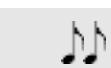
A long beep is produced if an operation/ID/code is incorrect.
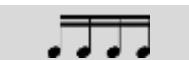
If an incorrect operation is done, wait for 5s until the keypad switches OFF before continuing.
A single beep (bad sound) is produced when some setup options of the lock are enabled.

A long beep plus 3 shorts beeps are produced if an expired code is entered.
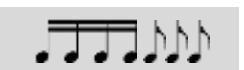
An error beep is produced in case of RTC issue. It is recommended then to update time and date. !


To open or access the menu in dual mode (if set), enter the first user's combination: the led flashes fastly. Then, enter the second user's combination.

To stop a dual mode opening, press after having introduced the firrst user's combination and while the led is flashing.
Shortcuts
Press and hold for 2 seconds the button related to the needed function:
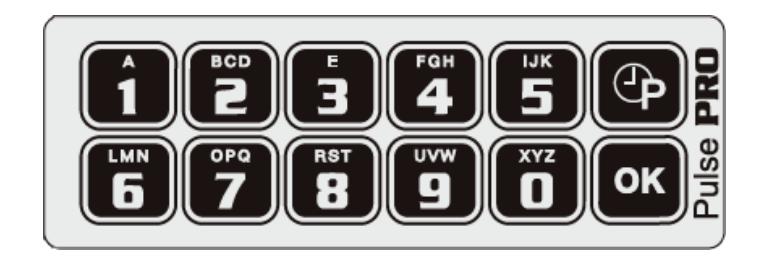
- = Change Master code (80, 81), Manager (60, 61), users (01-59) and override users (10 or 50-59)
- = Users installation
- = Users Enabling/Disabling
- = Users Deleting
- = Battery test
- = Test mode
- = System setup
- = Users status and Audit
- = Configuration selection/PC programming through setup software
- = Time delay and opening window
- = Time and date setting
- = Reset
Pre-setup & Configurations
When the lock is in pre-setup mode and connected with the keypad for the first time, a long series of short beeps plus 2 final short confirmation beeps are produced, to indicate that the lock has been recognized.
In this mode:
- lock can be simly opened by pressing the button 1. When the bolt is open, the output connector BAT is enabled;
- only the following options are allowed: Battery Test, Test mode, Date format, Time and date setting and Configuration selection;
- time and date must be set before the usage otherwise a long beep is produced at every opening.
WARNING: time and date values can be also entered in pre-setup mode, but only after selecting the Date format.
Through the keypad, the lock can be set according one among the 80 different configurations, involving the number of users, the dual mode opening and the Manager management. The PC is not necessary!
Pulse PRO can be also used with analog locks such as EM2020, EM2050, EM3520, EM3520/S, EM3550/S, EM3560 and EM 6050/C. If the keypad is connected with one of these locks, the options enabled are only the ones corresponding to the locks properties, hence please refer to the relative user manuals.
User properties and default codes
Users can be set for opening by entering their own combination created as:
- ID + numeric code;
- ID + numeric code + Dallas key;
- ID + Dallas key.
When programming, it is also possible to set a dual mode opening. Thus, it is necessary to enter the combinations of the two users involved, in order to open the lock.
Default combinations used are of type ID + numeric code:
1 st Master: 80-123456.
2 nd Master: 81-123456 (available only for some configurations).
Master can change his code, change a configuration in dual mode with the Manager and set also the time and date. In some configurations, Master can also manage Manager codes.
1 st Manager: 60-123456
2 nd Manager: 61-123456 (available only for some configurations).
Manager can perform an opening, change his own code, change a configuration in dual mode with Master, manage all the standard and override users, set a time delay, check a users configuration and download the lock events. Manager cannot manage the Master code.

Users from 01 to 59: 01-010101, 02-020202 and so on. They always open with time delay if set.
Override users: in depending on the configuration selected, the number of override users can be from one (10-101010) to 10 max. (from 50-505050 to 59-595959). They always open without time delay.
ERC code (Emergency Rescue Code) is always built as ID + 8 digits. 1 st ERC, random code provided by Tecnosicurezza: 98-98989898. 2 nd ERC, random code provided by Tecnosicurezza: 99-99999999.
This user manual describes the standard programming. According such programming and unless different requests while ordering the product, an opening can be performed by entering sigle users codes (no dual mode) and without time delay. Thus, the user manual must be adapted according the configuration selected.
It is strongly recommended to change the default codes before using the lock.
Overview functions
Lock opening
After entering an opening code, it is possible to open the lock within 3 seconds. It's no necessary instead with motorized locks: in this case indeed, the motor moves the bolt which remains in opening position for about 8 seconds before returning in closing position. In the manual closing version instead, the bolt can be closed by pressing key for few seconds.
Penalty
Four consecutive wrong codes initiate a four minutes penalty time. During this period, the LED flashes once every 10s. Each time a key is pressed, a long beep is produced and no operation is allowed.
Time Delay
Programmable time delay in between 0 and 99 minutes. Programmable opening window in between 1 and 19 minutes.
Dallas Keys
During the installation (function 1), a Dallas key (model 1982, 1990 or 1971) can be associated to a user or a Manager (no Master) by simply placing it in the Dallas reader after entering the ID and related code. The user is then identified by a combination built as ID + numeric code + Dallas key. Multiple Dallas keys with same ID, can be programmed through PC and setup software, in order to be used for particular applications. Please refer to the user manual IU_PulsePRO_setup_XX for further information or contact Tecnosicurezza.
IU_PulsePro_08 9 of 28

Power supply
Lock can be powered with:
- an ALKALINE 9V battery located in the battery compartement below the keypad;
- an internal battery box provided by Tecnosicurezza (6 ALKALINE 1.5 batteries);
- A power adapter (ref. N1212) with power supply interface (ref. T6005/W or T6005) both provided by Tecnosicurezza.
Low battery warning
A long beep together with the message "LOW BATTERY" on the display, indicate a low battery level which needs immediate replacing.
Audit
The lock is able to save the last 5500 operations with time, date, user and operations description.
Users Status
The current status of the user can be checked through the function 7 when using the keypad.
IMPORTANT
Some options/characteristics reported in this user manual, can only be used if previously enabled through the setup software. Thus, please refer to the user manual IU_PulsePRO_setup_XX.
Please contact Tecnosicurezza for further information.
Lock opening
Pre-setup mode
Press to open the lock. 2 short beeps are produced.

Open the lock within 3 seconds.
Manager and standard users
Enter an opening combination. 2 short beeps are produced.

Open the lock within 3 seconds.
If a time delay is programmed, a short beep is produced and the led flashes once every 2 seconds.

Press to stop the delay counting.
The opening window is indicated by a flashing and a short beep alternating at 1 second intervals.


Enter a combination during the opening window (2 combinations in case of dual mode opening). 2 short beeps are produced and the lock can be opened.
Override users
Enter an opening combination. 2 short beeps are produced and the lock can be opened.

If the dual mode opening is enabled, the led flashes fastly.

Enter the second opening combination.
To stop the dual mode opening, press while the led flashes.
Code changing (function 0)
WARNING: it is recommended to always perform this operation with door open.
Press and hold until 2 short beeps are produced. The led remains ON.

Enter the user ID plus the old code. 2 short beeps are produced.

Enter the new code without ID. 2 short beeps are produced.

Enter again the new code without ID for confirmation. 2 short beeps are produced. The led switches OFF.

Install/Disable/Delete users
NOTES: if the first configuration chosen is number 80 (shift mode), only Manager and user 01 are present. Thus, it is first necessary change the configuration and then install new users.
To install an override user, the bolt must be kept open. If the Manager management option is enabled, even a Master can perform these functions but with Manager codes only.
Users installation (function 1)
Press and hold until 2 short beeps are produced. The led remains ON.


Enter the Manager combination. 2 short beeps are produced.
Enter the new user ID. 2 short beeps are produced.
Enter the code (and/or the Dallas key) of the new user. 2 short beeps are produced.
Enter again the code (and/or the Dallas key) of the new user for confirmation. 2 short beeps are produced and the led switches OFF.

Disable/Enable users (function 2)
Press and hold until 2 short beeps are produced. The led remains ON.

Enter Manager combination. 2 short beeps are produced.

Enter the ID of the user to be enabled/disabled. A single beep (bad sound) is produced when the user is diasabled and 2 short beeps instead when the user is enabled. Then, the led switches OFF in both cases.

Delete users (function 3)
Press and hold until 2 short beeps are produced. The led remains ON.

Enter the Manager combination. 2 short beeps are produced.

Enter the ID of the user to be deleted. 2 short beeps are produced. Then, the led switches OFF.

Battery test (function 4)
Press and hold until 2 short beeps are produced.

2 further short beeps are produced if the battery level is good while a series of multiple beeps is produced for a low battery level.
Test mode (function 5)
This function allows for checking the correct system operation.
Press and hold until 2 short beeps are produced. The led remains ON.


Enter the following sequence of buttons:

Any working button produces 2 short beeps.
A damaged button produces a long beep and the keypad switches OFF.
Lock setup (function 6)
This function is used to set up the options below.
Press and hold until 2 short beeps are produced. If the lock is in pre-setup mode, skip the next step.

Enter the Manager combination. 2 short beeps are produced.

Enter one of the functions listed below:
Remote override/Remote block
With remote override enabled, it is possible to bypass the time delay counting (if set) when entering an opening combination.
With remote block enabled instead, it is not possible to open the lock when entering an opening combination (the keypad produces a long beep).
WARNING: to enable remote override , door must be open.
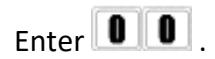
If remote block is enabled, a single beep (bad sound) is produced. If remote override is enabled instead, 2 short beeps are produced.
Default setting: "remote block" enabled.
Enter "1" to enable the remote override or "0" to enabled the remote block instead. 2 short beeps are produced and the led switches OFF.

Hold-up/Bolt output
With bolt output enabled, when performing an opening, the output device connected with the lock becomes active for all the time the bolt is open.
With hold-up enabled, enter an opening combination, increasing the last code digit by one unit (ex. 03-030304 instead of 03-030303): the lock opens and the output device connected becomes active for few seconds.
Enter .
If bolt output is enabled, 2 short beeps are produced. If hold-up is enabled instead, a single beep (bad sound) is produced.
Enter "0" to enable hold-up or"1" for enabling bolt output. 2 short beeps are produced and the led switches OFF.
Default setting: "bolt output" enabled.


Door alarm
With door alarm enabled, if the bolt remains open for more then the time set, the keypad produces a series of multiple beeps.
Enter .
When door alarm is disabled, a single beep (bad sound) is produced. 2 short beeps are instead produced when door alarm is enabled.
Enter a value in between 01 and 99 (enter 00 to disable this option). 2 short beeps are produced and the led switches OFF.
Default setting: "Door alam" disabled

Manual closing
When manual closing is active, press for reclosing the lock even the time for automatic reclosing (if set with PulsePro Setup) is not elapsed yet.
WARNING: this option is available for MotorLock versions only.
Enter .
A single beep (bad sound) is produced when this option is disabled. 2 beeps instead when this option is enabled.
Default setting: "Manual closing" disabled
Enter "1" to enable the manual closing Enter "0" instead to disable it. 2 short beeps are produced and the led switches OFF.

Buzzer silent
With this option enabled:
- the combination entered for opening, is indicated only by the led flashes;
- the opening window (if a time delay is set) is indicated by a series of faster flashes (1 every second).
Enter .
A single beep (bad sound) is produced when this option is enabled. 2 short beeps instead when this option is disabled.
Enter "0" to enable this option (i.e to disable the buzzer). 2 flashes are produced and then the led switches OFF.
Default setting: "Buzzer silent" disabled

Enter "1" to disable this option (i.e to enable the buzzer). 2 short beeps are produced and then the led switches OFF.
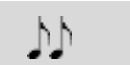
When a time delay is set, the opening window is indicated by a series of faster flashes (1 every second).
Date format
WARNING: in pre-setup mode, always select a date format before

setting the date itself.
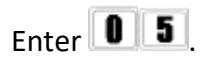
A single beep (bad sound) is produced for EU format DD/MM/YY and 2 beeps instead for US format MM/DD/YY.
Enter "0" for EU format or "1" for US format. 2 beeps are produced. Then, the led switches OFF.
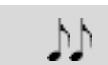
Expiring codes
With this option enabled, it is necessary to change the codes at least one time within the number of months set.
Enter .
A single beep (bad sound) is produced if this option is disabled, 2 short beeps instead if this option is enabled.
Default setting: "Code expiring" disabled
Enter a value in between 01 and 12 months (00 to disable this option). 2 short beeps are produced and then the led switches OFF.

Deletion of unused codes
With this option enabled, a code is deleted if no opening is performed within the number of months set.
Enter for deleting the unused codes.
A single beep is produced (bad sound) if this option is disabled, 2 short beeps instead if this option is enabled.
Default setting: "Code expiring" disabled
Enter a value in between 01 and 12 months (00 for disabling this option). 2 short beeps are produced, then the led switches OFF.
Users status (function 7)
Press and hold until 2 short beeps are produced. The led remains ON.

Enter the Manager code. 2 short beeps are produced.

Enter ID for the user to be checked.
A single beep (bad sound) is produced for available users (not installed) or for disabled/deleted users.
2 short beeps are instead produced for installed users.


A long beep is instead produced for blocked users (not possible to install). !

To close this option, wait for few seconds without entering any ID. A long beep is produced. Then, the led switches OFF.
Audit
Keypad and lock events can be stored in a Dallas key previously programmed using the software Pulse PRO Audit.
Dallas key only allows to store the last 1200 events which can be later downloaded on PC through an USB interface provided by Tecnosicurezza.
Direct PC connection allows to download all 5500 events, using an USB interface and a specific software provided by Tecnosicurezza.
For further information, refer to the user manual IU_PulsePRO_Audit_XX or contact Tecnosicurezza.
Download the audit on a Dallas key
Press and hold until 2 short beeps are produced. The led remains ON.

Enter Manager or Master code. 2 short beeps are produced.
Press . The led flashes.
Insert the audit Dallas key into the reader and keep it in (it is recommended to use a magnetic Dallas key): 2 short beeps are produced and the download begins automatically.

During the download, one short beep is produced every 3s.
When the download terminates, 2 short beeps are produced and the led switches OFF.

When removing the Dallas key from the reader, 2 short beeps are produced if the download is successful. Then, the led switches OFF.

Download the audit on PC:
Before performing this download, it is necessary to connect the keypad and the lock with the PC using an USB interface provided by Tecnosicurezza.
Run the software Pulse Pro Audit, using the "Download" session to select the number of

events to be downloaded. For further information, refer to the user manual IU_PulsePRO_Audit_XX or contact Tecnosicurezza.
Press and hold until 2 short beeps are produced. The led remains ON.

Enter Manager or Master code. 2 short beeps are produced.

Press . The led flashes.

On PulsePro Audit, click on Download to begin the events downloading.
During the download, the led flashes.

If the download terminates successfully, 2 short beeps are produced and the led switches OFF.

Configuration selection (function 8)
Door must be open (use an opening combination or press if the lock is in pre-setup mode).
Set a configuration number, chosing it among the ones reported in the table, at the end of the present user manual.
Chosing a configuration from keypad means:
- restoring the time delay at 0 minutes;
- restoring all the codes to their default values;
- Un-installing all the users which must be re-installed later. It is possible to install only the users provided by the configuration. For further information regarding the users provided by each configuration, use the software PulsePro Setup and refer also to the user manual IU_PulsePRO_setup_XX or contact Tecnosicurezza.
Press and hold until 2 short beeps are produced. If the lock is in pre-setup mode, skip the next 2 steps.

Enter the Manager combination. The led flashes.

Enter the Master combination. The led remains ON.

Enter the configuration number selected. 2 short beeps are produced.

Enter again the configuration number for confirmation. 2 short beeps are produced.


Enter the date format (0=EU format, 1=US format). The led flashes.

If the operation is successful, 2 short beeps are produced and the led switches OFF.

Time delay (function 9)
Press and hold until 2 short beeps are produced. The led remains ON.

Enter the Manager combination. 2 short beeps are produced.

Enter a time delay value in between 00 and 99 minutes (00=disabled). Enter an opening window value in between 01 and 19 minutes. 2 short beeps are produced.
Enter again the time delay and opening window values for confirmation. 2 short beeps are produced and the led switches OFF.

Time delay can be set in between 0 and 99 minutes, the open window in between 1 and 19 minutes instead.
To set a time delay shorter than the current one, lock must be open. If not, the current time delay counting begins while the new value is only recorded at the end of this counting.
Time setting
It is strongly recommended to upgrade time and date at least once a year.
Press and hold until 2 short beeps are produced. If the lock is in pre-setup mode, skip the next step. The led remains ON.

Enter the Manager or Master code. 2 short beeps are produced.

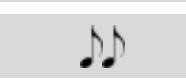
Press to enter the time value. 2 short beeps are produced.

Enter the time value in hh:mm format. 2 short beeps are produced.

Enter the time value again for confirmation. 2 short beeps are produced and the led switches OFF.

Date setting
It is strongly recommended to upgrade time and date at least once a year.
Press and hold until 2 short beeps are produced. If the lock is in pre-setup mode, skip the next step. The led remains ON.

Enter the Manager or Master code. 2 short beeps are produced.
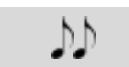
Press to enter the date value. 2 short beeps are produced.

Enter the date according the format selected with the function 05 (EU format=dd/mm/yy, US format=mm/dd/yy). 2 short beeps are produced.

Enter the date again for confirmation. 2 short beeps are produced and the led switches OFF.

Emergency Rescue Code (ERC)
The Emergency Rescue Code code, can programmed by Tecnosicurezza upon specific request. It allows to perform the emergency rescue operation.This operation is useful when all the codes are lost and when there is no possibility to open the lock. All the other settings are kept.
Press and hold until 2 short beeps are produced.

Enter the ERC code. The led flashes.

2 short beeps are produced if the operation is successful. Then the led switches OFF.

Reset mode (with reset box)
The reset operation restore the whole system in pre-setup mode, with all the default settings.
Connect the reset box with the "BAT" connector of the lock.
Press and hold until 2 short beeps are produced. The led flashes


fastly.
2 short beeps are produced if the operation is successful. The led switches OFF.

Configuration number
Configuration number of "Shift mode" is 80. In this configuration, the only available users are Manager and user 01. Every time the Manager performs an opening, user 01 code is restored to its default value (01-010101).
The only custom configurations that can be set through the software Pulse PRO Setup, are those ones in between 90 and 98. Please refer to the user manual IU_PulsePRO_setup_XX for further information or contact Tecnosicurezza.
For a better use of the tables below, select first the desired number of users (see the box on the top left side of each table) and then add a combination of features to get the correct configuration number.


10 USERS
|
Manager
management |
nd
2 Manager |
nd
2 Master |
Configuration
number |
|
|---|---|---|---|---|
| 10 Users | - | - | - | 02 |
| ✓ | - | - | ||
| ✓ | ✓ | - | ||
| - | ✓ | - | ||
| Manager |
nd
2 Manager |
nd
2 Master |
Configuration
number |
Manager
management |
nd
2 Manager |
nd
2 Master |
Configuration
number |
|
|---|---|---|---|---|---|---|---|---|
| - | - | - | 02 | 10 Users in dual mode | - | - | - | 04 |
| ✓ | - | - | 12 | ✓ | - | - | 14 | |
| ✓ | ✓ | - | 32 | ✓ | ✓ | - | 34 | |
| ✓ | ✓ | ✓ | 72 | ✓ | ✓ | ✓ | 74 | |
| ✓ | - | ✓ | 52 | ✓ | - | ✓ | 54 | |
| - | ✓ | - | 22 | - | ✓ | - | 24 | |
| - | ✓ | ✓ | 62 | - | ✓ | ✓ | 64 | |
| - | - | ✓ | 42 | - | - | ✓ | 44 |
10 USERS + 1 OVERRIDE USER
|
Manager
management |
nd
2 Manager |
nd
2 Master |
Configuration
number |
|
|---|---|---|---|---|
|
10 Users
+ 1 override user |
- | - | - | 01 |
| ✓ | - | - | 11 | |
| ✓ | ✓ | - | 31 | |
| ✓ | ✓ | ✓ | 71 | |
| ✓ | - | ✓ | 51 | |
| - | ✓ | - | 21 | |
| - | ✓ | ✓ | 61 | |
| - | - | ✓ | 41 |

10 USERS + 1 OVERRIDE USER, Dual mode
|
Manager
management |
nd
2 Manager |
nd
2 Master |
Configuration
number |
|
|---|---|---|---|---|
|
10 Users
+ 1 Override user in dual mode with all users |
- | - | - | 00 |
| ✓ | - | - | ||
| ✓ | ✓ | - | ||
| - | ✓ | - | ||
| Manager |
nd
2 Manager |
nd
2 Master |
Configuration
number |
Manager
management |
nd
2 Manager |
nd
2 Master |
Configuration
number |
|
|---|---|---|---|---|---|---|---|---|
| 00 |
10 Users + 1 Override user in dual
mode with all users |
- | - | - | 03 | |||
| ✓ | - | - | 10 | ✓ | - | - | 13 | |
| ✓ | ✓ | - | 30 | ✓ | ✓ | - | 33 | |
| ✓ | ✓ | ✓ | 70 | ✓ | ✓ | ✓ | 73 | |
| ✓ | - | ✓ | 50 | ✓ | - | ✓ | 53 | |
| - | ✓ | - | 20 | - | ✓ | - | 23 | |
| - | ✓ | ✓ | 60 | - | ✓ | ✓ | 63 | |
| - | - | ✓ | 40 | - | - | ✓ | 43 |


50 USERS
|
Manager
management |
nd
2 Manager |
nd
2 Master |
Configuration
number |
|
|---|---|---|---|---|
| 50 Users | - | - | - | 07 |
| ✓ | - | - | ||
| ✓ | ✓ | - | ||
| - | ✓ | - | ||
| Manager |
nd
2 Manager |
nd
2 Master |
Configuration
number |
Manager
management |
nd
2 Manager |
nd
2 Master |
Configuration
number |
|
|---|---|---|---|---|---|---|---|---|
| - | - | - | 07 | 50 Users in dual mode | - | - | - | 09 |
| ✓ | - | - | 17 | ✓ | - | - | 19 | |
| ✓ | ✓ | - | 37 | ✓ | ✓ | - | 39 | |
| ✓ | ✓ | ✓ | 77 | ✓ | ✓ | ✓ | 79 | |
| ✓ | - | ✓ | 57 | ✓ | - | ✓ | 59 | |
| - | ✓ | - | 27 | - | ✓ | - | 29 | |
| - | ✓ | ✓ | 37 | - | ✓ | ✓ | 69 | |
| - | - | ✓ | 47 | - | - | ✓ | 49 |
50 USERS + 10 OVERRIDE USERS
|
Manager
management |
nd
2 Manager |
nd
2 Master |
Configuration
number |
|
|---|---|---|---|---|
|
50 Users
+ 10 Override users |
- | - | - | 06 |
| ✓ | - | - | 16 | |
| ✓ | ✓ | - | 36 | |
| ✓ | ✓ | ✓ | 76 | |
| ✓ | - | ✓ | 56 | |
| - | ✓ | - | 26 | |
| - | ✓ | ✓ | 66 | |
| - | - | ✓ | 46 |


50 USERS + 10 OVERRIDE USERS, Dual mode
|
Manager
management |
nd
2 Manager |
nd
2 Master |
Configuration
number |
|
|---|---|---|---|---|
|
50 Users
+ 10 Override users in dual mode with all users |
- | - | - | 05 |
| ✓ | - | - | ||
| ✓ | ✓ | - | ||
| - | ✓ | - | ||
| Manager |
nd
2 Manager |
nd
2 Master |
Configuration
number |
Manager
management |
nd
2 Manager |
nd
2 Master |
Configuration
number |
|
|---|---|---|---|---|---|---|---|---|
| 05 |
50 Users + 10 Override users. All the
users in dual mode |
- | - | - | 08 | |||
| ✓ | - | - | 15 | ✓ | - | - | 18 | |
| ✓ | ✓ | - | 35 | ✓ | ✓ | - | 38 | |
| ✓ | ✓ | ✓ | 75 | ✓ | ✓ | ✓ | 78 | |
| ✓ | - | ✓ | 55 | ✓ | - | ✓ | 58 | |
| - | ✓ | - | 25 | - | ✓ | - | 28 | |
| - | ✓ | ✓ | 65 | - | ✓ | ✓ | 68 | |
| - | - | ✓ | 45 | - | - | ✓ | 48 |
24 di 28 IU_PulsePro_08


| NOTES | |
|---|---|

User instructions
| NOTES | |
|---|---|

| NOTES | |
|---|---|
| _ | |
| _ | |
| _ | |
| _ | |
| _ | |
| _ | |
| _ | |
| _ | |
| _ | |
| _ |

Correct disposal of this product: (Waste Electrical & Electronic Equipment)
Applicable in the European Union and other European countries with separate collection systems.

This marking displayed on the product or its literature indicates that it should not be disposed with other wastes at the end of its working life.
To prevent possible harm to the environment or human health from uncontrolled waste disposal, please separate this from other types of wastes and recycle it responsibly to promote the sustainable reuse of material resources.