Operating Instructions – ES1013, 1310, WES1310 (2002-2006)
Open the original PDF document
View PDFES1013, 1310, & WES1310
Electronic Digital Safe Lock Operating Instructions
• Electronic Digital Lock:
Upon installing the batteries, the electronics will perform a self-check.
· To OPEN:
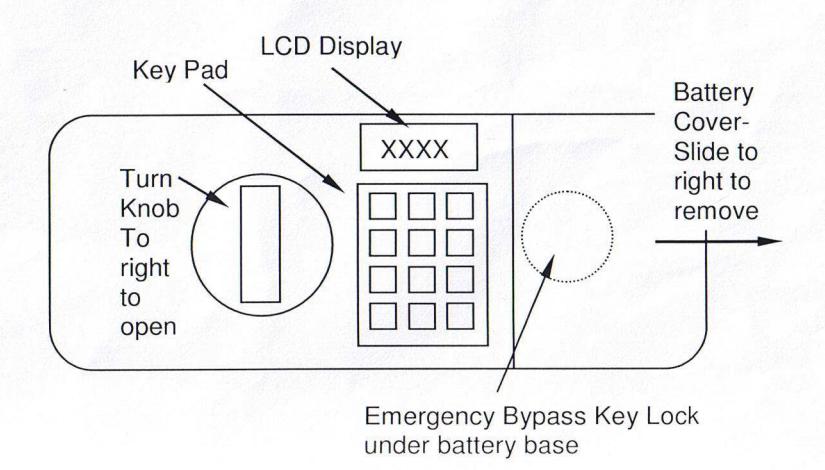
Press * then 7777 (Factory code) then #. After the signal and OPEN appears on the display, turn the knob to the right (within 4 seconds) to open the door.
To Change The Personal Code:
Two separate codes (1<sup>st</sup>) & (2<sup>nd</sup>) may be used with (2 to 6 digits in length).
(1<sup>st</sup> code) On the back of the door, press the change button , on the key pad press * ,enter new personal code, press #. Signal indicates accepted. Be sure and try the code before closing the door.
code, only if desired) Press the change button , on the key pad press #, enter new personal code, press #. Signal indicates accepted.
Be sure and try the code before closing the door.
Caution!
If a wrong number is entered, ERROR displays. If 3 wrong attempts, lock will power down for 5 minutes.
Emergency Bypass Key:
There is a key lock behind the battery compartment. Slide the battery cover to the right and remove. Remove the batteries. Un-snap the battery base from the clips and carefully let hang out of the way. Insert one of the keys provided with the safe and turn to the left a full rotation and hold, then turn the knob to the right and open the door.
Caution: Be sure and return the key back counterclockwise before removing, or the lock will remain open.
Note: If the keys are lost, the key number is stamped on the face of the cylinder.
Low Battery:
When Lo-Bat appears in the window when entering your code, it is time to replace the batteries. Replacing batteries will not affect existing personal codes. Slide the battery cover to the right and remove. Replace the batteries with a good brand of Alkaline battery. Be sure and place the (+) end of the battery in each position of the base as indicated by the symbol.