Operating Instructions – DL4000
Open the original PDF document
View PDFEach AMSEC safe is professionally hand-crafted with quality materials and is equipped with a precisionquality, digital lock. To become familiar with the lock, operate the lock (as outlined below) several times before closing the door and locking the safe.
OPERATION INSTRUCTIONS:
- • Don't slam the door. Extreme shock can damage the lock or jam the boltwork.
- • Don't shut the door with the boltwork in the locked position. Damage to the boltwork and marring the safe's finish may result.
- • Don't stack contents of the safe so that the door must be forced shut. Jamming of the boltwork may result.
- • Don't store the combination card inside the safe.
- • Don't use oil, grease or any other lubricant on the digital lock.
- • Keep all moving parts clean and free from obstruction, water and grease.
- • If you experience a difference in the feel of the operation, inconsistency or difficulty opening or operating the safe, DO NOT LOCK THE SAFE. Immediately contact the security store from whom you purchased the safe. If this is not practical, contact the AMSEC service department at 951-685-9680, Ext. 1036.
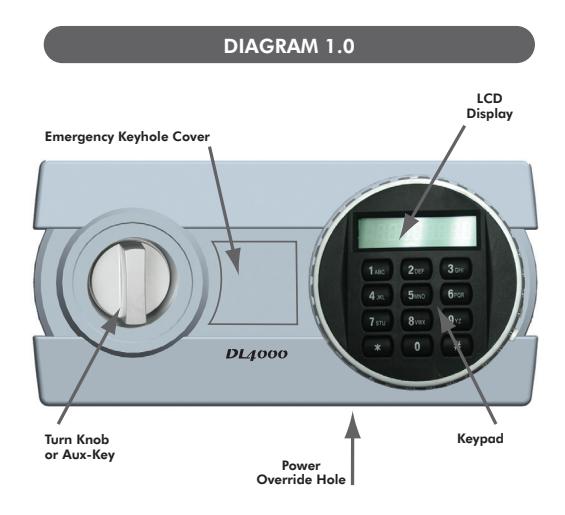
STEP 1 - OPENING THE SAFE
- 1-Press the # key.
- 2-Enter user code (Factory default is: 1-2-3-4)
- 3-Press the # key.
- 4-The LCD display will turn Blue and show Open. 5-Turn the Knob clockwise (Right) and open door.
- For models WES149, ES149 and ES1814: Turn the
- knob counter-clockwise (Left) and open door. 6-If the wrong user code is entered the display will
- show "Error". If the wrong code is entered 3 times consecutively, an alarm will sound for 10 seconds and the safe will be locked out for 3 minutes.
- 7-If you do not want your personal code shown on the LCD display press the # key followed by the * key). The LCD display will turn Blue. This function will be cancelled after each opening.
STEP 2 - CHANGING THE USER CODE
- 1-Open the safe by following step 1.
- 2-Press the Green set up button (Located on the back cover or the hinge side of the back door cover), the LCD display will turn Blue.
- 3-Enter your new user code (1-8 digits).
- 4-Press the # key.
- 5-The LCD display will turn Blue and show IN.
- 6-The LCD display will briefly show your new code.
- 7-Your new user code is now set to open the safe
NOTE: It is highly recommended to leave the safe door open and practice your new code several times before closing the door.
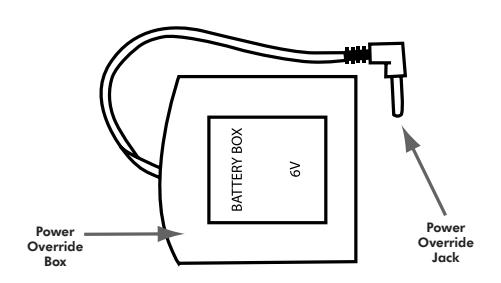
DIAGRAM 2.0
EMERGENCY OPENING
EMERGENCY BYPASS KEY:
- There is a key lock located between the keypad and the turn knob or auxiliary key. Gently remove the plastic key cover.
- 2. Insert the tubular key provided with the safe and turn clockwise (right).
- 3. Turn the Knob or Handle clockwise (Right) and open door.
NOTE: If the keys are lost, the key number is stamped on the key. Make sure to log the key number with your personal combination and store in a safe place.
BATTERY OVERRIDE:
- If the LCD display reads "Lo-BATTE" when opening the safe, it means the batteries are low and should be replaced.
- 2. With the safe open slide the battery cover (located on the back of the safe door) to the left and
- Replace the batteries with a good brand of Alkaline battery. The LCD display will turn Blue and show GOOD. Be sure and place the (+) end of the battery in each position of the base as indicated by the symbol.
- 4. Once the batteries are removed, the user code will default back to original factory code (1,2,3,4) if not replaced within 10 minutes. Reset the user code as stated under Enrolling procedures.
- If batteries are drained and will not power up the lock, install 4 new AA (1.5 volt) batteries into the "Power Override Box" supplied with the safe.
- 6. Plug the Power Override Jack into the Power Override Port located on the bottom of the keypad.
- 7. Open the safe by following Step 1 and install new batteries as instructed above.
TIPS
- 1. Use the * key as backspace to clear the last entry.
- 2. Hold the * key for more than 2 seconds to clear the LCD display.
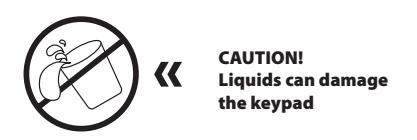
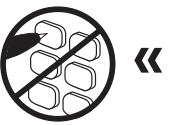
CAUTION! Pen points or other sharp objects can puncture the keypad membrane