Norton Rixson Model 900 Electromagnetic Extension Kit Installation Instructions_900EXT
Open the original PDF document
View PDFModel 900
Electromagnetic Extension Kit
Installation Instructions


/ WARNING
This product can expose you to lead which is known to the state of California to cause cancer and birth defects or other reproductive harm. For more information go to www.P65warnings.ca.gov.
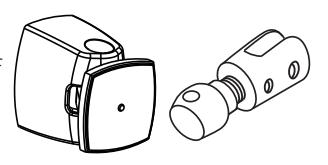
This 900 extension kit will extend the reach of the Armature Housing Assembly mounted on the door by 1-1/2" (38 mm). Additional spacers can be used to increase that length.
Install the Electromagnetic Assembly on the wall and the Armature Housing Assembly on the door. During the extension addition steps 3 & 4 removal of Armature Housing Assembly may be required to get better leverage.
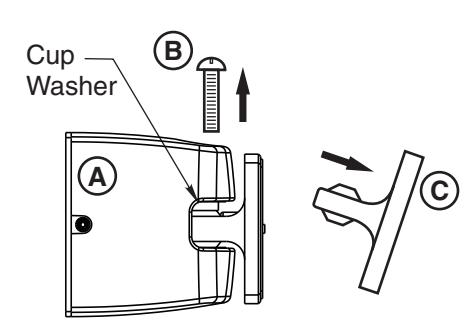
- 1. Remove the screw (B) on the Armature Housing Assembly (A).
- 2. Push the cup washer upward in the Armature Housing Assembly (A) with the Contact Plate Assembly (C).
- 3. Remove the Contact Plate Assembly (C) by pulling away from (A).
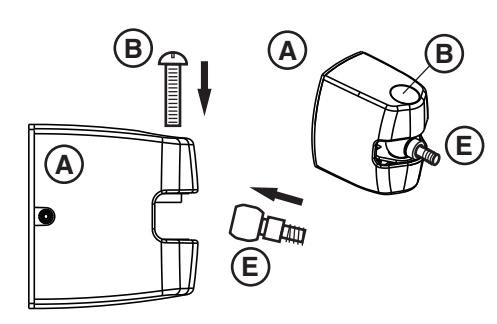
- 4. Using Armature Extension (E) push cup washer up and slide Armature Extension Swivel (E) into recess, align screw holes.
- 5. Insert screw (B) but do not tighten completely.
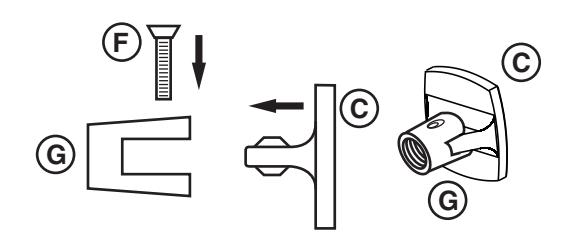
- 6. Insert Contact Plate Assembly (C) into Contact Plate Clamp (G) and align screw holes.
- 7. Insert screw (F) from 900 kit but do not tighten completely.
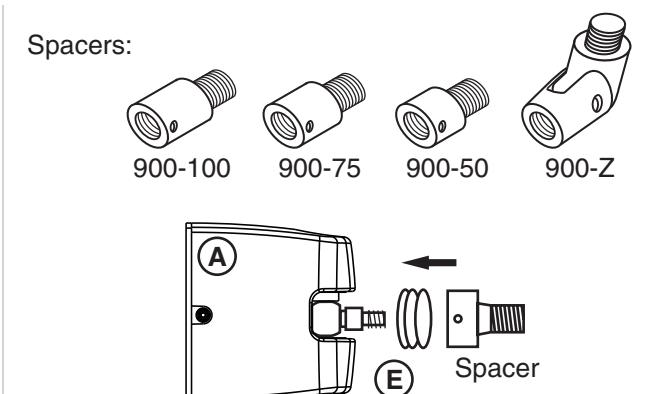
8. Add Spacers (if required) by threading them on the Armature Extension Swivel (E).
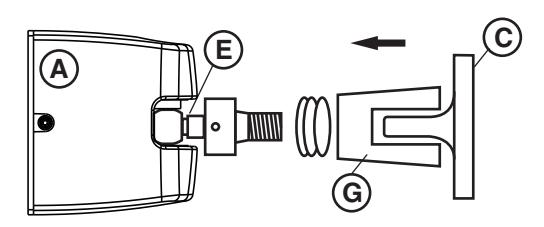
9. Attach Armature Assembly (A) and Armature Extension Swivel (E) by threading it in the end of the Contact Plate Clamp (G) or the Spacers.
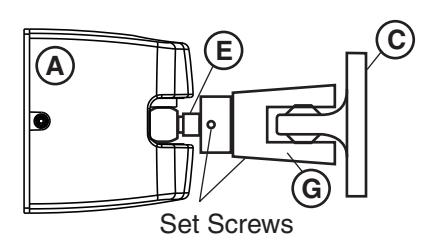
- 10. Open the door and engage the Electromagnet and the Contact Plate Assembly (C).
- 11. Adjust components to desired position.
- 12. Tighten both phillips head screws and all set screws on the extension pieces.
Technical Product Support: Monroe, NC 28112 USA
Phone: 800.438.1951 ext: 6030
Techsupport.NortonRixson@assaabloy.com
NortonRixson.com
Experience a safer and more open world