Norton Rixson 6000 Series Operator with WiFi, 6021, 6031 Push Side Installation Instructions_80-9360-1041-020
Open the original PDF document
View PDF6021/6031 Series
(Push Side) Power Operator Installation Instructions



! WARNING
This product can expose you to lead which is known to the state of California to cause cancer and birth defects or other reproductive harm. For more information go to www.P65warnings.ca.gov.
Pour la version française voir NortonRixson.com. READ AND FOLLOW ALL INSTRUCTIONS. SAVE THESE INSTRUCTIONS.

Contents
| Certifications and Standards | 2 |
|---|---|
| Product Safety Warnings 2 | |
| General Information | 3 |
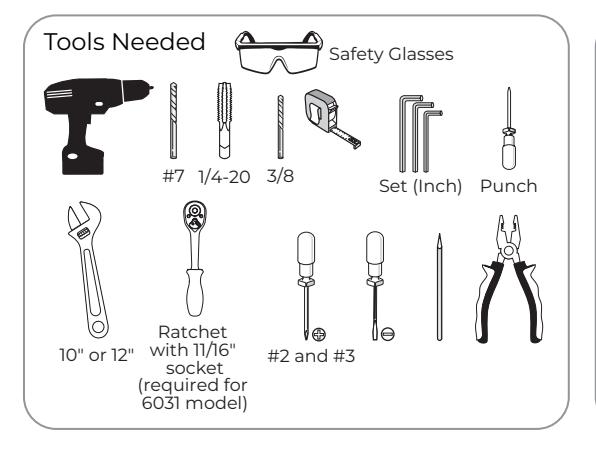
| Before You Begin | 4 |
| Technical Data | 4 |
| Prepare Frame and Door | 5 |
| Prepare Frame and Door | 6 |
| Install Operator | 7 |
| Install Adjusting Tube and Shoe and Main Arm . | 10 |
| Adjustments | 11 |
| Finalize Installation . | 12 |
| General Electrical Information12 | |
| Troubleshooting Guide13 | |
| 6021/6031 Template14 | |
Certifications and Standards
- y ETL Certified: Operator conforms to ANSI/UL standard 325 for automatic closing doors and UL10C Positive Pressure Fire Test for Door Assemblies.
- y ANSI A156.19: These products are designed to conform to this specification "for power assist and low energy power operated doors." These products are designed to exceed all the requirements for "Low Energy Power Operated Door".
- y Americans with Disabilities Act (A.D.A.): These door operators can be installed and adjusted to conform with A.D.A. regulations.
- y ANSI A117.1: These door controls permit door assemblies to conform to the requirements of this specification "for buildings and facilities - providing accessibility and usability for physically handicap people".
Product Safety Warnings
WARNING: To reduce risk of injury to person, use this operator only with Pedestrian Swing doors. FOR INDOOR USE ONLY
- 1. READ AND FOLLOW ALL INSTRUCTIONS.
- 2. Install only on a properly operating and balanced door. A door that is operating improperly could cause severe injury. Have qualified service personnel make repairs to any hardware before installing the operator.
- 3. Remove, or make inoperative, all locks (unless mechanically and/or electrically interlocked to the power unit) that are connected to the door before installing the operator.
- 4. Do not connect the door operator to the source power until instructed to do so.
- 5. Never let children operate or play with door controls. Keep remote control (when provided) away from children.
- 6. Personnel should keep away from a moving door in motion.
- 7. Test door's features at least once a month. After adjusting either force or limit of travel, retest door operator's features. Failure to adjust operator properly may cause severe injury or death.
- 8. KEEP DOOR PROPERLY OPERATING. An improperly operating door could cause severe injury or death.
80-9360-1041-020 Rev 1 01/23
9. SAVE THESE INSTRUCTIONS.

General Information
Operation:
Your Low Energy Operator can be configured in three variations to meet the standards:
- 1. Push plates, Wave-to-open switches, etc. are available to activate the operator.
- 2. Push & Go can be enabled. In this mode, your door is pushed (or pulled) slowly 15° manually, and then automatically opens to full open position.
- 3. Door can be used as a manual door. The door will work and act like a standard door closer, with or without power, when pushed or pulled open manually. If Push & Go is enabled and door is opened quickly, door will function as a manual door (energy save feature). Push plates are still active.
If desired, overhead presence devices can be provided for an extra level of protection. Consult local authority having jurisdiction. These are not required by current ANSI/BHMA A156.19 standards.
Opening:
When an opening signal is received by the control unit, the door opens to the fully open position. The open position is held by the motor and is adjustable from 0 to 30 seconds. If the door is obstructed while opening, the door will stop; the operator will sense obstruction (obstruction time is adjustable from 0 to 5 seconds) and the door will close.
NOTE: Door must be visible by person operating activation switch(es). Auxiliary door stop (by others) required.
Closing:
When the hold open time has elapsed, the door closer will close the door automatically. The door will slow to low speed at latch before it reaches the fully closed position. The door is kept closed by spring force of the closer. If the door is obstructed while closing, the door will stop against the obstruction; the operator will sense obstruction and reopen to fully open position after obstruction time has been reached. Once the hold open time has elapsed a second time, the door closer will close the door automatically. If the door is obstructed during this second closing cycle, the door will stop and rest against the obstruction using only the force of the closer spring. To reset, allow door to fully close and re-activate push plates to test operation.
Infinite Hold Open:
An optional feature to be used if door is desired to be held open for more than 30 seconds.
Set selector mode switch on underside of union assembly to hold open. Door will immediately begin to open to the fully open position. Once door is fully open, brake on end of motor energizes holding door in open position. To release from hold open, if door is set up for executive operation, door can be closed with activation device (see Programming Instructions, document #80-9360-1043-020 for executive wiring instructions). A pull on the door will also allow the unit to be taken out of hold open. Once door has closed, the door will reopen to fully open position unless activation device is pressed or selector mode switch is changed from hold open position.
NOTE: Door must be visible by person operating activation switch(es). Auxiliary door stop (by others) required.

WARNING: Make sure (120V, 60Hz) input power is turned OFF at facility's main circuit breaker before proceeding with installation

Before You Begin
- All dimensions are given in inches. DO NOT scale drawings.
- Thickness recommended for reinforcements in hollow metal doors and frames is charted.
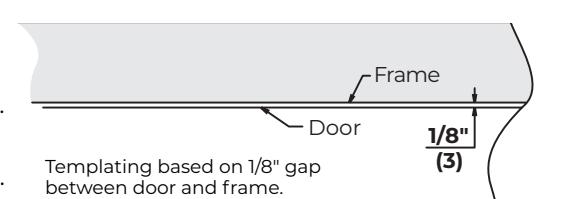
- This template information based upon use of 5" maximum width butt hinges.
- Maximum frame reveal is 6-7/8" for both 6021 and 6031 units
- Before beginning the installation, verify that the door frame is properly reinforced and is well anchored in the wall. Frame header must be straight without warp or bow.
- Unreinforced hollow metal frames and aluminum frames should be prepared and fitted with 1/4-20 blind rivet nuts, furnished by others.
- Concealed electrical conduit and concealed switch or sensor wires should be pulled to the frame before proceeding.
Fasteners for Frame:
- 1/4-20 Machine screws for hollow metal and aluminum.
- #14 x 2-3/4" (70mm) long sheet metal screws for wood.
| Hollow Metal Door Frame Reinforcing | ||
|---|---|---|
| Fuence Meterial | Reinforcing | |
| Frame Material | Recommended | Min. Required |
| 12 Ga. | 12 Ga. | 18 Ga. |
| .105 | .105 | .048 |
| (2.66) | (2.66) | (1.21) |
| 14 Ga. | 10 Ga. | 12 Ga. |
| .075 | .134 | .105 |
| (1.90) | (3.41) | (2.66) |
| 16 Ga. | 10 Ga. | 12 Ga. |
| .060 | .134 | .105 |
| (1.52) | (3.41) | (2.66) |
| 18 Ga. | 8 Ga. | 10 Ga. |
| .048 | .164 | .134 |
| (1.21) | (4.18) | (3.41) |
| Mounting Hardware | Door or Frame | Drill | |
|---|---|---|---|
| $ (mmmm= |
Backplate:
14 x 1-1/2 Oval Head Self Drilling Screw |
Wood | 3/16" (4.76mm) |
|
Backplate:
1/4-20 x 1 Flat Head Mach. Screw |
Martal | Drill #7 (.201 dia. or 5.10mm) | |
| \( \text{mm} \) |
Backplate:
1/4-20 x 5/8 Flat Head Mach. Screw |
M etal | Tap 1/4-20 |
| Adjusting Tube and Shoe: Sex Nut and Bolt (SNB) | Hollow Metal |
9/32" (7.00mm) thru
3/8" (9.50mm) door face opposite to closer |
|
| (optional) | Aluminum or Wood | 3/8" (9.50mm) thru | |
Technical Data
| _ | ||
|---|---|---|
| Input power: | 120VAC, 60Hz | |
| Power consumption: | .9 amps | ] |
| Circuit breaker: | 3 amps | ] |
| Power supply: | 24 V DC, max. 2.2 amp. | ] |
| Door width: | 36" - 48" (91-122 cm) | ] |
| Door weight: | 100-250 lb. (43-113 kg) | |
| Door opening angle: | 6021: up to 110°; 6031: 110° to 180° | |
| Hold open time: |
0-30 seconds (A.D.A. 5 seconds min.)
Indefinite for optional Infinite Hold Open |
NOTES:
- Permanent wiring is to be implemented as required by local codes.
- Activation devices: push plates, access control, mats, touchless wall switches, etc.
-
Maximum wire size is:
- 12AWG at terminals LINE and NEUTRAL (120VAC; 60Hz) on Power Input Terminal mounted on inside of end cap.
- 14AWG at all other terminals
- Rate of operation shall not exceed 300 cycles of opening and closing per hour.

Prepare Frame and Door
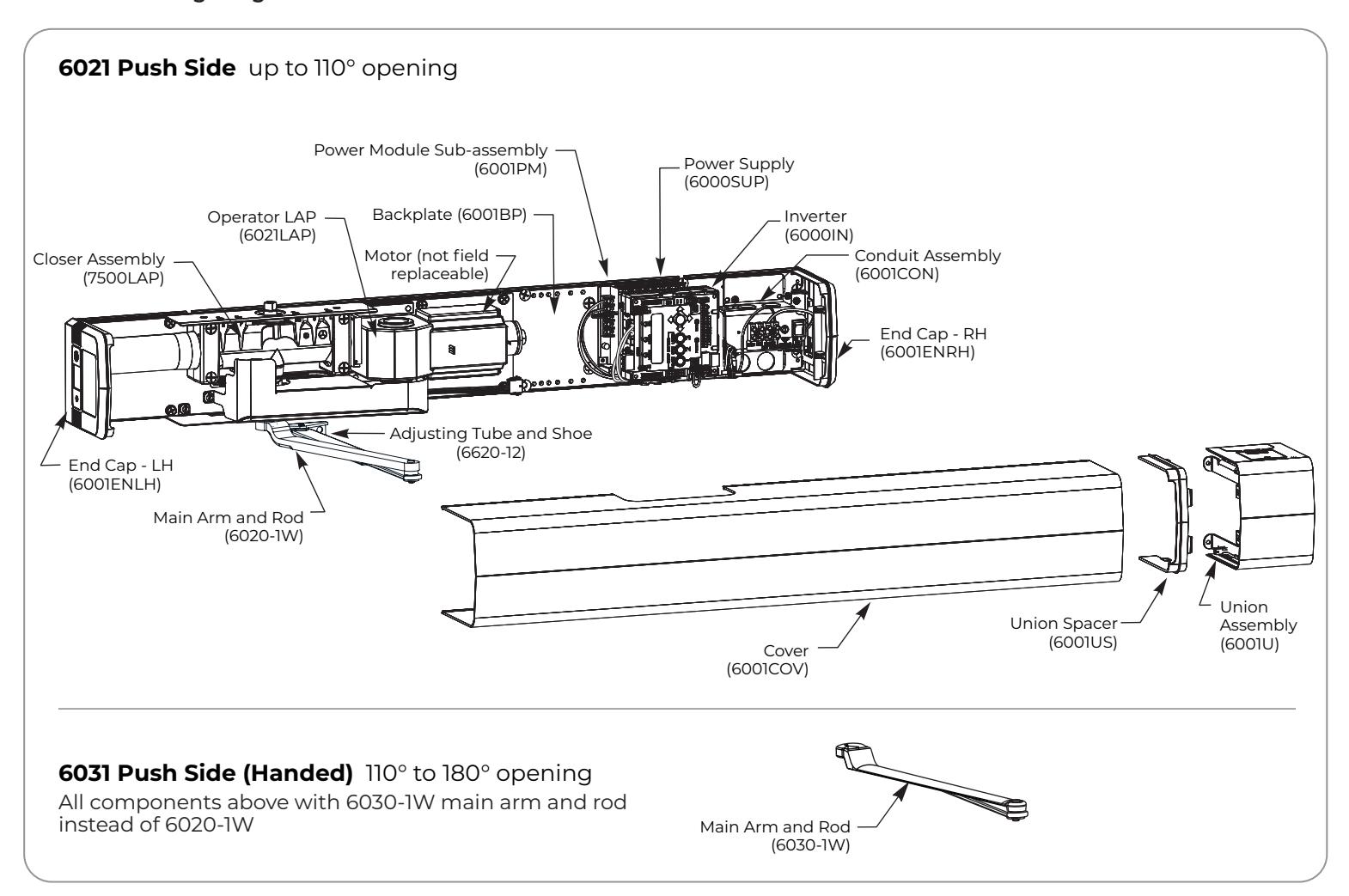
Become familiar with operator components and fasteners. It is recommended that components remain in box until installed. Verify there is minimum ceiling clearance for operator installation before proceeding. (Figure 1)
A. Prepare frame.
1. Determine if push or pull and if left hand or right hand installation. (Figure 2)

NOTE: These instructions are for PUSH only. See 80-9360-1040-020 instructions for 6011/6051 or 80-9360-1042-020 instructions for 6061/6071 Push installation.

NOTE: If frame is not flat or is twisted, an additional steel back plate or shimming is required. Failure to mount unit properly can result in improper function of operator or inability to snap on cover.
3. Using template on page 14, prepare mounting holes for screws. (Figure 3)


- c. Drill/tap two (2) 1/4-20 holes for steel frame or two (2) #14 holes for wood frame at marked locations.
-
4. Prepare holes for concealed mounted conduit (if applicable).
- a. Mark frame 33-7/8" from centerline of hinge toward latch edge of door and 11/16" up from underside of frame rabbet.
- b. Mark frame 1-1/4" from previous mark toward latch edge of door and 11/16" up from underside of frame rabbet.
- c. Drill two (2) 7/8" diameter holes in frame at marked locations.
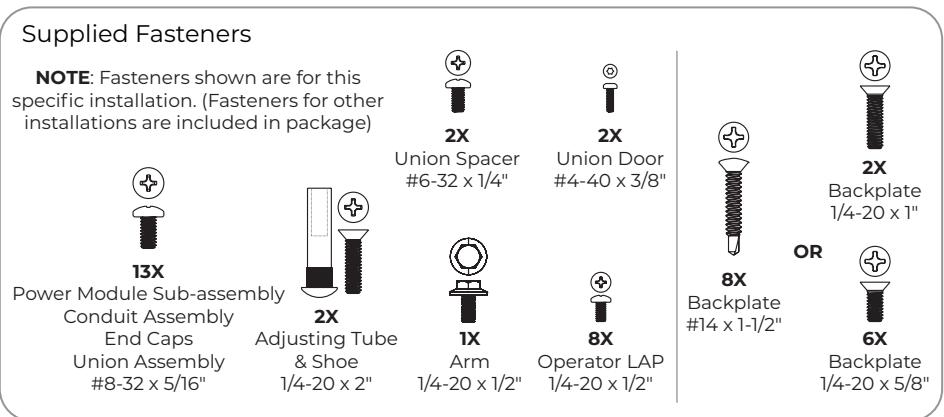
- 5. Using supplied backplate screw pack, insert screws into prepared mounting holes.
For Metal Frame: Use two (2) 1/4-20 x 1" flat head machine screws.
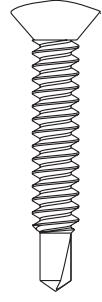
For Wood Frame: Use two (2) #14 x 1-1/2" oval head self-drilling screws.
NOTE: Do not tighten mounting screws at this time. Leave 5/16" minimum (thickness of backplate) between frame face and back of screw head.
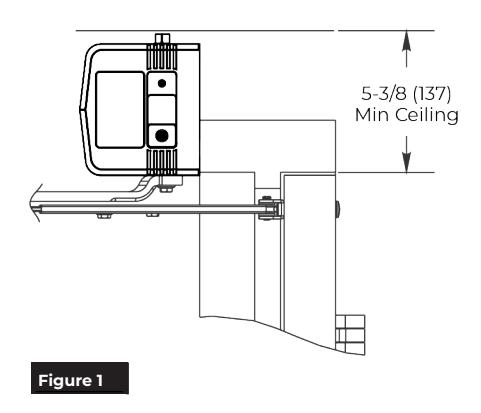
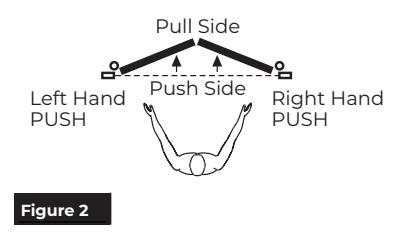
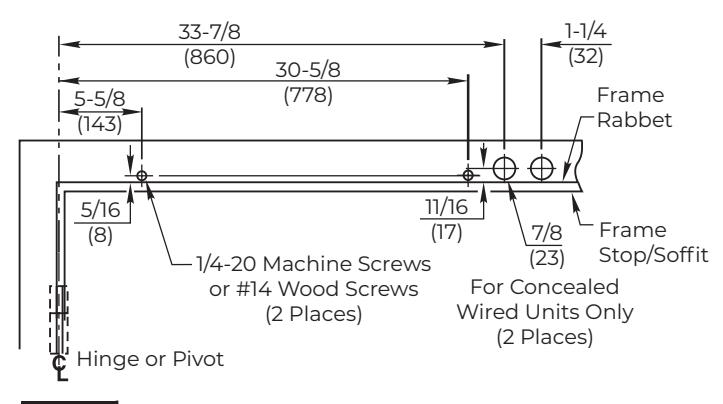
Figure 3 Left Hand Shown
OR

Prepare Frame and Door
B. Mount Backplate.
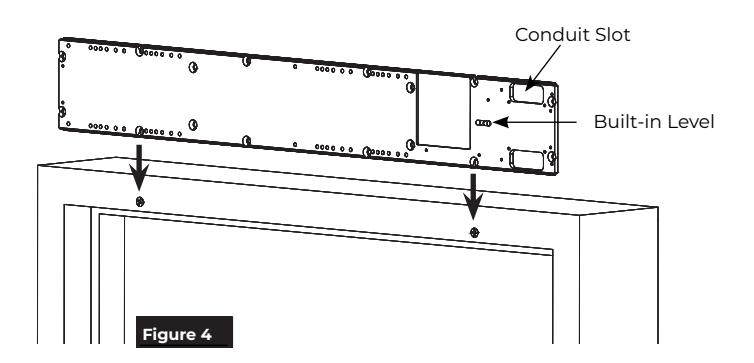
1. Slide backplate over mounting screws. (Figure 4)
NOTE: Backplate conduit slots are ALWAYS toward latch edge of frame for proper orientation.
- 2. Use level in backplate to align and tighten mounting screws.
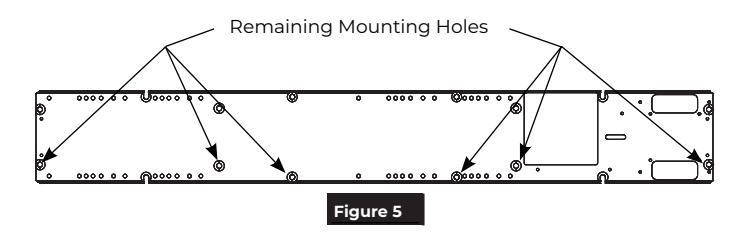
- 3. Using countersunk holes in backplate as a template, drill/tap remaining six (6) mounting holes: 1/4-20 for steel frame or #14 for wood frame. (Figure 5)
C. Prepare door for Adjusting Tube and Shoe.
1. Using template on page 14, locate and prepare adjusting tube and shoe holes in door. (Figure 6)
2. Drill 3/8" (9.5mm) through (2 places) for sex bolts.
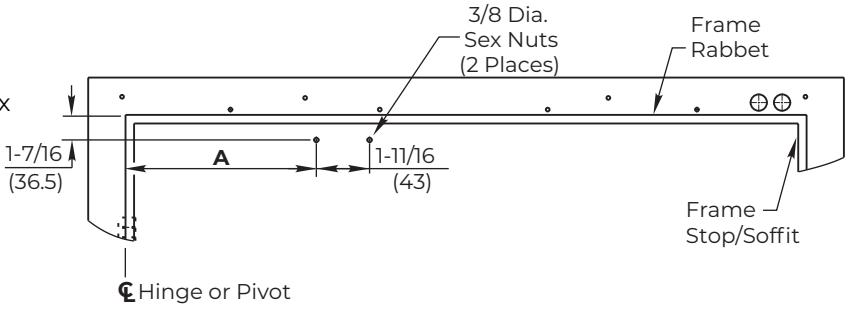
| A Dimension | Operator Model |
|---|---|
| 13-1/8" (333mm) | 6021 |
| 10-3/8" (264mm) | 6031 |
Figure 6 Left Hand Shown

Install Operator
A. Secure Backplate.

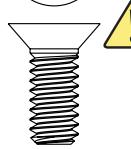
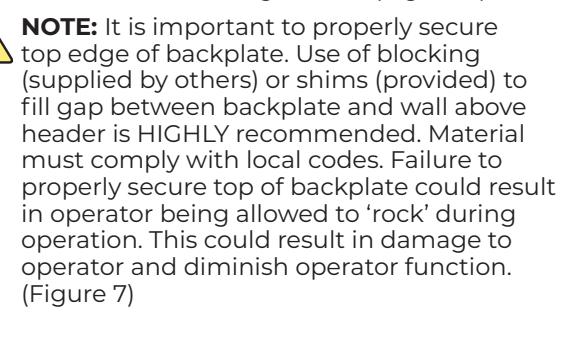
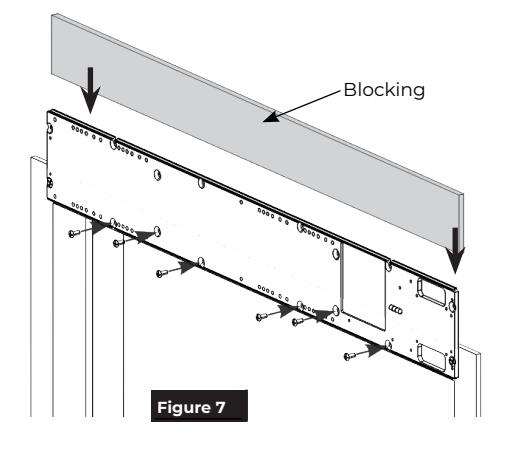
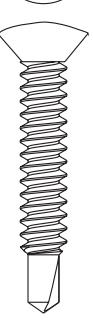
1. Secure backplate to frame using six (6): 1/4-20 x 5/8" machine screws or 1/4 x 1-1/2" self-drilling screws. (Figure 7)
OR
B. Install End Caps.
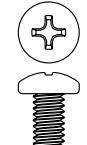
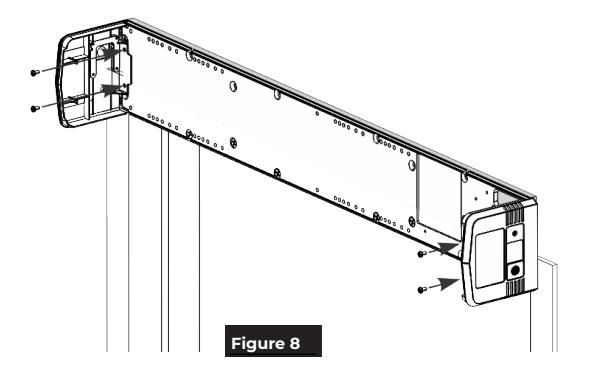
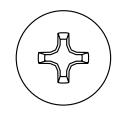
1. Secure end caps to each end of backplate using four (4) (two each) #8-32 x 5/16" Phillips pan head screws. (Figure 8)
NOTE: Orient end caps so that text on labels is legible when observed from ground.

C. Install Operator LAP.
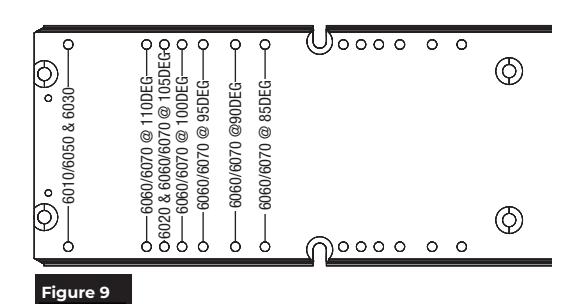
NOTE: Backplate is printed with text to assist installation.
1. With backplate mounted to frame, use text to locate holes along bottom of backplate that correspond to your specific closer installation. (Figure 9)
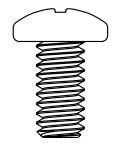
- 2. Insert two (2) 1/4-20 x 1/2" Phillips pan head screws into appropriate engraved locations leaving a 5/16" minimum gap between backplate and underside of screw head.
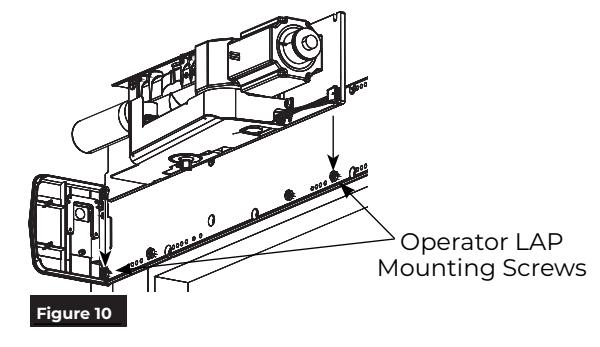
- 3. Orienting LAP so spring tube of closer is pointed toward hinge edge of frame, slide LAP over two (2) screws and tighten. (Figure 10)
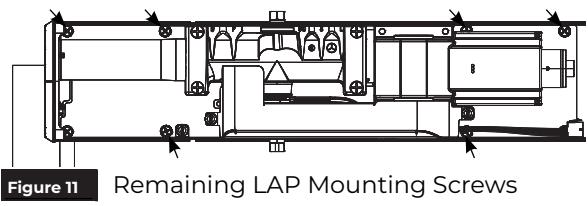
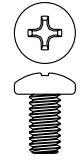
- 4. Using six (6) 1/4-20 x 1/2" Phillips head screws, secure LAP to backplate. (Figure 11)
NOTES:
- ‒ Holes in LAP align with threaded holes in backplate.
- ‒ Screws to be torqued to 80 in-lb minimum.
D. Install Conduit Assembly and wire to building.
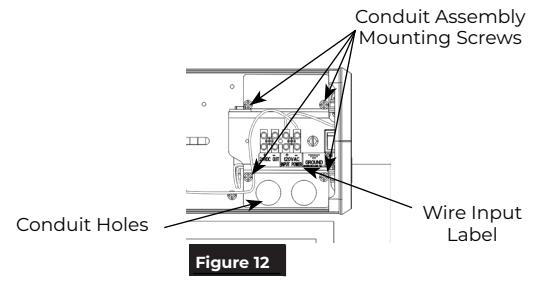
- 1. Orient conduit assembly so two (2) conduit holes are at bottom and text on wire input label is legible. (Figure 12)
- 2. Secure assembly to backplate using four (4) #8-32 x 5/16" Phillips head screws. (Figure 12)

WARNING: BUILDING POWER MUST BE OFF BEFORE PROCEEDING!
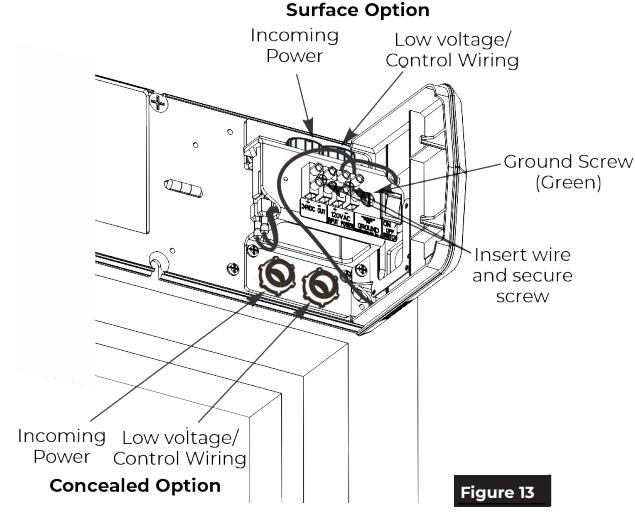
- 3. Secure conduits to conduit assembly (surface or concealed conduit). (Figure 13)
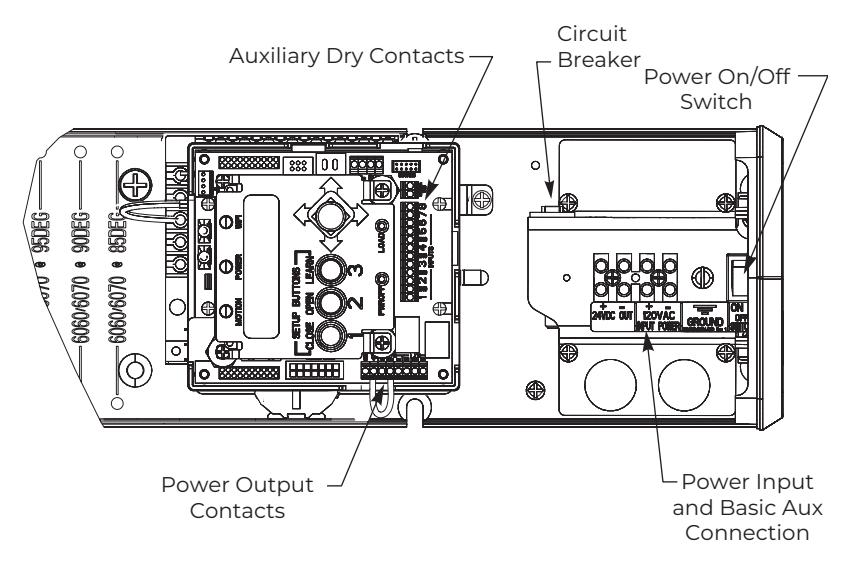
- 4. Wire building 120VAC to conduit assembly LINE, NEUTRAL, and GROUND. (See General Electrical Information on page 12.)
- 5. Wire 24VDC for accessories to conduit assembly 24VDC + / – as required. (See General Electrical Information on page 12.)

WARNING: DO NOT TURN ON BUILDING POWER UNTIL DIRECTED TO DO SO! RISK OF INJURY OR DEATH!

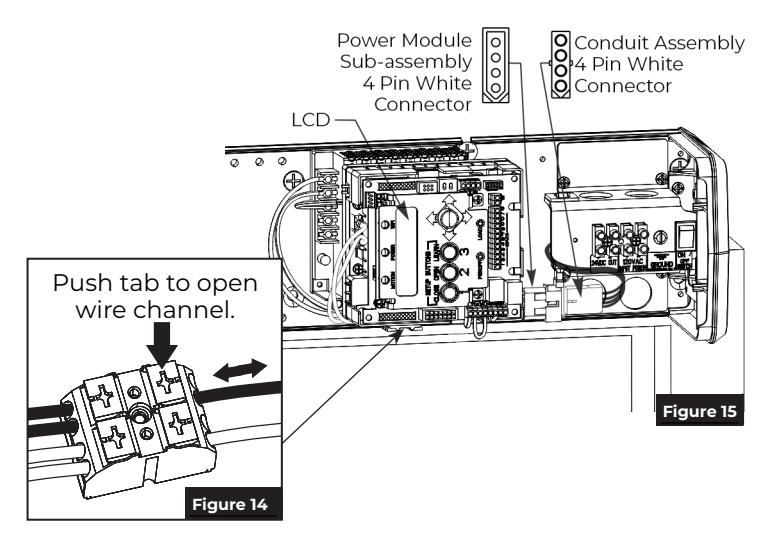
E. Install Power Module Sub-assembly.

Power module wiring may loosen during shipping. Gently tug each wire on the connector. If a wire is loose, push the connector tab and reinsert wire. Release tab and verify wire is secure. (Figure 14)
1. Using three (3) #8-32 x 5/16" Phillips screws, secure power module sub-assembly to backplate at location marked on backplate.
NOTE: Orient assembly so LCD screen on inverter is toward closer assembly. (Figure 15)
2. Attach 4-pin white rectangular connectors between power module sub-assembly and conduit assembly. (Figure 15)
NOTE: Connectors are keyed and only attach one way.
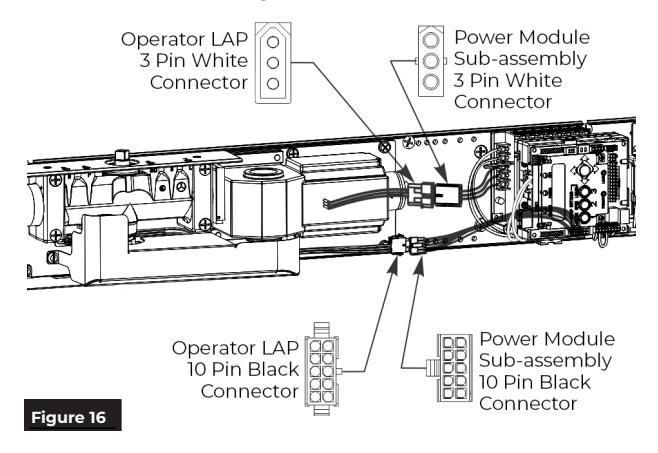
F. Connect Operator LAP and Power Module Sub-assembly.
- Attach 10-pin black connectors between operator LAP and power module subassembly. (Figure 16)
- 2. Attach 3-pin white connectors between operator LAP and power module subassembly. (Figure 16)
NOTE: Connectors are keyed and only attach one way.
G. Install Union Assembly and Union Spacer.

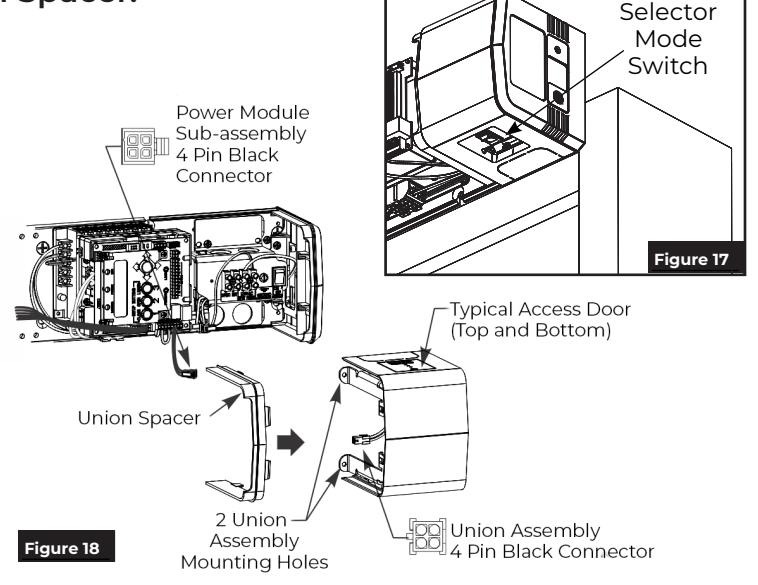
Orient union assembly so access door covering selector mode switch faces floor. (Figure 17)
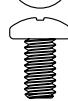
Snap union spacer onto union assembly opposite end cap and secure with two (2) #6-32 x 1/4" Phillips pan head screws. (Figure 18)
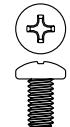
- 3. Secure union assembly to backplate using two (2) #8-32 x 5/16" Phillips pan head screws. (Figure 18)
- Connect 4-pin black square connector from power module sub-assembly to 4-pin black connector from union assembly. (Figure 18)
NOTE: Connectors are keyed and only assembly one way.

Install Adjusting Tube and Shoe and Main Arm
A. Mount Adjusting Tube and Shoe to door.
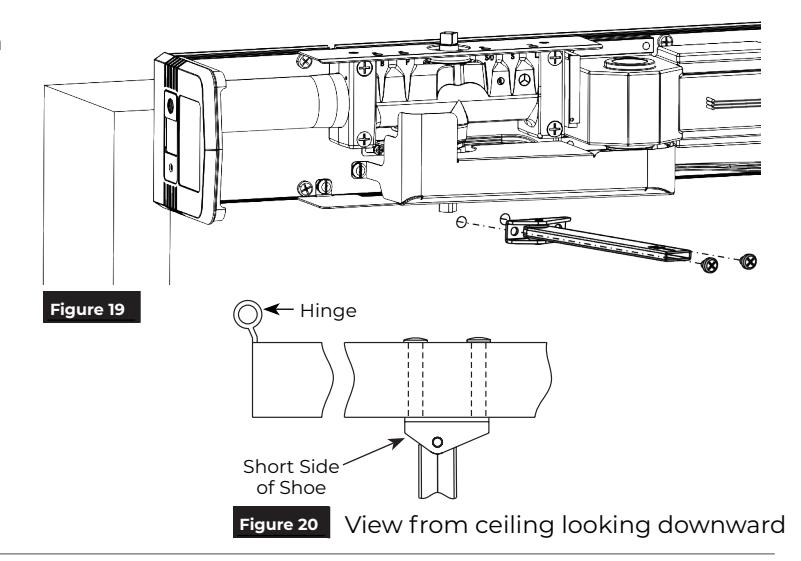
1. Using previously prepared holes in door, install two (2) 1/4-20 x 1-5/8" screws through shoe and into sex bolts. (Figure 19)
NOTE: Orient shoe with short side of shoe toward hinge. (Figure 20)
B. Install Main Arm.
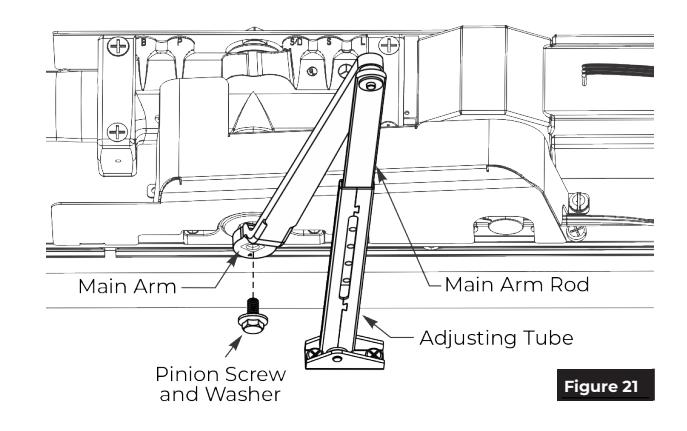
- 1. With door open, slide main arm rod into adjusting tube. (Figure 21)
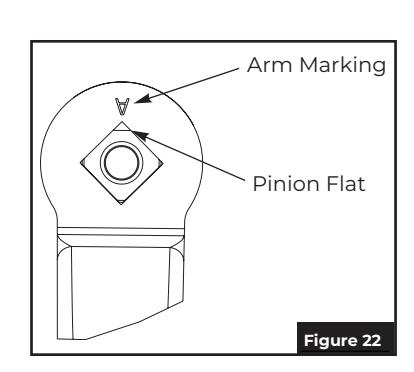
- 2. Place square of main arm onto closer pinion. (Figure 21)

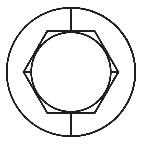
NOTE: Pinion flat should be aligned as shown. (Figure 22)
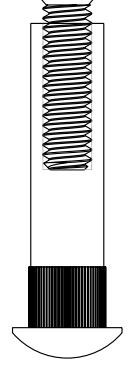
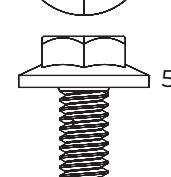
3. Attach main arm to pinion with screw then tighten with 7/16" wrench. (Figure 21)
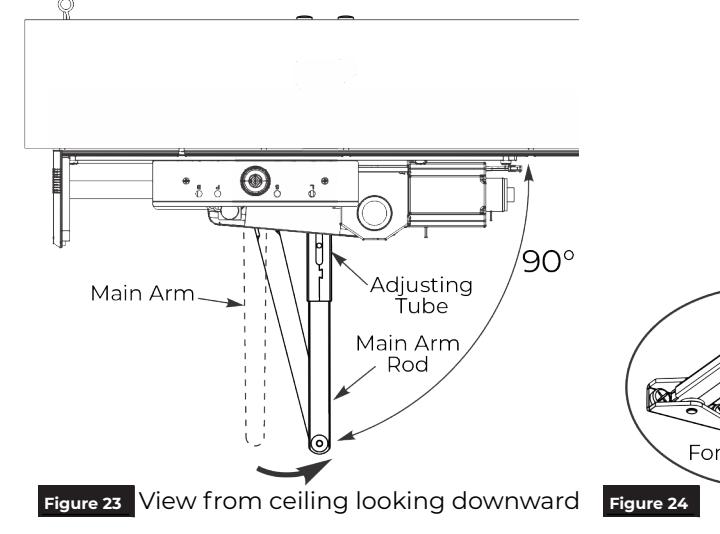
5. While holding arm in position, secure rod to adjusting tube with forearm screw. (Figure 24)

Adjustments
A. Adjust mechanical closer features. NOTES:
- y Make necessary mechanical adjustments so unit functions as a standard surface mounted door closer before adjusting spring force, applying power, adding accessories or making electrical/programming adjustments.
- y Valve location S/D is not adjustable.

Do not remove valves from closer. Hydraulic oil will escape.
-
1. Closing Speed Controls (Figure 25)
- y Valve "S" controls Sweep Range from full open to 10°.
- y Valve "L" controls Latch Range from 10° to closed.
-
2. Opening Cycle (Figure 25)
- y Valve "B" controls strength of cushioning in Backcheck Range.

NOTE: NEVER close Backcheck valve completely – it is not to provide a positive stop.
y Valve "P" adjusts angle that backcheck is felt in open cycle. Factory preset is typically acceptable.
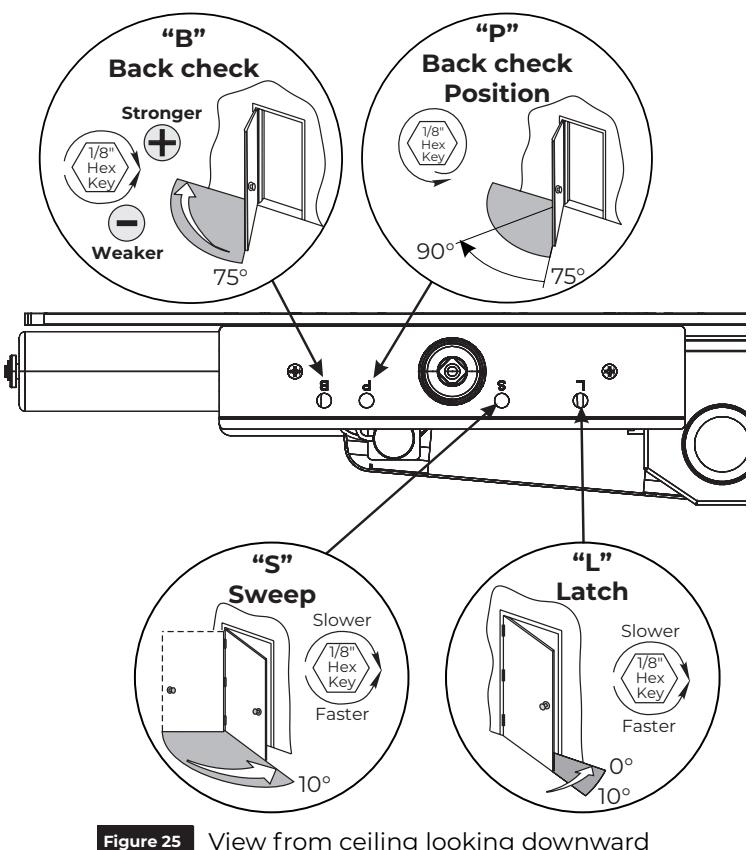
Figure 25 View from ceiling looking downward
Spring Force
B. Adjust spring force.
NOTES:
- y The amount of effort to manually open or close a door is called force and is controlled by the operator's closer spring.
- y Make necessary mechanical adjustments described in "A" above.
- y A closer set to ADA required 5 lbs opening force may not be strong enough to close door due to latching hardware, air pressure, or frame issues.
6021 Series : Using an adjustable wrench or a ratchet with an 11/16" socket, turn the nut in end of closer body tube clockwise to increase or counterclockwise to decrease force until desired setting is reached. (Figure 26)
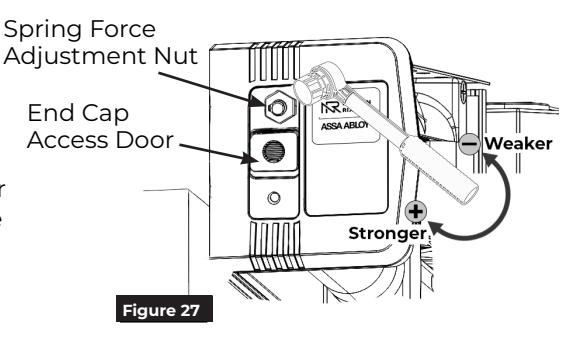
6031 Series : To adjust the spring force, access the Spring Force Adjustment Nut through the End Cap Access Door.
- 1. Remove small torx head screw from end cap.
- 2. Slide the End Cap Access door, exposing the spring adjustment nut.
- 3. Using a ratchet with an 11/16" socket, turn the nut in end of closer body tube clockwise to increase or counterclockwise to decrease force until the desired setting is reached. (Figure 27)
-
4. Once the desired force has been set:
- ‒ Remove the ratchet.
- ‒ Slide the end cap access door closed.
- ‒ Replace the end cap screw.
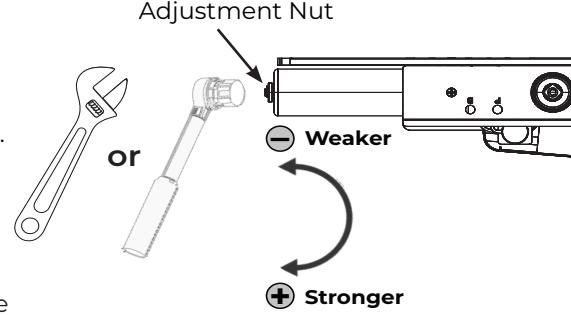
Figure 26 View from ceiling looking downward

Finalize Installation
A. Attach Cover to finalize installation
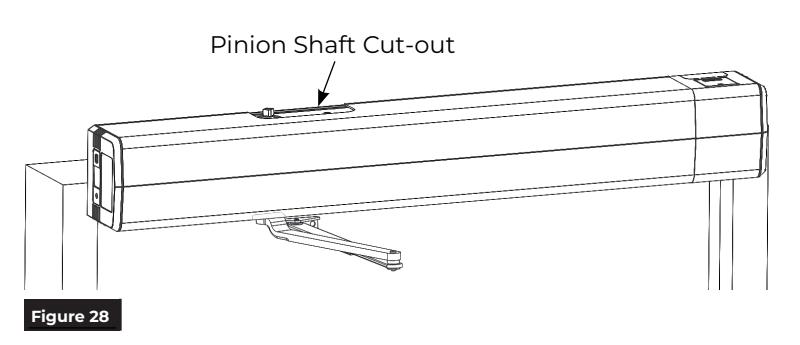
- 1. Align cut-outs in cover to pinion shafts.
-
2. Slide cover onto unit using end cap and union spacer as guides.
- NOTE: Verify all wiring and sheet metal guards are inside cover.
- 3. Snap cover securely to backplate. Pull on cover to verify it is secure.
NOTE: If cover will not securely snap onto backplate, verify backplate is not warped or twisted. Additional support or shimming may be required. See Sections A & B under Prepare Frame and Door.

WARNING: Make sure no wiring is loose or can be caught by cover when it is snapped into place.
You've now installed the 6021 or 6031 PUSH SIDE Low Energy Operator .
Continue with separate Programming Manual 80-9360-1043-020 for operator setup and adjustments.
General Electrical Information
- y Power inputs at power input connection and power output contacts must be made with copper wire only.
- y Maximum wire size: 12 AWG at power input connection 14 AWG at all other terminals.
- y Power input at terminals LINE and NEUTRAL must be 120VAC at 60 Hz (+10%, -15%).
- y Maximum current draw from auxiliary devices is 1.3 amps.
- y All wiring and connections use standard wiring practice conforming with local wiring codes.
- y Labeled fire or smoke barrier door assemblies require 120VAC 60Hz power input be supplied through normally closed alarm contacts of the alarm system / alarm panel.

Troubleshooting Guide
| Problem | Solution |
|---|---|
| Door closing too fast | Adjust Latch and/or Sweep valves on closer clockwise (see page 11). |
| Door closing too slow | Adjust Latch and/or Sweep valves on closer counterclockwise (see page 11). |
| Door does not open to desired location |
1) Adjust Backcheck valve on closer counterclockwise, OR
2) Decrease spring force on closer body (door must still close in event of power failure (see page 11), OR 3) Ensure shoe is properly oriented on door (see page 10) |
|
Door does not reach fully opened
position |
1) Adjust Backcheck valve on closer counterclockwise, OR
2) Decrease spring force on closer body (door must still close in event of power failure (see page 11), OR 3) Ensure shoe is properly oriented on door (see page 10) |
| Cover will not snap onto backplate |
1) Wire protruding from under cover
2) Backplate is twisted / not mounted properly. (see page 7) |
| Cover will not stay on operator | Cover extrusion has been stretched too wide and will not properly secure |
6021/6031 Series
Push Side Application ONLY Left Hand Door Shown

6021/6031 Template
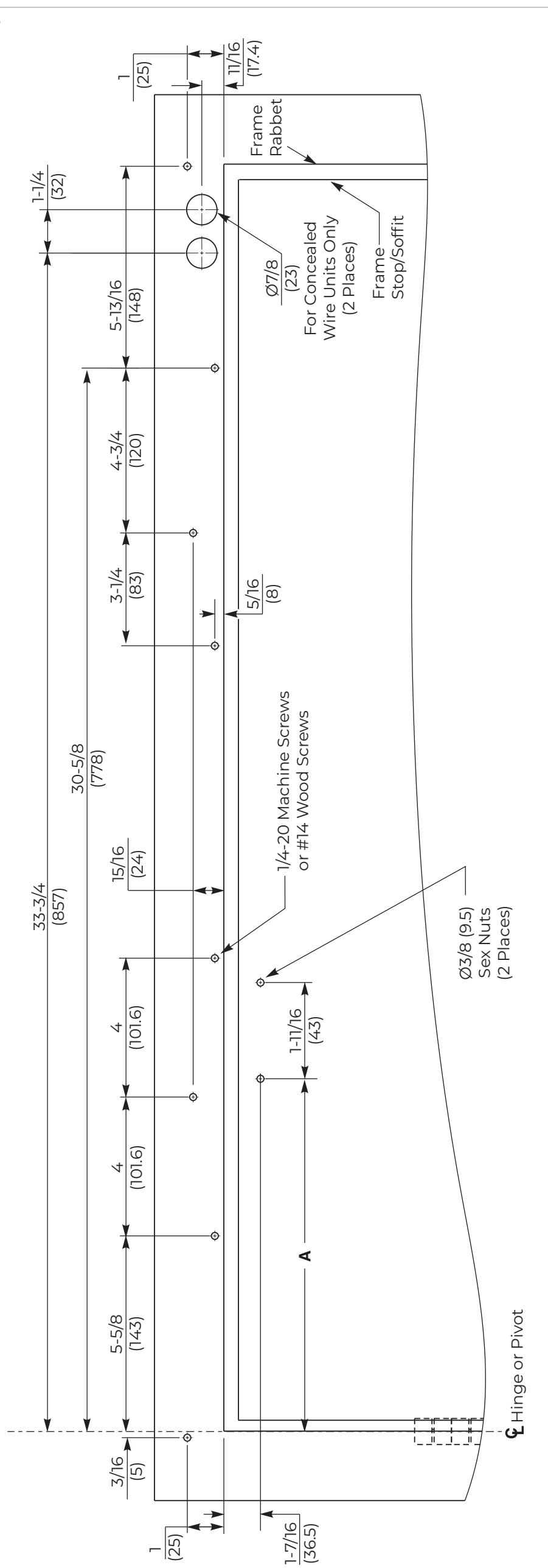
| A Dimension | Operator Model |
|---|---|
| 13-1/8" (333mm) | 6021 |
| 10-3/8" (264mm) | 6031 |
|
• All dimensions given in inches (mm).
• Left hand door shown. • Do not scale drawing. |
|---|