Norton Rixson 5800 Series Low Energy Operator Push Side Quick Start Guide_700402
Open the original PDF document
View PDF

5800 Series Low Energy Operator Push Side Quick Start Guide
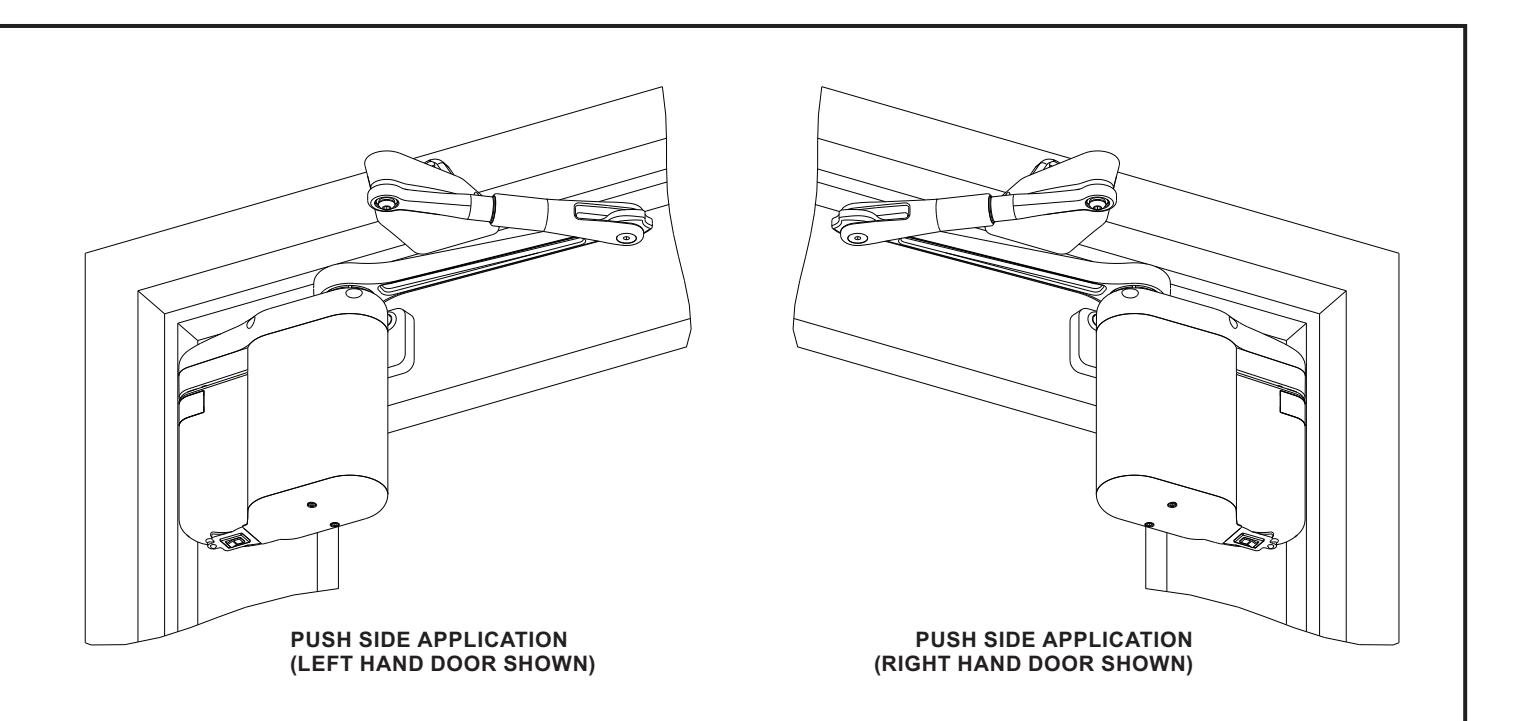
This manual provides quick reference instructions for installing and operating the push side 5800 door operator. Prior to performing these instructions thoroughly review the following information in document number 700002, "5800 Series Low Energy Operator Installation and Operating Instructions:"
- System Description
- Prerequisites
- Precautions
- Controls and indicators
- Installing the optional plug-in transformer
- Installing the push button switches
- Linking the RF push buttons
- Troubleshooting recommendations
- Detailed operator programming instructions
- Replacing the battery pack fuse
- Customizing the operator settings
- Installing door decals
- Detailed closeout instructions
- Wiring
- Replacement parts
- Adjusting door spring tension
To obtain the latest manual and template revisions or to view installation and programming videos go to www.NortonRixson.com. For technical support call 877-974-2255 ext. 2.

|
TABLE
OF CONTENTS |
||
|---|---|---|
| 1. | Installing the Operator Mounting Template | 3 |
| 2. | Mounting the Door Arm Pivot Bracket | 4 |
| 3. | Installing the Door Arm Pivot | 6 |
| 4. | Installing the Operator Mounting Bracket and Cover | 7 |
| 5. | Installing the Door Arm | 10 |
| 6. | Installing the Optional Plug-In Transformer | 12 |
| 7. | Programming the Operator | 14 |
| 8. | Initializing the Remote Control | 15 |

1 Installing the Operator Mounting Template
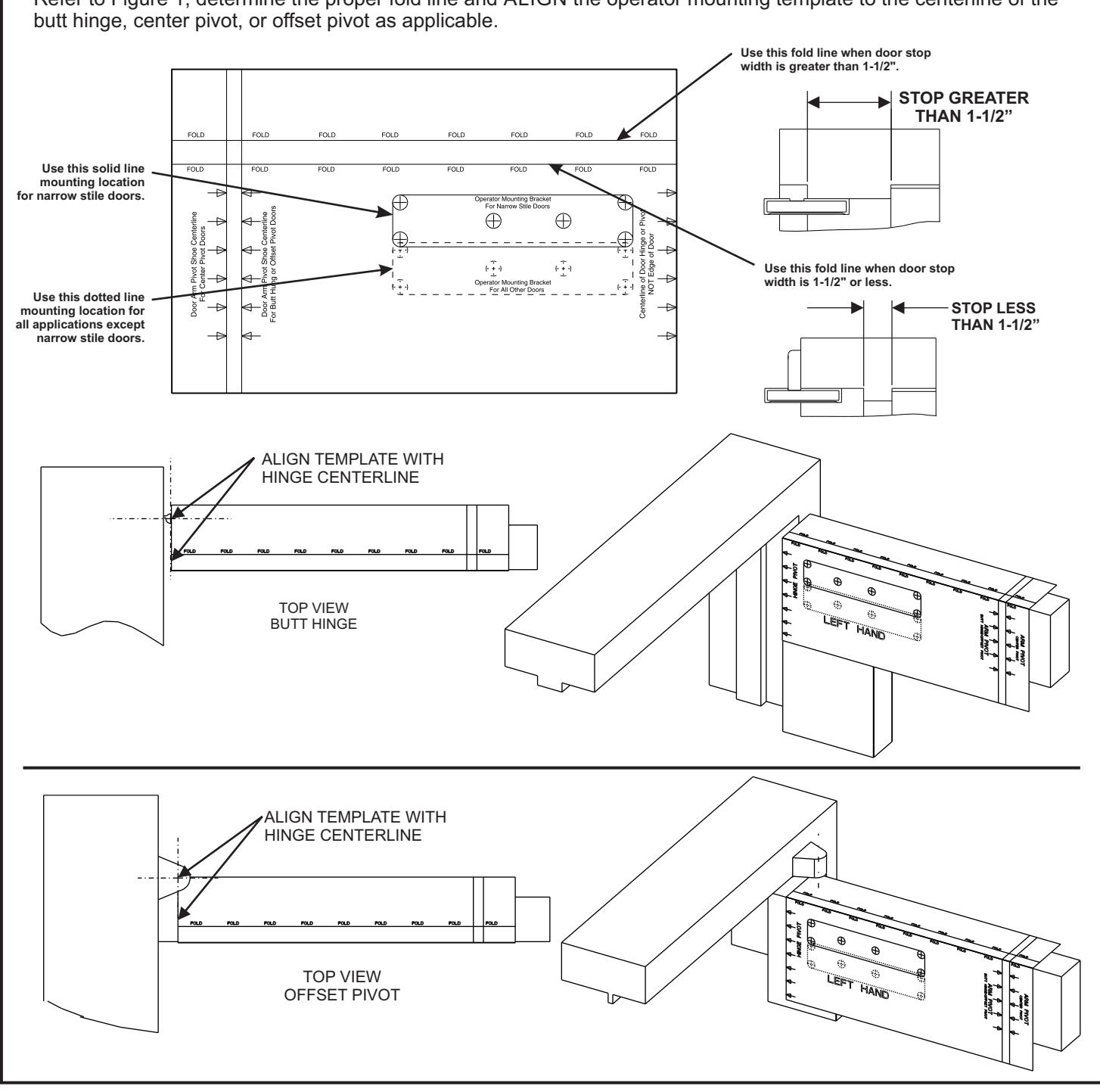
If the door is an aluminum storefront door, EXAMINE the top rail and, when drilling the mounting holes, ENSURE the following:
- Do not drill into the top rail web
- Do not drill into the rail-to-stile tie rod(s)
- Do not drill into the rail-to-stile junction
Refer to Figure 1, determine the proper fold line and ALIGN the operator mounting template to the centerline of the

2 Mounting the Door Arm Pivot Bracket
-
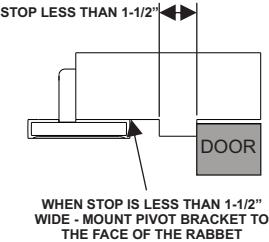
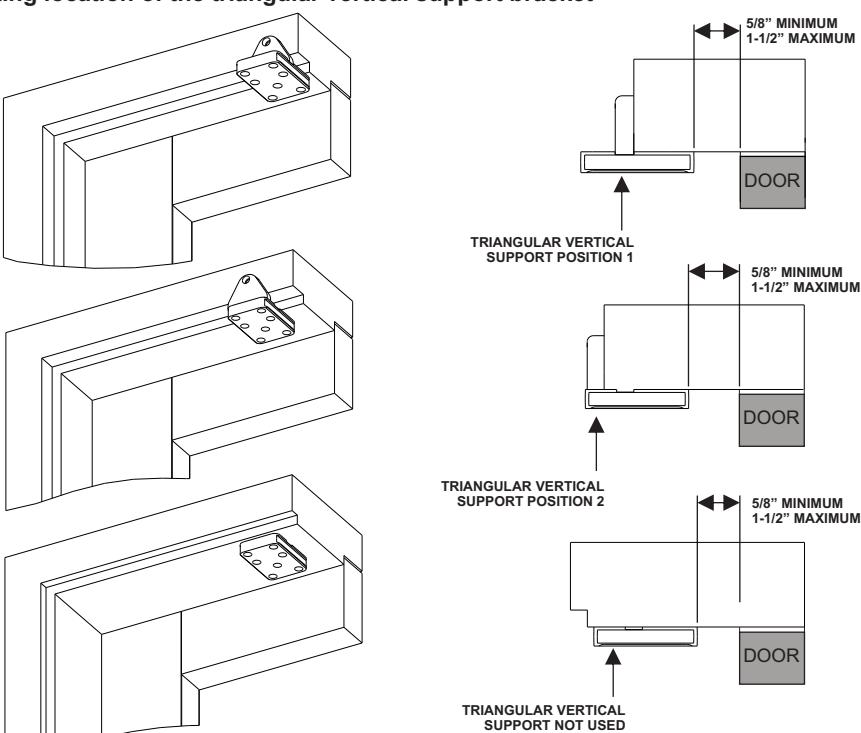
1. Refer to Figure 2, and DETERMINE the orientation of the door arm pivot bracket as necessary to ensure the following (as applicable):
- If the door is a typical installation, the vertical support will set flush against the face of the frame header.
- If the door is a large reveal installation, the bracket will mount to the underside of the frame header.
- The edge of the bracket will be between 5/8" (16 mm) and 1-1/2" (38 mm) from the face of door.
Determining the Door Arm Pivot Bracket Mounting Location.
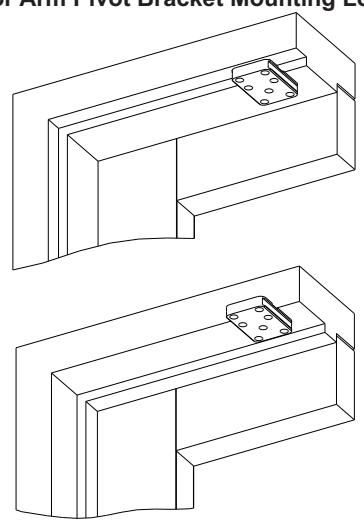
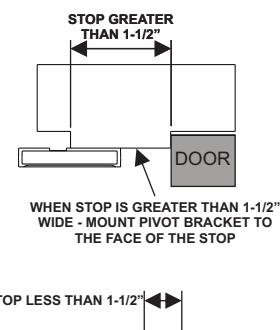
Determine the mounting location of the triangular vertical support bracket

2 Mounting the Door Arm Pivot Bracket con't
CAUTION
To ensure proper installation, the door arm pivot bracket must be fastened to the underside of the header frame and to the face of the header frame with at least three fasteners.
NOTE
When attempting to install the rivnuts to the underside of the door frame it may be necessary to remove the door stop.
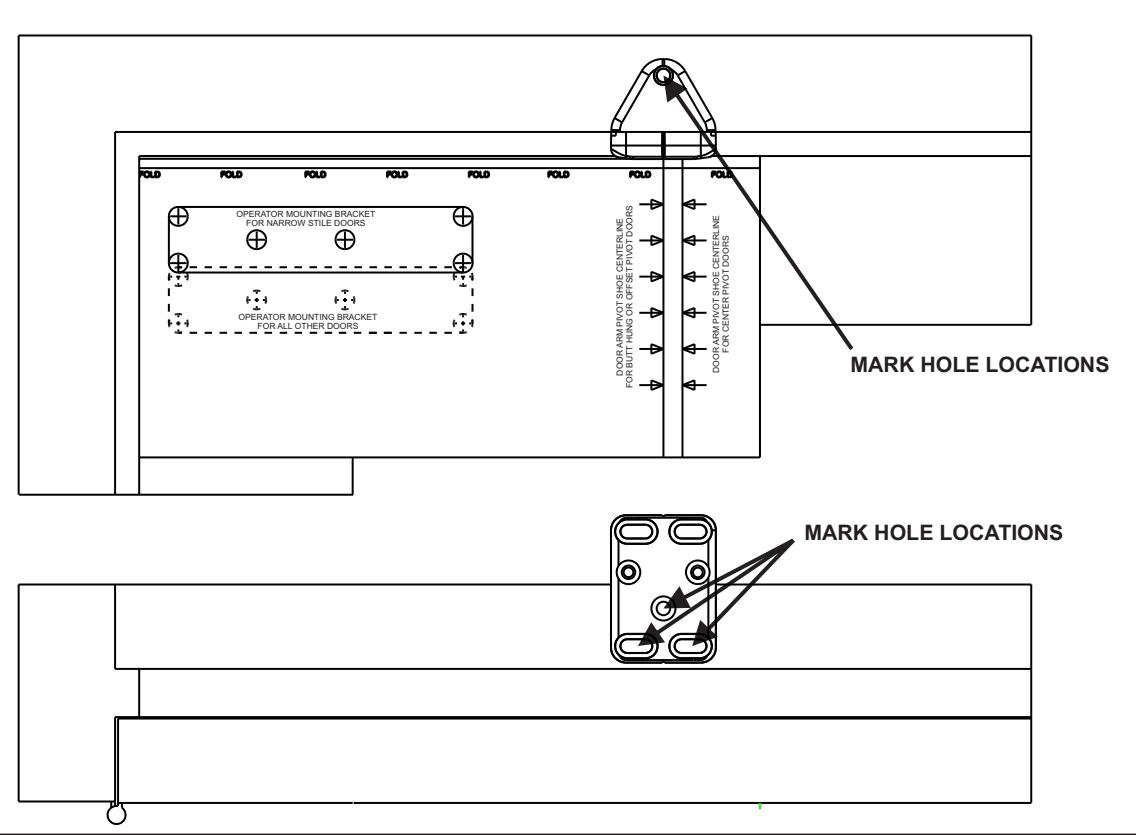
- 2. Refer to Figure 3 and, using a center punch, MARK the door arm pivot bracket hole locations.
-
3. If the door frame is aluminum and rivnuts must be installed, PERFORM the following:
- a. Using a 25/64" drill, DRILL the door arm pivot bracket holes.
- b. Using a rivnut tool, INSTALL the ¼-20 steel rivnuts.
- c. INSTALL and TIGHTEN the three (minimum) ¾" socket head capscrews securing the door arm pivot bracket to the underside and face of the frame header.
-
4. If the door frame is wood, PERFORM the following:
- a. Using a 5/32" drill, DRILL the door arm pivot bracket pilot holes.
- b. INSTALL and TIGHTEN the three #14 x 1-¼" wood screws (minimum) securing the door arm pivot bracket to the underside and face of the frame header.
Copyright © 2018, 2024, ASSA ABLOY Accessories and Door Controls Group, Inc. All rights reserved. Reproduction in whole or in part without the express written permission of ASSA ABLOY Accessories and Door Controls Group, Inc. is prohibited.
Figure 3

3 Installing the Door Arm Pivot
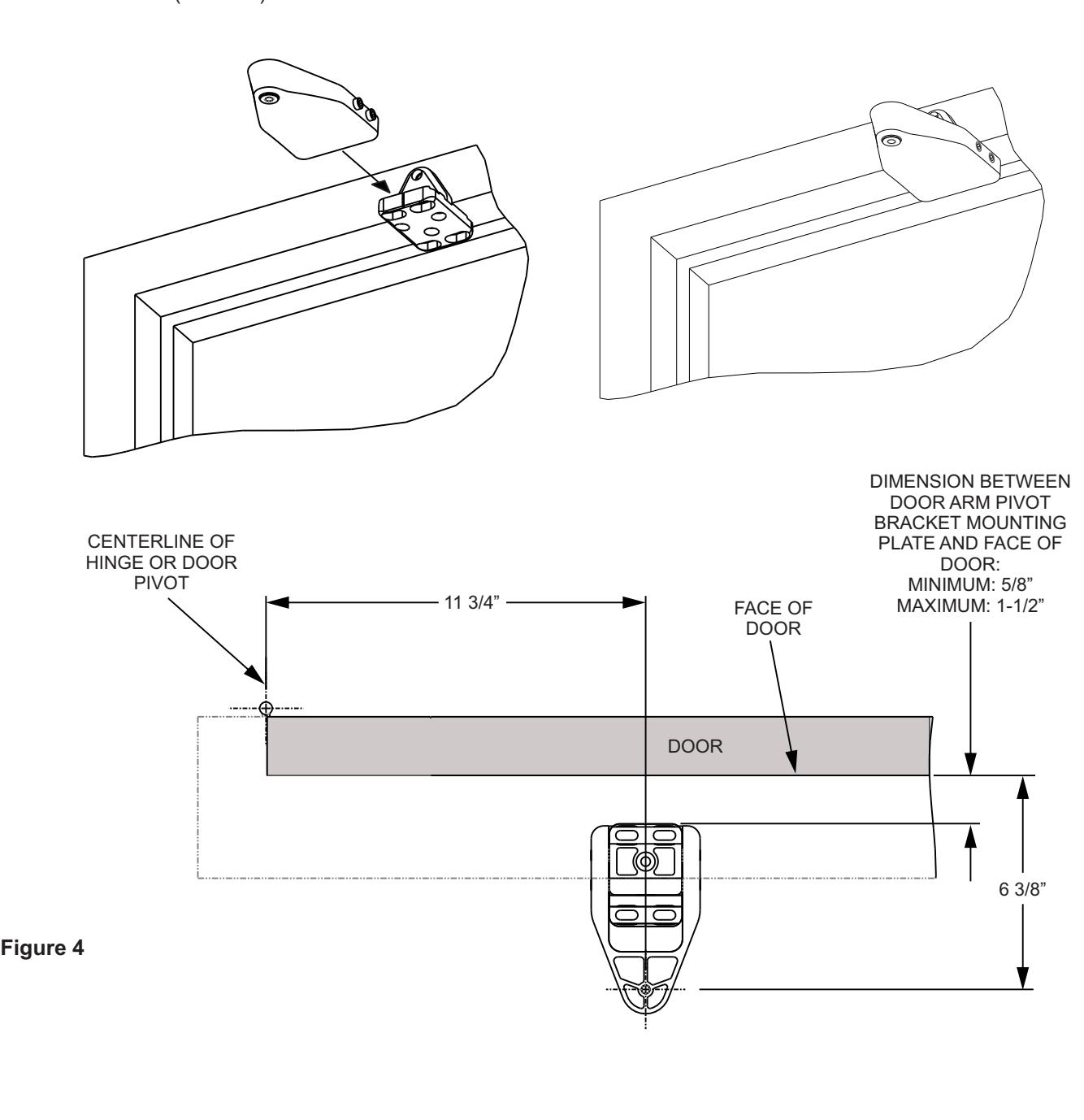
- 1. Refer to Figure 4, and SLIDE the door arm pivot over the door arm pivot bracket.
- 2. ENSURE that the dimension from the face of the door to the centerline of the door arm mounting hole is 6-3/8" (162 mm).
- 3. TIGHTEN the four set screws securing the door arm pivot to the door arm pivot bracket.

4 Installing the Operator Mounting Bracket and Cover
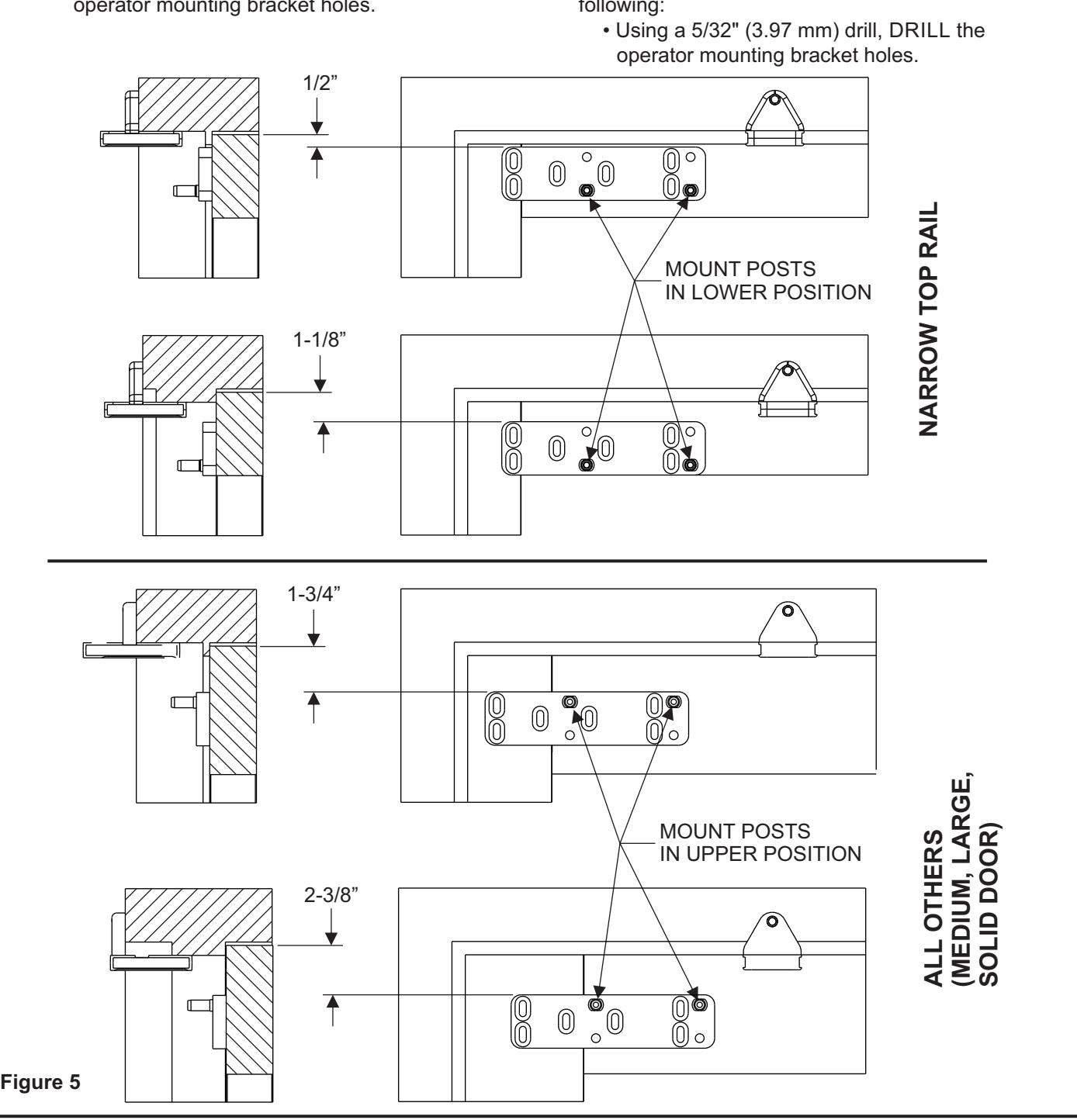
- 1. Refer to Figure 5, and DETERMINE the proper operator mounting bracket location.
-
2. If the door frame is aluminum and rivnuts must be installed, PERFORM the following:
- Using a 25/64" (9.92 mm) drill, DRILL the operator mounting bracket holes.
- 3. Using a rivnut tool, INSTALL the ¼-20 steel rivnuts.
NOTE : Some door installations may require sex nut and bolt fasteners.
4. If the door frame is wood, PERFORM the following:

4 Installing the Operator Mounting Bracket and Cover con't
- 5. INSTALL a washer onto each of the four (minimum) ¾" (19.05 mm) socket head operator mounting bracket capscrews.
- 6. INSTALL, but do not TIGHTEN the socket head capscrews securing the operator mounting bracket to the door.
-
7. ADJUST the operator mounting bracket as follows:
- If the upper fold on the operator mounting template was used (large stop mounting), ADJUST the bracket so that there is 2-3/8" (60.32 mm) space between the top of the bracket and the top of the door.
- If the lower fold on the operator mounting template was used (standard mounting), ADJUST the bracket so that there is 1¾" (44.45mm) space between the top of the bracket and the top of the door.
- If the narrow stile door mounting location was used (solid line on operator mounting template), ADJUST the bracket so that there is 1/2" (12.7 mm) space between the top of the bracket and the top of the door.
- 8. TIGHTEN the socket head capscrews securing the operator mounting bracket to the door.
NOTE: The operator mounting bracket includes four threaded holes that accept the operator mounting pins. The lower set of two threaded holes is used when the operator is installed on a narrow-rail door. The upper set of two threaded holes is used when the operator is installed on a medium- or wide-rail door.
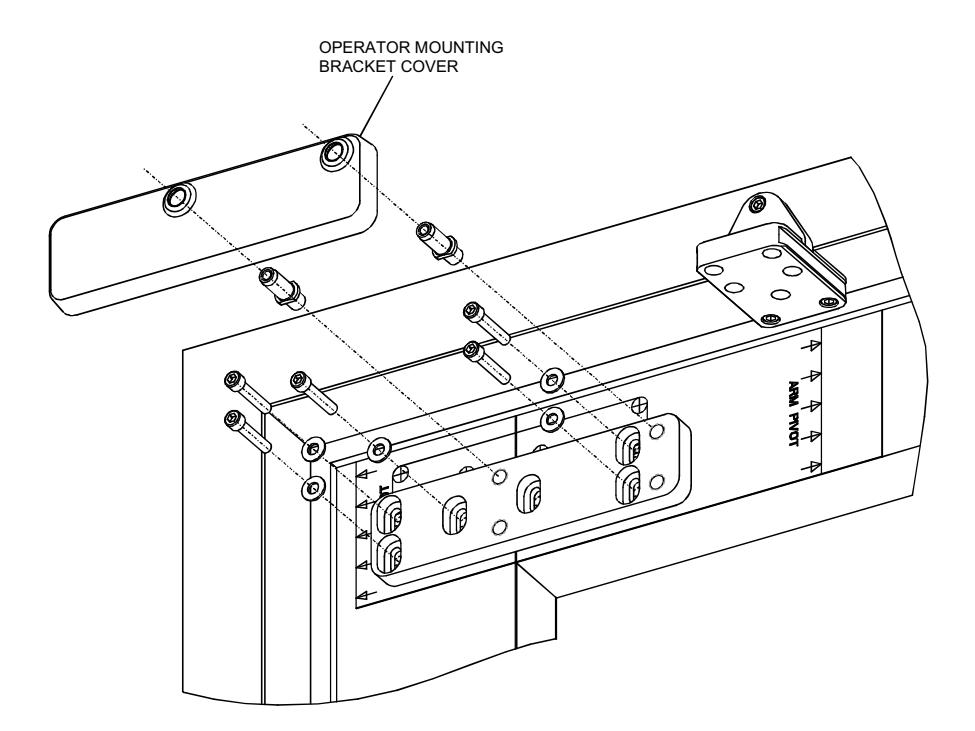
Figure 6

4 Installing the Operator Mounting Bracket and Cover con't
-
9. Refer to Figure 5 and PERFORM one of the following as applicable:
- If the operator is being mounted to a narrow rail door, TIGHTEN the operator mounting pins into the lower threaded holes in the mounting bracket using a 7/16" box wrench or large adjustable wrench.
- If the operator is being mounted to a wide or medium rail door, TIGHTEN the operator mounting pins into the upper threaded holes in the mounting bracket using a 7/16" box wrench or large adjustable wrench.
- 10. Refer to Figure 6, and INSTALL the operator mounting bracket cover over the operator mounting bracket.
- 11. REMOVE the two capscrews securing the operator bottom cover to the operator.
- 12. REMOVE the bottom cover from the operator.
- 13. SLIDE the battery pack from the operator and REMOVE the battery pack.
- 14. REMOVE the dress cover from the operator.
WARNING : To avoid inadvertent activation of the operator during connection of the door arm, the battery pack should not be installed until after the door arm is connected.
- 15. With the battery pack facing the jamb, POSITION the operator onto the operator mounting pins. ENSURE the operator does not slide off the mounting pins.
- 16. INSTALL and TIGHTEN the two ¼-20 X 1½" socket head capscrews securing the operator to the operator mounting pins.

5 Installing the Door Arm
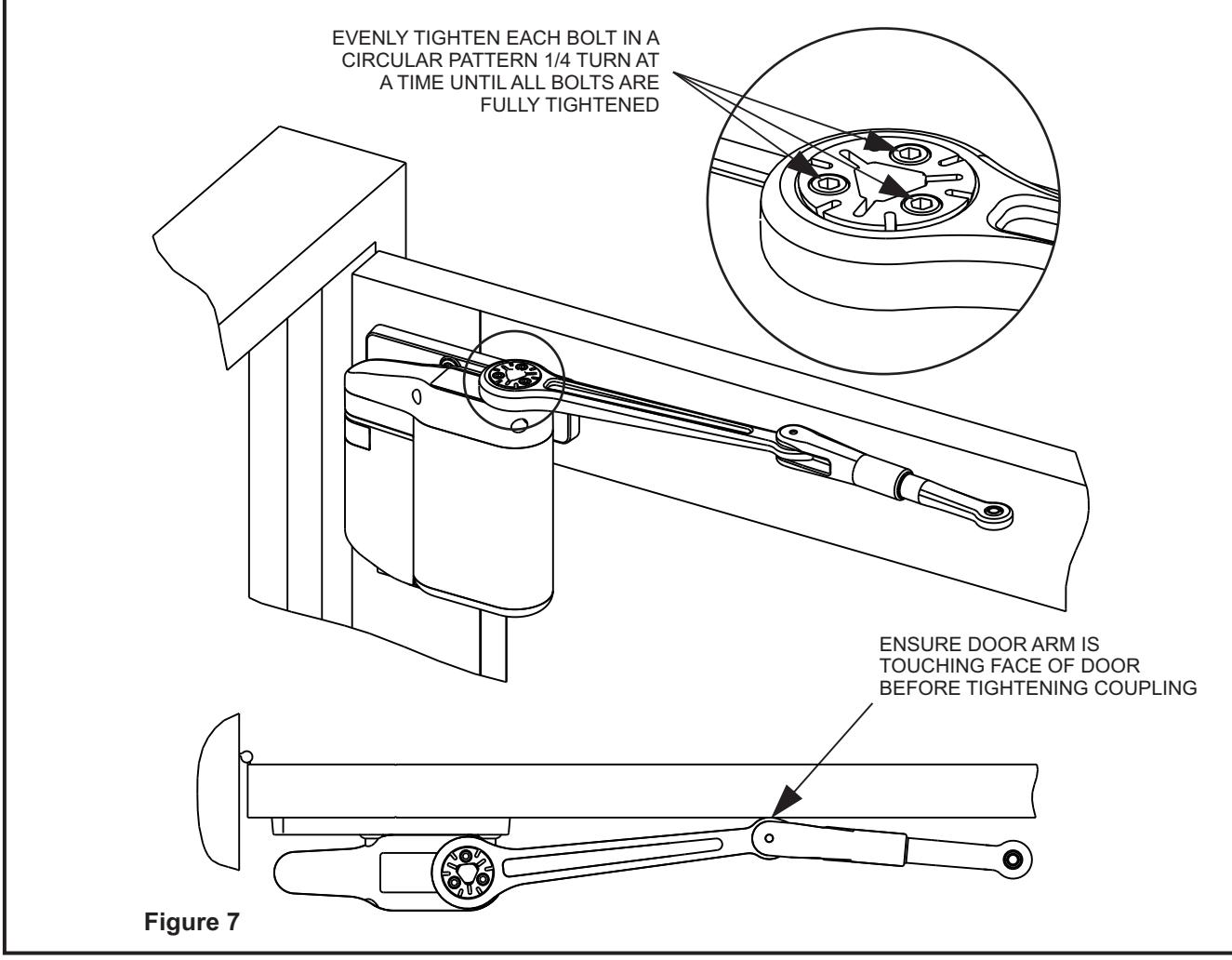
1. Refer to Figure 7, and, with the door arm coupling screws facing up and the door arm against the door rail, POSITION the larger end of the door arm onto the operator output shaft.
CAUTION
The door arm coupling is a two-piece tapered coupling. In order to draw the coupling halves together evenly the three door arm coupling screws must be tightened evenly (one quarter turn at a time) until fully tight.
- 2. With the door arm touching the face of the door, TIGHTEN the door arm coupling screws evenly (one quarter turn at a time) until fully tight.
- 3. HOLD the elbow of the door arm against the face of the door, and THREAD the adjustable door arm
- end link into the door arm as necessary to align the end link mounting hole with the door arm pivot mounting hole.
-
4. If the door arm end link does not align with the door arm pivot mounting hole and there is no available travel on the threaded end link, PERFORM the following:
- LOOSEN the socket head capscrews securing the door arm pivot to the door arm pivot bracket.
- SLIDE the door arm pivot as necessary to align the door arm end link with the door arm pivot mounting hole.
- TIGHTEN the socket head capscrews securing the door arm pivot to the door arm pivot bracket.

5 Installing the Door Arm con't
NOTE: In order to apply a preload to the door, the door arm must be threaded into the door arm three revolutions.
- 5. THREAD the adjustable door arm end link into the door arm three revolutions.
- 6. INSTALL the washer provided onto the top of the door arm end link, and TIGHTEN the 5/16 -18 X 7/8" button-head capscrew securing the door arm end link to the door arm pivot bracket.
- 7. CYCLE the door several times, and ENSURE that the door opens and closes smoothly.
- 8. SLIDE the dress cover onto the operator.
- 9. CONNECT the battery pack connector plug to the operator.
- 10. SLIDE the battery pack onto the operator, and ENSURE that the battery pack wires will not interfere with the operator cover.
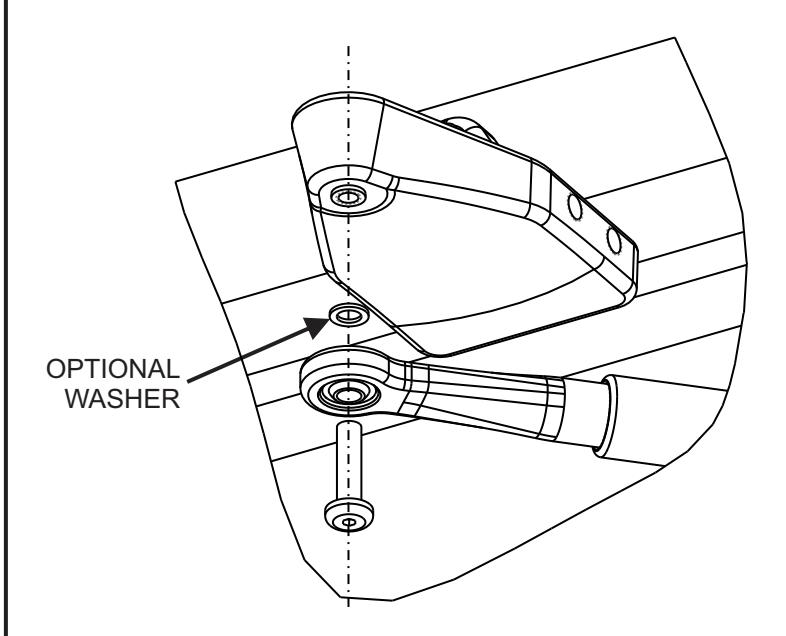
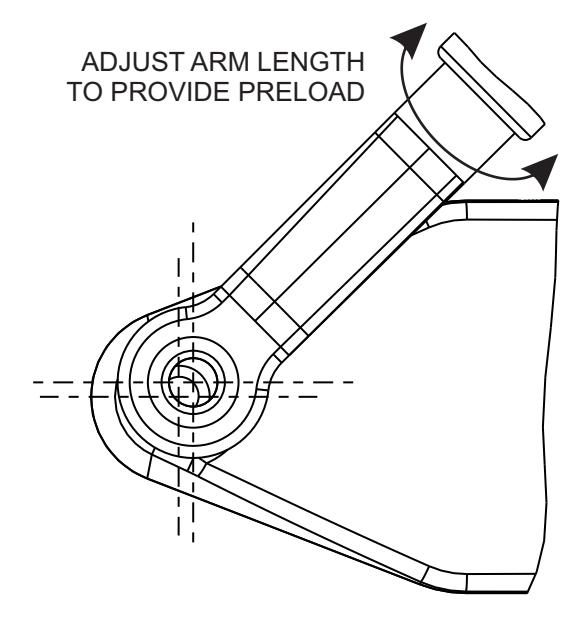
Figure 16

6 Installing the Optional Plug-In Transformer
NOTE: If possible, the transformer wiring should be routed against the door trim molding.
1. ROUTE transformer wiring to a 110-VAC outlet, but do not plug transformer into the outlet.
NOTE: An optional plug-in transformer is recommended in installations where the automatic door-opening feature will be used frequently. The optional plug-in transformer is REQUIRED for installations where Power Close and/or Push & Go features are enabled.
-
2. Refer To Figure 8, and ROUTE wires through armored cable end links. MOUNT the door cord end links as follows:
- MOUNT one end link in the area behind or next to the battery pack.
- MOUNT the other end link on or next to the door frame.
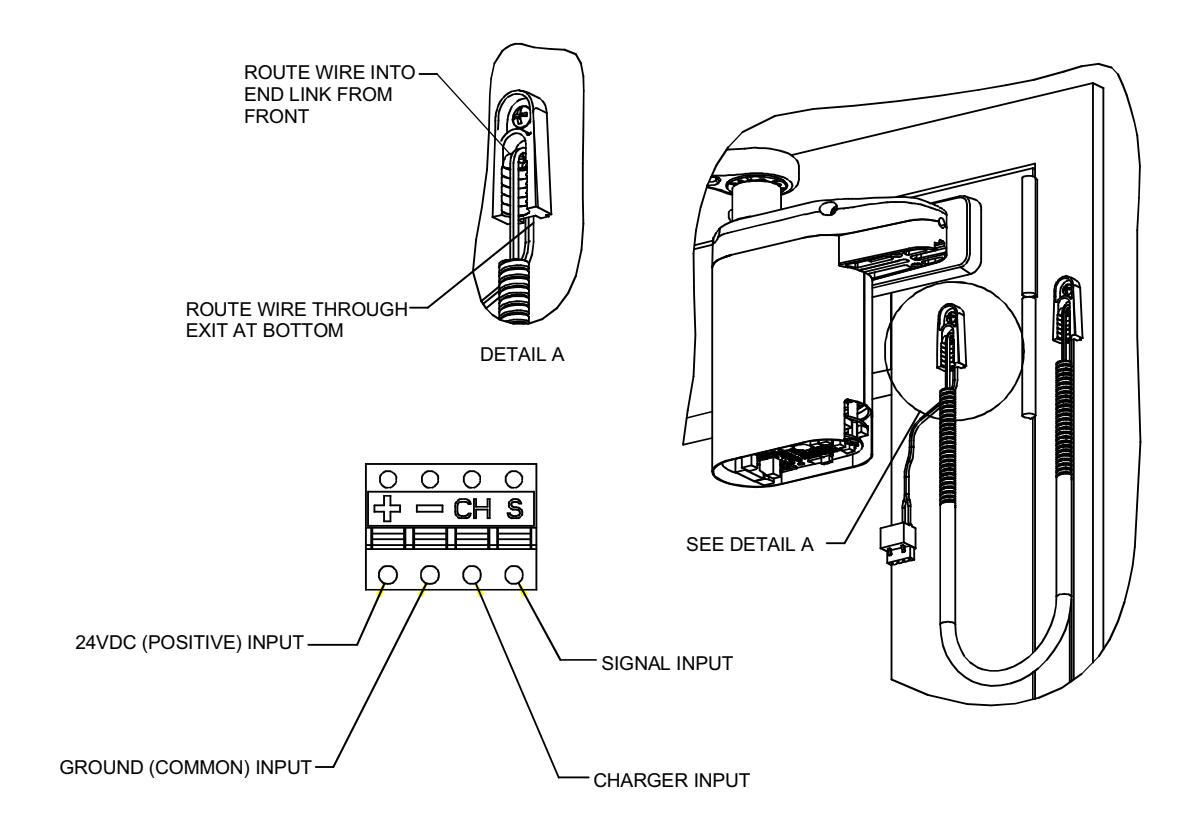
Figure 8

6 Installing the Optional Plug-In Transformer con't
3. Refer to Figure 9, and PLUG connector into receptacle on battery pack.
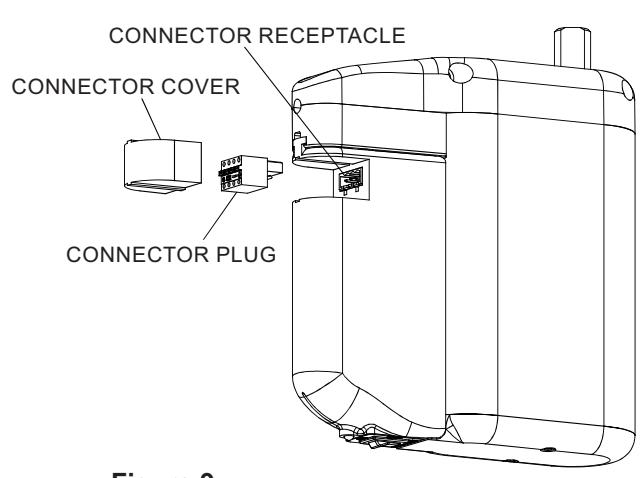
Figure 9
4. Refer to Figure 10, and VERIFY that the LED indicator lights GREEN.
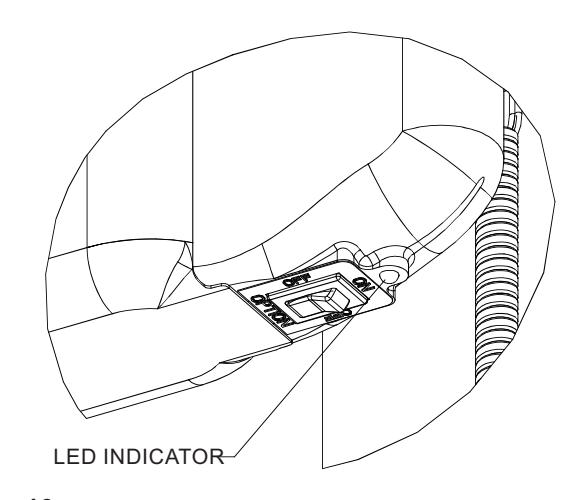
Figure 10

7 Programming the Operator
-
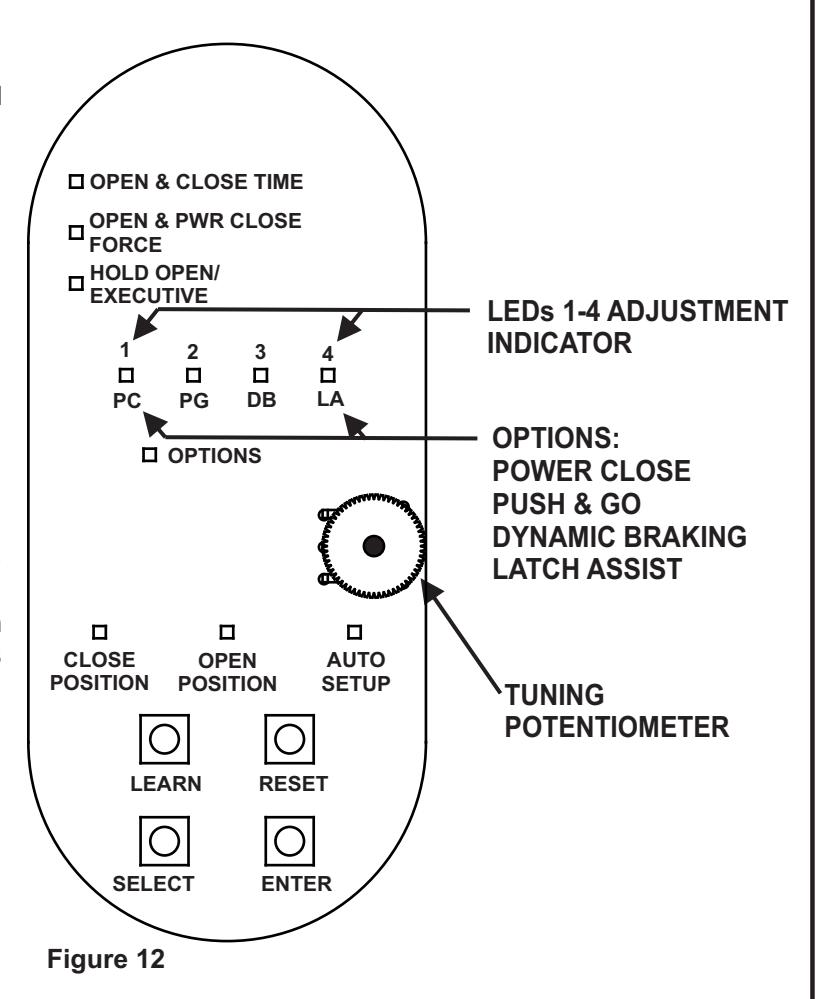
1. Refer to Figure 12 and, at the base of the setup board, PRESS and HOLD both "SELECT" and "ENTER" push buttons until LEDs 1 through 4 flash. The following shall occur:
- The operator shall enter program mode.
- The "CLOSE POSITION" LED shall illuminate red and remain lit.
-
2. With the door in the closed position, PRESS and RELEASE the "ENTER" push button. The following shall occur:
- The "CLOSE POSITION" LED shall flash green briefly.
- The "OPEN POSITION" LED shall illuminate red.
-
3. With the door in the fully open position, PRESS and RELEASE the "ENTER" push button. If the ENTER button is not accessible with the door in the fully open position, PRESS and RELEASE one of the activation push buttons. The following shall occur:
- The "OPEN POSITION" LED shall flash green briefly.
- The "AUTO SETUP" LED shall illuminate red.
-
4. With the door in the closed position, PRESS and RELEASE the "ENTER" push button. The following shall occur:
- The door shall rapidly open 30 to 45 degrees and then close.
- The "AUTO SETUP" led shall illuminate green.
- The Operator will exit programming mode.
- 5. If further door adjustments are desired or optional features will be enabled refer to Section 11, and PERFORM adjustments.
-
6. To reset the controller, PERFORM the following:
- PRESS and HOLD the "ENTER" button,
- While holding down the "ENTER" button PRESS and RELEASE the "RESET" button.
- LEDs 1 through 4 shall flash green briefly
NOTE: Resetting the controller does not reset the RF transmitters.

8 Initializing the Remote Control
-
1. To link an RF switch with a door controller, PERFORM the following:
- a. PRESS and HOLD the "LEARN" push button on the controller until LEDs 1 through 4 flash green. The controller shall remain in the learn mode for 20 seconds or until the RF signal is received.
- b. PUSH the RF push button. CLOSE POSITION LED shall flash green indicating that the operator accepted this RF push button.
- c. REPEAT steps a. and b. as necessary for up to eight 5800 transmitters.
-
2. To remove all RF push buttons from memory, PERFORM the following:
- a. While pressing and holding the "LEARN" push button on the controller, PRESS and RELEASE the "RESET" push button.
5800 Push Side Operator Quick Start Guide

Technical Product Support: Monroe, NC 28112 USA Phone: 877.974.2255 ext: 2
Techsupport.NortonRixson@assaabloy.com
NortonRixson.com
Copyright © 2018, 2024, ASSA ABLOY Accessories and Door Controls Group, Inc. All rights reserved. Reproduction in whole or in part without the express written permission of ASSA ABLOY Accessories and Door Controls Group, Inc. is prohibited.