Norton Rixson 5800 Series Low Energy Operator Battery Charger Instructions_700502
Open the original PDF document
View PDF

5800 Series Low Energy Operator Battery Charger Instructions

1 Connecting Battery Charger
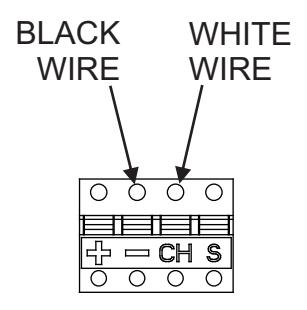
VERIFY the connections on the battery charger connector
- ENSURE the BLACK wire from the charger is properly seated in the position marked "-" on the green connector
- ENSURE the WHITE wire from the charger is properly seated in the position marked "+" on the green connector REMOVE auxiliary port connector cover from the battery pack.
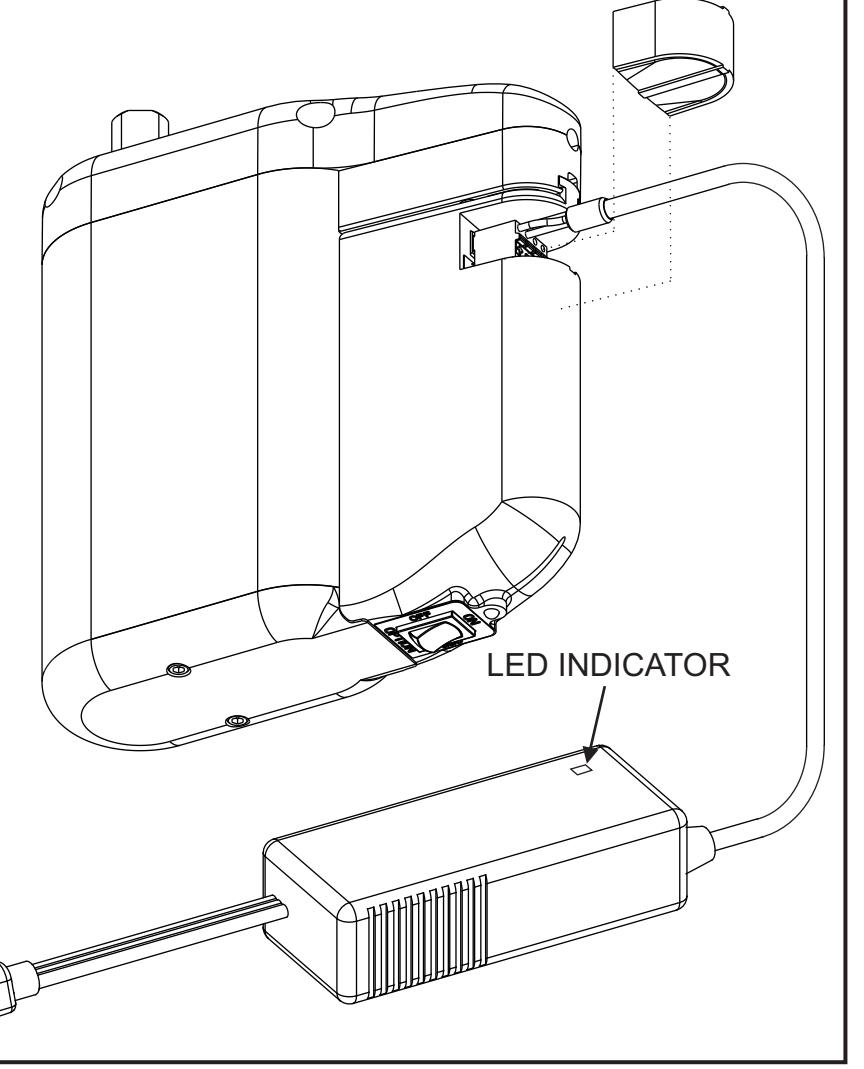
ENSURE the battery pack switch is set to the "ON" position
PLUG the green connector on the 5800 charger into the green port on the battery pack.
- The LED on the charger will light RED to indicate the battery is charging and will change to GREEN when charging is complete.
- If the LED on the charger flashes RED the battery pack must be replaced
- If the LED on the charger immediately turns GREEN and the LED on the battery pack indicates yellow, red, or gives no indication the battery must be replaced.
- If the LED on the charger remains RED for more than 3 hours and the LED on the battery pack indicates yellow, red, or gives no indication the battery must be replaced.
Technical Product Support: Monroe, NC 28112 USA Phone: 877.974.2255 ext: 2
Techsupport.NortonRixson@assaabloy.com
NortonRixson.com