Minimum Requirements for Cencon 4 with MicrosoftⓇ SQL 2008 R2 Enterprise
Open the original PDF document
View PDF
Minimum Requirements for Cencon 4 with Microsoft Ⓡ SQL 2008 R2 Enterprise
|
SQL 2008 R2 Enterprise
Restrictions |
High Availability
Options |
# of
Clients |
# of Cencon
Locks |
# of Centran
Transaction Hourly |
|---|---|---|---|---|
|
8 CPU
2 TB Ram Use Limit 524 PB Database Size |
Database Mirroring,
16 Node Failover Clustering, Database Snapshots, Database Available during Crash Recovery/Mirroring Failover |
11 -
Over |
25,000 -
Over |
2000 - Over |
Rev. D, 19 April 2013
Table of Contents
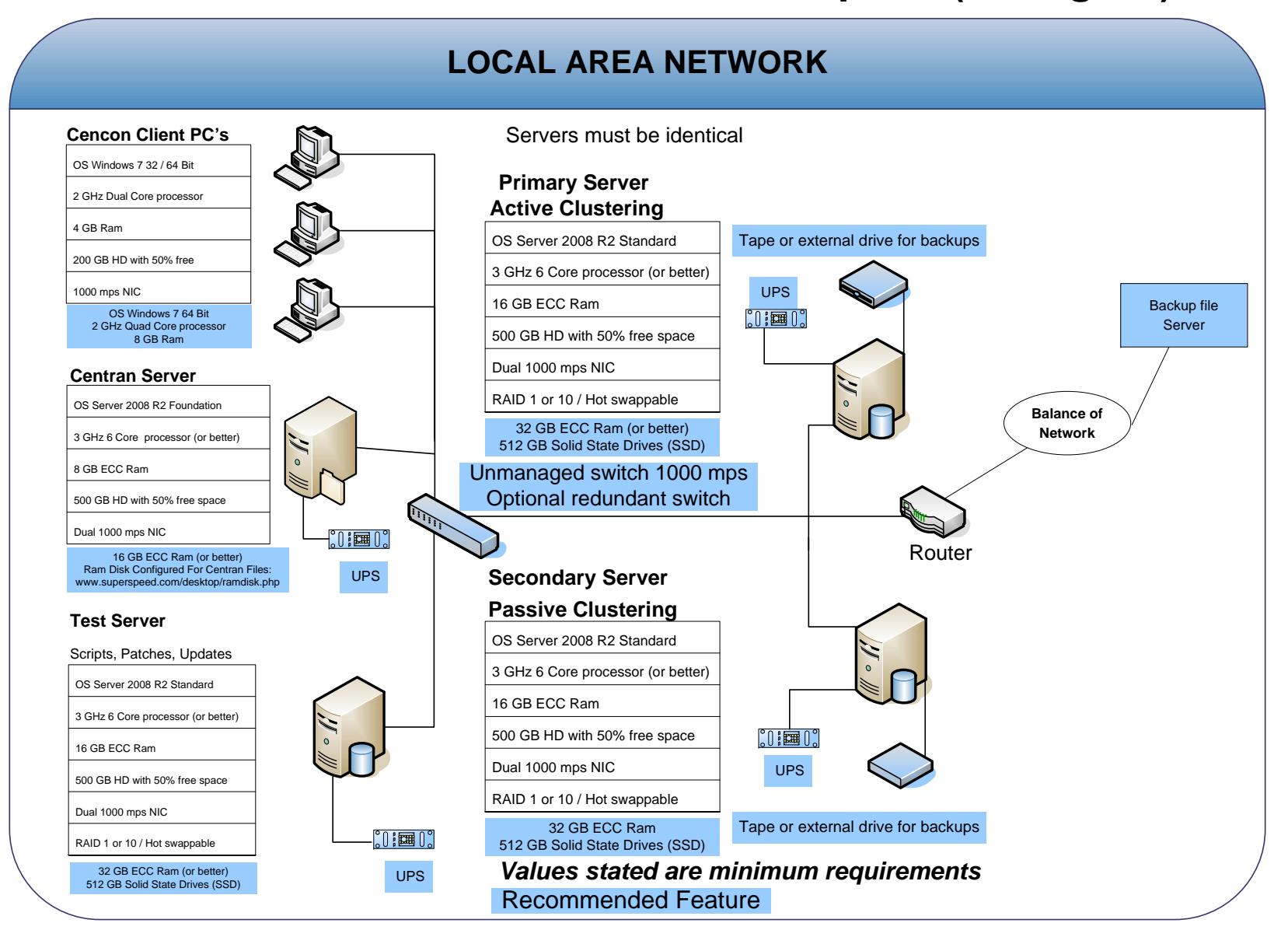
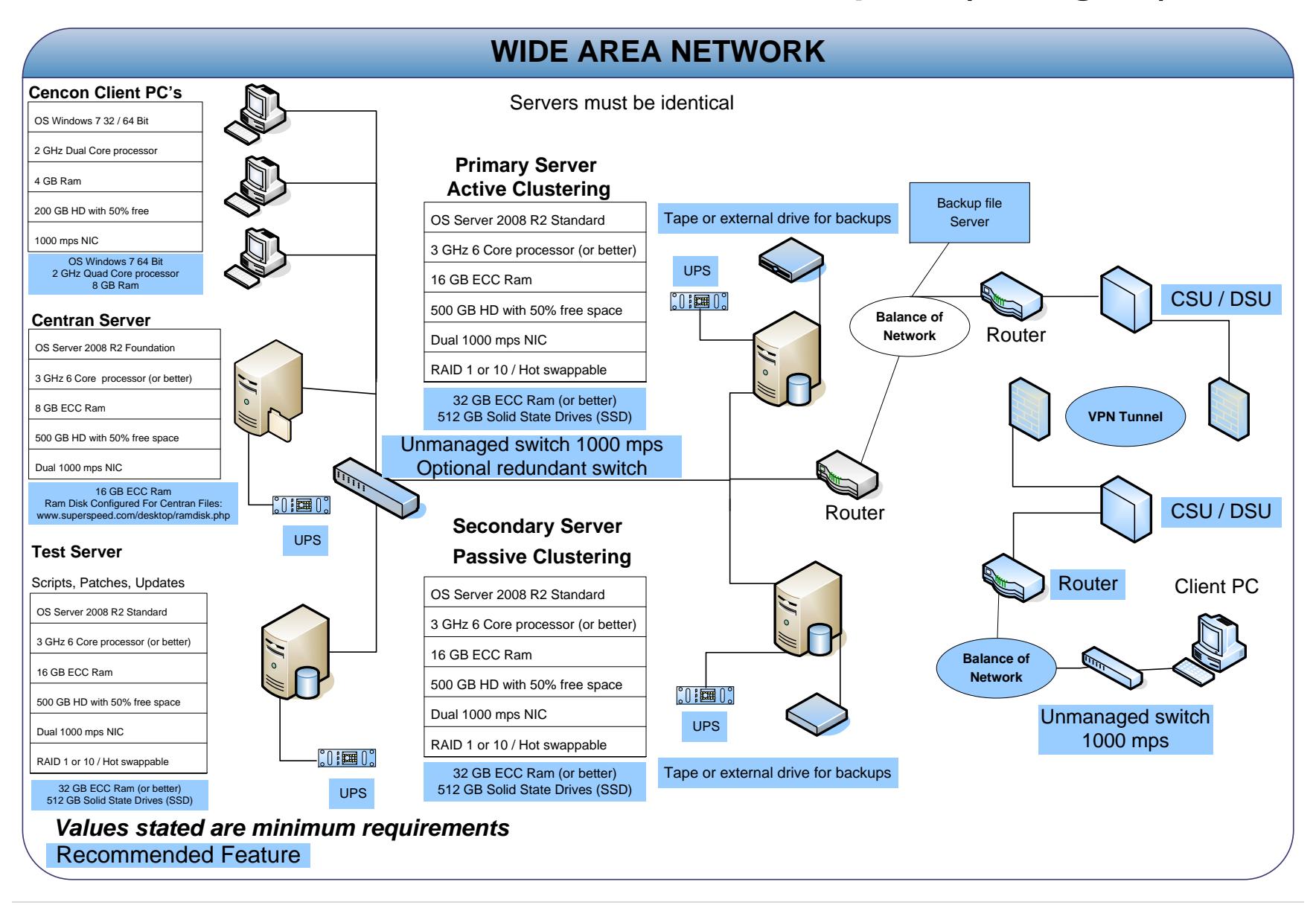
- 1. Visio Representation of Network Infrastructure
- 2. Microsoft SQL Server Installation Guidelines
- 3. Alert Guidelines
- 4. Backup and Recovery
- 5. Test Scripts and Test Recovery
- 6. Security
- 7. WAN
- 8. Required Preparation for Installation for Cencon 4
- 9. Best Practices
This specification provides information concerning network infrastructure, installation, and configuration of Microsoft SQL Server (herein, also "MS SQL" or "SQL") software.
This specification is subject to change and will be updated periodically.
Posted on the web at:
http://www.kaba-mas.com/Kaba-Brand/Documentation/518774/installationoperation.html?cat=366810
2. SQL 2008 R2 Express Server Installation
- Choose between case-sensitive and (default) non-case-sensitive collation for the SQL 2008 R2 database Cencon is to use.
- Transaction log backup path must be set to allow point-in-time recovery.
- Size the transaction logs to start with a file size of at least 25% of the database size.
- Prior to performing an update of a previous Cencon database using the CenconDBSetupUtility, first increase the size of the transaction logs and the database file size by at least 50% for best performance.
- Monitor the log transaction rates weekly and change size up or down depending on how quickly the logs are getting filled.
- Review system performance weekly and adjust accordingly.
3. Alerts
- Create performance condition alerts.
- Alerts must be used to notify the System Administrator and the Cencon Manager. Example: When SQL has hang times, high server use, locks, etc…
- Use Advice driven responses (automated) for alerts through scripting when available. Customize the notifications to assist with faster corrections.
4. Backup and Recovery
- Always have more than one backup and recovery solution. Note: Magnetic media is volatile. DVD/CD's can be damaged or broken.
- Make a complete back up, incremental backup, and backup the transaction logs periodically.
- Use SQL scripts or third party vendor to backup complete, incremental, exported database and transaction logs regularly.
5. Test Script or Test Recovery
- Periodically test your disaster recovery procedure using the complete, incremental, exported database and transaction log backups.
- Backup database and use with the test server to implement and test any patches for Kaba Mas Software, OS, SQL, or scripts prior to implementation on the live instance of SQL. Never test any patch or script on the live database.
- Any scripts run against the database must be sent to Kaba Mas prior to employing.
- Kaba Mas must test all OS or SQL patches you intend to implement prior to implementation. This may take Kaba Mas some time to complete. We will provide lead times with your request.
6. Security
Physical
- Do not leave passwords in the open.
- Do not leave Cencon logon keys in the reader.
- Do not write passwords on the key.
- If the system is not in use or is unattended, lock the terminal.
- Use BIOS and screensaver passwords to guard against unauthorized access.
Network
- Insider Hacks are the least preventable and the most destructive types.
- Have your HR department inform you before an employee is terminated.
- Set policies to constrain bandwidth availability for suspicious traffic. Port 80 for example is used for HTTP, Web surfing, streaming video, peer-to-peer sharing, music downloads, etc.
System
- Change password on all default accounts.
- Remove guest and other non-used accounts.
- Give specific access to SQL, transaction logs, and backups files, as needed.
- Make certain no hierarchical group or user policies are allowed access to SQL, transaction logs, and backup files.
- Limit or remove access to FTP.
- Review network IP protocols.
- All backups, exports, import files & scripts are possible sources of passwords/user names. Secure access to them.
• Learn about your USERS. If your users are working hours are between 9:00 AM and 5:00 PM, then any access at nights or weekends is suspect. Monitor and set alarms for this access.
SQL
- Change password on all default accounts.
- Lock or delete all non-used default accounts.
- Set policy in SQL to only allow 8 attempts to login before lockout.
- All backups, exports, import files & scripts are possible sources of passwords/user names. Secure the access to them.
- Check your alert logs REGULARLY for user access failures or unusual access errors.
- Always test scripts on a test server, never the live database.
- Monitor or set limits on very large queries. Hackers generally search whole databases.
7. WAN
• Use SQL recommended connection requirements.
8. Best Practices
Operating Environment
- Check the hardware manufacturers web sites for driver and BIOS updates
- All Cencon client machines must be on the same subnet.
- Add an Lmhosts file to all Cencon 4 and CenTran 4 machines to assist WINS resolution.
- Add a hosts file to all Cencon 4 and CenTran 4 machines to assist DNS resolution.
- Time and date must be synchronized between the clients and the server.
- Do not share a printer. Use network printer or print server, or use a series of local printers.
- Do not allow peer-to-peer file sharing between clients.
- Check the disk drives frequently and add or reclaim storage space as necessary.
Network
- 1000 Mbps connectivity must exist throughout the Cencon segment of the network.
- Use a switch or hub connecting the Cencon 4 and CenTran 4 clients to the server.
Driver signing for Windows
Device drivers and operating system files included with Windows have a Microsoft digital signature. The digital signature indicates that a particular driver or file has met a certain level of testing and that it was not altered or overwritten by another program's installation process. Device drivers for hardware products that have the Designed for Microsoft Windows 7 or Designed for Microsoft Windows Server 2008 R2 logos have a digital signature from Microsoft which indicates that the product was tested for compatibility with Windows and has not been altered since testing.
Depending on how your administrator configured your computer, Windows either ignores device drivers that are not digitally signed, displays a warning when it detects device drivers that are not digitally signed (the default behavior), or prevents you from installing device drivers that do not have digital signatures.
Windows includes the following features to ensure that your device drivers and system files remain in their original, digitally-signed state:
- Windows File Protection
- System File Checker
- File Signature Verification
The Drivers for the Cencon USB KeyBox are digitally signed and have been certified by Kaba Mas as compatible with Microsoft Windows 7 operating system and the hardware appearing on the Microsoft HCL.
HCL
The Microsoft Windows Catalog (also known as the hardware compatibility list or as the HCL) is a compilation of computers and computer hardware that have been extensively tested with Windows for stability and compatibility. Microsoft Product Support Services (PSS) uses the catalog to determine whether particular hardware is supported for use with the Windows operating system.
Before you install Windows on a computer, check the Windows Catalog to determine whether the computer is certified by Microsoft as Windows-compliant.
Hardware not found on the Windows HCL is unsupported. However, Kaba Mas will aid in troubleshooting these issues, if the customer requests it. Kaba Mas does not guarantee that a resolution will be found for non-HCL equipment. Applicable Professional support rates will apply for troubleshooting assistance.
BIOS
Please do not update the BIOS if your system is running fine.
Please do not update the BIOS if the BIOS patch doesn't pertain to your current problem.
Unsuccessful BIOS flash may cause the system to fail to boot up. Kaba Mas is not responsible for any BIOS flash failure.
PURCHASE PROCESS
Once you have reviewed the Cencon 4 Product Bulletin, Release Information & New Features, and the appropriate Minimum Requirements document for either Microsoft SQL 2008 R2
Enterprise, Microsoft SQL 2008 R2 Standard or Microsoft SQL 2008 R2 Express, please follow these steps to place your order:
- 1.) Complete the Customer Information Form and submit.
- 2.) Contact your Kaba Mas distributor or sales person and place your order. (List of distributors inside the U.S.)
Additional keys, locks and other Cencon parts are found in the Kaba Mas Price Book.
For information and scheduling of Cencon training, please email the Product Manager.