Marks USA i-Qwik LITE Programming Guide
Open the original PDF document
View PDF

PROGRAMMING GUIDE®
MARKS USA
365 Bayview Ave., Amityville, NY 11701 631-225-5400 • 1-800-526-0233 • Fax 631-225-6136 www.marksusa.com
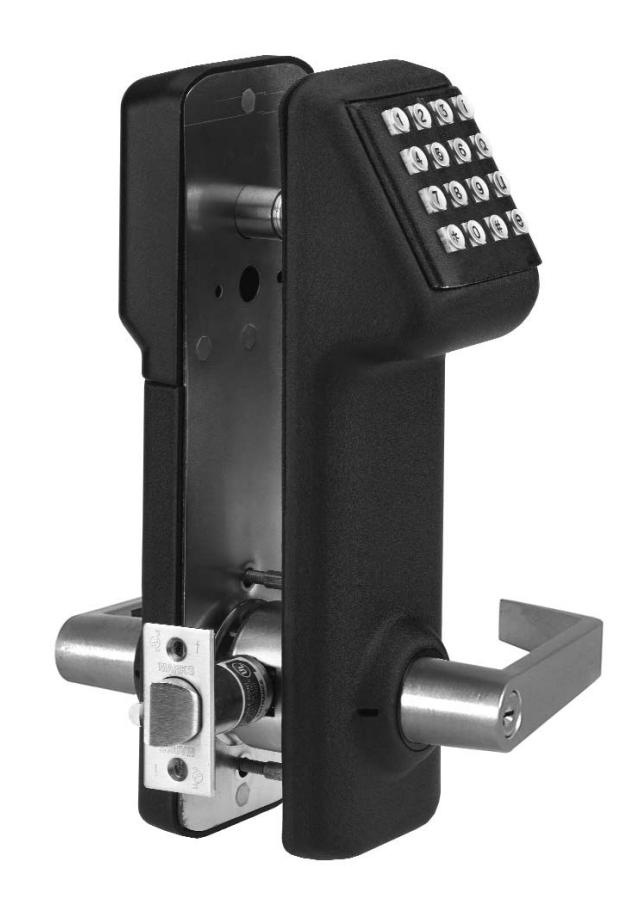
Congratulations, you have just purchased the i-Qwik LITE Series lockset from Marks USA. This lockset, designed for easy installation, will provide years of reliable service when properly installed and maintained.
This manual is designed to act as a guide through the many features & functions of your i-Qwik LITE Series Stand-Alone Access Control System.
Please take the time to read it thoroughly and follow the instructions carefully so that your experience will be positive and trouble free.
Marks USA would like to thank you for selecting the i-Qwik LITE Series for your access control needs.
365 Bayview Ave., Amityville, NY 11701
LIVE TECH SUPPORT 8am - 8pm EST Mon- Fri
Toll Free: 800 • 526 • 0233 In NY: 631 • 225 • 5400 Fax: 631 • 225 • 6136
E-mail: techsupport@marksusa.com
For more information about the i-Qwik Line, i-Que series, the Complete Marks USA Product line, templates & manuals visit our website @ www.marksusa.com
Table of Contents:
| Before You Start, Important DefinitionsPage i |
|---|
|
Important KeysPage 1
LED IndicatorsPage 1 Create Master CodePage 1 GroupsPage 1 To Add UsersPage 1 To Delete UsersPage 1 |
|
Pin Only EntryPage 2
Change User PinPage 2 Define Open TimePage 2 Lock AudioPage 2 Terminator On/OffPage 2 |
|
Manual Passage ModePage 3
Temporary User SchedulePage 3 Set TimePage 3 Set DatePage 3 Double Code EntryPage 3 |
|
Privacy Mode/Secretary ModePage 4
Disable/Enable Three Strike LockoutPage 4 Clear MemoryPage 4 Battery Check StatusPage 4 |
|
Battery InformationPage 5
Connection DiagramPage 5 Reset The LockPage 5 |
BEFORE YOU START! BEFORE YOU START! BEFORE YOU START!
IMPORTANT DEFINITIONS:
FACTORY CODE: 9991234
This code is only used to initialize the lock after reset. This code must be entered to set the Master Code. After the Master Code is set, the Factory Code will no longer be valid until lock is reset. The Factory Code will not open the lock.
USER IDENTIFICATION NUMBER (UID):
A unique 3 digit number assigned to each User.
PERSONAL IDENTIFICATION NUMBER (PIN):
A combination of 3 alphanumeric characters.
(Letters or numbers may be used multiple times to increase the total number of combinations).
MASTER CODE:
This code is required in order to perform all programming functions. The Master Code replaces the Factory Code.
This code will open the lock.
USER CODE:
A combination of User ID and PIN.
IMPORTANT KEYS:
TERMINATOR KEY ():
Acts like the "Enter" key on a computer, and is used to confirm entries on the keypad.
PROGRAMMING KEY (#):
After a valid Master Code is entered, this key is depressed to enter the programming mode.
NOTE: At the end of any programming series, replace the last with a # to return to function number input.
This allows the programmer to perform multiple functions without having to re-enter the Master Code for each function.
LED INDICATOR:
LED INDICATING GREEN (NORMAL MODE):
1. Denotes lock enabled to open. Will flash green after valid entry and terminator key ().
LED INDICATING RED (NORMAL MODE):
- 1. Denotes a wrong code entry.
- 2. Three consecutive wrong entries will disable keypad for 20 seconds. If another wrong code is entered, the keypad is disabled for 40 seconds. This is indicated by a solid red light.
LED INDICATING RED (PROGRAMMING MODE):
- 1. Denotes incorrect entry and vacates programming mode.
- 2. Programming mode vacated if no key entry within 5 seconds.
CREATE MASTER CODE
This code is required to perform all programming functions. The number of digits used for the User ID and PIN of each additional user must be the same as the Master Code.
| Enter 9991234 | |
(User ID) |
# |
(PIN) |
# |
|---|
User ID and PIN followed by () will open the lock.
GROUPS
ALL USERS MUST BE ASSIGNED TO A GROUP. Users in the same group will have the same access rights.
Each group is assigned a 2 digit group number from 02 to 99.
The Master Code is automatically assigned to group 01, and has full programming rights.
GROUPS 02-08: Management groups with 24/7 access.
GROUP 09: Group that allows the lock to be placed in passage mode when the code is entered. The lockset will re-lock when code is entered again or at midnight of that day.
GROUPS 10-99: No programming rights. They may, however, change their own PIN. (See "Change User PIN" on page 2)
TO ADD USERS
Enter Master Code (User ID and PIN), the # key, (01), the key, the User ID you wish to add, the key, the 2 digit group number, the key, the new PIN, and the key twice.
|
ADD
USER CODE |
|||||||||||
|---|---|---|---|---|---|---|---|---|---|---|---|
| Enter MASTER CODE | # | 01 | |
(User ID) |
| 10 | |
(PIN) |
| | |
User ID and PIN followed by () will open the lock.
TO DELETE USERS
Enter Master Code (User ID and PIN), the # key, (01), the key, the User ID you wish to delete, the key, (0), and the key twice.
|
DELETE USER
CODE |
||||||||||
|---|---|---|---|---|---|---|---|---|---|---|
| Enter MASTER CODE | # | 01 | |
(User ID to be Deleted) |
| 0 | | | ||
PIN ONLY ENTRY
The PIN Only mode will shorten the code required to open the lock.
|
ENABLE (PIN
TO OPEN LOCK) |
|||||||||
|---|---|---|---|---|---|---|---|---|---|
|
#
32 0 Enter MASTER CODE |
|||||||||
| DISABLE (USER ID & PIN TO OPEN LOCK) | |||||||||
| Enter MASTER CODE | # | 32 | | 1 | | | |||
CHANGE USER PIN
This function gives users the ability to change their PIN. (User must know their User ID & PIN to perform this function)
| Enter UID & PIN | # | 08 | |
(New PIN) |
|
(Verify PIN) |
| |
|---|
DEFINE OPEN TIME
This function will adjust the amount of time that the lock will stay unlocked after a valid User code has been entered. The open time can be set from 1 to 9 seconds. (Default setting is 3 seconds)
| Enter MASTER CODE | # | 18 | | Single Digit 1-9 Seconds | | |
|---|
LOCK AUDIO
When the audio is set to "ON" the lock will beep with each key pressed. (On by default)
| AUDIO OFF | |||||||||
|---|---|---|---|---|---|---|---|---|---|
|
#
34 0 Enter MASTER CODE |
|||||||||
| AUDIO ON | |||||||||
| Enter MASTER CODE | # | 34 | | 1 | | | |||
TERMINATOR ON/OFF
This function will switch the "" Terminator On or Off. Selecting off automatically sets lock to PIN Only mode. To gain access with Terminator Off, simply enter your PIN code. With Terminator On, you are required to enter "" after your code.
| TERMINATOR OFF | ||||||||||
|---|---|---|---|---|---|---|---|---|---|---|
|
#
37 0 Enter MASTER CODE |
||||||||||
| TERMINATOR ON | ||||||||||
| Enter MASTER CODE | # | 37 | | 1 | | | ||||
NOTE: TO ENTER PROGRAM MODE WITH TERMINATOR OFF, YOU MUST FIRST PRESS THE "#" KEY BEFORE THE MASTER CODE.
MANUAL PASSAGE MODE
This function puts the lock in an unlocked state, granting free egress (no code required) to all Users until the lock is returned to the locked state. The lock will return to the locked state at midnight. This function requires that the time be set (see "Set Time" below).
| ENABLE | ||||||||||
|---|---|---|---|---|---|---|---|---|---|---|
|
#
30 1 Enter MASTER CODE |
||||||||||
| DISABLE | ||||||||||
| Enter MASTER CODE | # | 30 | | 0 | | | ||||
TEMPORARY USER SCHEDULE
This function allows you to restrict an existing Users access by a date range. Temporary User Schedules do not delete and must be maintained or access repeats annually. This function requires setting the date in the lockset (see "Set Date" below).
SET TIME
This function will set the time (HHMM). Time is set in 24 hour format. (Example 3:30pm = 1530)
| Enter MASTER CODE | # | 12 | | HHMM | | |
|---|
Daylight savings time is enabled by default. To disable daylight savings add a "0" (zero) at the end of the time entry. (Example 3:30pm = 15300)
SET DATE
This function will set the Month, Day and Year. There are 2 formats available: Standard (default: MM-DD-YY) or European (DD-MM-YY).
| Enter MASTER CODE | # | 13 | | MMDDYY | | |
|---|
NOTE: FOR EUROPEAN DATE FORMAT SET: DD MM YY "0" (ZERO).
DOUBLE CODE ENTRY
For higher security the lock can be set to require that two User codes be entered before access is granted.
| SINGLE CODE | |||||||||
|---|---|---|---|---|---|---|---|---|---|
|
#
33 0 Enter MASTER CODE |
|||||||||
| DOUBLE CODE | |||||||||
| Enter MASTER CODE | # | 33 | | 1 | | | |||
PRIVACY MODE/SECRETARY MODE
Privacy Mode/Secretary Mode (Secretary Mode is default):
An i-Qwik LITE with the Privacy Mode option will have a button installed on the inside housing. When the button is pressed it will block out keypad entries (except User Codes from groups 01-03). When the inside lever is pressed the request to exit switch will reset the keypad back to normal operating mode.
| PRIVACY MODE | |||||||
|---|---|---|---|---|---|---|---|
| Enter MASTER CODE | # | 39 | | 1 | | | |
| SECRETARY MODE | |||||||
| 39 | 0 | ||||||
DISABLE/ENABLE THREE STRIKE LOCKOUT
The lock responds to three consecutive incorrect codes by displaying a red light and shutting down the keypad for 20 seconds. Subsequent attempts with an incorrect code will increase the time to 40 seconds maximum. Disabling this feature allows an unlimited number of incorrect codes to be entered without a lockout.
| DISABLE | ||||||
|---|---|---|---|---|---|---|
| Enter MASTER CODE | # | 40 | | 0 | | |
| ENABLE | ||||||
| Enter MASTER CODE | # | 40 | | 1 | | |
CLEAR MEMORY
If it becomes necessary to reset the memory of the i-Qwik LITE, there are two options other than the Full Reset option.
| DELETE ALL USERS & SCHEDULES | ||||||||
|---|---|---|---|---|---|---|---|---|
| Enter MASTER CODE | # | 16 | | 16 | | 0 | | |
| DELETE ONLY SCHEDULES | ||||||||
| Enter MASTER CODE | # | 16 | | 16 | | 1 | | |
BATTERY CHECK STATUS
This function manually checks the battery status of the i-Qwik LITE. The LED on the keypad will display visual indicator.
| Enter MASTER CODE | # | 17 | | Watch LED | |
|---|
Green - Green: Two green LED flashes indicate full power 5.25 volts and above.
Yellow - Yellow: Two yellow LED flashes 5.25 to 4.75 volts.
Yellow - Red: Yellow then red LED flashes 4.75 to 4.37 volts.
Red - Red: Two red flashes indicates below 4.37 volts. Batteries need to be changed.
NOTE: IF THE VOLTAGE OF THE BATTERIES FALLS TO 4.2v DC, THE i-Qwik LITE WILL BEEP EVERY HOUR INDICATING LOW BATTERY STATUS
BATTERY INFORMATION
THE i-QWIK LITE IS SHIPPED WITH 4 "AA" ALKALINE BATTERIES: The life span of the batteries has been tested in two different ways. The first test was performed to see how many operations could be performed repeatedly before a failure. The test averaged 150 thousand operations. The second test was performed over time for normal operations. This test revealed that the i-Qwik LITE batteries would last approximately 4 years at 80-90 thousand operations. Using the factory settings, the lockset is set for optimized power usage.
CHANGE THE BATTERIES: The batteries should not be disconnected longer than 10 minutes or there is a risk of affecting the lock's memory.
IT IS RECOMMENDED TO USE ONLY ALKALINE BATTERIES: The alkaline battery has a gradual curve in the drop off voltage. This curve determines the power settings for the two stages of battery warnings and the Fail Secure settings. A lithium battery differs from an alkaline battery in the life cycle of the battery cell. A lithium battery has a very sharp drop off voltage, going from fully charged to a dead cell quickly. This makes monitoring the voltage settings impossible.
TWO STAGE LOW BATTERY WARNING: The i-Qwik LITE has a two-stage low battery warning. The first warning stage will add a double beep and Red LED when the user enters their code. The second warning stage will be a double beep every hour. BATTERIES SHOULD BE CHANGED IMMEDIATELY. Double beeps will occur until the batteries fail.
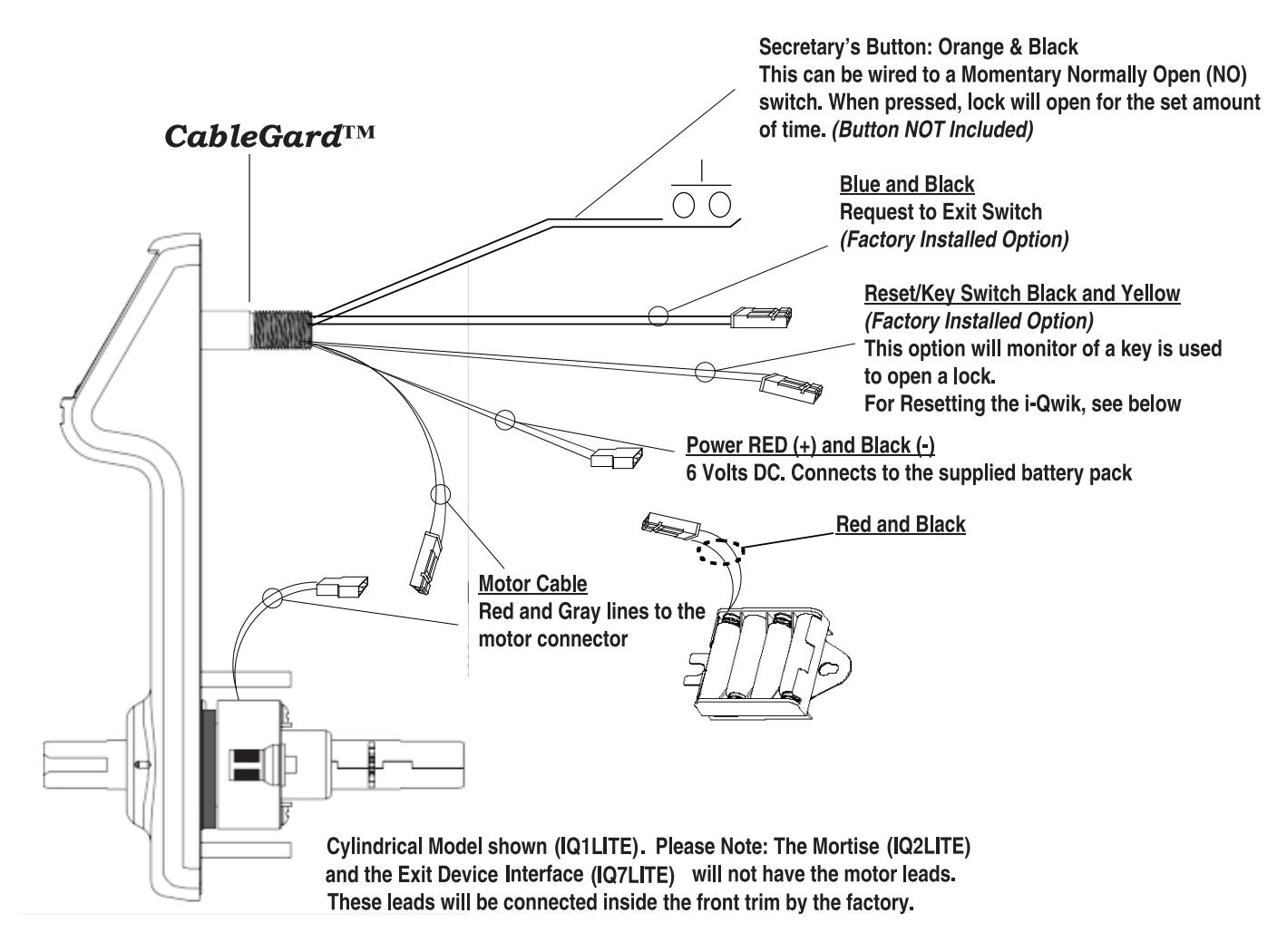
CONNECTION DIAGRAM
RESET THE LOCK
Reset The i-Qwik LITE Back To Factory Default:
- Open battery cover (top of housing on inside of door)
- Disconnect the batteries
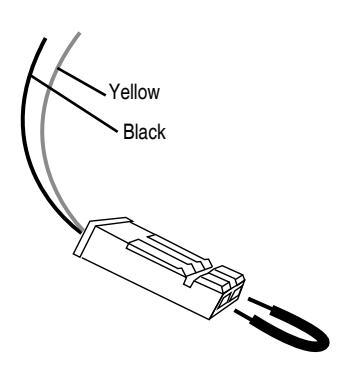
- Locate the Yellow and Black cable (behind battery pack)
- Insert both ends of the reset wire (or paper clip) into the holes of the connector on the yellow and black cable.
- With the reset wire in place, reconnect the batteries. (The LED will go GREEN)
- Press the # key (The LED will go RED and then back to GREEN)
- Remove the reset wire
- The lock is now reset
For more information about the i-Qwik Line, the i-Que series, the complete Marks USA product line, templates and manuals
visit our website @ www.marksusa.com
| Distributed by: | ||
|---|---|---|
For i-Qwik/i-Que Tech Support Call:
Toll Free: 800 • 526 • 0233
In N.Y.: 631 • 225 • 5400
Fax: 631 • 225 • 6136
LIVE TECH SUPPORT 8am to 8pm EST Mon - Fri
Email: techsupport@marksusa.com
