Major HIT-108 Installation Tool for Unican EE1000 Series Locks Instructions
Open the original PDF document
View PDF

714-772-5202 FAX 714-772-2302 web: www.majormfg.com
INSTRUCTIONS FOR USE WITH HIT-108 INSTALLATION TOOL FOR UNICAN EE1000 SERIES LOCKS
Remove allen bolt and back plate. Place HIT-108 drill guide on door with aligning washers in the 2-1/8" crossbore. HIT-108 should be placed on door so the writing on the front plate is in the up right position. Replace back plate and tighten allen bolt until snug. Do not over tighten. HIT-108 is now ready to retrofit Unican EE1000 series. All through bolt holes may be drilled in one operation through the door, or half way from both sides. This unit was designed to retrofit locks with 2-3/4" backsets. The use of this fixture for 2-3/8" backsets may be accomplished the following way. Mount the template to the door as usual (the tool will over hang the door edge 3/8"). Next with the use of a combination square, square the template to the door and tighten the allen bolt. The template is now in proper alignment for use.
DRILLING INSTRUCTIONS
- 1. Drill six 1/4" holes through door using the six bushings located on the drill guide.. These holes can be drilled through from one side of the door or half way from both sides of the door.
- 2. Remove the HIT-108 from the door and enlarge the four 1/4" pilot holes located above the 2-1/8" crossbore to 1/2" with the use of a twist drill.
- 3. Install Unican EE1000 series lock as per directions provided by the manufacturer.
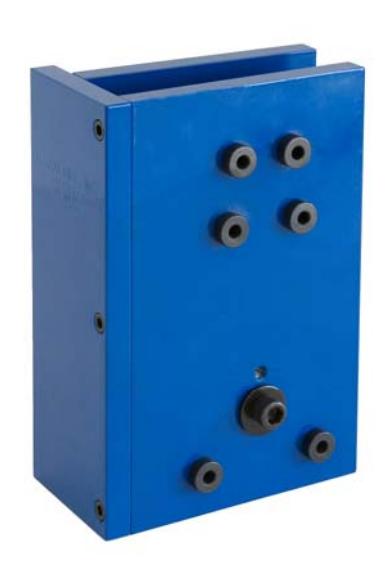
Drill four-1/4" pilot holes through door, enlarge to 1/2" with the use of a twist drill after HIT-108 template has been removed from door.
Drill two-1/4" holes through door.