Locknetics TS 100 Series Programming Manual 112115
Open the original PDF document
View PDFTS-100 Series
Programming Manual

Normal Mode
In locked status :light in red (default in red) Operating:
Door closed (Red On) → Touch the switch → door is open and light flashes green (time delay adjustable by Software Settings or dip switch. Flash once every second.) → door is closed (light in red ,door is locked)
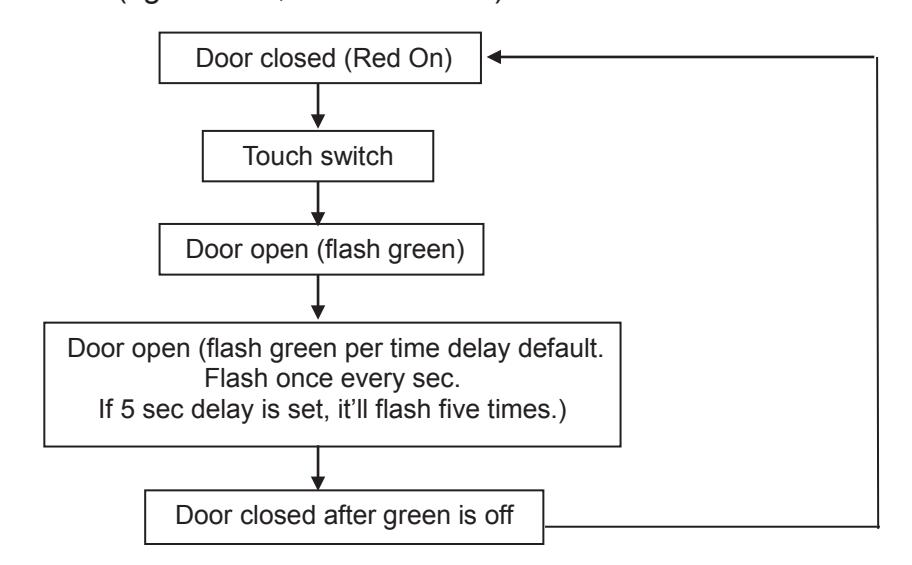
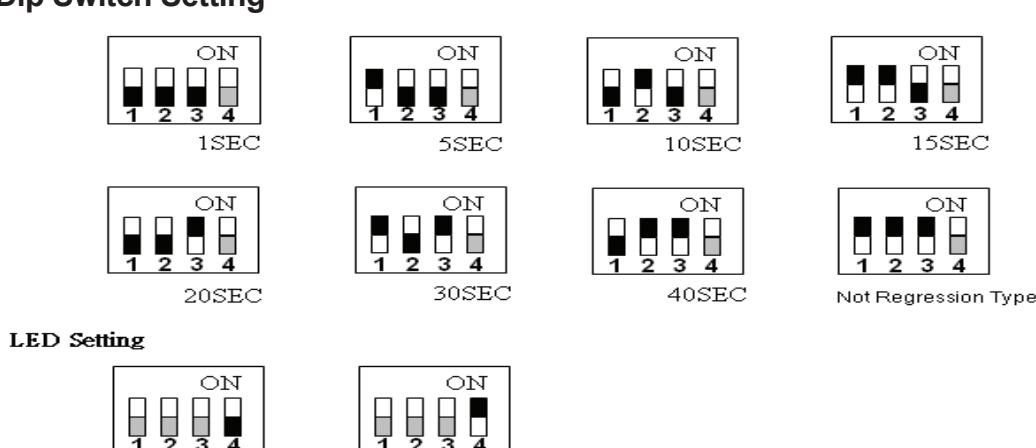
Not Regression Mode (Switch 1.2.3PIN of dip switch to ON)
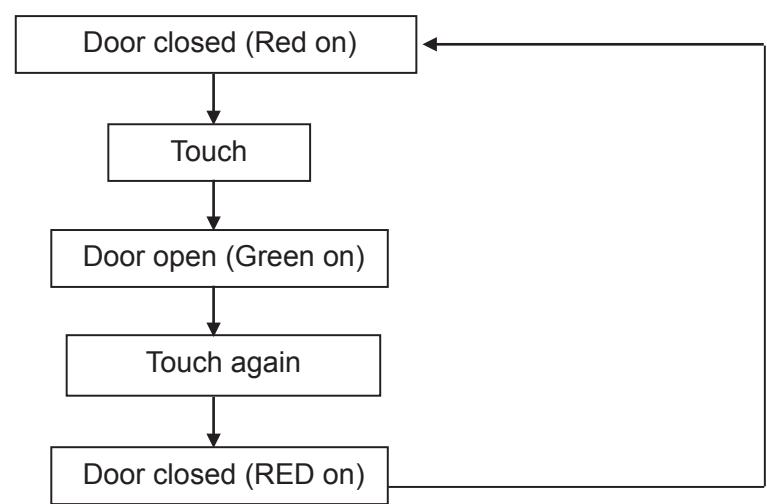
In locked status: light in red (default in red)
Operating:
Door closed (Red On) → Touch switch → Door open→ Green on
Door closed (Red On) → Touch switch → Door closed (Red on, back to locked status.)
Notes :
- a. Door is locked: Red on (default to red, Set by the user in accordance with the DIP switch or software selection changes.)
- b. If the default light has been changed, the light will be accordingly changed.
- c. LED Display Description:
In Normal mode:
- Red on: door is closed.
- Flash green (once/sec): in open status
In Not Regression mode:
- Red on: door is closed.
- Green on: in open status

Timer Setting (default in Red, Setting Mode)
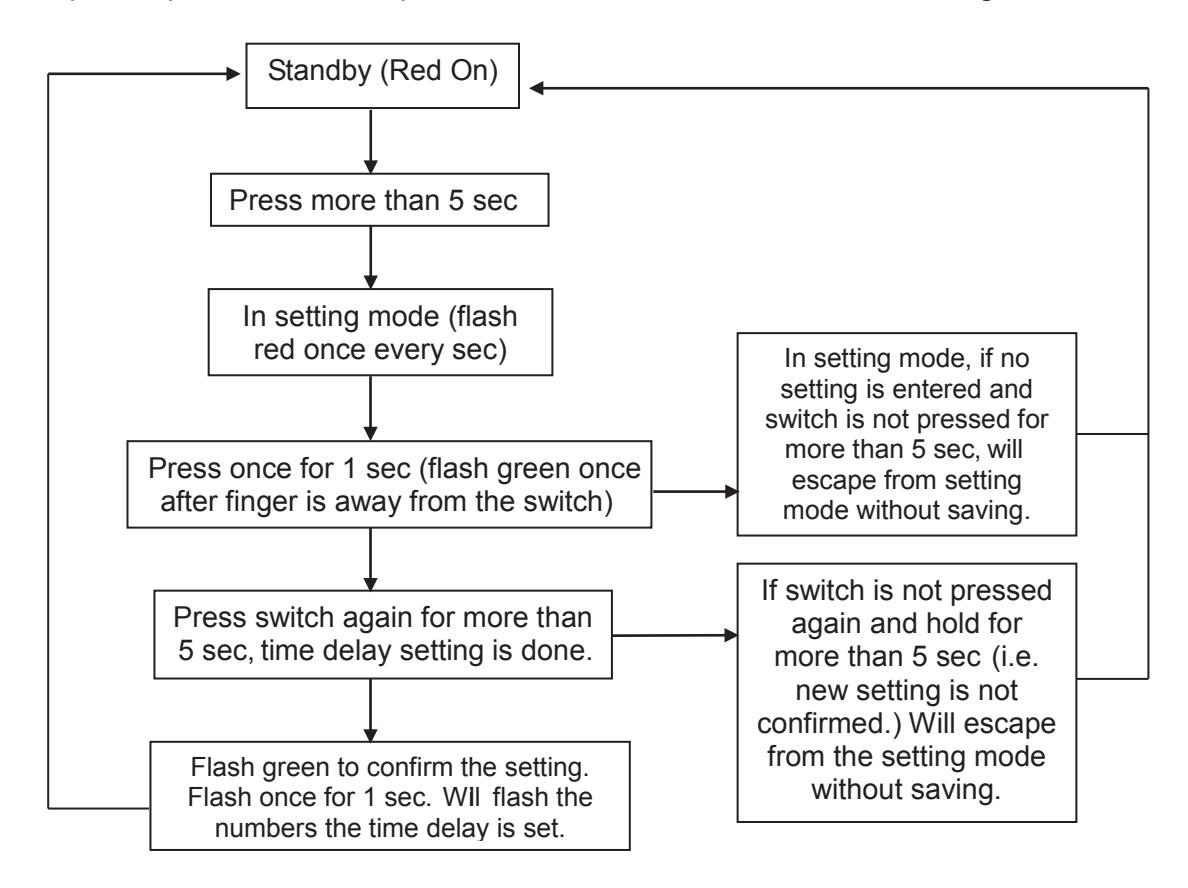
Standby (Red On) press the switch more than 5 sec into setting mode (flash red) touch the switch once, flash in green once (a confirm for successful setting for 1 sec), after the requested time delay has been set, press the switch more than 5 sec. Escape the setting mode. Will flash in green the numbers the time delay is set. Back to standby (Red on)
Notes:
- a. Max. seconds setting is 30 sec. When it's more than 30 sec, it'll be taken as invalid input and escape the setting mode
- b. In setting mode, if more than 5 sec no action, it'll automatically escape from setting mode, and the previous setting is invalid.
- c. If the default light has been changed, the light will be accordingly changed.
- d. Escape from setting mode: after setting is completed, press the switch for more than 5 sec to confirm. Then setting is done.
- e. LED Display Description
- Red on: door is closed.
- Flash red (once/sec): in setting mode
- Flash green (once/sec) → time delay setting, or confirm the time delay set
- f. Except for specific demand, press the switch within 5 sec for all setting.
LOCKNETICS.
LED Setting
Dip switch : 4th pin of dip switch (default in red)
Programming: (default in red, Setting Mode)
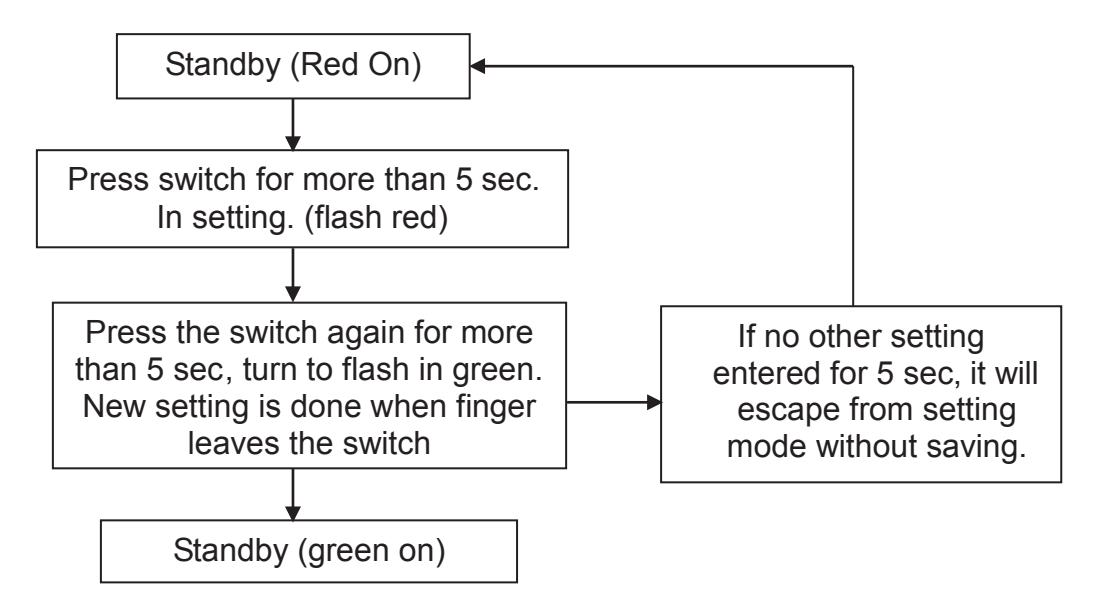
Standby (Red On) → press the switch for more than 5 secs →enter setting mode (flash in red) → press the switch again for more than 5 secs→ flash red turn to flash in green→ leave the switch → back to locked status (green on).
Notes :
- a. In setting mode, if more than 5 sec no action, it'll automatically escape from setting mode, and the previous setting is invalid.
- b. Except for specific demand, press the switch within 5 sec for all setting.
- c. If the default standby light has been changed, the light will be accordingly changed.
- d. LED lighting:
- Red on: locked status
- flash red (once/sec): in setting mode
- flash green (once/sec): changing color default
- Green on: back to locked status
Dip Switch Setting
For details regarding the limited warranty:

1-877-671-7011 www.allegion.com/us

© Allegion 2017 47259499 Rev 12/17-a