LockeyUSA Electronic Keypad Lever and Knob Lock User Manual Reduced 3 Instructions
Open the original PDF document
View PDF
Limited Warranty Statements
1. Warranty
LockeyUSA warrants the Product to be free from defects in material and workmanship for a period of 12 months from the original date of purchase.
If you discover a defect in the Product covered by this warranty, we will repair or replace the item at our option using new or refurbished components.
2. Exclusions
This warranty covers defects in manufacturing discovered while using the Products as recommended by LockeyUSA rather than occurred by the act of God, and damages caused by misuse, abuse, installation errors and/or unauthorized modification.
3. Limited Liability
LockeyUSA will not be held liable for incidental or consequential losses or damages to any act of God, misuse, abuse or unauthorized modification of Product.
4. Reminder
Service requirement shall subject to the presentation of this warranty card and defective parts to the manufacturer, LockeyUSA. The warranty card will not be reissued if lost.
Product: LOCKEYUSA E-DIGITAL ELECTRONIC KEYPAD KNOB & LEVER LOCK
| Purchase Date : | |
|---|---|
| Name & Address of Distributor : | |
|
|
For Product Warranty Support, contact:
LockeyUSA Warranty Department Phone: 888.395.0163 Email: support@lockeyusa.com or warranty@lockeyusa.com

USER MANUAL

Attention : Please do not use the "electronic" screwdriver for installation.
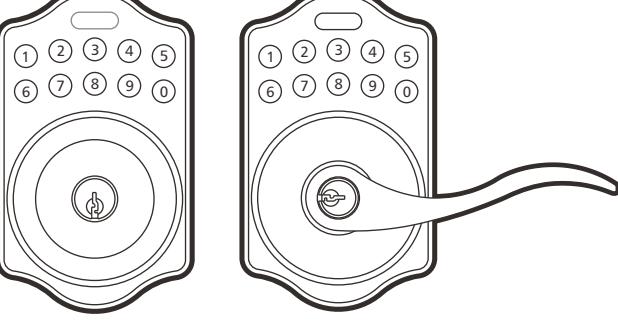
KEYPAD ELECTRONIC LEVER & KNOB INSTALLATION INSTRUCTION
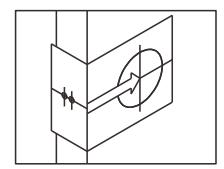
The BACKSET is the distance between the center of cross bore and edge bore of the door.
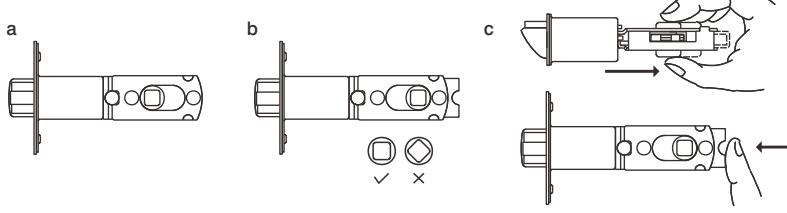
Adjustable latch fits both BACKSET of 2-3/8" (60mm) and 2-3/4" (70mm). Please follow the steps shown below for BACKSET adjustment.
- a. The backset shown on the left is 60mm (2-3/8").
- b. Pull the cam toward right to extend the backset to 70mm (2-3/4").
- c. The backset shown in figure C is 70mm (2-3/4"). Pull the cam back to left will return the backset to 60mm (2-3/8").
Note : The shape of cam should be square.
1. Mark The Door With Template
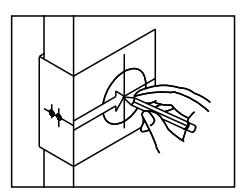
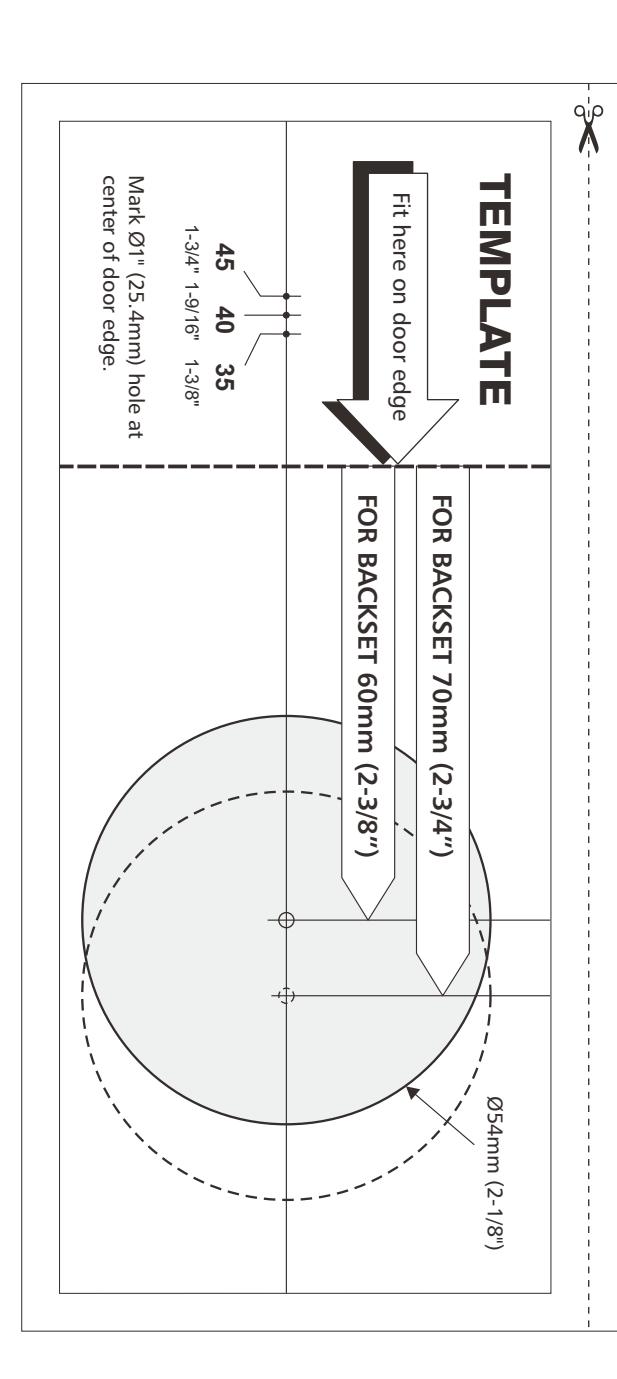
Select the height and backset as desired on the door face ; use the TEMPLATE as an indication to mark the center of the circle on the door face and the center of the door edge.
2. Drill Holes
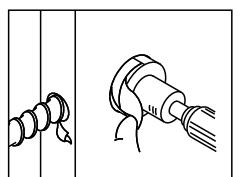
Using the marks as a guide to drill a hole Ø2-1/8" (54mm) through the door face for the lockset, then a hole of Ø1" (25.4mm) for latch.
3. Identify Door Handing
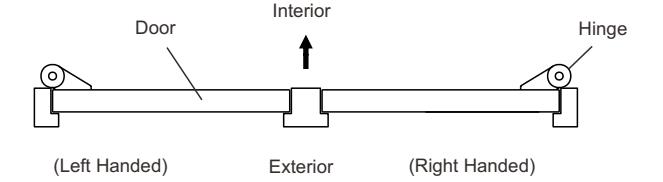
Face the door from outside, the door is left handed if the hinge is on the left-hand side of the door, whereas the door is right handed if the hinge is on the right-hand side of the door.
4. Install Latch
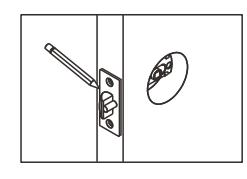
- a. Insert the latch and lay the faceplate against the door edge.
- Use a pencil to mark it's perimeter, then take out the latch.
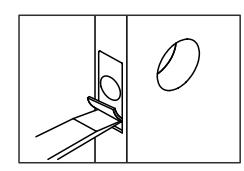
b. Chisel out the portion you've marked with pencil for about 4mm (5/32") deep. Score the area within the borders as clearly and precisely as possible. Ensure the plate can fit flush with the door edge surface.
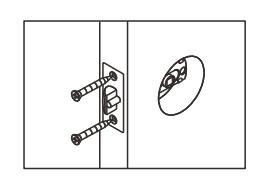
c. Insert the latch and tighten it with screws. Be sure the holes for thru-bolts (next to the adjustable cam) should be horizontally aligned.
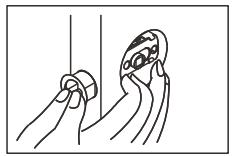
d. There is no necessary to chisel the door edge for the faceplate installation if you use the drive-in latch. You may install it into the edge bore directly, but be sure the bevel should face the outside assembly.
5. Install Strike
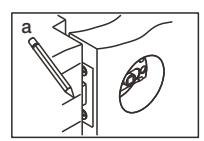
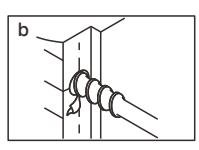
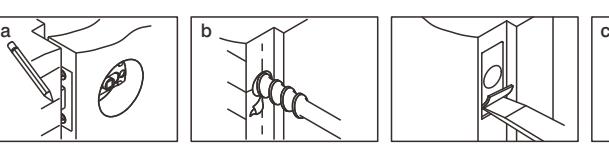
- a. Half-close the door to lay the latchbolt against the door frame. Mark the position of faceplate as an indication. Place the strike against the door frame and mark it's erimeter. Be sure the center of strike is perfectly aligned with the center of faceplate.
- b. Drill a ø25.4mm (1") hole with 13mm (1/2") depth on the center of strike outline. Then use the chisel to scrape out the door frame for 1.6mm (1/16") deep within your pencil mark.
- Ensure to chisel deep enough to allow the strike lay flush with the frame surface.
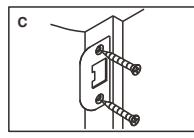
- c. Insert the strike and tighten it with screws.
- Note : please use "tapping screws" for metal door.
6. Install Keypad Assembly
a. Place the leverset/knobset against keypad with tailpiece in vertical position inserted through cam of the latch.
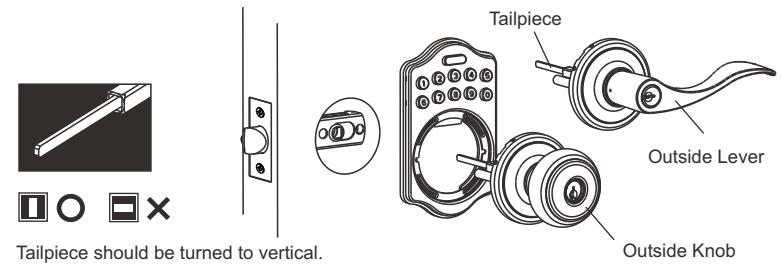
b. Pass the IC wire over the latch to the interior side of door.
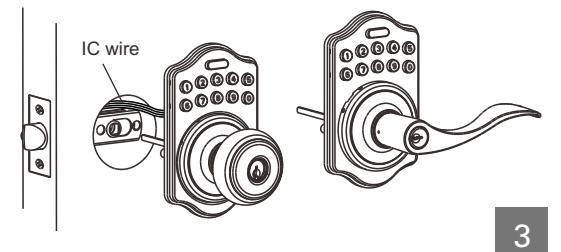
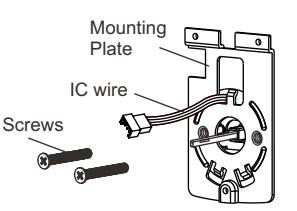
7. Install Inside Mounting Plate
Pass the IC wire through the wire hole on the mounting plate and fix the mounting plate with screws. If outside lock assembly is lopsided, please loosen the screws to adjust it's position and tighten the screws again.
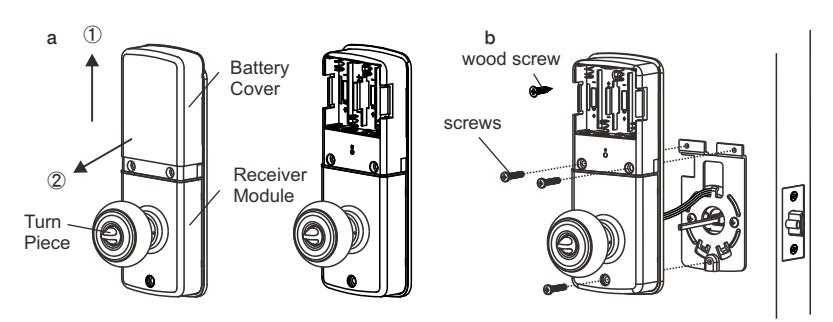
8. Install Receiver Module
- a. Remove the battery cover (push it up and pull it out).
- b. Connect the IC wire and ensure the turn piece is horizontal, so that the tailpiece is able to engaged with the inside lever/knob. Then attach receiver module to the door with screws. It's optional to use the attached wood screw. (Wood screw only for wood door)
c. Insert 4 (AA) 1.5V alkaline batteries and put the battery cover back to the receiver module.
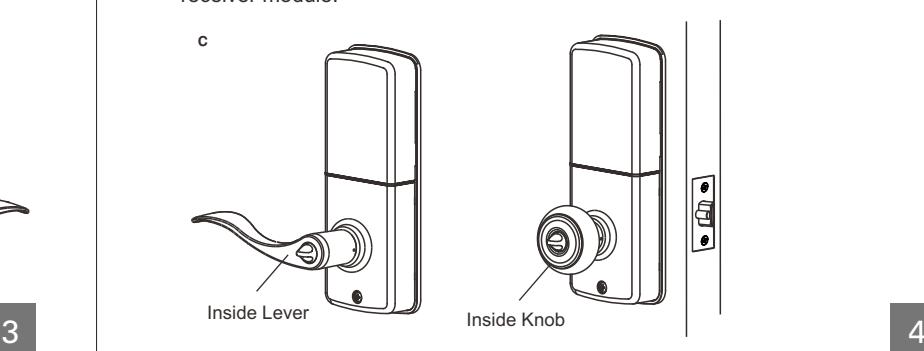
9. Change Lever Handing
a. Be sure the levers are unlocked. Insert the provided pin wrench into the small hole on the neck of lever and apply pressure to depress the catch and pull out the lever from the stem. Follow the same steps to remove interior lever and exchange the position of inside and outside levers.
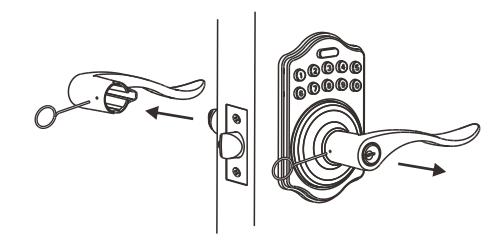
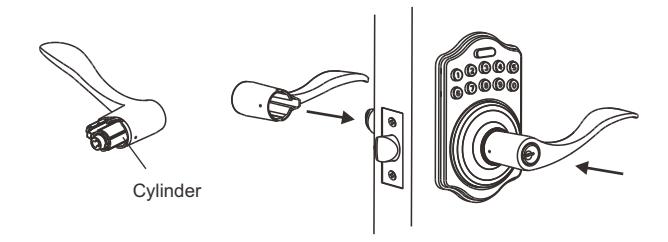
b. Remove the cylinder from lever and insert it into opposite lever. Then install the levers and make sure the small hole on the neck of lever aligns over the catch perfectly. Rotate the levers to see if it operates well.
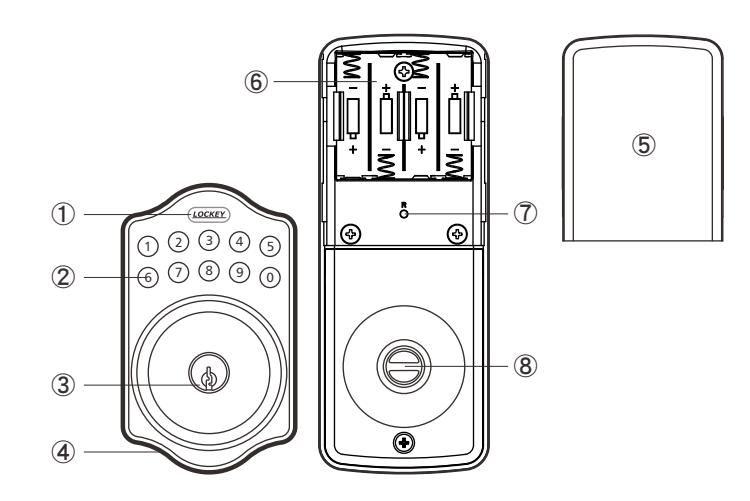
Programming Button
Programming Button is for entering codes, clearing errors and setting function. It's also a lock button.
Number Buttons
Input the user codes, each user code is 4-10 digits in length.
Cylinder
Lock/Unlock the lockset from exterior.
Gasket
Prevent water permeating into lockset.
Battery Lid
Slide the lid to change the batteries.
Battery Holder
Four AA(1.5V)Alkaline batteries.
R Button (Reset)
Restore default setting.
Turn-Button
Lock/Unlock the lockset from interior.
■ Specification / Function 6.User Code
1.Power
6V, four AA(1.5V)Alkaline batteries.
2.Low Battery
- 2-1 The batteries should be changed immediately once you see button1 flashes in red and hear when press programming button. 10 rapid beep sounds
- 2-2 All settings are retained in the memory and will not be affected even if the battery is completely dead.
- 2-3 The lock still can be operated by key even there is a power outage.
3.Illuminated Indicator
- 3-1 Button1 flashes in green once when successful operation.
- 3-2 Button1 flashes in green twice when successful programming.
- 3-3 Button1 flashes in red 3 times when there is an operation error.
- 3-4 Button1 flashes in red 5 times when codes input error, the system will shut down for system protection (Refer to 17).
- 3-5 Button1 flashes in orange 3 times when system has been restored to default setting.
- 3-6 Button1 flashes in orange slowly while in programming mode.
4.Audible Indicator
- 4-1 1 beep sound indicates a successful operation.
- 4-2 2 long beeps indicate a successful programming
- 4-3 3 beeps indicate an operation error.
- 4-4 3 long beeps indicate that system has been restored to default setting.
- 4-5 5 beeps when codes input error, the system will shut down for system protection. (Refer to 17)
- 4-6 10 rapid beeps indicate the power of battery is low.
5.Programming Code
- 5-1 The preset Programming Code is 0000. Please change it into new one when first time operation.
- 5-2 Only one set of Programming Code for function setting.
- 5-3 Programming Code is only for function setting, you can't unlock the lockset by entering Programming Code.
- 5-4 Programming Code is 4-10 digits in length.
- 5-5 Programming Code can be changed anytime if needed.
- 6-1 The preset User Code is 1234. Please delete it and create new one when first time operation.
- 6-2 Up to 6 sets of User Codes can be saved.
- 6-3 User Code is only for unlocking the lock, without programming function.
- 6-4 User Code is 4-10 digits in length.
- 6-5 User Code can be deleted or added anytime if needed.
7.Delete Individual User Code
- 7-1 User Codes can be deleted individually. You can re-set the same number as code even it's deleted before.
- 7-2 Programming Code is needed when deleting individual User Code.
8.Delete All User Codes At Once
- 8-1 All the User Codes can be deleted at once. You can still reset the same numbers as codes even they're deleted before.
- 8-2 Auto-locking and Keypad locking function will be invalid after deleting all User Codes and the lock can only be operated by key. These functions will be restored when recreate new User Codes.
- 8-3 Programming Code is needed when deleting all User Codes.
9.Temporarily Disable All User Codes
- 9-1 Auto-locking and Keypad locking function will be invalid when User Codes are temporarily disabled. The lock can only be operated by key during the time.
- 9-2 Repeat the programming steps again to restore the auto-locking, keypad locking function and User Codes.
10.Create a Disposable User Code
- 10-1 Disposable User Code will be no longer valid once being used.
- 10-2 You can reset same number as Disposal User Code again.
- 10-3 Programming Code is needed when creating a Disposable User Code.
11.Restore Preset Factory Code
- 11-1 You can restore Preset Factory Code by pressing "R" button on the interior receiver module when you forget Programming Code or you want to cancel all previous setting.
- 11-2 After restore, the Programming Code would be 0000; the User Code would be 1234 again.
12.Unlock the door
- 12-1 The lockset will be unlocked by key or pressing User Code on keypad from outside or by interior turn-button.
- 12-2 To unlock the door on the keypad, enter the User Code and then press the Programming/Enter button.
13.Lock the door
The lockset will be locked by key or pressing Programming Button on keypad from outside or by interior turn-button.
14.To Activate / Deactivate Auto-Locking Function
- 14-1 The lockset will automatically lock itself within 10~99 seconds when this function is programmed.
- 14-2 This function is not preset at the beginning; it can be set if needed.
- 14-3 The preset delay-time is 30 seconds; you can adjust the period as you want.
- 14-4 Please repeat the same programming steps to cancel Auto-Locking function when needed.
15.Toggle Mute On/Off
- 15-1 You will hear beep sounds when pressing keypad, programming or operating errors. It can be turned off if needed.
- 15-2 LED Illumination is still functioning when it's in mute. For there will be no any warning alarm, we suggest not to mute the beeper if it's not necessary.
- 15-3 Motor operating sound cannot be muted.
16.Code Protection Function
The system will shut down if entering unauthorized codes over 5 times. The System will be operative again after 45 sec.
17.Illumination
The LED Keypad will light up when pressing any button for ease of operating in the dark.
■ Pass Code & Function Set up
- 1. It should be under unlock status while programming.
- 2. Please change default Programming Code (0000) and User Code (1234) before function set up when first time operation base on safety consideration.
- 3. LED flashes orange slowly while programming. LED flashes green twice with 2 long beeps when correct input. LED flashes red 3 times with 3 beeps when incorrect input.
- (You need to wait for 6 seconds or press programming button when incorrect input, then the system will be operative again.)
- 4. Each programming step should be done within 6 seconds.
- 5. You can lock/unlock this product by either key or keypad. Please refer to the following programming table for function set up.
■ Remark
- 1. We recommend to use alkaline battery in order to stabilize the power supply.
- 2. Do not mix alkaline battery with regular zinc-carbon ones or mixed brands.
- 3. Do not use any chemical liquid or lubricating oil with additives to clean the lock body, it will damage the surface or even mainboard.
- 4. If there is any problem of the product, please contact your local retailer and send back the product to us for repair or replacement.
■ Function Programming
Programming Code (PC) USER Code (UC)
Add New User Code
Enter PC
Remark :
Up to 6 sets of User Code can be saved. User Code should be 4-10 digits in length.
Delete An Existing User Code

Delete All User Code At once
Enter PC LOCKEY 3 LOCKEY
Remark : Auto-locking and Keypad locking function will be invalid when User Codes are deleted. The lock can only be operated by key during the time.
Change Programming Code
Toggle Autolock On/Off
Enter PC LOCKEY 5 LOCKEY
Remark : The preset delay-time is 30 seconds, you can change the time by following instruction.
Repeat the steps to cancel the Auto-locking function.
Set Autolock Time Delay
Enter PC 6 Enter Seconds (10~99)
Remark : 10-99 seconds delay-time available.
Programming Code (PC) USER Code (UC)
Toggle Mute On/Off

Remark : Repeat same steps to turn beeper On/Off. LED illumination is still functioning when it's in mute. But there will be no any warning alarm.
Enable/Disable All User Code

Remark : Auto-locking and Keypad locking function will be invalid when User Codes are disabled. The lock can only be operated by key during the time. Repeat the steps to enable the User Codes again.
Create a disposable User Code

Remark : Disposable code will be no longer valid once being used.
Restore all preset lock settings
Press R
Remark : Press "R" button for over 5 seconds, the programming will complete after you hear 3 long beeps.