LockeyUSA 2985 Mechanical Lock Instructions Updated 3.21.16 Compressed 1
Open the original PDF document
View PDF

2985 NARROW STILE LEVER HANDLE
*WITH PASSAGE FUNCTION
INSTALLATION INSTRUCTIONS
IMPORTANT INFORMATION ABOUT YOUR DIGITAL 2985
The Lockey 2985 is designed for narrow stile prep doors or for configurations with existing narrow stile hardware with 1 1/8" prep. The 2985 can also be installed on new mortise prep doors, 2"x2" gates or chainlink gates.
2. In order to work with Lockey keyless locks, the drive/spindle hole is located on the bottom of the latch. The system operates opposite compared to Adams-Rite style products. The strike may need to be modified.
- 3. When the door is closed, the system locks automatically.
- 4. From the inside, unlock using the Lever Handle.
- From the outside, unlock by pressing 'C' (CLEAR), followed by your User Code.
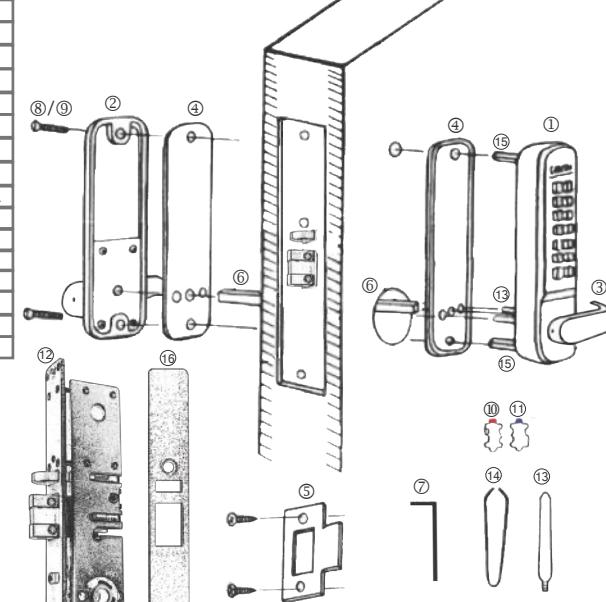
| No. | Part Name | 2985 | |
|---|---|---|---|
| r | 1 | Outside Body | 1 |
| • | 2 | Inside Body | 1 |
| 3 | Lever Handle | 2 | |
| 4 | Rubber Trim Plate | 2 | |
| 5 | Strike Plate | 1 | |
| 6 | Spindle | 1 | |
| 7 | Allen Wrench | 1 | |
| 5 | 8 | Machine Screw M4 x 40mm | 2 |
| 9 | Machine Screw M4 x 30mm | 50mm | 1 1 | |
| 10 | Extra Code Tumblers (Red) | 1 | |
| t | 11 | Extra Non-Code Tumblers (Blue) | 2 |
| 12 | Narrow Stile Deadlatch | 1 | |
| 13 | Support Pin | 2 | |
| 14 | Tweezers | 1 | |
| _ | 15 | Hex Bolts | 2 |
| 16 | Faceplate | 1 | |
PASSAGE FUNCTION:
The 2985 is equipped with a PASSAGE FUNCTION, allowing you to leave the door unlocked.
-To enable the passage function:
Press 'C' (CLEAR), then 'Y' (PASSAGE), then enter User Code.
-To disable the passage function:
Press 'Y' (PASSAGE), followed by 'C' (CLEAR).
-To disable the passage function PERMANENTLY:
Remove the 'Y' (PASSAGE) tumbler, leaving that slot empty.
IMPORTANT: Always press and hold the 'C' Button when removing and inserting Tumblers. Refer to 'How to Change Code' instructions on reverse side.
Step 1: Change User Code/Combination (OPTIONAL)
To change user code/combination, see instructions on reverse side.
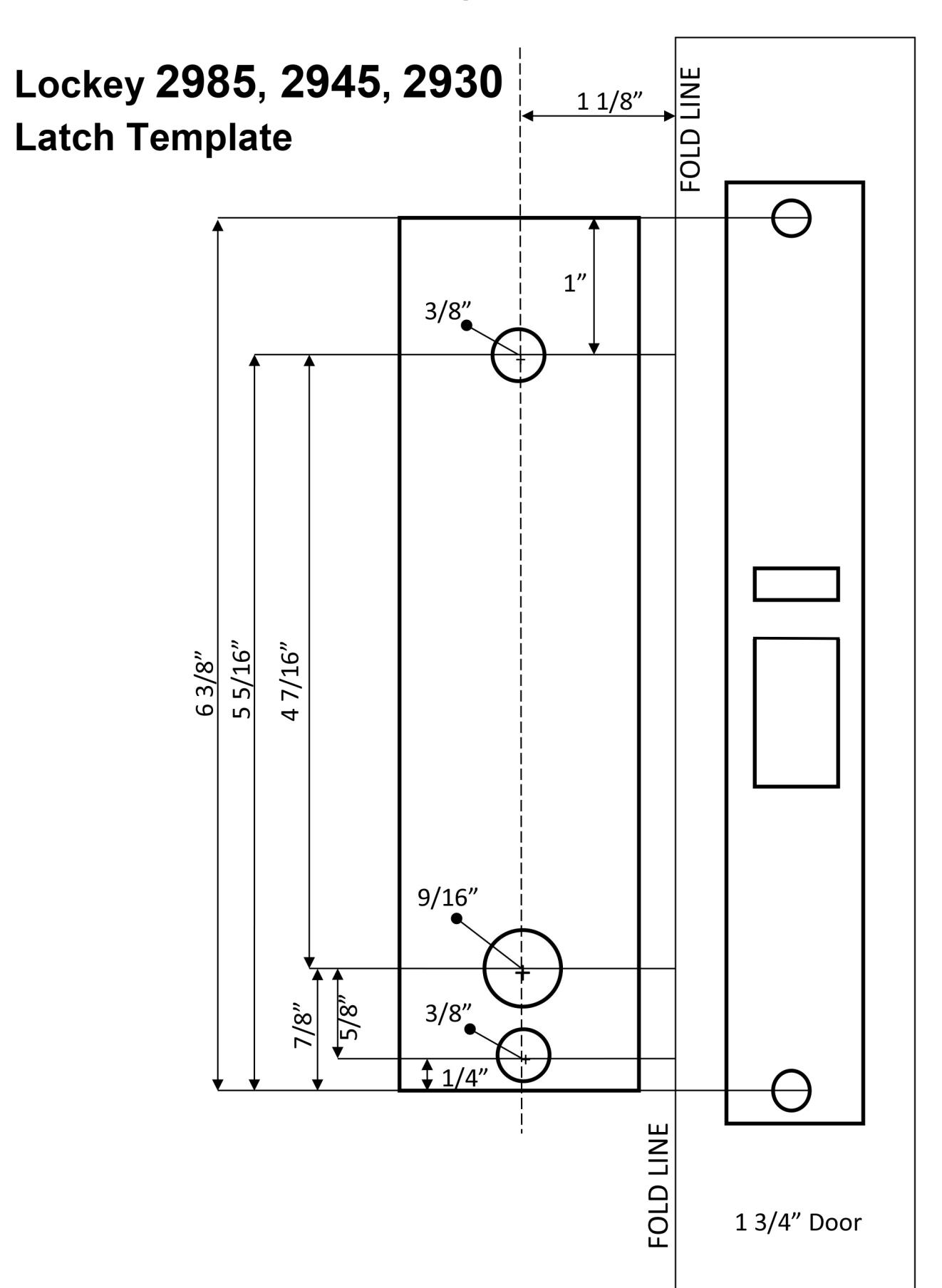
Step 2: Prep Door for Installation with Template
Place template (supplied) on door and fold along door's edge. Check to ensure proper measurements. Drill holes accordingly.
Step 3: Identify Door Handing
Right-Hand Doors – From exterior of door, hinges are on right side (Fig. 1). Left-Hand Doors – From exterior of door, hinges are on left side (Fig. 2).
Install Support Pin (#13) in position 'A' or position 'B' on the Outside Body as shown in Fig. 3. For 2985DC, install extra support pin on the Inside Body.
Now, install/screw Hex Bolts (#15) into the top and bottom of the Outside Body as shown in Fig. 3.
Fig. 1 Fig. 2 Fig. 3 RIGHT HAND LEFT HAND HINGE
Step 4: Change Latch Handing (if necessary) & Install Latch
IMPORTANT: Do NOT remove Cam from latch when changing handing.
2985 Cam Position: MUST be on RIGHT side of latch. If latch head is adjustable, pull and twist.
2985 Adjustable Head: Pull latch head and twist.
If latch does not pull and twist, proceed with the following steps:
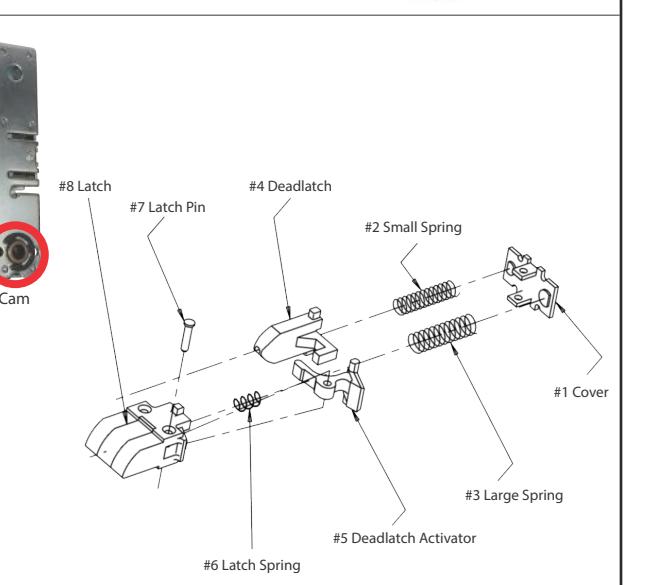
- 1. Remove screws from both sides of latch casing.
- 2. Remove cover and interior springs (#1, #2, #3).
- 3. Remove latch and deadlatch (#4, #8).
- 4. Carefully remove Latch Pin (#7) and Latch Spring (#6).
- 5. Replace the Latch Spring (#6) and then move the Deadlatch Activator (#5) to the opposite side of the latch, ensuring that it depresses the Latch Spring.
- 6. Replace the Latch Pin.
- 7. Replace Latch, Deadlatch, Latching Springs and Cover.
- 8. Secure Screws on each side of the Latch Casing.
Place the Narrow Stile Deadlatch (#12) in the door prep and secure.
INSTALLATION INSTRUCTIONS CONTINUED:
Step 5: Install Lever Handles
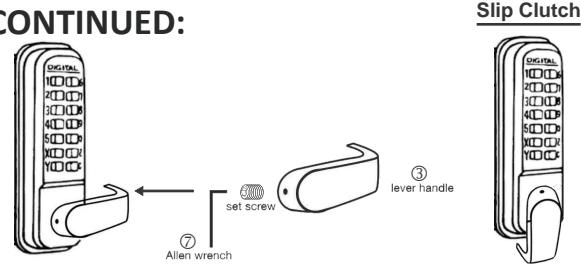
Using Allen Wrench (#7), install levers to the inside and outside bodies.
Secure with set screws.
Note: Levers should point towards the door hinges.
The 2985 is equipped with a built-in slip clutch lever handle to prevent damage in the event of an attempted forced entry.
If lever handle is in position shown (far right), pull lever back to desired position.
Step 6: Verify Correct Spindle Length (Fig. 6)
With the Deadlatch installed, hold the Inside Body (#2) and Rubber Trim Plate (#4) to the door.
Place Spindle (#6) through Latch, into the Inside Body, as far as possible.
Spindle should extend from exterior of door 3/8" min. to 5/8" max.
If Spindle is too long, cut it to the correct length using pliers.
*IMPORTANT:
If spindle extends less than 3/8" it may not engage the lock.
If spindle extends more than 5/8", it will cause the lock to bind.
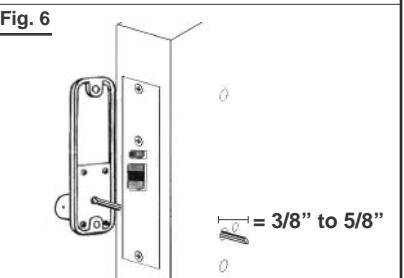
Fig. 7
2:00
8:00
Fig. 8.
10:00
4:00
Step 7: Install the 2985
Place the Rubber Trim Plate (#4) on the backside of the Outside Body (#1).
Place the Outside Body on the door. The Hex Bolts (#15) should extend into the top and bottom holes.
The Support Pin (#13) should extend through the hole in the Latch (#12).
Insert the Spindle (#6) into the Outside Body (#1) ensuring it's in the proper angled position.

RIGHT-HAND DOORS: From inside, place spindle through Latch, into the Outside Body in the 2:00/8:00 position (Fig. 7). LEFT-HAND DOORS: From inside, place spindle through Latch, into the Outside Body in the 10:00/4:00 position (Fig. 8).
Place the Rubber Trim Plate (#4) and Inside Body (#2) on the inside of the door.
Using a screwdriver, secure the lock to the door with Screws (#9)( Screw length dependent on door thickness). Test the operation of the latch by turning the inside lever.
Locate position where latch strikes door frame and install Strike Plate (#5).
TEST YOUR LOCK: Press 'C' button (clear), followed by your combination. Push lever down and lock will open.
TEST PASSAGE: Press 'C', followed by 'Y', followed by combination. Lock should remain unlocked (passage).
TO LOCK: Push 'Y', followed by 'C'. Lock will remain locked.
After installing and testing the lock, secure Faceplate (#16).
NOTE: If lever handle must be pulled up to unlock, change spindle position/angle (see figures 7 and 8).
If latch sticks: First, make sure Support Pin (#13) is in place. Second, verify correct spindle length (see step 6).
How to Change User Code/Combination SAVE
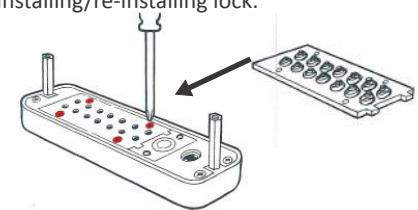
1. Using a #2 screwdriver, remove the four (4) Red Screws.
2. Carefully remove cover plate.
WARNING: Springs are attached to plate.
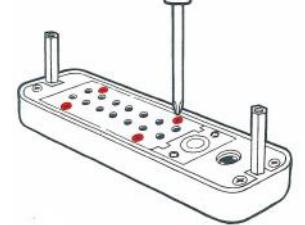
'C' = CLEAR (DO NOT REMOVE)
'Y' = PASSAGE ('Y' Tumbler may be removed to disable PASSAGE FUNCTION)
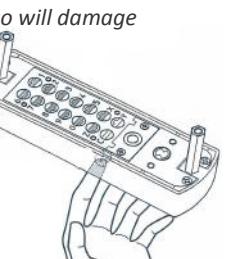
3. PRESS & HOLD 'C' BUTTON to release tumblers.
IMPORTANT: 'C' button MUST be pressed and held down when removing and inserting tumblers. Failure to do so will damage
the lock and void the warranty.
4. While holding the 'C' BUTTON, remove/add CODE (Red) and NONCODE (Blue) tumblers to create your desired code.
Ex: 3 Red = 3-Digit Code / 6 Red = 6-Digit Code
5. After changing your code, release the 'C' BUTTON to secure the tumblers in place.
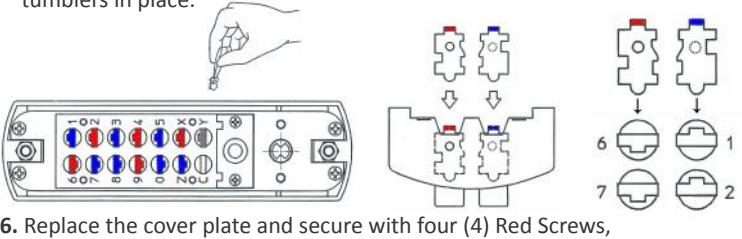
using a #2 screwdriver.
7. TEST CODE before installing/re-installing lock.
WARNING:
Do NOT force tumblers into position!
Lockey® 2900 Series 2930 | 2945 | 2985 Installation Instructions & Template