LaGard Electronic Safe Lock ComboGard 3750 K User Opreating Instructions
Open the original PDF document
View PDF3750-K Electronic Entry Device
USER OPERATING INSTRUCTIONS
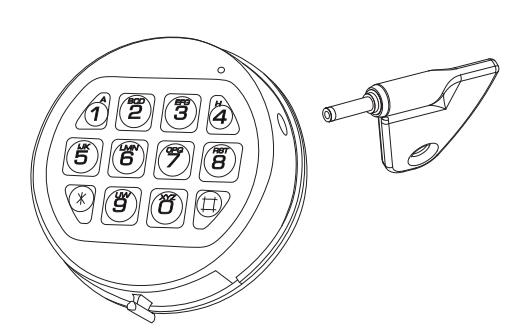
FEATURES
See Manager Instructions for additional features. USER COMBINATION
- Open Lock
- Change Combination
WRONG TRY PENALTY
• Four (4) consecutive invalid combination initiates fi ve (5) minute delay period.
LOW BATTERY WARNING
• Repeated LED fl ashing and beeping during opening indicates battery is low and needs immediate replacement.
AUDIO AND VISUAL SIGNAL
- Double signal two (2) LED fl ashes and two (2) beeps - indicates entry is valid or accepted.
- Triple signal three (3) LED fl ashes and three (3) beeps - indicates invalid or not accepted.
OPENING THE LOCK
- 1. Enter valid combination (insert eKEYII, if set-up, then remove key).
- 2. The lock will confi rm a valid combination entry with a double signal.
- 3. Within four (4) seconds, turn the keypad to the open position (clock-wise) if using a deadbolt style lock, or turn the handle to the open position if using a swingbolt style lock.
- 4. Pull door open.
- Invalid Combination Entry Lock will signal three (3) times.
CHANGING YOUR COMBINATION
ALWAYS PERFORM THIS OPERATION WITH THE DOOR OPEN
- 1. Enter existing combination and hold down the last digit until unit double signals twice and the LED stays on . If eKEYII is set-up, enter existing combination, insert and leave in key until unit double signals and LED stays on.
- 2. Press the "0" key.
- 3. Enter your NEW combination two times (and insert eKEYII, if set-up).
- 4. If a mistake is made wait thirty (30) seconds and repeat steps 1 3 .
- 5. Test lock operation several times before closing the door.
CAUTION: When selecting a combination do not use birthday or other predictable data that could give correlation between the user and combination. Keep the combination secret.
- Valid Combination Entry Double signal after valid combination is entered.
- Invalid Combination Entry Triple signal indicates the old combination is still valid.
WRONG TRY PENALTY
- Entry of four (4) consecutive invalid combinations starts a fi ve (5) minute delay period.
- LED fl ashes red at ten (10) second intervals.
- At the end of the delay period, two more consecutive invalid combinations will restart the fi ve (5) minute delay period.
During delay period, any keystroke will give three audio and visual signals.
BATTERY LOW WARNING
- Repeated LED fl ashing and beeping during an opening indicates that the battery is low and needs immediate replacement.
- Uses one (1) 9-Volt alkaline battery. (Example: Duracell™ or Eveready™ alkaline batteries.) It is recommended that batteries be replaced at least once a year.
- If internal battery is depleted and will not allow lock to open, follow instructions below. Lock contains a non-volatile memory, even with batteries removed the lock will retain all programming.
WARNING: The port for the eKEYII is a data port only. Connecting power to this port will damage the system.
CHANGING YOUR BATTERY
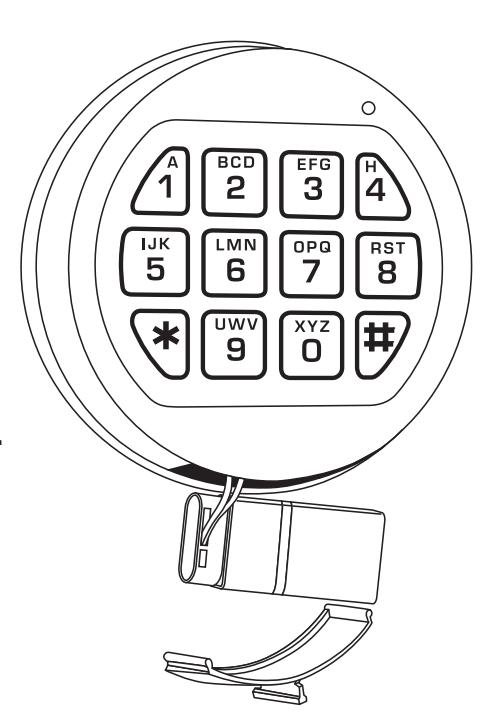
- 1. Remove black plastic battery compartment cover (located at the bottom of the keypad) by gently pulling downward on its handle.
- 2. Allow the battery and its attached leads to drop down and out of the battery compartment. If it does not drop, gently pull on the battery until it drops out.
- 3. Remove the connector unsnapping it from the two terminals on the top of the battery.
CAUTION! Hold onto the battery terminal connector to avoid pulling the wires out of housing.
- 4. Connect a new 9-Volt Alkaline battery to the battery connector.
- 5. Gently push the battery and the leads completely into the battery compartment.
- 6. Install the battery cover by placing one side of the cover in position fi rst and then gently pressing the other side into place.
Mounting Instructions available at www.kaba-mas.com.