LR100AWK Installation Instructions for Arrow S1150 and S1250 Exit Device
Open the original PDF document
View PDF

801 Avenida Acaso, Camarillo, Ca. 93012 • (805) 494-0622 • www.sdcsecurity.com • E-mail: service@sdcsecurity.com
INSTALLATION INSTRUCTIONS LR100AWK ELECTRIC LATCH RETRACTION DEVICE KIT ARROW MODELS: S1150 & S1250
Step 1
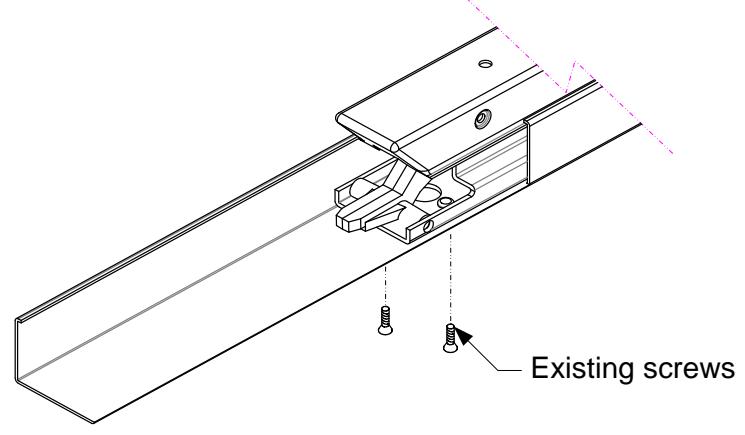
Remove access cover. Disconnect and discard all dogging components. Then remove the two pre-existing screws from the device.
Step 2
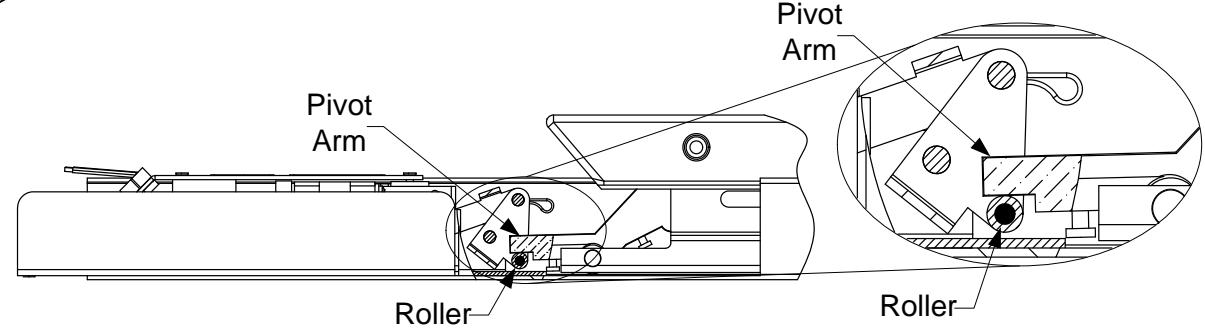
Slide the ELR assembly into the housing and under the hinge bracket. Position the roller at the front of the ELR under the pivot arm of the push bar.
PATENT #8,851,530
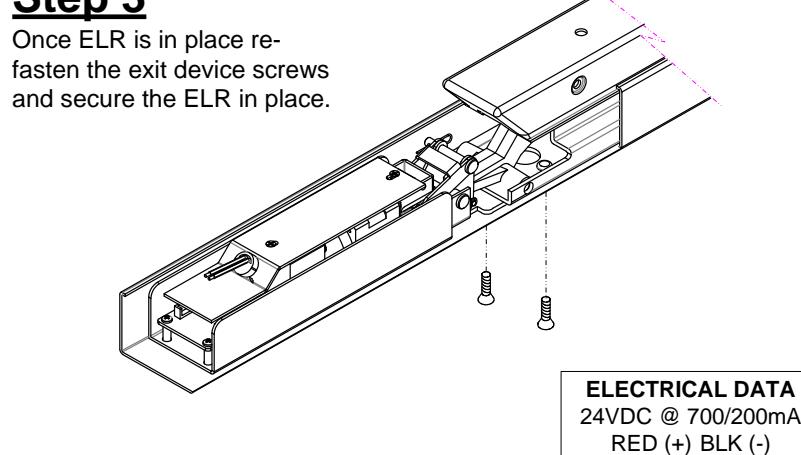
Step 3
Test the unit
Wire the unit and test function. Reinstall the cover (in reverse) and end cap.
Retrofit Installation Note: 42" or 48" exit devices that have been modified to fit a 36" or smaller opening, may not have the required space to fit the standard E. L. R. assembly. Always verify the distance from the end of the touchpad to the end rail, and if necessary, consult with the factory for appropriate selection.
Any suggestions or comments to this instruction or product are welcome. Please contact us through our website or email engineer@sdcsecurity.com