LCN Optional Bumper Installation Instructions 106940
Open the original PDF document
View PDF

Optional Bumper

Installation Instructions
To locate required sete of holes for desired degree of door opening. See installation instruction/template.
Caution
Improper installation or regulation may result in personal injury or property damage. Follow all instructions carefully. For questions, call LCN at 877 - 671 - 7011
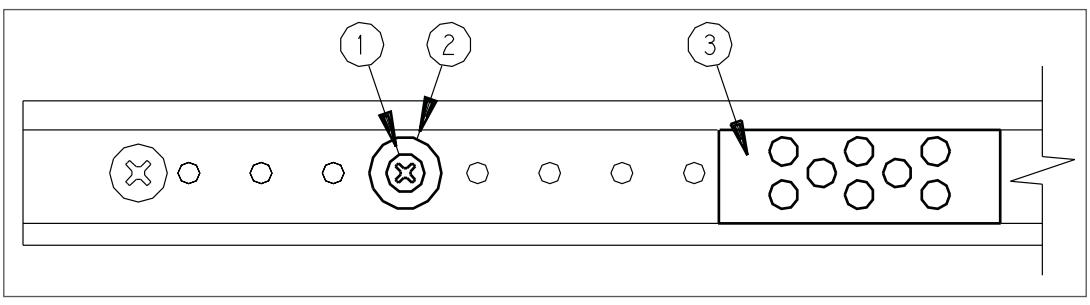
1 Relocation of Bumper, if Required
- a. Slide bumper (3) away from post (2).
- b. Remove screw (1) and post (2).
- c. Reinstall in new hole location and tighten screw securely.
- d. Slide bumper (3) against post (2).
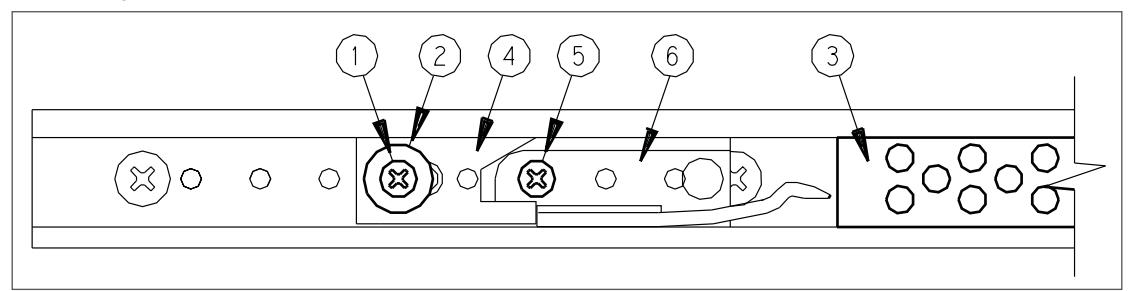
2 Location Adjustment of Hold Open Device with Bumper Option
- a. Slide bumper (3) away from post (2).
- b. Remove screw (1), post (2), adjusting cam (4) and screw (5).
- c. Slide hold open clip (6) to required hole location.
- d. Reinstall screw (5) and tighten securely.
- e. Replace cam (4), post (2), and screw (1) and tighten securely.
- f. Slide bumper (3) against post (2).

| Additional Notes: | |
|---|---|
| 1. None | |
| Revision History | Revision Description: | |||||||||||
|---|---|---|---|---|---|---|---|---|---|---|---|---|
| Е | F | G | Н | J | К | E > Revised artwork | ||||||
| 043228 | ||||||||||||
| Material | Material White Paper | Edited By | Approved By | EC Number | Release Date | |||||||
| D. Myers | M. Sasso | 043228 | 01-01-14 | |||||||||
| Notes | Notes 1. printed one sides 2. printed black 3. tolerance ± .13 4. printed in country may vary 5. drawings not to scale | Title | ||||||||||
| 1 ' | Optional Bumper Installation Instruction Sheet | |||||||||||
| Creation Date | Number | Revision | ||||||||||
| 1 ' | 05-10-10 | 19371 | E | |||||||||
| J. diawii |
Created By
N/A |
Activity
3899 Hancock Expwy Security, CO 80911 |
||||||||||
| Software: InDesign CS6 | Allegion 2014 | |||||||||||