LCN 7902 ES7902 Series Installation Instructions 107052
Open the original PDF document
View PDF

Model 7902/ES7902

Control Box Installation Instructions
For closer information see closer installation instruction sheet.
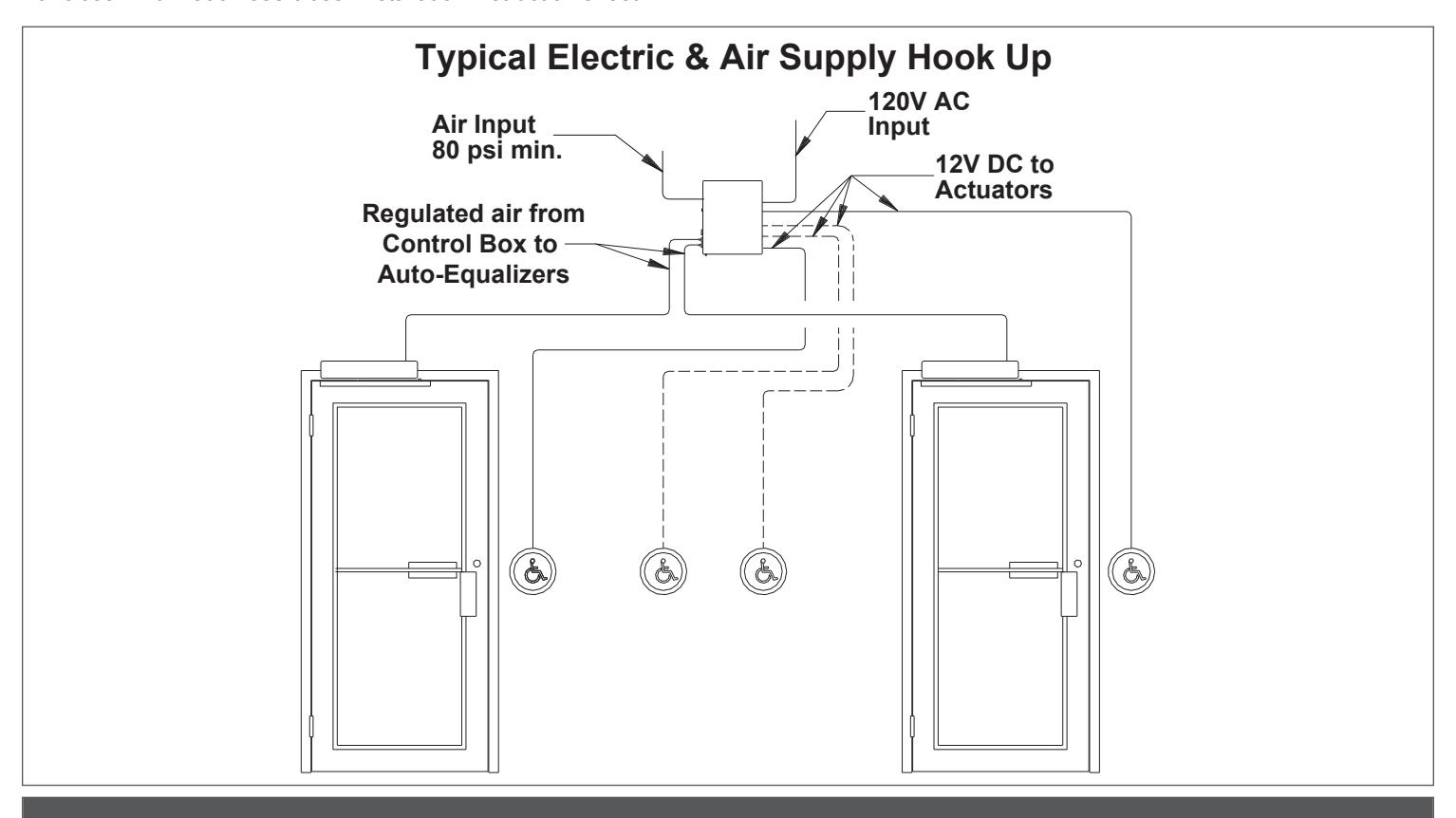
Installation
- 1a Locate box on interior of building within 100 tubing feet of the door to be controlled. Box must be in a clean, dry, well ventilated place where temperatures do not exceed 120°F or fall below 35°F.
- 1b Mount box to a structurally sound surface using screws provided as shown on page 2 with air fittings on left side as shown. Do not mount box upside down or on a horizontal plane.
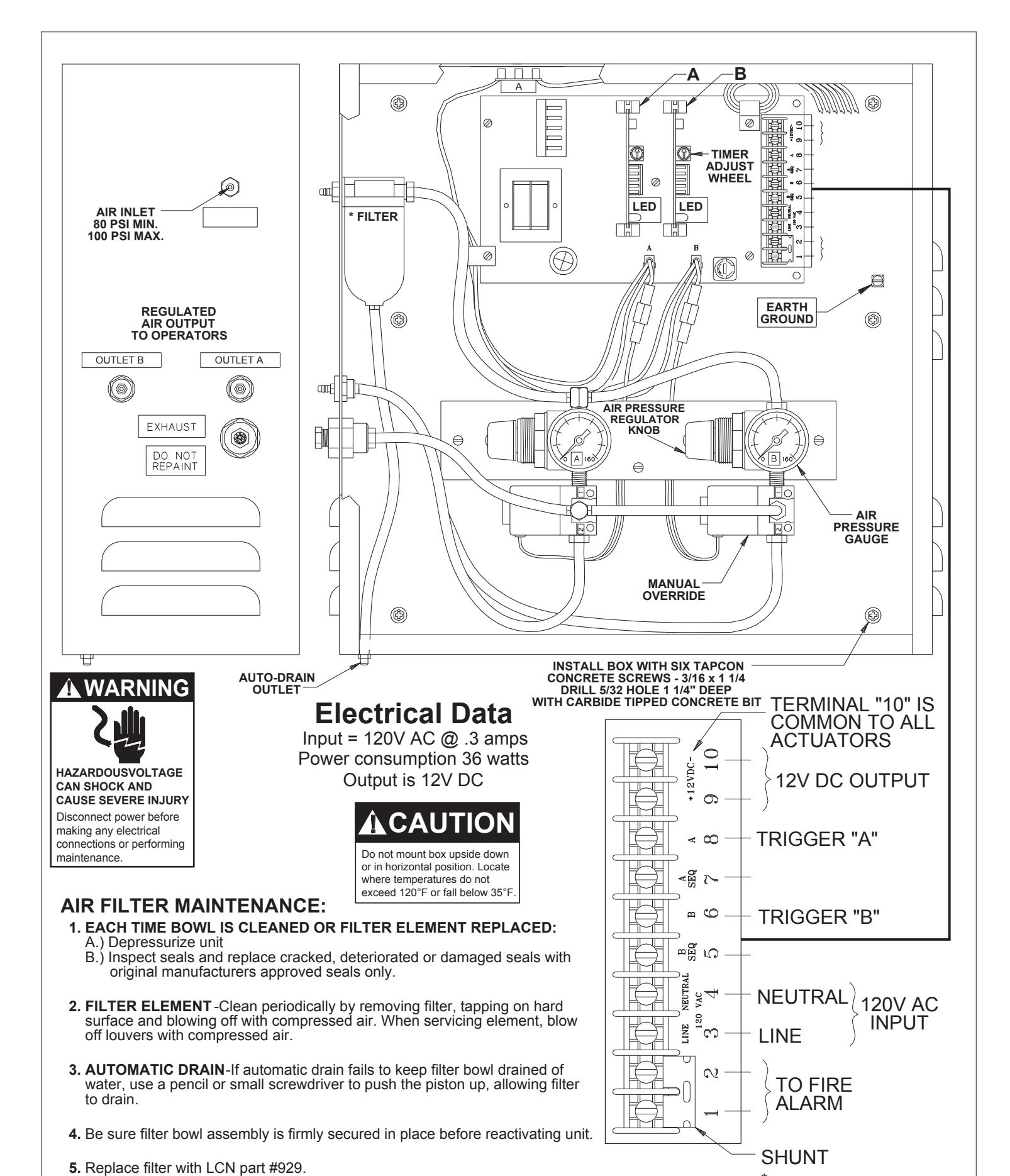
- 1c Refer to instructions packed with actuators and connect leads to terminals 6, 8, 9, and 10 as required.
- 1d Connect 1/8 inch diameter air tubing from clean, dry air source to inlet on side of box. Connect 1/8 inch diameter air tubing from door control to output fittings "A" & "B" on side of the control box.
- 1e Connect unpowered 120V AC input to terminals 3, 4, and ground screw. (Line side to terminal 3, neutral side to terminal 4 and ground wire to ground screw.) If door control is on a fire door, 120V AC input must be interrupted by the fire alarm panel when in alarm. When dry auxiliary fire alarm contacts are used, remove shunt from terminals 1 and 2 and connect to dry contacts of fire detector or alarm panel. Terminals 1 and 2 are in series with line side of 120V input.
- 1f Turn on power. Air valve will operate one cycle when power is applied.
- 1g Air pressure output has been preset at factory. If more air pressure is required to adequately open doors, adjust regulator valves found inside control box.
- 1h Adjust time delay to keep air valve energized by turning adjustment wheel on timer modules "A" & "B" (CW to increase - CCW to decrease). The LED (light) on the timer module indicates the valve is energized. The time can be adjusted from 0-30 seconds. 10 seconds is a "normal" delay.
- 1i Test actuators to insure wiring and tubing are properly connected.
A DANGER
CONTROL BOX MUST BE CONNECTED TO EARTH GROUND
* REMOVE THIS SHUNT ONLY WHEN CONNECTING TO NORMALLY CLOSED FIRE ALARMS CONTACTS
Installation Troubleshooting Chart
| Symptom | Possible Cause | Suggested Remedy | |||
|---|---|---|---|---|---|
| No Power Opening | No power to control box / blown fuse |
Verify 120VAC 60HZ power is present at
terminals 3 & 4 on control box terminal strip. Check fuse. Replace only with 5 amp (3AG type) fuse. |
|||
|
Actuator(s) not connected properly
Fire alarm system causing open circuit on terminals 1 & 2 |
Be sure a timer module board is firmly in
place in "A" & "B" slots. Operate actuator(s). LED on timer module should light when actuator is used. If not, briefly short actuator terminals 6 & 10 and 8 & 10 in the control box. If LED lights, check wiring to actuators for an open circuit. If it does not light, check for voltage at terminals 9 &10. Voltage should read from 11.75 to 13.25V DC. If there is no reading, disconnect leads from terminals 9 & 10. Short actuator terminals 6 & 10 and 8 & 10. If LED lights, check for short circuit in actuators. Shunt terminals 1 & 2 with power off. Restore power. If control operates when actuator terminals 8 & 10 in the control box are shorted, an open circuit exist in wiring to |
||||
|
fire alarm. When Auto-Equalizer is not used
with fire alarms, terminals 1 & 2 must be permanently shorted with a shunt. IMPORTANT! When Auto-Equalizer is connected to fire alarm, make sure shunt is removed from terminals 1 & 2. Terminals 1 & 2 are one leg of 120V line. |
|||||
| No input to Auto-Equalizer operator |
Disconnect tubing from Auto-Equalizer
operator. Try actuator and verify that air is coming out of tubing. If not, trace tubing to control box, checking for breaks or kinks in air line. |
||||
| Air lines obstructed with dirt or ice. |
Clean or thaw lines and reroute if
necessary. Eliminate dips near cold zones. If freezing is a repeated problem, desiccant filter may need to be changed. |
||||
| Air valves not working |
Make sure air valve leads are plugged into
main board. (Be sure valves in system are plugged into connector "A" & "B".) |
||||
| Low or no air inlet pressure to control box. |
Check compressor output to make sure air
shut-off is open. 80 psi must be available at the control box. If not, check compressor and lines. |
||||
| No air output to Auto-Equalizer operator |
Check pressure gauge in control box. Adjust
as required, if necessary. Check for leaking or damaged lines in control box. |
||||
| Power Opening will not time out. | Scanner maintaining signal to control box. |
Make sure lenses are clean and there are
no obstructions in front of scanner. Model 909 or 939 proximity scanner may "see" an opposite wall. Adjust range as described earlier. |
|||
| Switch circuit maintaining contact. |
Check for short circuit or error in wiring to
actuator. |
||||
| Air valve blocked open with contaminant. |
Cycle valve several times by momentarily
shorting terminals 6 & 10 and 8 & 10. This should clear valve. |
||||
| Control box exhaust restricted |
Exhaust muffler may be clogged. Clean in
alcohol or mineral spirits. |
||||
Model ES7902 For Use With Electric Latching Hardware
ES7902 - 2 electric strikes maximum
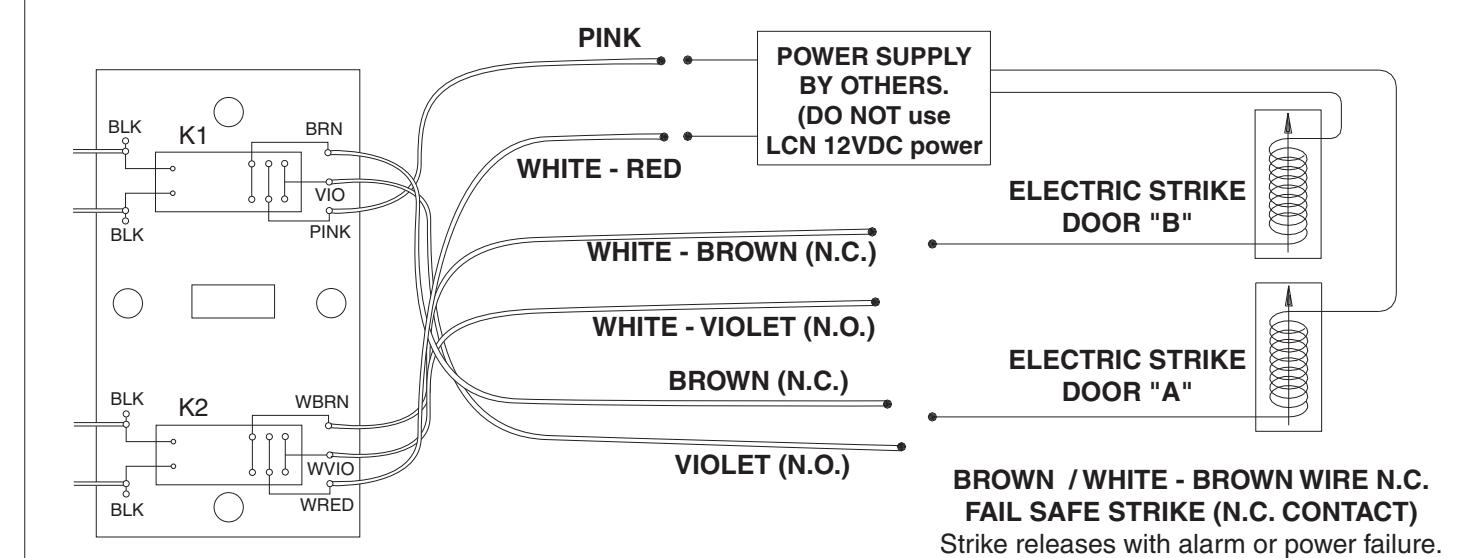
VIOLET / WHITE - VIOLET WIRE N.O. FAIL SECURE STRIKE (N.O. CONTACT)
Strike releases when energized. Remains locked in alarm or power failure. (Manual release hardware required to open door in alarm or power failure.)
Remains lached with power on. (Not compatible with UL listed fire door.)

| Additional Notes: | Revision History | Revision Description: | ||||||||
|---|---|---|---|---|---|---|---|---|---|---|
| 1. None | D | Е | F | G | Н | J | D > Revised artwork | |||
| 043228 | ||||||||||
| Material | Material White Paper | Edited By | Approved By | EC Number | Release Date | |||||
| D. Myers | M. Sasso | 043228 | 01-01-14 | |||||||
| Notes 1. printed two sides 2. printed black 3. tolerance ± .13 4. printed in country may vary 5. drawings not to scale | Title 7902/ES7902 Series Control Box Instruction Sheet | |||||||||
|
3. tolerar
4. printed |
Creation Date
04-27-10 |
Number 23761 | Revision D | |||||||
| 3. Grawii |
Created By
N/A |
Activity
3899 Hancock Expwy Security, CO 80911 |
||||||||
| Software: InDesign CS6 | © Allegion 2014 | |||||||||