Isonas – How to Upgrade an RC03 to RC04 Guide
Open the original PDF document
View PDF

How to Upgrade an RC-03 to RC-04 using the adapter cable:
The adapter cable will assist in a simpler transition when upgrading an RC-03 to an RC-04. By using the adapter cable you do not need to run a new 8 wire pigtail, you can use the existing 12 wire pigtail and the adapter will re-orient the RC-03 pigtail conductors to the RC-04 pigtail color code. The wire colors changed from the RC-03 pigtail to the RC-04 pigtail and
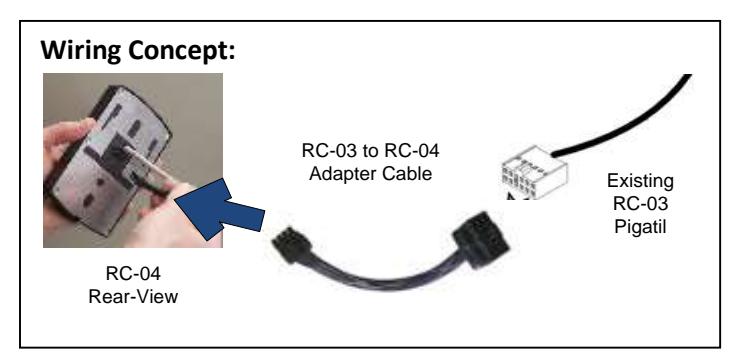
therefore requires that you update the connections at the end of the 12 pin pigtail to the peripherals at the door.
Step by Step Process:
- 1. Review the current wiring at the door
- 2. Determine if extra hardware or alternative wiring is needed (uncommon). See below for some scenarios that you may run into out in the field:
Scenarios:
- a. If the RC-03 is powered by 24vdc then a change must be made; the RC-04 only accepts 12V DC or PoE power. Either power the RC-04 by PoE or use a Altronix VR3T to "step down" the 24vdc to 12vdc.
- b. If there is 24vdc to the lock using the RC-03 internal relay, then either an ISONAS Advanced Security Module (previously EDK) (secure) or Altronix RBSN (unsecure) is needed.
- c. If there is a 12vdc lock drawing more than 600ma and no Advanced Security Module, then an ASM or RBSN will be needed. (The output on the RC-04 will only provide up to 600ma out)
- d. If both the AUX and REX are used, they will need to be condensed into one input (called AUX or REX on the RC-04).
- e. If TTLs or a WIM are being used, please consult ISONAS pre-sales for alternative solutions at support@isonas.com.
- 3. Disconnect the RC-03
- 4. Rewire the connections according to the RC-04 wiring diagram, for more informatio n click here.
- 5. Install the RC-04, see our quick install up guid e here.
- 6. Next you will need to configure the new reader and connect it to Pure Access
- 7. Log into Pure Access, edit the existing access point and take a screenshot of the information. * Do not deactivate the access point and replace it with the RC-04!
- 8. Deactivate and then delete the access point.


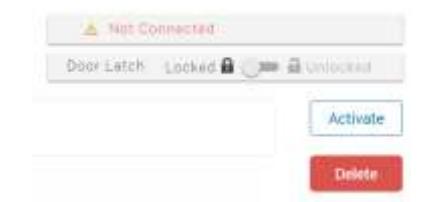

- 9. Add in the RC-04 as a new access point using the information from the screenshot.
- 10. Run Update and test
Wiring Conversion Chart, which RC-03 pigtail wires match the RC-04
|
RC03
Cable Color Code (Standard RC03 Pigtail colors) |
Cable Adaptor
Cable Color Code (Standard RC04 Pigtail color) |
Notes |
|---|---|---|
| Red | Orange (See | Important: Validate that any input DC Power is 12VDC |
| (12V in/out) or | Note) (12VDC | RC04 is not designed for 24VDC operation. Attaching 24VDC to the RC04 |
| (24V in) | in/out) | will invalidate the unit's warrantee and may damage the unit. |
| Black | Black and/or | RC04 supports two "common" conductors, to simplify connecting |
| (Common) | Brown |
multiple devices to the "common". These BLACK/BROWN conductors are
interchangeable. |
| Tan (FailSecure) | Red |
Host software must be configured for "FailSecure" operation. Assumes
the previous RC03 did not use the PINK wire. |
| Gray (FailSafe) | Red | Host software must be configured for "FailSafe" operation. Assumes the |
| previous RC03 did not use the PINK wire. | ||
| If your installation was using an ACC-IRS-4000 in-rush suppressor (IRS), | ||
| assure the IRS is installed between the 12V source, and the lock. | ||
| Pink (Relay In) | Not used |
If the PINK wire was used, then the RC04 installation will need an EDK
installed to control the voltage/signal that was supplied on the RC03's PINK wire. If your installation was using an EDK, the PINK & TAN wires will be replaced by the RC04's YELLOW and WHITE. Please refer to the PureIP Installation Guide for more details on the installation of the EDK |
| Green (REX) | Green (see note) |
Host software must be configured to process this input as a "REX". RC04
supports either a REX or AUX. If both were in-use, select the most desirable feature for that door. |
|
Blue (Door
Sensor) |
Blue | Direct replacement of the RC03's function |
| Orange (AUX) | Green (see note) |
Host software must be configured to process this input as an "AUX".
RC04 supports either a REX or AUX. If both were in-use, select the most desirable feature for that door. Any existing RC03 AUX input connection must be disconnected from RC04's ORANGE wire. If the RC04's GREEN wire is being used as a REX input, then disconnect the AUX device from the RC04. |
| Purple (TTL1) | Not Used | Feature is not supported by the RC04 |
| Brown (TTL2) | Not Used | Feature is not supported by the RC04 |
| Yellow (RS232) | Not Used | Feature is not supported by the RC04 |
| White (RS232) | Not Used | Feature is not supported by the RC04 |